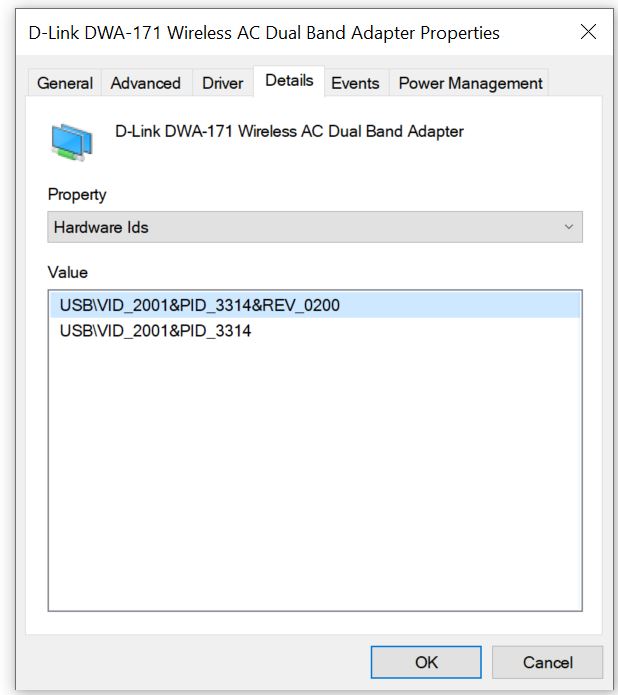
Hi @lizh
Apologies missed out the PID of my DWA-171 :
USB\VID_2001&PID_331D&REV_0200
USB\VID_2001&PID_331D
Thanks.
Hi @lizh
Apologies missed out the PID of my DWA-171 :
USB\VID_2001&PID_331D&REV_0200
USB\VID_2001&PID_331D
Thanks.
Hi @Slate
I have added hardware id of DWA-171 to the driver.Please update the driver:kmod-8812au_4.14.151 2020-3-31-1_aarch64_cortex-a53.zip (611.5 KB)
After unzip kmod-8812au_4.14.151+2020-3-31-1_aarch64_cortex-a53.zip:
1,opkg remove kmod-8812au;
2,opkg install kmod-8812au_4.14.151+2020-3-31-1_aarch64_cortex-a53.ipk;
3,reboot;
Looking forward to your good test results.
Thanks for the package.
Installed, reboot twice, but my copy of DWA-171 does not turn on and NO UI Wifi.
Hi @Slate
I’m sorry this DWA-171 isn’t working yet.
I have placed an order for DWA-171. When It come to me,i will debug it right away.
Thanks for your assistance.
Looking back at above Marcz’s post #3, his UI Wifi displayed the chipset to be 8821AU instead of 8812AU.
Would you be able to compile me a plug-in with my DWA-171 PID for kmod-8821AU instead?
Look forward to your reply. Thanks.
It seems that the DWA171 has different drivers between revisions, this the DWA171A1:
When connected log:
Wed Apr  1 16:39:19 2020 kern.info kernel: [  259.582881] usb 1-1: new high-speed USB device number 11 using orion-ehci
Wed Apr  1 16:39:40 2020 daemon.notice netifd: radio0 (25009): command failed: No such device (-19)
Wed Apr  1 16:39:40 2020 user.notice mac80211: Failed command: iw phy phy2 interface add wlan0 type __ap
Wed Apr  1 16:39:40 2020 daemon.err hostapd: Configuration file: /var/run/hostapd-phy2.conf
Wed Apr  1 16:39:41 2020 kern.info kernel: [  281.487428] IPv6: ADDRCONF(NETDEV_UP): wlan0: link is not ready
Wed Apr  1 16:39:41 2020 kern.info kernel: [  281.495954] br-lan: port 4(wlan0) entered blocking state
Wed Apr  1 16:39:41 2020 kern.info kernel: [  281.501485] br-lan: port 4(wlan0) entered disabled state
Wed Apr  1 16:39:41 2020 kern.info kernel: [  281.507175] device wlan0 entered promiscuous mode
Wed Apr  1 16:39:41 2020 daemon.notice hostapd: wlan0: interface state UNINITIALIZED->COUNTRY_UPDATE
Wed Apr  1 16:39:41 2020 daemon.err hostapd: Using interface wlan0 with hwaddr 00:00:00:00:00:00 and ssid "brume"
Wed Apr  1 16:39:41 2020 kern.info kernel: [  281.687105] IPv6: ADDRCONF(NETDEV_CHANGE):       wlan0: link becomes ready
Wed Apr  1 16:39:41 2020 kern.info kernel: [  281.693966] br-lan: port 4(wlan0) entered blocking state
Wed Apr  1 16:39:41 2020 daemon.notice hostapd: wlan0: interface state COUNTRY_UPDATE->ENABLED
Wed Apr  1 16:39:41 2020 daemon.notice hostapd: wlan0: AP-ENABLED
Wed Apr  1 16:39:41 2020 daemon.notice netifd: Network device 'wlan0' link is up

OpenWrt 19.07.0-rc1, r10649-c4fdb377a2
-----------------------------------------------------
root@GL-MV1000:~# lsusb
Bus 002 Device 001: ID 1d6b:0002 Linux Foundation 2.0 root hub
Bus 001 Device 011: ID 2001:3314 D-Link Corp.
Bus 001 Device 001: ID 1d6b:0002 Linux Foundation 2.0 root hub
Bus 003 Device 001: ID 1d6b:0003 Linux Foundation 3.0 root hub
root@GL-MV1000:~# lsusb -D /dev/bus/usb/001/011
Device: ID 2001:3314 D-Link Corp.
Device Descriptor:
bLength                18
bDescriptorType         1
bcdUSB               2.10
bDeviceClass            0 (Defined at Interface level)
bDeviceSubClass         0
bDeviceProtocol         0
bMaxPacketSize0        64
idVendor           0x2001 D-Link Corp.
idProduct          0x3314
bcdDevice            2.00
iManufacturer           1 Realtek
iProduct                2 802.11n WLAN Adapter
iSerial                 3 00e04c000001
bNumConfigurations      1
Configuration Descriptor:
bLength                 9
bDescriptorType         2
wTotalLength           60
bNumInterfaces          1
bConfigurationValue     1
iConfiguration          0
bmAttributes         0xe0
  Self Powered
  Remote Wakeup
MaxPower              500mA
Interface Descriptor:
  bLength                 9
  bDescriptorType         4
  bInterfaceNumber        0
  bAlternateSetting       0
  bNumEndpoints           6
  bInterfaceClass       255 Vendor Specific Class
  bInterfaceSubClass    255 Vendor Specific Subclass
  bInterfaceProtocol    255 Vendor Specific Protocol
  iInterface              2 802.11n WLAN Adapter
  Endpoint Descriptor:
    bLength                 7
    bDescriptorType         5
    bEndpointAddress     0x84  EP 4 IN
    bmAttributes            2
      Transfer Type            Bulk
      Synch Type               None
      Usage Type               Data
    wMaxPacketSize     0x0200  1x 512 bytes
    bInterval               0
  Endpoint Descriptor:
    bLength                 7
    bDescriptorType         5
    bEndpointAddress     0x05  EP 5 OUT
    bmAttributes            2
      Transfer Type            Bulk
      Synch Type               None
      Usage Type               Data
    wMaxPacketSize     0x0200  1x 512 bytes
    bInterval               0
    Endpoint Descriptor:
    bLength                 7
    bDescriptorType         5
    bEndpointAddress     0x06  EP 6 OUT
    bmAttributes            2
      Transfer Type            Bulk
      Synch Type               None
      Usage Type               Data
    wMaxPacketSize     0x0200  1x 512 bytes
    bInterval               0
    Endpoint Descriptor:
    bLength                 7
    bDescriptorType         5
    bEndpointAddress     0x87  EP 7 IN
    bmAttributes            3
      Transfer Type            Interrupt
      Synch Type               None
      Usage Type               Data
    wMaxPacketSize     0x0040  1x 64 bytes
    bInterval               3
   Endpoint Descriptor:
    bLength                 7
    bDescriptorType         5
    bEndpointAddress     0x08  EP 8 OUT
    bmAttributes            2
      Transfer Type            Bulk
      Synch Type               None
      Usage Type               Data
    wMaxPacketSize     0x0200  1x 512 bytes
    bInterval               0
   Endpoint Descriptor:
    bLength                 7
    bDescriptorType         5
    bEndpointAddress     0x09  EP 9 OUT
    bmAttributes            2
      Transfer Type            Bulk
      Synch Type               None
      Usage Type               Data
    wMaxPacketSize     0x0200  1x 512 bytes
    bInterval               0
Binary Object Store Descriptor:
 bLength                 5
bDescriptorType        15
wTotalLength           12
bNumDeviceCaps          1
USB 2.0 Extension Device Capability:
   bLength                 7
  bDescriptorType        16
  bDevCapabilityType      2
  bmAttributes   0x00000002
  Link Power Management (LPM) Supported
Device Status:     0x0001
Self Powered
root@GL-MV1000:~#
just to confirm, my dead one is also the same one as marcz which is revision A1
Hi @Slate
It is same driver for 8811au and 8821au.And I have add hardware id to the driver.
kmod-8811au_4.14.151 2020-4-2-1_aarch64_cortex-a53.zip (680.9 KB)
Thanks @lizh for the driver. Thanks @marcz & @rp201rp for your inputs.
Unfortunately the DWA-171 does not light up and Wifi UI also not appearing.
Seems like Rev A1 of DWA-171 works out of the box, but not my new copy of Rev C1G.
Will wait for your set to arrive. Thanks for the effort.
root@GL-MV1000:~# lsusb
Bus 002 Device 001: ID 1d6b:0002 Linux Foundation 2.0 root hub
Bus 001 Device 004: ID 0bda:1a2b Realtek Semiconductor Corp.
Bus 001 Device 001: ID 1d6b:0002 Linux Foundation 2.0 root hub
Bus 003 Device 001: ID 1d6b:0003 Linux Foundation 3.0 root hub
root@GL-MV1000:~# lsusb -D /dev/bus/usb/001/004
Device: ID 0bda:1a2b Realtek Semiconductor Corp.
Device Descriptor:
bLength 18
bDescriptorType 1
bcdUSB 2.00
bDeviceClass 0 (Defined at Interface level)
bDeviceSubClass 0
bDeviceProtocol 0
bMaxPacketSize0 64
idVendor 0x0bda Realtek Semiconductor Corp.
idProduct 0x1a2b
bcdDevice 2.00
iManufacturer 1 D-Link Corporation
iProduct 2 DISK
iSerial 0
bNumConfigurations 1
Configuration Descriptor:
bLength 9
bDescriptorType 2
wTotalLength 32
bNumInterfaces 1
bConfigurationValue 1
iConfiguration 0
bmAttributes 0xa0
(Bus Powered)
Remote Wakeup
MaxPower 500mA
Interface Descriptor:
bLength 9
bDescriptorType 4
bInterfaceNumber 0
bAlternateSetting 0
bNumEndpoints 2
bInterfaceClass 8 Mass Storage
bInterfaceSubClass 6 SCSI
bInterfaceProtocol 80 Bulk-Only
iInterface 0
Endpoint Descriptor:
bLength 7
bDescriptorType 5
bEndpointAddress 0x8a EP 10 IN
bmAttributes 2
Transfer Type Bulk
Synch Type None
Usage Type Data
wMaxPacketSize 0x0200 1x 512 bytes
bInterval 0
Endpoint Descriptor:
bLength 7
bDescriptorType 5
bEndpointAddress 0x0b EP 11 OUT
bmAttributes 2
Transfer Type Bulk
Synch Type None
Usage Type Data
wMaxPacketSize 0x0200 1x 512 bytes
bInterval 0
Device Qualifier (for other device speed):
bLength 10
bDescriptorType 6
bcdUSB 2.00
bDeviceClass 0 (Defined at Interface level)
bDeviceSubClass 0
bDeviceProtocol 0
bMaxPacketSize0 64
bNumConfigurations 1
Device Status: 0x0000
(Bus Powered)
root@GL-MV1000:~#
Problem is that revision C is recognised as USB Flash Memory and needs to be ejected wireless - ubuntu 18.04 - dlink dwa171 (revC) shows as a memory stick - Ask Ubuntu
@alzhao
Would you please provide the source code which has been used to compile the testing firmware?
Thanks in advance
Hi @kirdes
Sorry,the driver souce could not be open.But openwrt source could be provide,and it have integrated MV1000 compilation environment .The url is:https://github.com/gl-inet/openwrt/tree/openwrt-19.07
@marcz Thanks for the info.
Can you or @lizh provide me some steps (for Putty) to “eject” my version of DWA-171?
Thanks.
@Slate Can you try this: 3g/4g USB dongle not showing up - #10 by bmork - Hardware Questions and Recommendations - OpenWrt Forum
mymodem.zip (261 Bytes)
Save to /tmp and run
usbmode -v -s -c /tmp/mymodem.json
Hello, first time fiddling with an OpenWrt thing.
I flashed the .img file via the web interface, but my TPLink Archer T2U Plus is not showing. What is missing here?
Which img did you flash? We just released a new firmware today.
It was the 0422 one. I’ll try the new one, see how that works 
Did your Archer T2U show in older firmware? Are you sure it is supported ?
No, the T2U and brume have basically just arrived. The chip is rtl8811au.