People on reddit … 
Anyway.
You can’t implement it on your own. There is no magical „Do this, then that“
This thread is done, imho.
People on reddit …
Anyway.
You can’t implement it on your own. There is no magical „Do this, then that“
This thread is done, imho.
Do you have further update of the testing? I’d like to hear something from you to mark it as an answer so that people is not asking.
If you want to block option 121 use:
uci set network.wan.classlessroute='0'
uci commit network
/etc/init.d/network restart
though having 121 disabled by default may be not a good idea, some people rely on iptv or voip which can break by having this disabled.
So yeah this is very discussable wether it should be disabled by default or not.
Though ive been carefully looking to this and made my own assessment, this vulnerability is not only limited to vpn, but can also be caused by rogue isp pushing malicious routes and maybe even non rfc1918 ones causing mitms and breaking the anti mitm effects from encrypted tunnels entirely.
^ also i have to add, option 121 is a dhcp option so only limited to dhcp clients, wan can be a dhcp cliënt.
On the openwrt forums some came with the idea to lower the priority of this option so good routes don’t get replaced by malicious ones i think this could be the best direction to provide still stability for those who need it.
from what i gather from the article it basicly resemble two attacks, a dhcp starvation attack, and a malicious route attack wether in local context or remotely by evil isp.
On one side it makes sense the routes get ignored by the firewalls input chain because we allow dhcp for wan to renew a public ip, but then i also question why the bogus detection does may not detect it, i think a rebind protection might do the trick but not for the non rfc1918 ip, basicly with routes they can also sent 8.8.8.8 and voila mitmed, this is why i suspect it to be something much more malicious than just vpn.
No additional updates besides the one we have discussed so far in this post. Thanks.
We found something. Will post soon.
Reddit is not technical forum. I recommend not to use it for such things. Use this forum or OpenWRT one.
Without option 121 you can still inject /32 routes via DHCP, it just takes 256 of /32s to fill a /24, but these will likely take precedent as they will be the longest. (quote)
We will release firmware(disable dhcp option 121 by default) to address this issue ASAP.
This vulnerability could potentially lead to DNS leaks if exploited.
Following command has been tested effective:
uci set network.wan.classlessroute='0' # cable
uci set network.wwan.classlessroute='0' # repeater
uci commit network
/etc/init.d/network reload
Can anybody explain why 121 option even exists? Where it is used?
It’s used if you don’t want the router to route all traffic. It does make sense to have this option.
Isn’t it router purpose?
In bigger networks, there might be different routers for each network.
@alzhao i think my assuring of this vulnerability on gl devices has now been proven to be valid!
@hansome could you please give us more technical details of the test you did? Is it similar to what we have discussed so far? How did you test it and find the dns leak for example ? Did you test it from the the wan side or the lan, and with VPN on or off ?
@alzhao This really needs to be selectable, in Luci, imo. If this is removed, it will cause issues where folks might be using DHCP option in their networks. If this is defaulted to disallow option 121 and cannot easily be set to allow it, I will have to find other ways to route traffic inside my network. This is a valid and purposeful DHCP option that is being abused - it is not a vulnerability. If you prefer, set it to disallow 121 by default, but make sure there is a way to opt out of that.
No. you said the opposite. You mean my assumption. You just claimed a few posts above it would not work to set that setting.
@hansome you should give an optional toggle option to enable it again for some people who might want it still be enabled if they need it for IPTV or other reasons.
I have argued since the beginning of this post that this vulnerability indeed affects gl devices! When everyone was
I did however mentioned that the uci commands won’t work! At least in my go device !
Please grow up and behave nicely ! We are here to share knowledge NOT to discredit/disrespect each other !
Yes, the way we disable it by default is quite simple. Just use uci to setting it classlessroute option to 0 for any dhcp proto interface, not patching netifd or udhcpc code.
It’s a way to do network management I think, like the OpenVPN server can push a route to OpenVPN client a router.
But it’s based on users’ trust in their access point or ISP.
It took us some time to realize the issue.
The DNS leak aspect is inspired by your test:
How I test:
I just set up a DHCP server that pushes a route to overwrite the VPN DNS server route.
(DHCP option is : 121,1.1.1.1/32,192.168.10.1)
It’s via the VPN interface initially, it will go via cable/repeater interface once overwritten.
The DNS traffic is different than normal traffic, it reaches to router LAN, and then router sends DNS query as a proxy, it’s the way how dnsmasq works.
We judge wrongly the LAN-WAN forward firewall can protect it.
I tested firmware 4.4.6 the uci command works. Can you share what route you pushed?
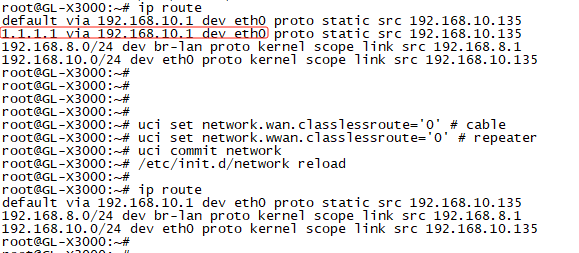
Exactly! So when pushing the malicious dns, it will indeed leak the dns traffic as the firewall vpn policy (that marks egress packets) won’t work in this case!
I tested the uci commands on FW version 4.4.8. Thanks however for sharing the screenshot with exact commands needed; I will test it again.