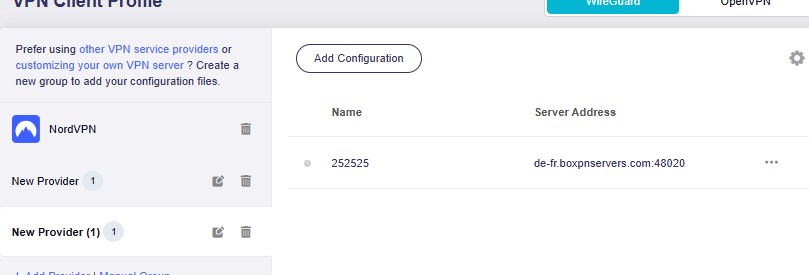
But when I load the config file through the mobile app or through the web interface, the "Endpoint" is not parsed and the endpoint just remains empty. However, if I paste the config text into the configuration tab in the manual config then the correct endpoint is set.
Your config itself looks valid, so this smells like the file importer rather than the WireGuard settings. A few things worth trying:
Line endings and encoding. If the .conf was generated or edited on Windows (or downloaded from a provider portal), it may have CRLF line endings or a UTF-8 BOM. Some importers then read the value as de-fr.boxpnservers.com:48020\r and quietly drop it. Open it in an editor like VS Code or Notepad++, convert to LF and plain UTF-8 without BOM, save, and import again.
Spacing around the equals sign. Make sure the line is exactly Endpoint = host:port, with no tabs or non-breaking spaces copied from a web page.
Hostname vs IP. As a quick test, resolve the hostname (nslookup de-fr.boxpnservers.com) and put the IP in the file instead. If the import then fills in the endpoint, the importer is having trouble with hostnames, which is worth reporting to GL.iNet with your firmware version.
Firmware. If you're not on the latest stable for the Velica, update first, since the VPN client UI has had parser fixes over time.
Pasting the text into the manual config tab gives you exactly the same tunnel, so if it connects and handshakes there, you can safely keep using it while you narrow down the file import issue.
Could you please confirm the current firmware version displayed on the Upgrade page of your Velica router?
Also, could you send us the problematic .conf file via private message for further investigation? Before sending it, please remove the values of both PrivateKey and PublicKey, while keeping the rest of the file unchanged.
I checked with the IP address directly and that did not make a difference.
I'm on firmware version 3.218, which I believe is current for that router.
Strangely, I prepared config files for the router in the past and exactly the same way and they did not get rejected. Is it possibly the Android app that I'm using to upload the file to the router? The Android app is at version 2.8.3...
The firmware version currently running on your Velica may have compatibility issues when importing certain WireGuard configuration files.
For now, you can continue importing your configuration by manually copying and pasting its contents into the Configuration tab.