Some notes for others that might land here:
Before starting:
- connect to the router via LAN cable not wifi (you may need to disable wifi to stop auto connect)
- Always backup along the way
- Only save & apply at the main chuncks (after interfaces and device work)
- in stock firmware OpenWrt 21 sometimes you click save and it appears not to have worked, beware it might have. If in doubt dismiss and reload the page. Pending changes are in the top right.
- Start small and build (I am a noob and probably took on too much too soon)
- Reboots can be useful after network changes are applied, just to refresh everything with new settings.
Vlan / Subnet filtering
LuCI > Network > Interfaces > Devices
br-lan > Configure
Enable vlan filtering = yes
I used 1 for the primary vlan filter but i’ve seen videos of 99 or whatever, the important bit for me was selecting the LAN ports I wanted included in each vlan.
For me LAN5 would be dedicated to a Virgin Media TV box that doesn’t play nice with others.
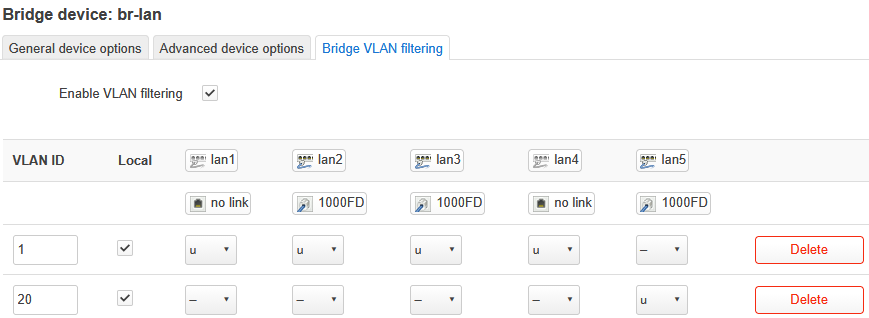
SAVE only
Network > Interfaces > Interfaces
br-lan > Edit
Device = br-lan.1 (to match the vlan1 I just created)
Save & Apply
Network > Interfaces > Interfaces > Add New Interface
Name = vlanxx
Protocol = Static address
Device = br-lan.20 (to match the vlan20 I created earlier)
IPv4 address = 192.168.xx.1 (whatever you want)
Pv4 netmask = 255.255.255.0
Use default gateway = I think I should have left ticked, think it means you can access admin on 192.168.8.1 and the new IPv4
Setup DHCP = yes (i think this is needed if you assign this to a wifi, I will only ever have one client attached via lan only)
Firewall - mine vlan20 is part of LAN, at some point I will want to segregate things to more defined groups
Save & Apply
Probably Reboot too
