Flint4 - new owner coming from Turris Omnia

Hi all!

Well, I finally bought some new router after 10 years of living with my Turris Omnia, so I would like to say few words.. Main reason to buy, was my new NAS with 10Gbps LAN.

First look and setup:

Beatiful design (subjective) and great build quality. Display is not as useless as I thought.

First setup was a little bit tricky for me. I thought, that if some port is marked as WAN, it suppose to work as WAN from the first time. I plugged my wan cable into 2,5Gbps port, as I am using 10Gbps for NAS. Even when plugged to 10Gbps port, router gave me ip not from LAN, but my external IPv4 178.x.x.x. The cable had to be fully disconnected to cover this.

My advice to developers: First setup should cover this somehow.

Next step I went to 4.11 beta3 as I knew that VLANs and firewall settings would not work if they are set on old openwrt.

After, everything was set, I have noticed, that my phones are unable to connect to the wifi. After the router reboot, even my laptop was unable to connect. This was probably by some settings combination (I suspect masquerading on wgclient setup) as I have turned on almost everything, so I don’t blame anyone else except me (+ Google Gemini which helped me a little) :-)

So, reset to factory → flash to 4.9.2 and all settings again…

During the setting of wireguard client (site-2-site), I have noticed, that some guide/options were missing in 4.11, comparing to 4.9.2.

Bugs found:

Device IP cannot be set as static via GlinetUI when it is on another subnet (e.g. IoT). The only option working is from LuCI.

Known: AdGuard Home update works only, when site-2-site wireguard tunnel is turned off. Workaround is script in LuCI scheduled tasks: 0 3 * * * ubus call network.interface.wgclient1 down && sleep 10 && /usr/bin/adguardhome --update-filters && sleep 20 && ubus call network.interface.wgclient1 up

Wish-list:

I hope, there will be some script to move settings form Openwrt 21 to Openwrt 25 (Turris team managed changes for VLANS and Firewall almost excellently).

Live updates and Snapshots as on the Turris Omnia.

LAN bandwidth displayed on the router display and GlinetUI.

Possibility to edit display entries (I don’t need to see cellular or tethering on it…).

Conclusion:

Beautiful and functional (comparing to reForis UI on Omnia) GlinetUI, very good wifi coverage (even 6GHz is available everywhere) and some bugs, which hopefully will be solved.

So far, I am satisfied.

Ok, I have just found, that this does not work…

And didn’t found option for editing my original post, sorry.

Hi,

Thank you for sharing your detailed feedback on the Flint 4.

Regarding the issues you mentioned:

  • WAN setup
    For initial Internet setup and Ethernet port configuration, please refer to our Internet Connection Guide and Ethernet Port Guide.
    If the issue occurs again, could you clarify whether the 178.x.x.x address was assigned to a device connected to the Flint 4 LAN/Wi-Fi, or was it the router's WAN IP?

  • WireGuard Client setup
    Our VPN documentation covers firmware v4.9 and later, including v4.11. You can refer to the VPN Client Profile Guide and VPN Dashboard Guide for configuration instructions.

  • Static IP on another subnet
    Currently, the GL.iNet Web UI does not support reserving IP addresses for devices on other subnets. We have already submitted this feature request for evaluation.

  • AdGuard Home filter updates with WireGuard enabled
    Normally, enabling WireGuard should not by itself prevent AdGuard Home from updating its filter lists. However, routing or DNS configuration may affect the connection to the filter-list servers.
    Could you confirm whether the filter-list update fails whenever the Site-to-Site WireGuard tunnel is enabled?
    If possible, could you please share the error message or relevant logs from an update attempt with the tunnel enabled?

  • VLAN configuration and migration
    The current GL.iNet Web UI supports VLAN and network configuration, making it relatively easy to set up VLANs. We recommend configuring the required VLANs on your new device based on your existing network topology, rather than migrating the old configuration, to avoid potential issues caused by configuration incompatibilities.

  • Regarding your feature suggestions:
    We have noted your suggestions regarding Live Updates and Snapshots, LAN bandwidth display, and screen customization, and will share them with the relevant team for further discussion.

Thank you again for your feedback and support.

Oh and I forgot to mwntion another bug:

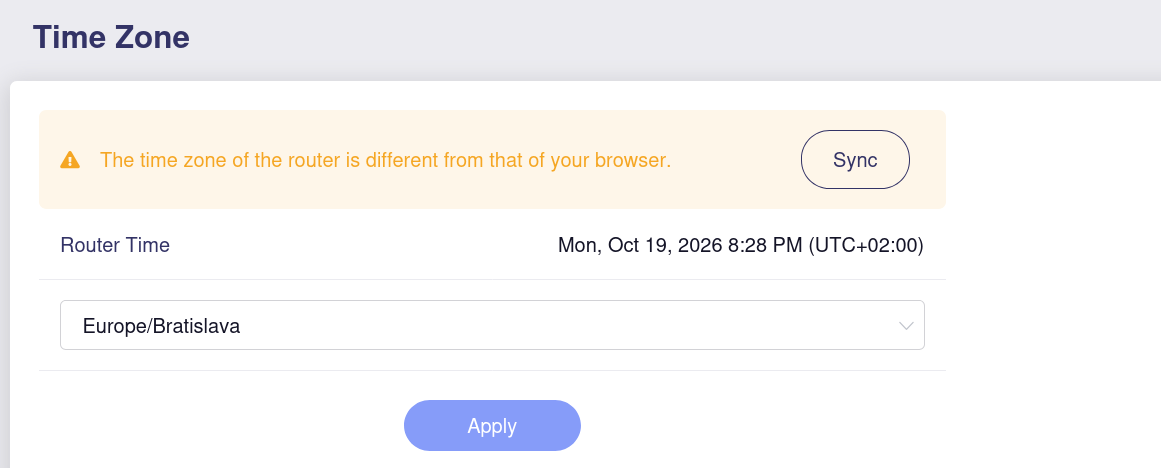
When I ma connected via my laptop (Linux Mint 22.3 timezone set to Europe/Bratislava, latest Firefox), Glinet interface thinks that my real time zone is wrong:

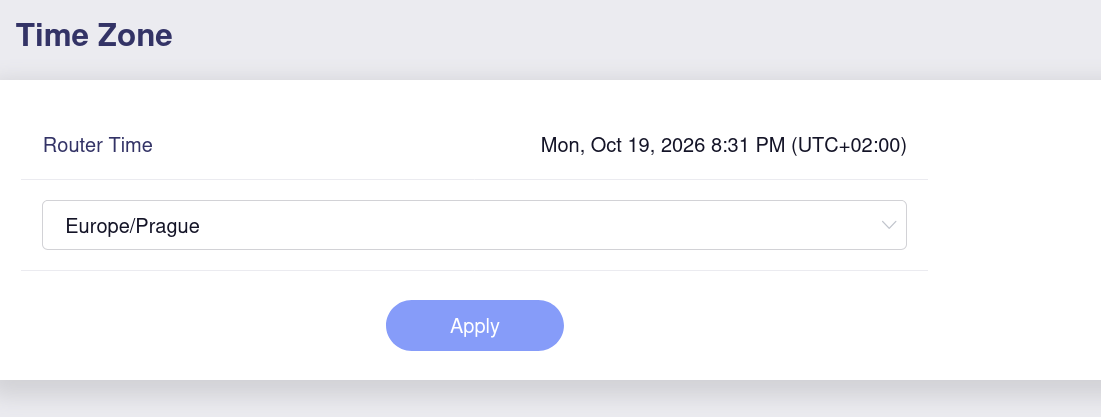
After clicking on "Sync" button it is automatically set to Europe/Prague:

But via the android app - the time zone is correctly identified as Europe/Bratislava.

No big deal, but very strange behaviour.

Hello,

I am not going to through the initial setting again unless, the new version on Openwrt 25.x comes to stable. But that IP 178.x.x.x was assigned to my laptop connected via ethernet cable to the Flint 4.

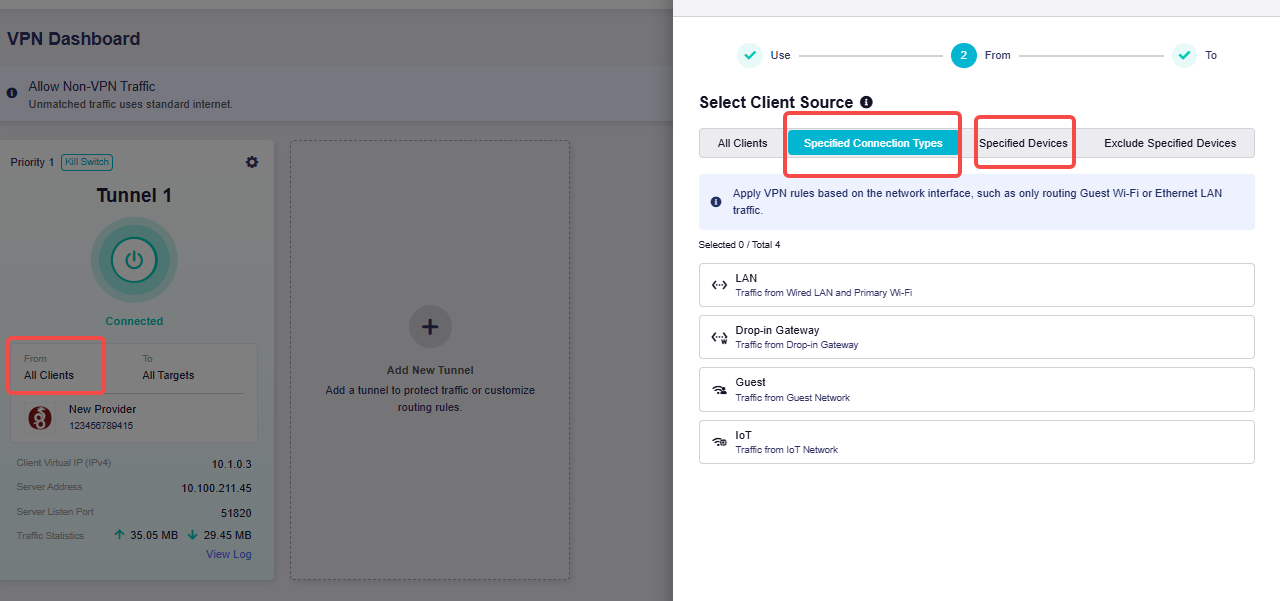
According to this, no "specified connection types" or "specified devices" dialog was displayed. Those wizard was absolutely missing on 4.11 beta 3. But, maybe I did something wrong.

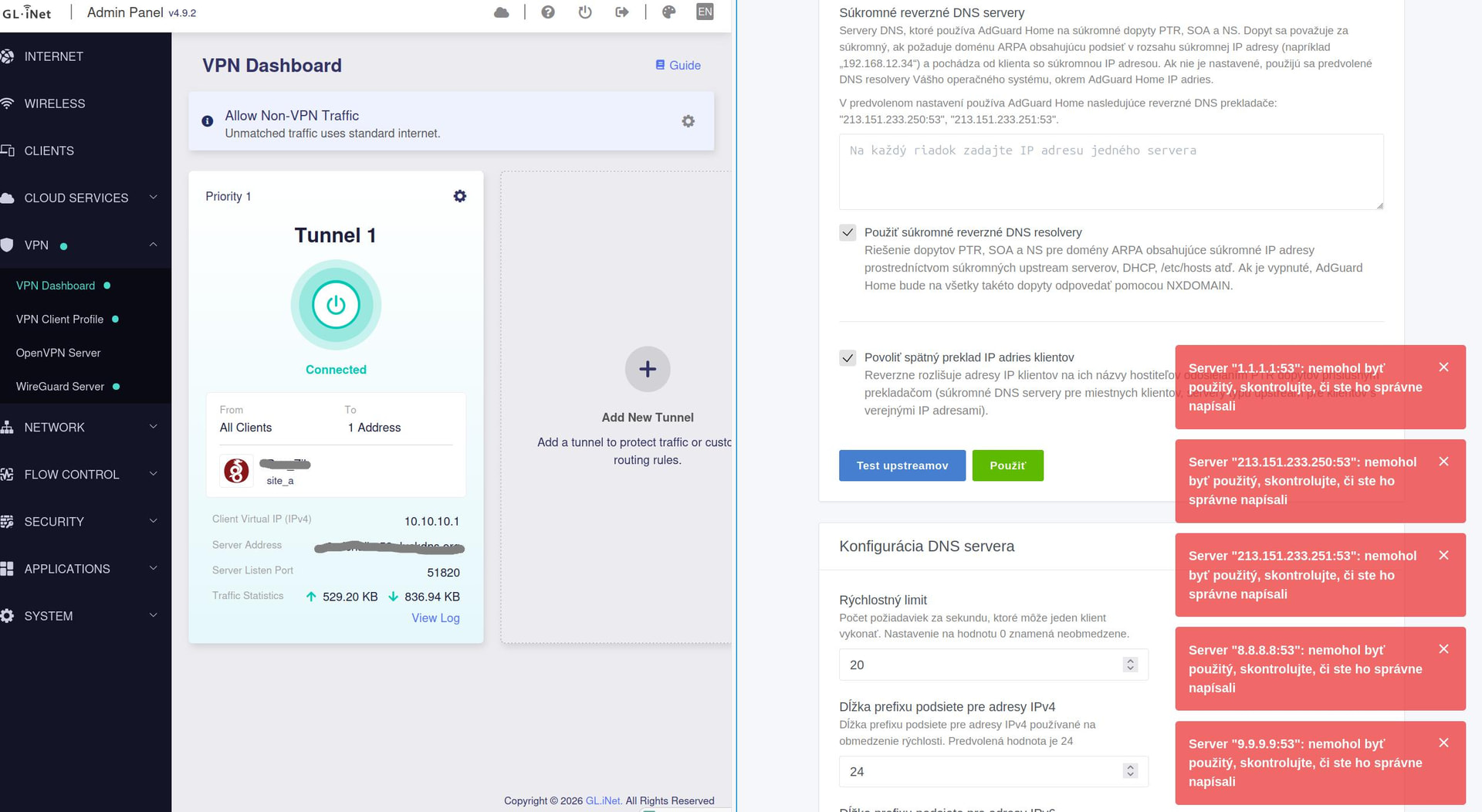
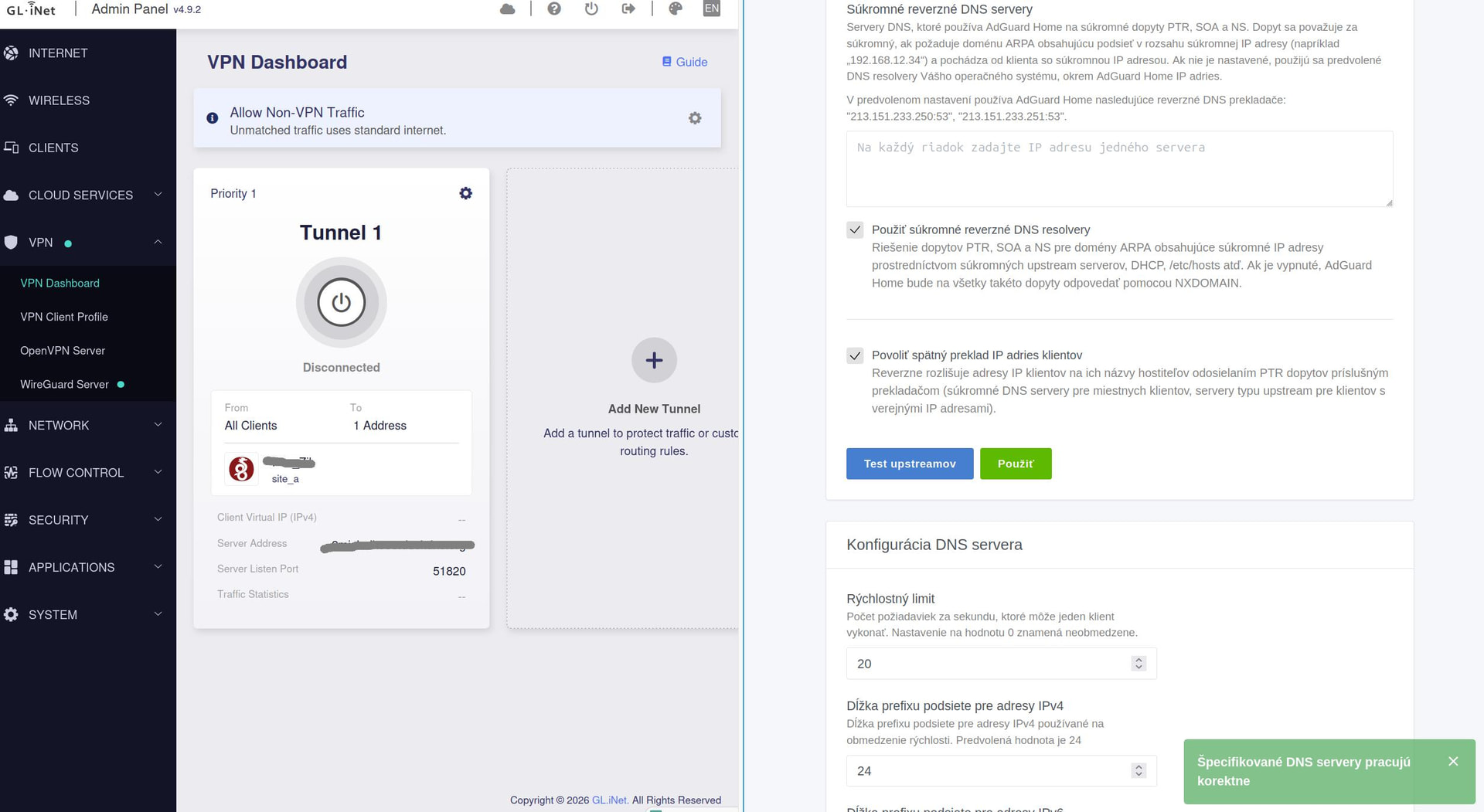
Well, I can confirm this 100%.

Site-2-site ON:

Site-2-site OFF:

for some reason they keep pushing Adguard dns over VPN...

Hi,

Regarding your question:

  1. Time zone detection
    Could you please try accessing the Flint 4 Web Admin Panel using another browser and check whether clicking “Sync” still changes the time zone to Europe/Prague?

  2. The public IP address assigned to your laptop
    Thank you for clarifying that 178.x.x.x was assigned to your laptop connected to the Flint 4 via Ethernet.
    To better understand the connection setup, could you clarify which port the upstream cable was connected to? Under your current setup, does your laptop now receive a private LAN IP address, or does it still receive a public IP address?

  3. VPN Dashboard options
    The current VPN Dashboard guide includes “Specified Connection Types” and “Specified Devices” in the client source selection step.
    You can find it here:

  4. AdGuard Home and Site-to-Site WireGuard
    Sorry for the misunderstanding in our previous reply. As explained in this related discussion, AdGuard Home sends DNS queries through the VPN by default when a tunnel is active. If the tunnel cannot reach the configured upstream DNS servers, DNS resolution may fail.

Thank you again for your patience and detailed feedback.

The same when accessing via Brave browser.

Upstream cable from Huawei GPON connected to 2,5 Gbps WAN/LAN port on Flint 4, laptop conencted to 2,5Gbps LAN port.

Maybe, but during the setup, this wizard was not displayed for me. again, it could be caused by my fault.

Oh thanks, this helped! :+1:

Thank you

Hi, thank you for the updates.

  • Time zone detection
    Since Europe/Bratislava and Europe/Prague currently use the same UTC offset and daylight-saving rules, the displayed time can be identical even when the time zone names differ.

  • The public IP address assigned to your laptop
    Under your current network setup, can your laptop obtain a private LAN IP address normally? Can you also see the laptop in the Flint 4 client list?
    When connecting your laptop to the Flint 4 via Ethernet and Wi-Fi separately, does it receive a public IP address or a private LAN IP address in each case?

I know that the time zone is the same, but both web browser and android displays warning about bad time zone.

Laptop obtains LAN IP normally, I can see it in client list etc. The situation with public IP assigned to laptop is during the initial setup, as I have been describing before.

Hi, thank you for your clarification.

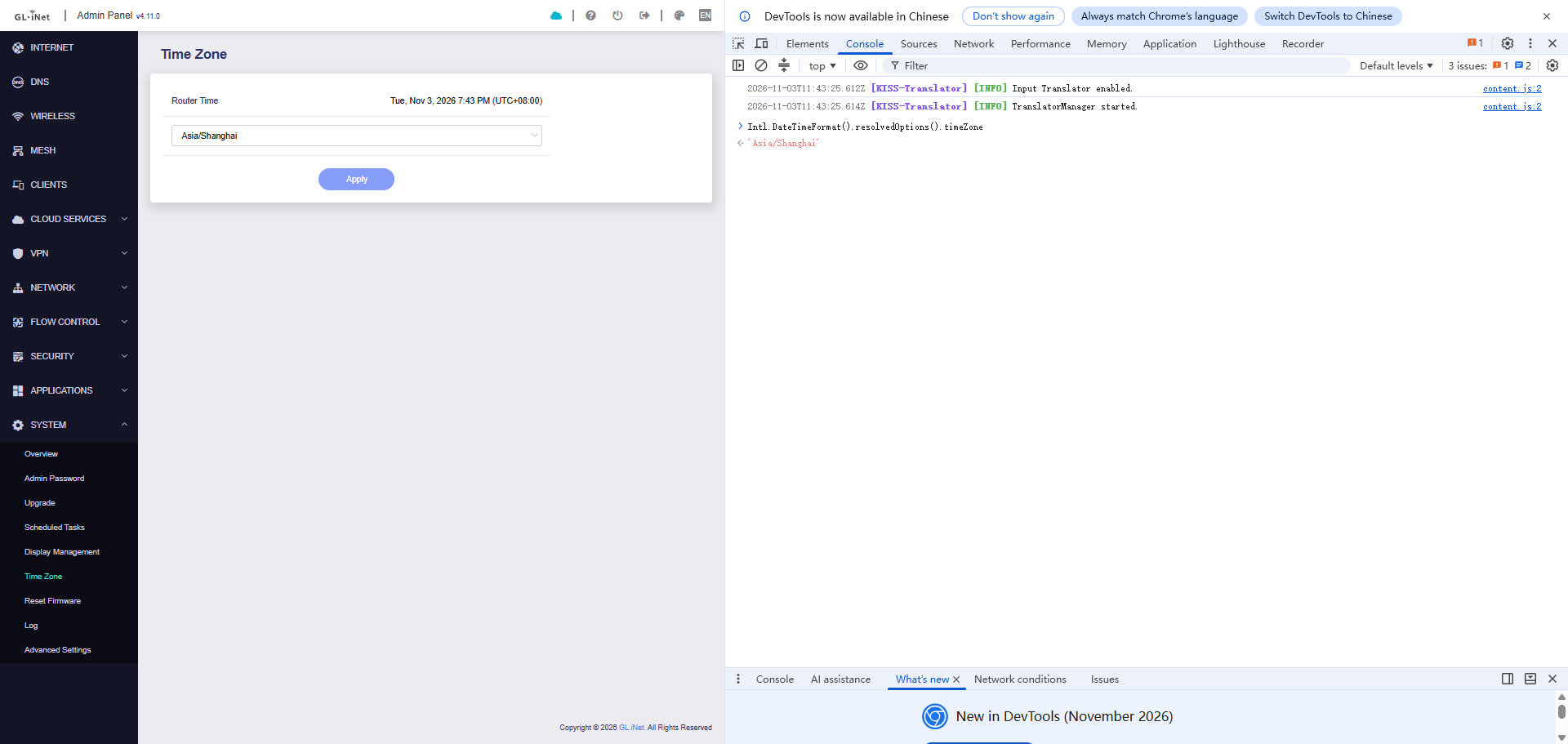
Could you please check whether the time zone reported by Firefox matches the one currently shown on the router’s Time Zone page?

With the router’s Web Admin Panel open, press Ctrl + Shift + K to open the Console.
Enter the following command and press Enter:

Intl.DateTimeFormat().resolvedOptions().timeZone


Does it return Europe/Bratislava or Europe/Prague, and does it match the time zone currently shown on the router?

It returns Europe/Prague, no matter that system is set to Europe/Bratislava. Browser or OS bug, probably.

Local time: Po 2026-11-09 22:27:37 CET
Universal time: Po 2026-11-09 21:27:37 UTC
RTC time: Po 2026-11-09 21:27:37
Time zone: Europe/Bratislava (CET, +0100)
System clock synchronized: yes
NTP service: active
RTC in local TZ: no

Hi,

Thank you for checking and sharing the result.

The difference between the time zone reported by Firefox and your system’s time zone setting is likely what triggers the warning.

Thank you for your patience and cooperation.

I have tried almost everything except profile change, nothing helped :smiley: