Hello,
I connected router GL-MT3000 to a public hotspot (hotel).
The router has a working internet connection. I can verify this e.g. by SSH into the router and running command opkg update.However, any client that is connected to LAN has no access to internet.
I can verify this by running this command:
❯ nmap -Pn -p 80,443 ibm.com
Starting Nmap 7.97 ( https://nmap.org ) at 2025-09-05 23:33 +0530
Nmap scan report for ibm.com (23.58.45.8)
Host is up.
Other addresses for ibm.com (not scanned): 2600:140f:5e00:487::3831 2600:140f:5e00:489::3831
rDNS record for 23.58.45.8: a23-58-45-8.deploy.static.akamaitechnologies.comPORT STATE SERVICE
80/tcp filtered http
443/tcp filtered httpsThis means a firewall setting rejects communication from client to server on port 80,443.
Can you please advise how to fix this issue?
THX
You're using the wrong command. nmap is to scan for open ports on a remote host. netstat -natp will show you all the open ports LAN-side of the router. The firewall's default is to REJECT rather than DROP unsolicited incoming network connections. It does not restrict outgoing traffic as you verified by opkg update.
If your downstream clients can get a IP from your Beryl AX you should have no trouble. Visit https://ip.me from each of them, including the router (curl ip.me) to check your WAN-side IP. They should all report the same.
Please execute these commands on both the router and LAN client to check where there is a problem:
- SSH to router:
ping 8.8.8.8
ping www.google.com
curl -v ip.me
- On LAN client:
ping 8.8.8.8
ping www.google.com
ping [router LAN IP]  #example ping 192.168.8.1
curl -v ip.me
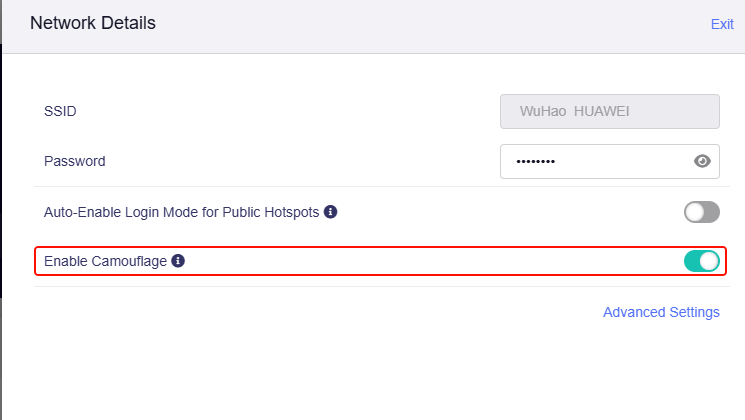
- You can try to enable Enable Camouflage on repeater:
I fixed the issue by resetting the device to factory settings.
This time I didn’t install Luci to get extended settings.
This topic was automatically closed 30 days after the last reply. New replies are no longer allowed.