That's my concern too.
Well, Brume 2 also uses a MediaTek SoC, and its last stable firmware was released more than one year ago. So it does not follow your rationale.
Anyway, I pulled the trigger and placed an order for a Brume 3, but it still feels like a bet. Depending on how well it is supported over the next year or so (either continued support from GL.iNET or support from official OpenWrt), I may end up buying a second unit. Let’s see.
@oorweeg Note that @dsouza isn’t talking about “slow updates”, he is talking about no updates at all. For more than a year.
1 Like
But GL have already confirmed that it will also get 4.9 so support isn’t dropped and new firmware is coming so I’d say it does
1 Like
I know. But again, this is not about new features. This is about update cadence and security patches. The problem is that Brume 2 has gone over one year without updates (4.7.4). It should have received 4.7.x updates. With AI being actively used by bad actors to find zero-day vulnerabilities, I could not be at ease using a router whose firmware remains unpatched for such a long time.
Anyway, I believe Brume 3 has quite good hardware, to the point that I ordered one. But if it stays more than six months without being patched, and without OpenWrt official support, I will shelve it.
Unpatched is not the same as vulnerable though. Chasing upgrades for vulnerabilities that don’t actually apply is the kind of bad practice that has enterprise organisations spinning countess hours of engineering time on things that don’t actually protect them, rather than prioritising the things that do. You fix things that actually apply to a specific platform or service, not just because there is a new version. If it’s not exploitable or the fix doesn’t apply to a specific device or version, then it’s not required.
All the evidence I have seen so far is that GL do release patches for security issues and other fixes that need patching in their firmware. I’ve seen no evidence myself yet that they haven’t patched something that specifically needed it?
This is no different to how an ISP provided router will be patched. Core infrastructure, services and CPE are generally patched when they specifically need it, not just because a newer version is available.
Rolling out constant firmwares with upgrades can actually make things less stable because you spend less time on QA and can introduce other problems. Availability is a big part of security as well and maintaining stability is generally just as, if not more important when a specific vulnerability doesn’t actually apply.
3 Likes
Notice that I am not attacking GL.iNet. I just want to understand what is GL.iNet’s patching strategy for their routers. TBH it is naive to think that any router running a one-year old firmware does not have any vulnerability. Just check kernel vulns.git to see what I mean.
Also below are the example of some CVEs that OpenWrt fixed in 24.10 in the 6 last months or so. I know it uses a different kernel from 21.02 (used by Brume 2), but it is a concrete example why frequent patching vulnerabilities in old devices is important.
Anyway, this is just my opinion. Right now waiting for Brume 3 to be delivered! 
24.10.6 (18-Mar-2026)
- CVE-2026-30871: Stack buffer overflow in umdns DNS PTR query handling (HIGH)
- CVE-2026-30872: Stack buffer overflow in umdns IPv6 reverse DNS lookup (HIGH)
- CVE-2026-30873: Memory leak in jsonpath when processing strings, labels, and regexp tokens (LOW)
- CVE-2026-30874: Command execution via PATH environment variable filter bypass in procd (LOW)
24.10.5 (19-Dec-2025)
- CVE-2025-14282: Dropbear privilege escalation via Unix domain socket forwarding
24.10.4 (22-Oct-2025)
- CVE-2025-62525: ltq-ptm: local privilege escalation
- CVE-2025-62526: ubusd: heap buffer overflow
2 Likes
I can see that side of it, but I think there is an element of trust that must be applied to any vendor as any serious reputational damage would harm their business.
I’m not saying there are none, I’m just saying there is a difference between a disclosed vulnerability and that vulnerability having an actual real impact on a device and can be exploited in some way.
e.g. Priv escalation is for the most part irrelevant on an OpenWRT device where the only user is, and everything runs as, root.
It’s also impossible to know which kernel vulnerabilities exist based on version numbers alone, as in the stock firmware these are built with goodness knows what flags, vendor specific patches and backports and with the majority of drivers and features that are not required removed to reduce the size. This also reduces the surface for actual vulnerabilities to exist in the same way they do in a mainline kernel.
In general the recent posts I’ve seen where specific vulnerabilities have been queried GL have demonstrated why it doesn’t apply, there may be others, but it’s not something I have noticed. I think that combined with the above gives me enough confidence myself personally.
1 Like
Currently running 4.9beta 1 so far so good
2 Likes
We can discuss a very long time…
Maybe someone from GL.inet team put here the official comment?
1 Like
I just received my Brume 3 today. While I consider myself an advanced OpenWrt user, I am new to GL.iNet firmware.
Since there is no official OpenWrt build for this device for now, what I would like to do is, using GL.iNet firmware, start from a clean install equivalent of a clean OpenWrt setup without all the “add-ons” from GL.iNet.
Question: is there a simple way to remove all GL.iNet packages and custom configurations and start from scratch (just like a clean OpenWrt install but using GL.iNet firmware)? Obviously, I can do this manually, but it would take a lot of effort to remove every configuration and package one by one. I mean, just as an example, the /etc/config folder is overcrowded with 66 files (on a clean GL.iNet 4.6.x), while on a clean OpenWrt install this folder has fewer than 10 files.
If this is not the right place to ask this question, let me know and I will create a new topic.
Thanks!
BusyBox v1.33.2 (2026-04-22 02:33:08 UTC) built-in shell (ash)

  _______                     ________        __
 |       |.-----.-----.-----.|  |  |  |.----.|  |_
 |   -   ||  _  |  -__|     ||  |  |  ||   _||   _|
 |_______||   __|_____|__|__||________||__|  |____|
          |__| W I R E L E S S   F R E E D O M
 -----------------------------------------------------
 OpenWrt 21.02-SNAPSHOT,
 -----------------------------------------------------
root@GL-MT5000:~# ll /etc/config
drwxrwxr-x    1 root     root          3488 Jun  3 12:54 ./
drwxrwxr-x    1 root     root          3488 Oct 15  2022 ../
-rw-r--r--    1 root     root            47 Apr 21 23:33 adguardhome
-rwxrwxr-x    1 root     root          1201 Apr 21 23:33 apnprofile*
-rw-r--r--    1 root     root           321 Apr 21 23:33 board_special
-rw-------    1 root     root           820 Apr 21 23:36 chrony
-rwxrwxr-x    1 root     root           128 Apr 21 23:33 custom_apn*
-rw-------    1 root     root          1207 Apr 21 23:36 dhcp
-rw-------    1 root     root           118 Apr 21 23:36 dropbear
-rw-r--r--    1 root     root           145 Apr 21 23:33 edgerouter
-rw-------    1 root     root          3902 Jun  3 12:54 firewall
-rw-r--r--    1 root     root           151 Apr 21 23:33 fstab
-rw-rw-r--    1 root     root            46 Apr 21 23:33 fullconenat
-rw-r--r--    1 root     root           296 Apr 21 23:33 fwdd
-rw-------    1 root     root           280 Apr 21 23:33 gl-black_white_list
-rw-------    1 root     root            35 Apr 21 23:33 gl-cloud
-rw-------    1 root     root            83 Apr 21 23:33 gl-dns
-rw-------    1 root     root           342 Apr 21 23:33 gl-tertf
-rw-------    1 root     root             0 Apr 21 23:33 gl_block
-rwxrwxr-x    1 root     root          1727 Apr 21 23:33 gl_category*
-rw-rw-r--    1 root     root           104 Apr 21 23:33 gl_ddns
-rw-rw-r--    1 root     root           254 Apr 21 23:33 gl_dpi
-rwxrwxr-x    1 root     root           136 Apr 21 23:33 gl_dpi_content_protection*
-rwxrwxr-x    1 root     root            89 Apr 21 23:33 gl_dpi_flow_statistics*
-rwxrwxr-x    1 root     root           424 Apr 21 23:33 gl_dpi_qos*
-rw-rw-r--    1 root     root            68 Apr 21 23:33 gl_led
-rwxr-xr-x    1 root     root            53 Apr 21 23:33 gl_logread*
drwxr-xr-x    2 root     root          3488 Jun  3 12:54 gl_nas/
-rwxr-xr-x    1 root     root            63 Apr 21 23:33 gl_s2s*
-rw-rw-r--    1 root     root          4184 Apr 21 23:33 gl_timer
-rw-r--r--    1 root     root           381 Jun  3 12:46 glconfig
-rwxr-xr-x    1 root     root            91 Apr 21 23:33 glforward*
-rwxr-xr-x    1 root     root           407 Apr 21 23:33 glipv6*
-rwxrwxr-x    1 root     root            92 Apr 21 23:33 glmodem*
-rw-rw-r--    1 root     root          2621 Apr 21 23:33 kmwan
-rw-rw-r--    1 root     root          1039 Jun  3 12:47 luci
-rw-------    1 root     root           610 Jun  3 12:54 minidlna
-rw-------    1 root     root           863 Apr 21 23:33 mptun
-rwxr-xr-x    1 root     root         14220 Apr 21 23:33 mtkhnat*
-rw-r--r--    1 root     root           283 Jun  3 12:54 nas
-rw-r--r--    1 root     root             1 Apr 21 23:33 netify-proc-flow-actions
-rw-------    1 root     root           103 Apr 21 23:33 netifyd
-rw-------    1 root     root          1593 Apr 21 23:33 network
-rw-------    1 root     root         16714 Apr 21 23:33 openvpn
-rw-------    1 root     root           475 Apr 21 23:36 oui-httpd
-rw-rw-r--    1 root     root           177 Apr 21 23:33 ovpnclient
-rw-rw-r--    1 root     root           576 Apr 21 23:33 ovpnserver
-rw-rw-r--    1 root     root           457 Apr 21 23:33 parental_control
-rw-rw-r--    1 root     root            85 Jun  3 12:54 plugins
-rw-rw-r--    1 root     root           547 Apr 21 23:33 qos
-rw-------    1 root     root           765 Apr 21 23:33 route_policy
-rw-------    1 root     root           167 Apr 21 23:33 rpcd
-rw-------    1 root     root            24 Apr 21 23:33 rtty
-rw-------    1 root     root           134 Jun  3 12:54 samba4
-rw-rw-r--    1 root     root            67 Apr 21 23:33 sip_alg
-rw-r--r--    1 root     root           390 Apr 21 23:33 sqm
-rw-------    1 root     root          2964 Apr 21 23:33 stubby
-rw-r--r--    1 root     root            12 Apr 21 23:33 switch-button
-rw-------    1 root     root           505 Apr 21 23:36 system
-rw-r--r--    1 root     root           159 Apr 21 23:33 tailscale
-rw-rw-r--    1 root     root            95 Apr 21 23:33 tor
-rw-r--r--    1 root     root             0 Apr 21 23:33 ubootenv
-rw-rw-r--    1 root     root           788 Apr  3  2023 ucitrack
-rw-------    1 root     root           808 Jun  3 12:47 uhttpd
-rw-------    1 root     root           131 Apr 21 23:33 upgrade
-rw-------    1 root     root           189 Apr 21 23:33 wan-access
-rw-rw-r--    1 root     root          2426 Apr 21 23:33 wireguard
-rw-rw-r--    1 root     root           200 Apr 21 23:33 wireguard_server
-rw-r--r--    1 root     root             1 Apr 21 23:33 wireless
-rw-rw-r--    1 root     root            79 Apr 21 23:33 zerotier
root@GL-MT5000:~#
Seems unlikely, as for the older devices the method for this would be to install vanilla openwrt? But maybe someone has a way?
1 Like
Will be a difficult task to do, to manually do it configs and scripts.
Imho I would rather choose to look for a fork of OpenWrt to compile yourself, for Qualcomm based routers a good one is the wlan-ap from Telecominfraproject, but this is Mediatek however.
But for Mediatek there are a few chinese groups which could have a port or made a port with MTK SDK drivers.
You can search for leans openwrt, or ImmortalWrt, maybe you are in luck and compile it from there 
1 Like
@oorweeg @xize11 thank you. Since I can do my own OpenWrt builds, I may try building one including the GL.iNet pull request referenced by the OP. However, since there is no open source driver for the Ethernet switch, this has a drawback that it will support only WAN-LAN communication.
1 Like
OK, I hit a wall trying to use GL.iNet firmware. Even using LuCI, I was not able to have a trunk setup with tagged and untagged VLANs on the same port.
I will now try to build a 25.12 version from the official branch using the GL.iNet pull request. I know it will have support to a single Ethernet port, and I will check if VLAN support will work as expected.
1 Like
I feel like you have done something wrong here as this is certainly possible? What exactly doesn’t work when you try and configure this? Can you share screenshots of your config pages etc?
Well some documentation about it would be really nice.
I learned a few things with this with the Brume 3 and their MTK SDK.
For this router in specific you could better follow the QSDK specification this means everything about DSA should be more motivated to swconfig nuance.
So this means... You absolutely need to configure a 802.1Q device manually, like which is more common to swconfig.
Then under network -> switch you then need to specify the vlans, one problem though lan1 (eth0.1) is the cpu I believe or it was lan2 (eth1), the issue I found myself in that you cannot properly segment the vlans invidually per port, one port will work the other will fail or it will work but on both ports, I never got a proper solution for this though, I found it very complicated, the problem start when you try to segment on this cpu lan port.
As for tagged traffic from upstream... Maybe just only defining a 802.1q device is enough.
1 Like
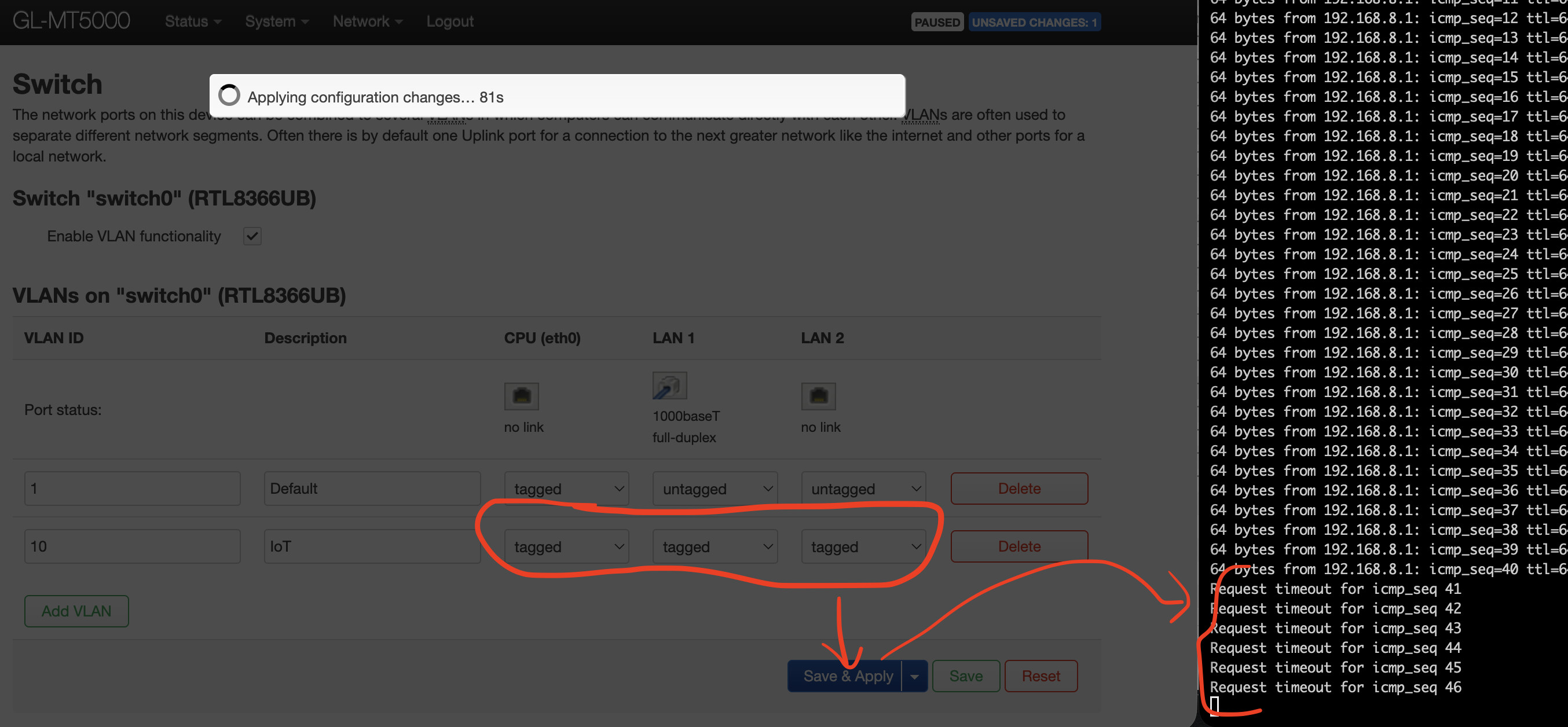
What I was trying to do is really very simple, basic VLAN trunk. Starting clean after a firmware config reset, I enabled LuCI and I created VLAN 10, assigning it as “tagged” egress in both LAN1 and LAN2 (while keeping the default VLAN 1 as untagged). This is the configuration I am using in my network, since each AP will assign VLAN 10 to the guest/IoT wifi SSIDs.
As soon as I apply this config (see below), I immediately lose connection to the router. Maybe I am observing the bug reported here? BTW, I am running 4.9.0 beta1.
2 Likes
Seems like it, perhaps bug report has been missed being on Reddit so hopefully you raising here will bring some attention. Have you tried this? Unable to create VLAN on GL-MT5000 Brume3
1 Like
Try on the other port , this is kinda what I also was seeing.
1 Like