Practically got lots of performance issues, even I’m using local network. I am having a 10 gbit local network, the GL client uses almost nothing, still the performance is bad. I feel like it’s going around the globe before reaching me back. High compression with lots of artefacts and lots of lag no matter what mode I select. Connecting a remote camera introduces huge delays in Teams calls even that network traffic is neglegable. Any guidance?
I have 10 gbit as well and 4 GL-RM10. I can help with this. I don’t have any issues that you describe but if you share your config maybe I can help. Here’s my config for a Mac laptop:
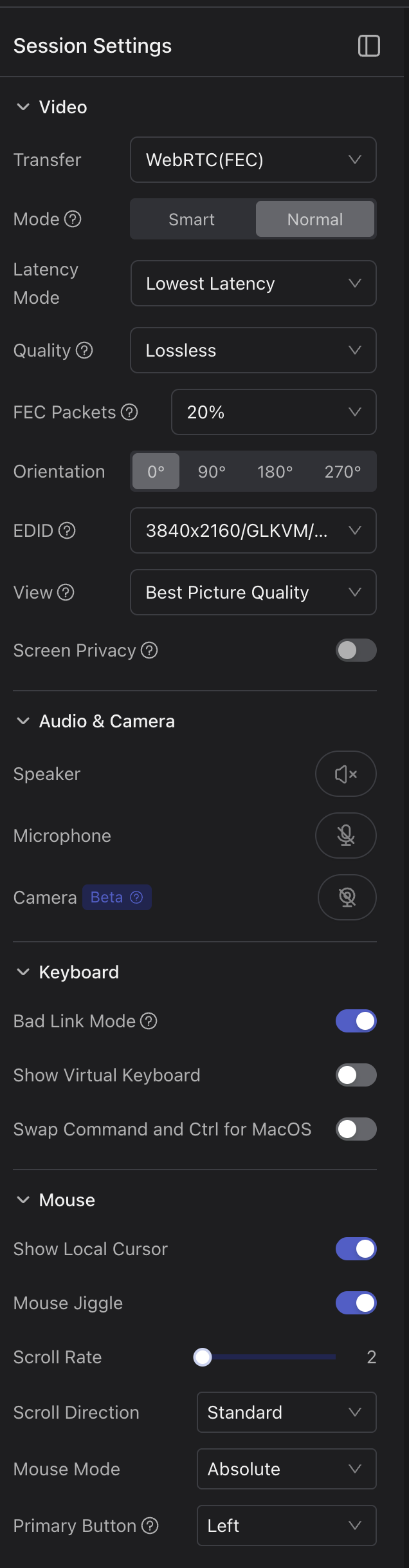
I normally use local IP to connect to it, if I’m away and use the cloud connection I lower a bit the resolution depending on my broadband connection, but that’s it.
I normally use Speaker/Mic/Camera on Teams which works fine BUT sometimes Mic stops working when I enable/disable any of the Speaker/Mic/Camera devices from the config so I have to reload the page.
I find the browser more reliable than the app, e.g. if the mic fails on the app I go to the browser and re-enable it and allow the audio on Chrome, that, somehow, makes the app settings work again.
I suggest play a little bit with the video settings but the ones above gives me the closest to the physical device resolution.
I hope it helps
With show local cursor, there isn’t much mouse lag but I can see two pointers as I move the mouse. With it disabled, the mouse seems “jumpy” as you move it.
Also, what is the screen privacy button you have? I do not have that option.
This feature requires an upgrade to firmware v1.10.
Hi, thanks for the feedback. Could you try the RM10 on another network and see if the issue still occurs?
Also, could you share a few more details and check the network latency and jitter in the Data Dashboard while the issue is happening? If possible, please send us the syslog.
v1.10.1 release 2 is installed. Never mind… I just realized this may be a feature only for the RM10. I’m using an RM1PE.