Since a few hours I can't get my dns to resolve, nslookup to [mydomain].glddns.com does not resolve, is this a known issue and where can I see the status of it resolving? Unfortunately this is a big deal for me and while it's the first time this happened, I need a reliable dns server. Thanks!
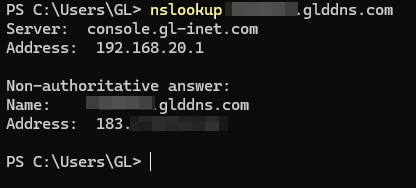
I have access to my client router which uses the custom ddns to resolve my server's IP and it shows as not being resolved. Nothing was changed anywhere by the way, nslookup also fails to resolve it. Is it possible that this has expired without me having touched any config on the server?
Do you mind if I send you my custom DDNS privately for you to check? I'm trying to find a solution and unfortunately this is very frustrating!
Do you use a dns blocker like adguardhome or nextdns?
I know that nextdns uses a algorithm in their blocklist filters, like the bypass methods one.
To me it even blocked every vpn blog site 
Nothing at all, I tried resolving it from multiple networks (including my phone mobile data) and it does not resolve  .
Hi,
We checked the DDNS hostname you sent via PM and confirmed that it did fail to resolve.
If the issue persists now, could you share the router associated with that hostname with GL.iNet Technical Support via GoodCloud so we can investigate? Please follow our GoodCloud remote support guide, enable Remote Web / SSH.
Once shared, please send us the router’s MAC address and a temporary admin password in our existing private message conversation. After troubleshooting, you can cancel sharing and change the temporary password. Thank you!
Thank you for checking and for confirming the issue! Unfortunately I don't have access to the router as it's in a remote location, hence my cry for help 
The issue still persists and it might be coincidental but it started around the time the PHP security incident was publicly known, is it possible that this is related and are still patching things? If this is a "my router problem" do you have any expiry policy for ddns, such that if my router does not send updates the ddns entry will be discarded?
If this is something you can check - again - on my router the ddns or any other config have not changed, it's just not resolving to the IP so I assumed it was a ddns server issue since it's giving me NXDOMAIN. Thanks!
I managed to get remote access by having someone enable the option "Allow Remote Access LAN" and disabling/re-enabling the dynamic dns on the router. Now the dns is resolving to the correct IP address. An annoying problem though..