I have the same, for me it seems to be a problem with the Flint 3. My phone roams fine to my Salte 7 and Slate 7 pro, but once i'm in our kitchen or hallway/toilet, where the flint 3 has the best signal, i often end up on cellular, sometimes even with my phone saying wifi password incorrect.
I have the same, for me it seems to be a problem with the Flint 3. My phone roams fine to my Salte 7 and Slate 7 pro, but once i'm in our kitchen or hallway/toilet, where the flint 3 has the best signal, i often end up on cellular, sometimes even with my phone saying wifi password incorrect.
We have confirmed this issue and will be releasing a fix in BE9300 v4.11 beta soon. I hope it will be next week.
Could you add a mode-switching button to the BE3600’s screen so it’s easy to manually switch between Mesh mode and main router mode?  Currently, when the BE3600 is in Mesh mode and it’s removed from the main router, it immediately switches back to router mode. It would be helpful to have a 1–3 minute grace period during which it retains its Mesh pairing status, making it easier to switch it from MT6000 A to MT6000 B. If it still hasn’t connected to the new main router after the timeout, it could then automatically switch back to main router mode. You could also consider adding an option to „Automatically restore main router mode after reboot“, making it more flexible to switch modes depending on the use case.

@Miles what's the ETA for a stable, release version of the mesh?
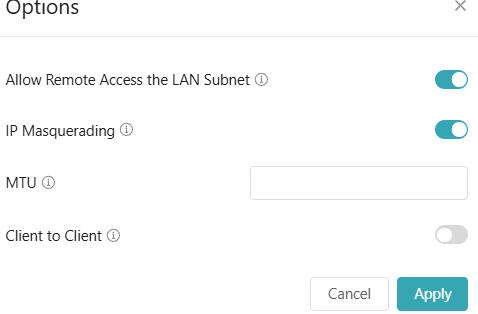

Try disabling CGNAT if used and / or use a fixe IP for the WAN connection.
after updated to beta6 is stop working
what's the ETA for a stable, release version of the mesh?
The stable firmware version v4.11 for Flint 4 is expected to be released at the end of this month.
Thank you for your suggestion. I will pass it on to our team.
Currently, the easiest way to switch the router from Mesh mode to routing mode is to press and hold the Reset button for about 4 seconds.
You can share your device with Goodcloud's technical support team so we can help you with further checks.
Please click the link to refer to the steps for sharing your device: Technical Support via GoodCloud - GL.iNet Router Docs 4
Once you've finished sharing, you can PM me.
How can 4.11 be released as stable for the Flint 4 if the SFP+ isn't supported? Flint 4 Mesh Beta Firmware support for SFP+ port - #3 by charles2
I lack understanding - you are saying 4.11 is the stable release but then reference the mesh beta (4.11.0 Beta6 2026-10-29)?
I do not see a 4.11 stable release for the F4 (4.9.2 2026-09-28).
The SFP work well for the main MESH router but I think you may be referring for the node?
How can they release mesh as stable if it doesn't support a flagship feature like the SFP+ port?
Because it is stable but the full features have not yet been implemented. Simples...
What are you calling stable firmware - as far as I ama aware the F4, 4.11.0 is still beta 6. Beta firmware is not stable firmware.
This is the stable firmware GL.iNet download center