Any updates on this?
I’ve stopped using my Opal as it’s unstable with the config I need.
Thanks!
Any updates on this?
I’ve stopped using my Opal as it’s unstable with the config I need.
Thanks!
Looks like SF is pretty tough for opening source.
May I know what unstable issues you encountered?
I have this model, and I also experience the same problem. Sending you the system log via PM
I didn't find your message in my PM list. I've sent you a message in PM.
Hey,
This is a real easy bug to reproduce. Would it be possible for your team to grab an Opal and give it a try?
Hello,
Yes, we did not reproduce it, so that we need the logs that users encounter issue.
Check whether the issue exists based on the logs, also will try to reproduce the issue locally.
Just wanted to chime in and say I had very similar issues on my flint 3 router.
After tons of trouble shooting the issue for me turned out to be with the dns settings I was using for the specific wifi network i was connecting to (spectrum access point). I was using cloudflare over HTTPS. Would work for a little bit then all or most connections would drop and I would have to reconnect the repeater mode or router to fix it. I switched to cloudflare dns over TLS instead and now the repeater mode works flawlessly.
So for all you guys having similar issues with repeater mode I would strongly recommend messing with your router DNS settings and testing different things to see if you get better results. Different dns settings may work better than others depending on the network you're connected to.
Hi,
I suggest picking up a sft1200 if you wish to diagnose this fault with us.
can we have access to 4.3.28 for the Opal, apparently new Opal’s are shipping with it installed yet it’s not available to install
This is great feedback for the GL-iNet team @bruce .
It’s super easy to re-produce this bug… can your team grab a router and test it out?
Can anyone else confirm that this fix worked?
@bruce With respect, it’s just not possible for your team to not be able to reproduce this issue. The error is confirmed and experienced by many here and on other forums.
Hello,
It compared with 4.3.25 there are no feature updates or bug fixes, just a firmware for certification, so wasn't upload to in the firmware center.
Thank you for your feedback. We have collected this issue, but we currently do not have local environment which access to the specific Wi‑Fi network (like spectrum) and therefore cannot reproduce the DNS issue.
If others user is willing to help, please let us know, we will perform a remote investigation of the issue via GoodCloud.
As that user noted, different network connections can present different DNS behaviors.
There are many possible causes for this issue. We cannot determine at this time whether the problem lies with the dnsmasq/dnscrypt-proxy2, or with upstream blocking of UDP DNS and DoH, especially since it was reported that DNS worked properly after switching to DoT.
Understood,
But if someone wanted to uboot recover to the factory installed firmware, they cannot because 4.3.28 is not available for download.
I placed this router in storage as it was not usable for me but I could replicate the issue with any WIFI network and with three different VPN providers regardless of protocol used.
It should not be hard to replicate this issue.
emm in this case they can flash the 4.3.25 firmware in uboot, 25 and 28 are identical at the GL-SDK.
If really need the v4.3.28 firmware, please PM me in forum, or contact support@gl-inet.com by email.
Hello,
We have tested many routers and APs from different brands and using different configurations, and did not encounter any problems in Opal. However we could not test every brand because some wireless solutions are uncommon and their devices are difficult to purchase.
If possible you can assist us, please let us know. The wireless specialist team will investigate the repeater.
4.3.25 was unstable in my situation. I am using my Opal as a repeater; it connects to the 5ghz of my BerylAX. WiFi broadcast is turned off on the Opal (used to connect LAN devices to my main network over wireless backhaul). 4.3.25 would work but my Opal would randomly reboot or boot loop and never come back, requiring a factory reset… Not ideal.
I went ahead and downloaded4.8.3 Beta3, installed it (wiping configuration), setting it up again. Within the first 24hrs, the Opal is randomly disconnecting from my network and reconnecting. This takes about 1-2 minutes. This is more frequent and renders the repeater useless.
This is easy to replicate. I will gladly work with someone and get them the information they need to really fix this issue. It’s a great little device when it works..
Also issues overhere.
I planned to use the Opal as a bridge between some devices and my ubiquiti network.
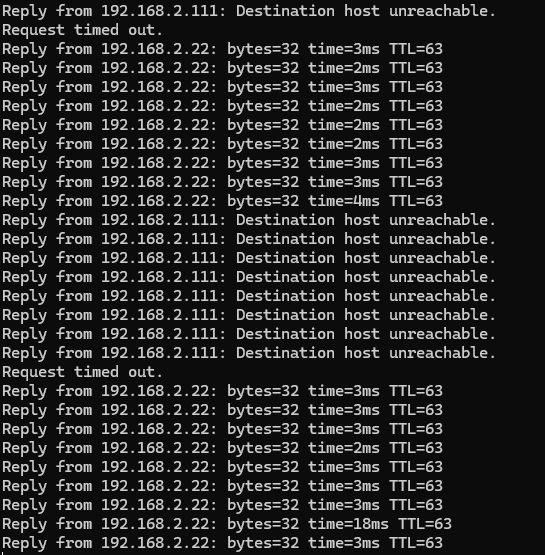
If it is doing it’s thing then the speed is fine. But it drops connection very frequently.
I did upgrade to the latest beta because the latest “stable” (which is far from stable) is ancient.
This is what I see pinging my Nas: