Lossless mode on the RM10 still looks pretty compressed - you can see a lot of artifacts/fragments. Is there a way to fix this so it transfers in true lossless quality? (Latest firmware 1.8.1 beta1)
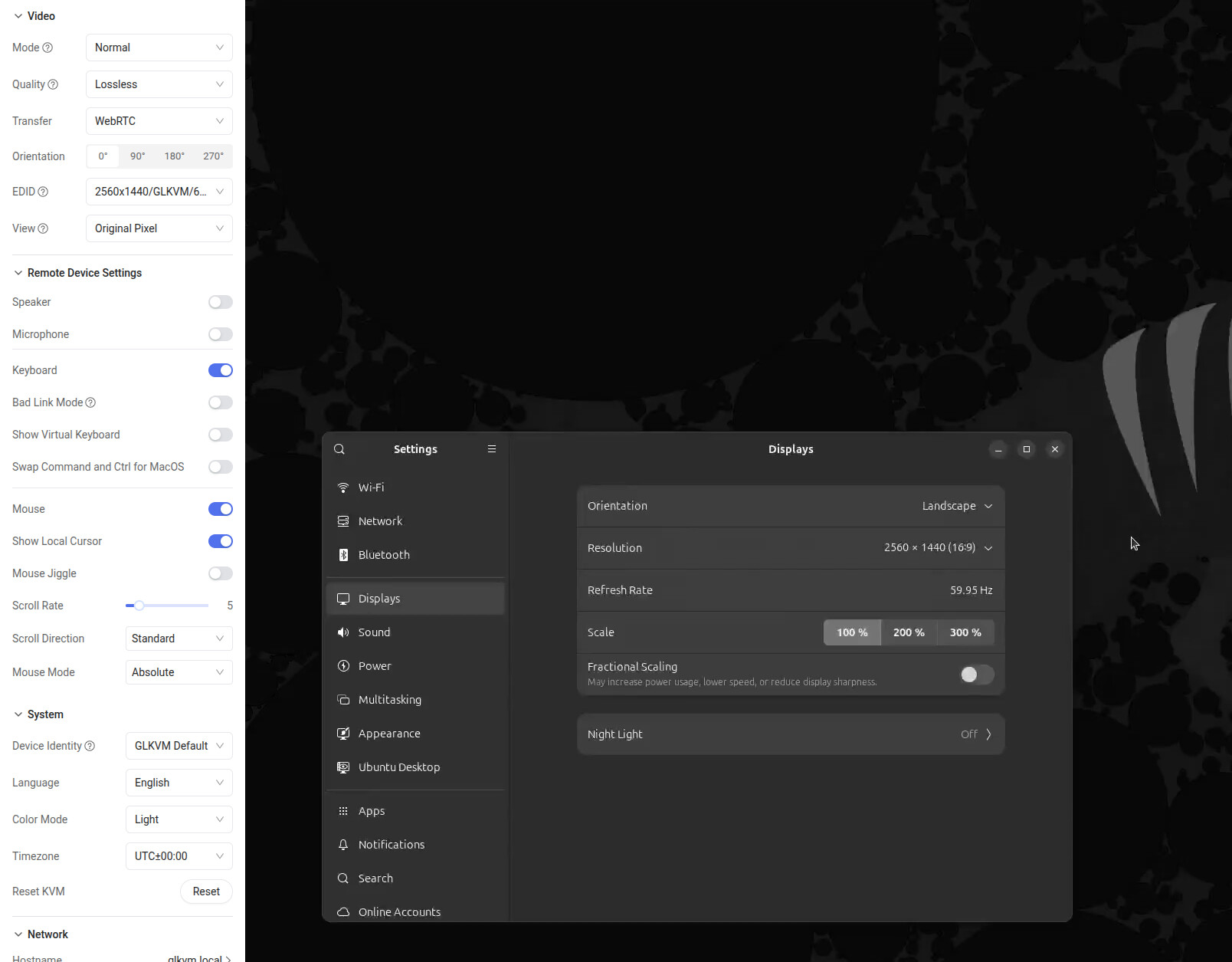


There is nothing we can do about it.
why not? at least possibility to use h265 would improve whole experience a lot. It seems possible. also webrtc can transfer h265.
mpi_enc_test shows that there is HEVC (h265) under type 16777220 too and quality switching works. So I guess it is only missing in the UI?
mkfifo /tmp/vstream
mpi_enc_test -i /dev/video0 -w 1920 -h 1080 -f 0 -t 16777220 -rc 2 -qc 1:1:10:1:10 -fqc 1:5:1:5 -g 0:1:1 -atf 3 -sm 1 -dbe 1 -qpdd 2 -n 0 -o /tmp/vstream
ffmpeg -f hevc -i /tmp/vstream -c:v copy -f mpegts "udp://targethost:5000?pkt_size=1316"
on host:
ffplay -vcodec hevc -fflags nobuffer -flags low_delay -i "udp://0.0.0.0:5000"
1 Like
H.265 has patent issues, so I cannot provide this option.
Lossless does indeed look very lossy. Interestingly, I get better quality on ultra-high with the previous firmware than with lossless on the current firmware, the new firmware shows a bunch of artifacts, especially with dark backgrounds. Lossless says it uses 20mpbs, but in my experience, it uses far less, it’s much closer to a couple of mbps at best.
Long story short, it appears the compression settings are far too aggressive on the latest release.
would it be possible to have more control over quality of h264 encoding in the ui or in configuration files?
There is definitely an issue with compression profiles, and I get issues where quality and bitrate drops over time.
Having the option to set a fixed bitrate woulb be great.
I also notice pretty poor video quality, even with “lossless” quality and resolution matching on my target and controlling machines.
switch to normal mode instead of smart
What resolution you are using?
I’m using 1920x1080 on both machines, and the 1920x1080/ASUS/60Hz EDID
I am using normal mode.
We may not be able to optimize this issue in the short term. This is because the chip is inherently designed for IPC (Internet Protocol Camera) and differs from pure software-based remote desktop solutions that utilize GPU encoding. We are unable to fine-tune its encoding parameters.