admon
November 4, 2023, 9:10pm
42
This won’t work anyway.
VPN isn’t like magic hole punching. It won’t work because the traffic will flow through different networks until it reaches the destination.
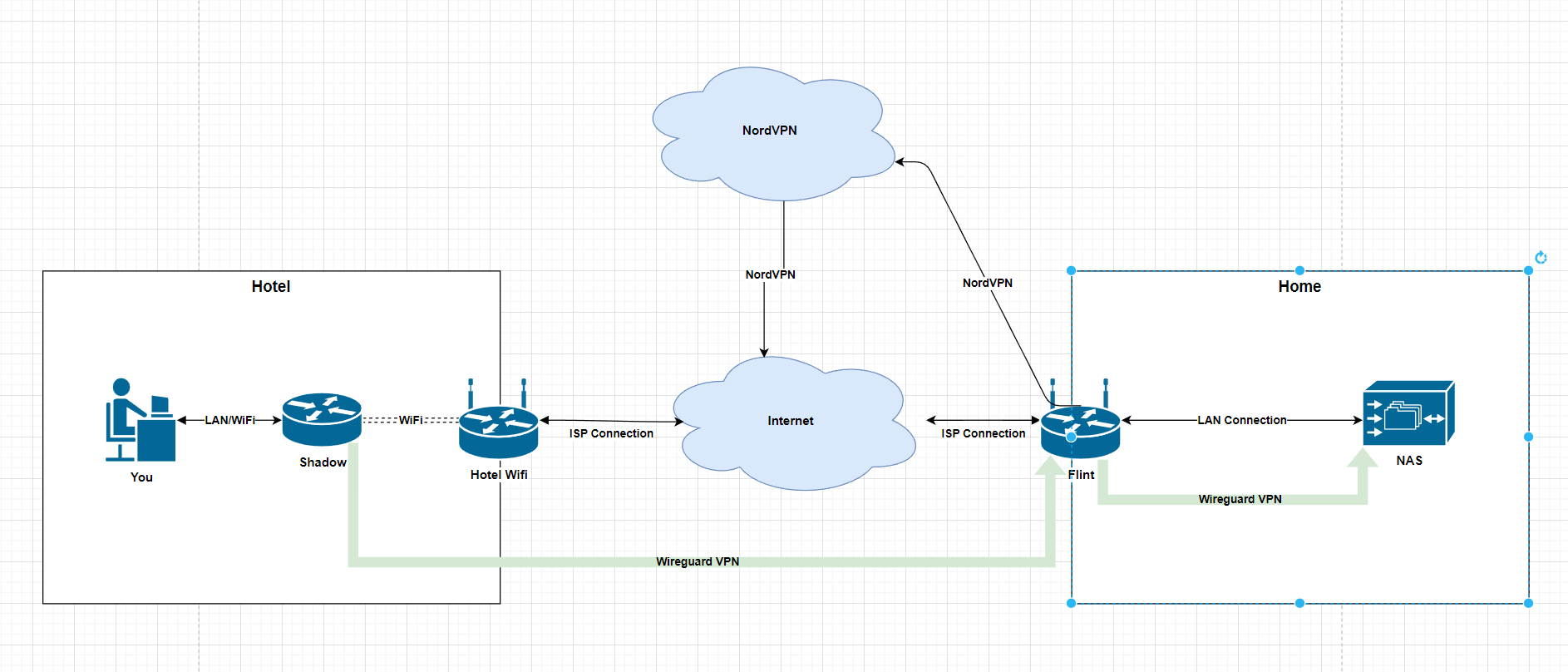
That would be my setting:
The Flint can use a VPN for Internet connection and a VPN server at the same time.
If all is too difficult, you can just stick with https://www.zerotier.com/ which is way more easy and as secure as VPN.
elpmeh
November 4, 2023, 9:11pm
43
Cant i just forward my traffic from one router to another and obfusate the traffic so its not in the way of anytihng else
elpmeh
November 4, 2023, 9:13pm
44
Thank you so much for this mate and Lupus E
legends of the grind over here
that diagram looks about right uno
admon
November 4, 2023, 9:13pm
45
There are various possibilities. But you need to have very good network knowledge and the right hardware. Go with ZeroTier instead, it’s easier and doesn’t care about ISP routers or firewalls. At least not on consumer level.
elpmeh
November 4, 2023, 9:14pm
46
well im home to offsite home , i still want my normal network traffic to be through Flint
elpmeh
November 4, 2023, 9:15pm
47
okay, lets assume i use zero tier, or i ge tit working , do i need to do routes to get one subnet from outside thats deffo diffent
mine is 192.168.8.xxx
offsite is 192.168.0.xxx
im so thankful for this btw
admon
November 4, 2023, 9:18pm
48
ZeroTier works a bit different from VPN. You will have a more or less steep learning curve
Most easy: All devices you want to reach use ZeroTier - then you don’t need any routing. All devices are auto-magically connected to each other by its ZeroTier IP. That’s why it’s pretty easy and suitable for beginners.
If you want to use routes:https://zerotier.atlassian.net/wiki/spaces/SD/pages/224395274/Route+between+ZeroTier+and+Physical+Networks
and
Simple Route Needed for Typical home setup - #3 by maxwellfire - Community Support - ZeroTier Discussions
Connect the Flint to ZeroTier
Create a route for your home network and using the ZeroTier IP of the Flint as Gateway
Install ZeroTier on your PC you want to use in Hotel
elpmeh
November 4, 2023, 9:19pm
49
Right F**K thid then ill use zero tier, if i connect my phone now to one router and vpn into it via flint ,
can i assume that i cxan take it offsite an connect to it and drag my ip adress of my nas into the same zone allowign comunication, via the router ,
Barin in mind, I want all my internet traffic to be via my isp , not via the offsite location
this is why i bought two boxes,
my assumption was that if i connect in client mode on a router, that im there and not at home ,
elpmeh
November 4, 2023, 9:21pm
50
is this a split tunnel scenario,
all traffic but the one device is unaffected?
admon
November 4, 2023, 9:21pm
51
Not sure what you mean here, but it works like this:
Device A gets ZeroTier IP 10.0.10.25 (native IP 192.168.0.17)
You then use the ZeroTier IPs to connect between the devices. Instead of using 192.168.0.52 to connect to B, you will simply use 10.0.10.45
elpmeh
November 4, 2023, 9:24pm
52
and i can send large volumes of data this way?
admon
November 4, 2023, 9:25pm
53
Yep. I used it to watch movies from my NAS while I stayed with friends.https://zerotier.atlassian.net/wiki/spaces/SD/pages/224395274/Route+between+ZeroTier+and+Physical+Networks
Just try it out
elpmeh
November 4, 2023, 9:27pm
54
so i can have one on either side then, a client on one lan at home
and server offsite
or does the lan assigment have to happen on flint,
I want flint or whatever device to sllow both nas onsite and offsite to be able to see each other for offsite backup
i have 20tb storage on both sides
admon
November 4, 2023, 9:29pm
55
As long as all devices can reach each other by ZeroTier they will be able to … reach each others
I am not sure if the Shadow can use ZeroTier out of the box. If not, it might be smart to use a Flint as well - more comfy.
Just read the ZeroTier docs and try it out. You can’t break anything - at least not with just using ZeroTier.
1 Like
elpmeh
November 4, 2023, 9:55pm
56
Oh thank you so much for everything i will update on how it does legendary you and lupus
legends
In luci turn off the authoritive dhcp and then it might allow you to assign the lan pool to the same subnet… Not 100% on that. It’s just a guess.