Same issue, did you solve?
That didn’t work for me…
Really hoping for a breakthrough here.
Updating to 0600snapshot1 (GL.iNet 固件下载中心 on snapshot tab) fixed the problem. Now tailscale works on my x3000 out of box and I can access other remote lan devices seamlessly)
nevermind, it still requires the firewall zone to be set. However on previous stable firmware (4.4.8) I can’t get it work even with the zone set
What in the actual heck is going on with GL-iNet when it comes to Tailscale? I just bought a Beryl AX with the sole intention of connecting it to my tailnet and thus allowing clients behind the Beryl AX full access to not only the machines on my tailnet, but also to ANY machines on ANY subnets that have been advertised to my tailnet.
I've enabled every option on the Tailscale application page EXCEPT choosing an exit node and unequivocally clients behind the Beryl AX cannot reach ANY machines on the actual tailnet and they absolutely can't access any machine on ANY subnet advertised to the tailnet.
I've followed the advice on multiple posts on this thread and none of them cause this functionality (essentially the basic of basic Tailscale functionality) to even work. If I SSH into the Beryl AX and try and ping machines on subnets advertised to the tailnet, it works... kinda... the packet loss is so extreme.. >80% loss, even though I'm testing this in my home on my own actual network connected to the internet via fiber, there shouldn't be ANY packet loss.
At any rate, this all seems to be like way too much of a hassle to even justify keeping this "travel router." I don't even see how GL-iNet can claim to "support" Tailscale when it literally doesn't work at all out of the box. FYI, I'm on the latest stable firmware, 4.5.16. I see where --accept-routes was added to the tailscale command line, but that doesn't even appear to matter one iota.
If I can't figure out how to make this work and work reliably (no packet loss), I'm going to be forced to just return this device.
==============================================================================
EDITING THIS POST AS MY PREVIOUS POSTS ENDED UP BEING POSTED OUT OF ORDER, THE ABOVE IS MY ORIGINAL FIRST POST AND BELOW ARE MY TWO FOLLOW UP POSTS WHILE DOING FURTHER RESEARCH
==============================================================================
1/2
Alright.. so I did a bunch of digging around relevant posts here, reddit, and asking on unifi discord and here are a few things I discovered that need to be fixed by GL-iNet to get this working "out of the box."
First, you need to go into LUCI and goto the firewall and edit the "wan" zone.. goto "advanced settings" and add "tailscale0" to the "covered devices" then save & apply. This will instantly make Tailscale function as intended.
Second, GL-iNet needs to fix their "tailscale" command line, yet again.. --accept-dns=false should be switched to true or omitted completely (as true is the default), this way when your beryl ax is connected to tailscale you'll get proper DNS for things on the tailnet (whether that be Magic DNS or a local dns server that's exposed via the tailnet and likely added by the user to "global nameservers" on the tailscale admin console). Without this change, hostnames of machines on the tailnet (or even worse things on subnets exposed to the tailnet) are completely unresolvable. I'm guessing GL-iNet specifically set this to false because of their advertising around adguard or ad blocking and setting this to true may break that? I don't know, but specifically breaking DNS around the tailnet when the user is specifically enabling tailscale seems rather dumb. At any rate, if you're like me and you run adguard or a pihole on your tailnet (and you intend on always having your beryl on your tailnet when in use, which is probably the primary reason you bought this thing (like me) in the first place.. just go ahead and add your local dns server to the DNS page on beryl web ui.
Anyhow, doing these two things has at least made me likely to maybe keep this beryl.. for now. I'm going to have to put it through its pace on my upcoming trip to truly decide if it's worth keeping. I must say though, my mind is really blown by how Tailscale is specifically called out in the applications with a vanilla beryl and when you enable it.. it well... literally doesn't work at all as intended unless you scouring the internet and happen across a thread like this one to make it work as it should!
2/2
Another option to my first step above is for GL-iNet to build a new firewall zone upon enabling tailscale and also tear the same zone down when disabling tailscale, for the sake of completeness. To see what needs to be built/torn down.. see this post from 2022.. Help to configure tailscale as a proxy service - #2 by pavelgl - Installing and Using OpenWrt - OpenWrt Forum
==============================================================================
ANOTHER EDIT, BECAUSE THE DECISIONS MADE BY GL-INET ARE EXTREMELY FRUSTRATING!
==============================================================================
There should be a dropdown allowing the end user to toggle "--accept-dns" to true or false and at the very least you should allow a custom dns server to be set when enabling tailscale. There's no way we should be forced to inherit the dns server from the primary WAN interface when essentially using a VPN, even though for some reason GL-iNet seems to think it's just an application and not a VPN. 
Also, the version of tailscale that's being used has a known security vulnerability.. you'd think there would be a way to update to the current version?
6 Likes
1 Like
You are absolutely right and I support your proposal
The updates from pcmike works! Thank you. The only thing I would like to add is, you need to save the firewall zone changes in LUCI and then save and apply the configuration on the main screen. I was just not noticing that button to apply configuration on the main page. I have Beryl AX and it works as it should out of the box.
Okay I am pulling my hair out with this one. I’ve seemingly tried everything in this discussion on my 1300. I still cannot access my subnets on my home network when trying from 1300 lan/wan. Can anyone help with this?
Thanks for the solution @pcmike. What does including tailscale0 in the covered devices in the Wan zone do?
This old post worked for me. It essentially adds the tailscale interface to a zone, and then allows forwarding on lan/wan to/from that zone.
I'm only trying to reach devices on my home subnet (which is being announced by a tailscale node) from behind the beryl
I'm running GL.iNet GL-MT3000
Me too. Tried everything. Only routes that are added to the main table are accesible, which is just Tailscales 100.64.0.0/10. As seen with ssh command ip show routes. Any other subnets that should be exposed by --accept-routes is added to routing table 52 (as seen in Luci-->status-->routes.
The odd thing is even the router can't ping subnets in table 52 ! let alone clients in the lan.
All of the adding tailscale0 device and setting up a new firewall zone didn't help.
We'll add the firewall zone by default. FYI
If it's still not working with tailscale zone added, you can try further enable masq for that tailscale zone.
Enabling masq for tailscale has the most connectivity if the other end doesn't enable "accept route" or not enabled on tailscale console(Tailscale).
@hansome, I tried masq as well. For me the issue seems to be that the Tailscale routes are not added with the correct priority to the routing table. Table 52 routes are too low down. So in my case I just manually added ip route rules to my luci > system > local startup file. Eg
sleep 180
ip rule add to 192.168.4.0/22 lookup 52 priority 49
ip rule add to 10.193.7.0/24 lookup 52 priority 48
exit 0
I can now access all my remote subnets.
1 Like
FWIW, I have a beryl AX and I had to do the "add tailscale0 to the wan zone covered devices" action to get my tailscale with custom exit node to work.
Out of the box, it would connect, and I would somehow have a single device connected to the repeater WiFi to be able to talk to the Internet, but then no others would work. Adding the device to the zone fixed it. I don't have other devices on the tailnet yet, this was just trying to get it to make it out the exit node.
1 Like
Is this happening any time soon?
The tailscale interface has been added to the firewall in firmware v4.8.

Yeah… it doesn’t look like that in any of the three devices I have. Spitz AX 3000, Slate AXT 1800, Beryl AX 3000. All updated to the latest 4.8, and tailscale updated to the latest version. Except maybe the Spitz AX, I’ll have to double-check the firmware on that one.
I’m looking at updating the zones per this other post (a condensed version of steps mentioned earlier in this one). The firewall zone looks like that after following those steps, with the exception of the third column (forward) being set to ‘accept’ as well.
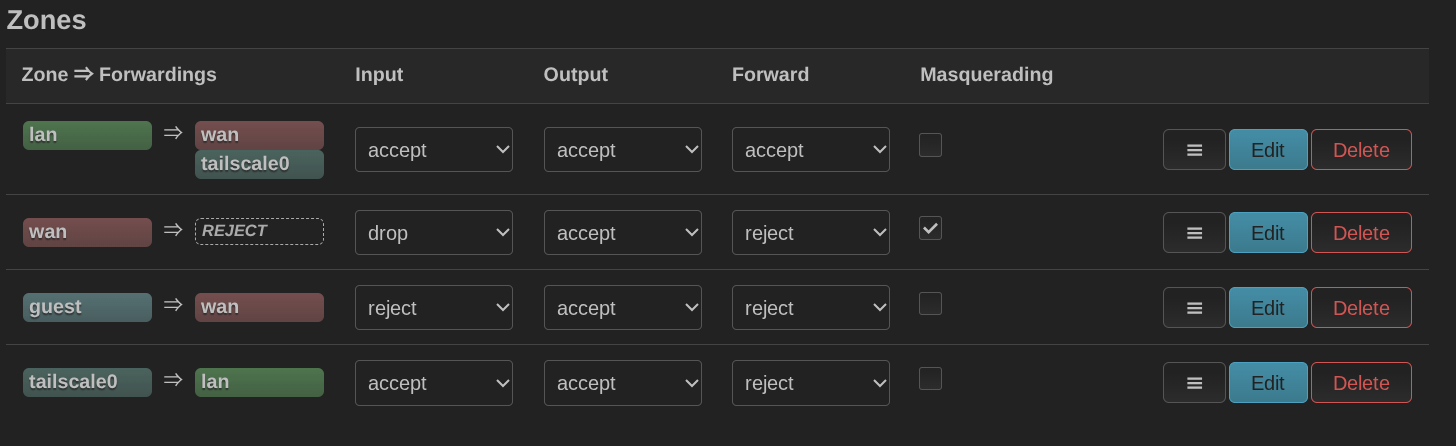
Forwarding "accept" is not necessary.
May I know is the Tailscale available now? What question did you encounter?
Not sure if I understand the question… I was looking for the same thing the OP was - why when I had TS enabled, with subnet routes turned on, a non-TS client couldn’t see/reach devices on the other end of the connection.
More specifically, before modifying the tailscale zone rules to include WAN, a smart TV (Roku) behind the glinet router couldn’t reach a media server in my home LAN, either by it’s LAN ip (192.168.1.x) or tailnet IP (100.x.x.x). Now it can.