Hello,
Please try this script:
Brume3-AddVLANs_inLANzone.sh (5.3 KB)
Upload it to the router /root/, and execute command sh /root/Brume3-AddVLANs_inLANzone.sh
Note:
- Ignore any DHCP-related "failed" printed.
- Retain the default
br-lan192.168.8.0/24, retain the existing VLAN 1, and the LAN1 port untagged (management port).- Add VLAN 100 on LAN2 as tagged: 192.168.100.0/24, gateway 192.168.100.1.
- Add VLAN 101 on LAN2 as tagged: 192.168.101.0/24, gateway 192.168.101.1.
- Add VLAN 102 on LAN2 as tagged: 192.168.102.0/24, gateway 192.168.102.1.
- For VLANs 100/101/102 enable DHCP servers (range .25–.240); place their firewall rules in the lan zone.
- CLIENTS and DPI cannot account for traffic on these VLAN clients
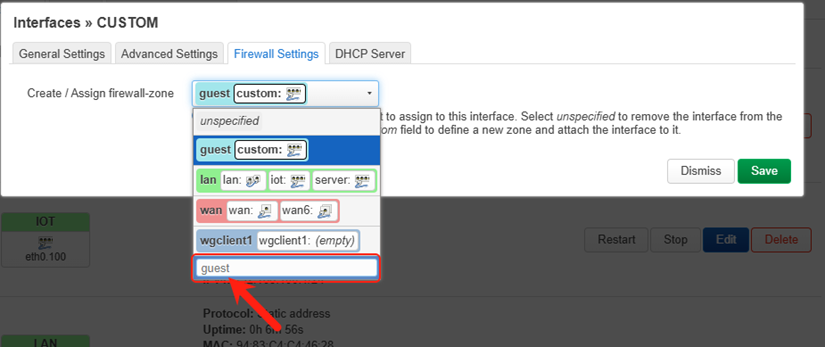
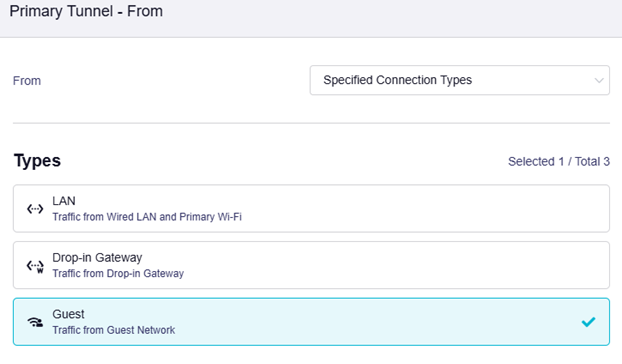
- All three VLANs will go to the VPN tunnel by default. If you want to apply policies inside the VPN Dashboard, you can add a zone in LuCI -> Network -> Firewall (there is no guest zone by default, but the firmware includes guest rules — just enter "guest" to enable this rule).