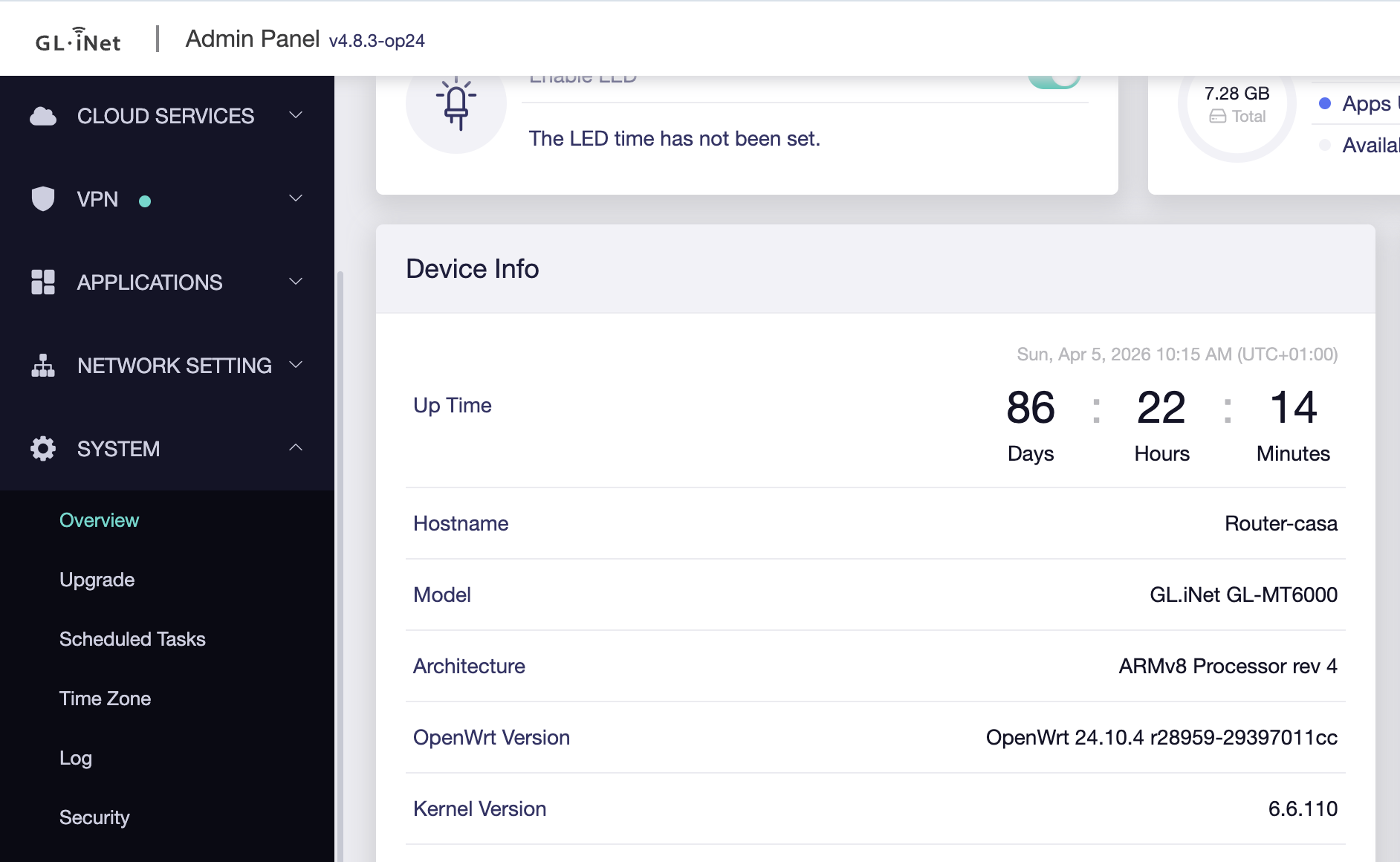
according to the download center there is no new op24 available. But maybe you want to use the gl-inet version instead? I think you are confused because you are getting an update message for the gl-inet version for the firmware although you are running on the last op24 already. @kb_tech95 Mentioned that issue some posts earlier.
@will.qiu The 4.8.4 update was taken down a few days ago, but it’s available again since two days or so. Is it safe to use? Are the DNS issues solved?
Thank you Void and kb very useful info. I am leaning towards op24 but i’ll wait for some feedback in another post regarding the adguard home update frequency in op24. The 4.8.3 from gl-inet is working fine these days. Maybe the gl-inet firmware still gets a little more effort from the developers in case that something needs to be fixed, i am just guessing, not sure. I am not in a hurry.
So far, i really like the product and the suppot gli and the users are offering on this forum. Just don’t rush into new updates without extensive testing.
FWIW I normally avoid trying beta firmwares, but after seeing the drop in wifi signal with 4.8.4 I thought I would try 4.8.5 beta. And even though the max signal strength is the same 100 mW, the actual signal bars on my PC wifi connection and throughput are back to what they were pre 4.8.4
Next time something is released from gl inet wait around 2 weeks and watch the forum and reddit. (this pretty much applies to a lot of software releases in general)
This isnt the first nor the last firmware that will get pulled. It will save you so many headaches.
Within a day of the release people were already complaining about this release on both sites I posted above.
the system information of my Flint 2 says: ARMv8 Processor rev 4. Can i install the latest openwrt 24 firmware form Gl-inet without causing any conflicts? @pierocafa Are you using adguard home on your openwrt 24 without issues? The uptime of your router is encouraging.
Hello, I am sorry to bother you, but I have a rather naive question after discovering this surprising topic (I would like to be on safe ground with my Flint2)
I installed the “old” version v4.8.4 when it was released and now you released a “new” version v4.8.4, so my twofold question/request is:
could you please confirm that I need to replace the faulty old one with the sound new one
could you please explain as precisely as possible the different steps to do so
Just some clarifying info for people wishing to check their 4.8.4 version release type in the Admin Panel:
My upgrade from 4.8.4 release 1 to 4.8.4 release 2 went 100% smoothly but the labelling in the Admin Panel is far from crystal clear. In fact the Firmware Type stayed exactly the same for both 4.8.4 releases (only “release” appears in the display).
However, what is informative is the displayed Update Time, which corresponds to release 2 ==> 2026-03-30 06:14:32 (UTC+00:00)
What is also informative of course is the name of the downloaded file – mt6000-4.8.4_release2-879-0330-1774852402.bin for release 2 – but this is not useful if you deleted it after installation
Hi there. Flint 2 + 4.8.4 FW: Facing significantly slower Internet and the overall connection to the router is also worse. Will downgrade back to 4.8.3.
MT 6000 Flint 2 just completely shut down today. I don’t know if it’s 4.8.4 + agh, but it completely bricked on me. First I noticed adguard home was failing, couldn’t access sometimes. Then luci went down. Then now my internet went down. Thought it was the router and just waited and waited but tried plugging in my laptop to the modem and it started working.
Currently trying to uboot and flashing page has been spinning for a couple minutes, wish me luck
update: tries chrome and brave to upload the firmware. both times i used the default name mt6000-4.8.3_rel….bin and it kept going dark the moment i pressed flash.
this time i changed to firefox (not recommended but i didnt feel like I'd lose much at this point) and changed the name to just update.bin. its stuck at a white led now. tempted to pull the plug… nothing on 192.168.1.1 or 192.168.8.1 yet. but I've been sitting here watch the led for 20 min.
@will.qiu The only but annoying problem that i have with the 4.8.4, but from what i remember i also had on 4.8.3 is that the internet just stops working on all devices until i i change the vpn server on any of the configured four tunnels, or if i just change a setting like turning on or off the fallover on any of the tunnels or if i turn a tunnel off and on again. It clearly isn’t a problem of a vpn server that has been taken down by the vpn provider. It happens once or twice a week. It seems like something stucks and after a settings change it gets a wipe and the system initiates correctly, so that it runs smoothly for a while again. Any advice on that?
If traceroute fails, please SSH into the router and check whether the router itself still has network connectivity:
ping 8.8.8.8 -c 4
traceroute 8.8.8.8
If the router itself still has internet access, then after the issue occurs, could you please follow the guide below and share your device with us via GoodCloud so we can check it remotely?
Please also send us the MAC address and the router password via private message so that we can access the device.