hi all, sorry for bothering you. maybe what I am asking it dummy question but I don't know how to solve it.
i have a MT600 4.9.0op24 2026-06-01 version, flint2, which is one of the best purchase I did in my life 
in order to access to my files when I am out of the house ,
I would like to make a dedicated tunnel for my usb thumdrive ExFAT formatted .
I started the service and I can access to the storage locally, even if I have activated the access WAN webdav option.
Then , I found your nice guide “How to allow access to WAN when VPN client is enabled?” , Allow access to WAN when VPN client is enabled - GL.iNet Router Docs 4 .
so I started to follow the instructions . But I do not know how to specify a Mac address to target specifically the webdav storage.
i was wonderingif you could , please, help me . because I di not find anything for that topic when you run 4.9 op24
thanks in advance
Hi
Could you clarify which method you would like to use to access your files remotely when away from home?
- Connect back home through a VPN
- Access the WebDAV service directly through a public IP address
For Option 1, you would need to:
-
Set up a VPN server on your GL.iNet router by following this guide:
Build your own WireGuard home server - GL.iNet Router Docs 4
-
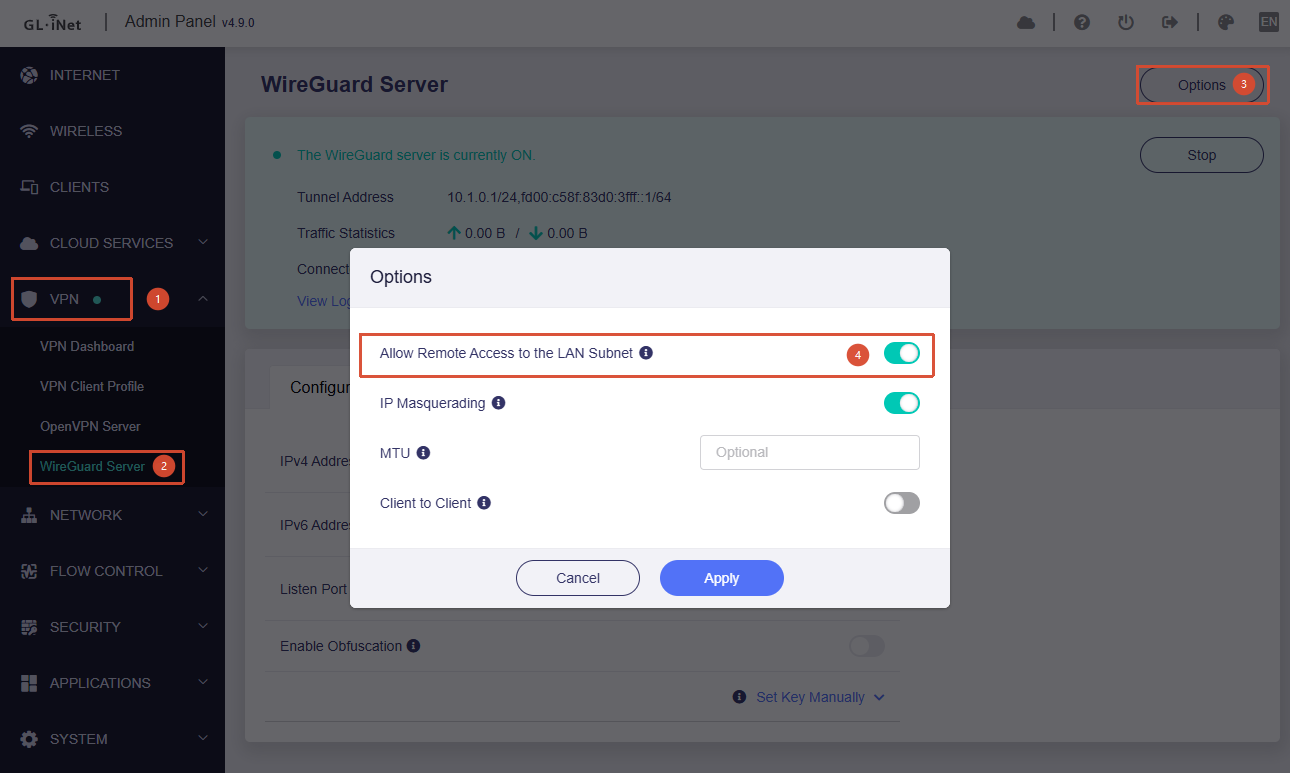
Enable "Allow Remote Access to the LAN Subnet" under Admin Panel → VPN → WireGuard Server.
-
When you are away from home, connect to your home network using a VPN client and then access the WebDAV server through its LAN IP address.
For Option 2, simply enable "Allow Access WebDAV from WAN" in the WebDAV settings.
Please note that both methods require your home network to have a public IP address, either:
- Directly assigned to the Flint 2, or
- Properly forwarded through port forwarding on your main router or ISP-provided router.
The guide you referenced is intended for a different scenario: accessing the main router's LAN while a GL.iNet router is being used as a secondary router with a VPN enabled. It is likely unrelated to your use case.