I am trying to access my GLinet Opal admin page from my GLinet Flint 3 network.
The opal is connected to the IoT network of the Flint 3.
Currently I have a port forward on the opal from WAN TCP port 80 to LAN 192.168.8.1 port 80.
I would like to access the Opal from the main network. IP of the main network is 10.10.29.1. And the Opal’s IP is 192.168.8.1.
Any suggestions on how to accomplish this would be appreciated.
Hi
From your description, it sounds like your goal is simply to access the Opal's management panel from the WAN side.
In that case, you do not need to create a port forwarding rule. Instead:
-
For v4.3.x firmware, go to Admin Panel → Network → Firewall → Open Ports on Router and open TCP port 80. Please refer to:
Firewall - GL.iNet Router Docs 4
-
For v4.7.x / v4.8.x firmware, go to System → Security → Remote Access Control and enable HTTPS Remote Access. If you prefer to use HTTP instead, open TCP port 80 under Open Ports on Router. Please refer to:
Security - GL.iNet Router Docs 4
After that, when connected to the Flint 3 (Main) network, you can access the Opal's management panel using its WAN IP address, which can be found under Flint 3 → Admin Panel → Clients.
Thank you! I will try this when I get back home later today and report back.
I opened port 80 on the opal and I am unable to reach the Opals admin portal from the Flint 3 network.
I forgot to mention in my main post that my Opal is connected to the IoT network of the Flint 3.
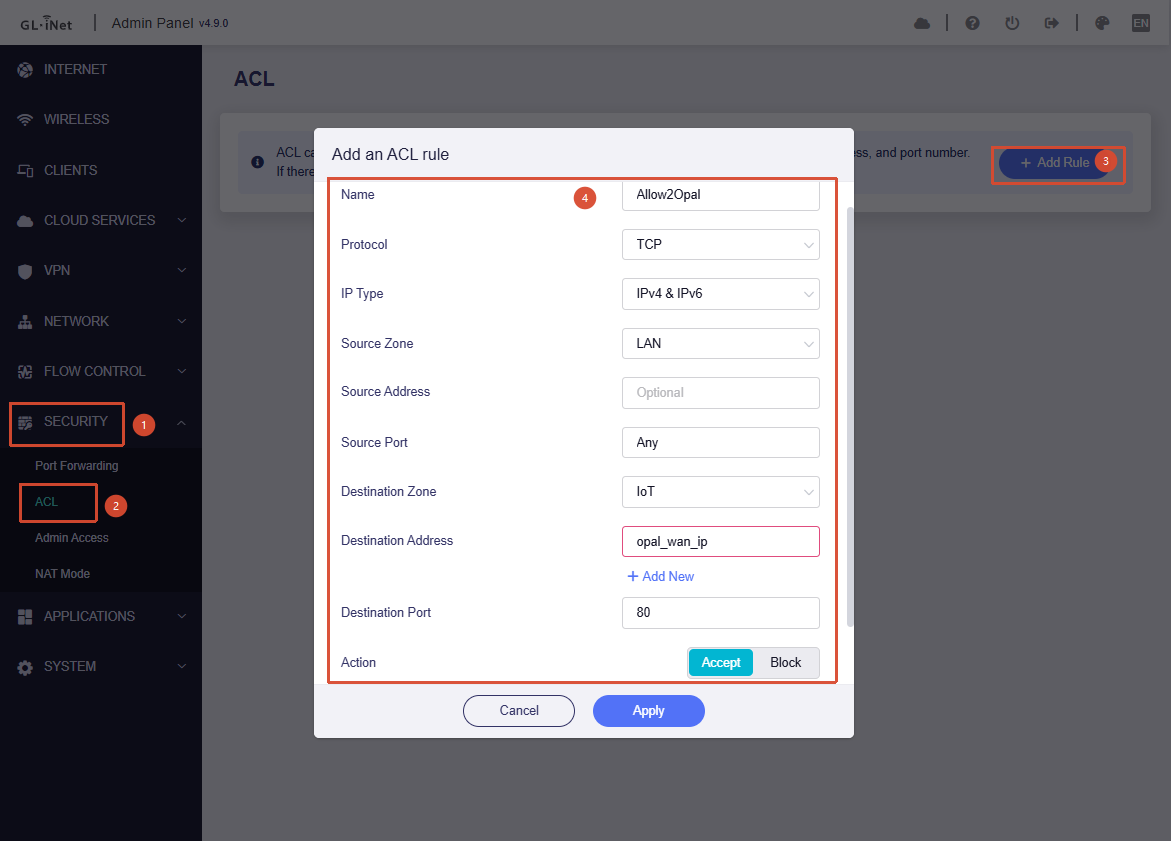
If the Opal is connected to the IoT SSID, and the devices that need to access the Opal are connected to the Main LAN network of the Flint 3, we will also need to add the following ACL rule under Admin Panel → Security → ACL on Flint 3:
That did it! Thank you so much for guiding me through this. You guys are the best!
1 Like