I just received my Flint 3e, and I’ve been having fun setting it up ever since.
I’m a bit of a beginner, and I haven’t found a solution on this forum or by asking an AI for help, so I’m posting here to ask for your assistance.
I have a VPN running, as well as Adguard, which I managed to set up.
The problem is, my server and my NAS are having some issues, particularly with qBittorrent, which can no longer connect to the internet (it was working fine at first, and now I don’t know why it’s not working anymore).
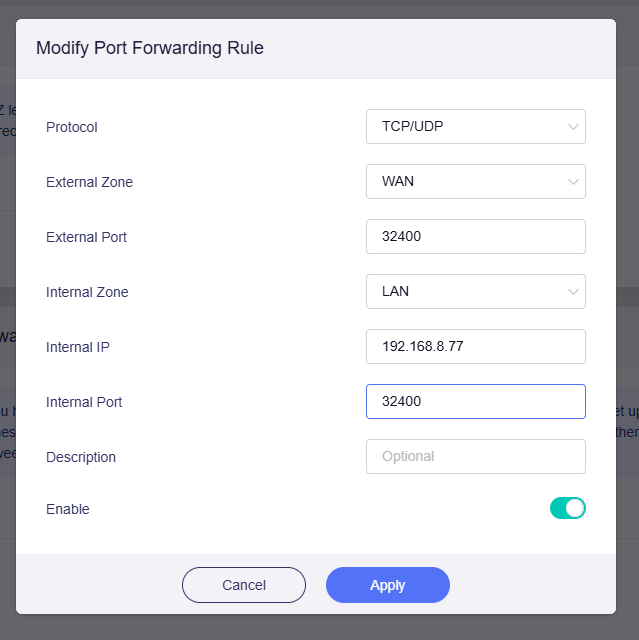
I also have a Plex server; I saw here that I needed to set up port forwarding, which I did (TCP 32400), but I can’t access it remotely, even though it seems to work for others.
Sorry if this is a bit jumbled. I tried installing UPnP so that Plex could set up external access on its own, but nothing happens.
That’s a lot to cover in one post, but if you have any suggestions, I’d love to hear them! Thanks a lot!!
You can create a ACL, then the source zone must be the wgserver, and the destination zone the network zone where your plex instance is in, as destination port you can do 32400.
Port forwarding is not really needed here.
You may also have to ensure these settings are checked in the vpn dashboard:
enhanced killswitch must be on, read carefully the description it should do something to lan aswell.
then on the settings wheel, there are more options and you want to make sure allow access to lan has heen checked.
Then it should work in theory.
However in case you also are using custom domain names to reach plex, you may need to enter advanced settings, then navigate in the tab menu to network and then dhcp.
As you can see there is a main instance you skip that one, and there is a second instance if you scroll down which is for wgclient or wgserver, ensure that /lan/ has been removed, if your plex is behind a second router you don't need an ACL but portforward on the upstream router, and then on the downwards router you also have to remove the /lan/ section but then on the main instance so that the upstream router has the authority of this domain lan.
If the wireguard client is also a openwrt router like those travel routers from GL-iNet make sure the /lan/ is also gone there
if /lan/ clashes you will see the dns probe possible message in the browser.
So you end with only having /lan/ on your most upstream router only on the main dhcp instance, and down stream routers and the wireguard dhcp on the upstream routers don't have a entry.
P.s I don't know the exact naming of this option but it is the only field inside the dhcp/dns options in luci, with these / slashes, GL-iNet may also have a longer text but it has these slashes, on newer OpenWrts this has been renamed alot of times so.
I do have the VPN set to Kill Switch, as well as the authorized LAN.
I even disabled the VPN to see if that might be the issue, but even without the VPN, I still can't access Plex from outside the network (I'm testing via my phone on 5G).
I only have my modem, which forwards everything, and my router. I don’t have a “/lan” as you explained, so normally that should be fine.
I set a manual port on Plex: 32400
I set a port forwarding rule on the router: 32400
In LuCi, under Firewall, I added a traffic rule so that requests coming from the WAN can go to lan>Server(Plex)>32400>accept.
Ahh, you are using a TV. Tailscale works with Apple TV box to easy connect to a Tailscale net. Not sure how you creating a VPN tunnel with a TV offsite unless its Apple TV box.
After that, it should work as expected. You can test access using a mobile device on cellular data by connecting to your public IP and external port.
We also recommend using the address reservation feature to assign a fixed IP to your Plex server, so the port forwarding rule won’t break if the IP changes later.
I have a modem connected upstream of my router. I do have a public IP address with it, but on my router, in the place shown on your screenshot, in the WAN section, I have my modem’s LAN IP address, namely 192.168.1.1.