Hey,
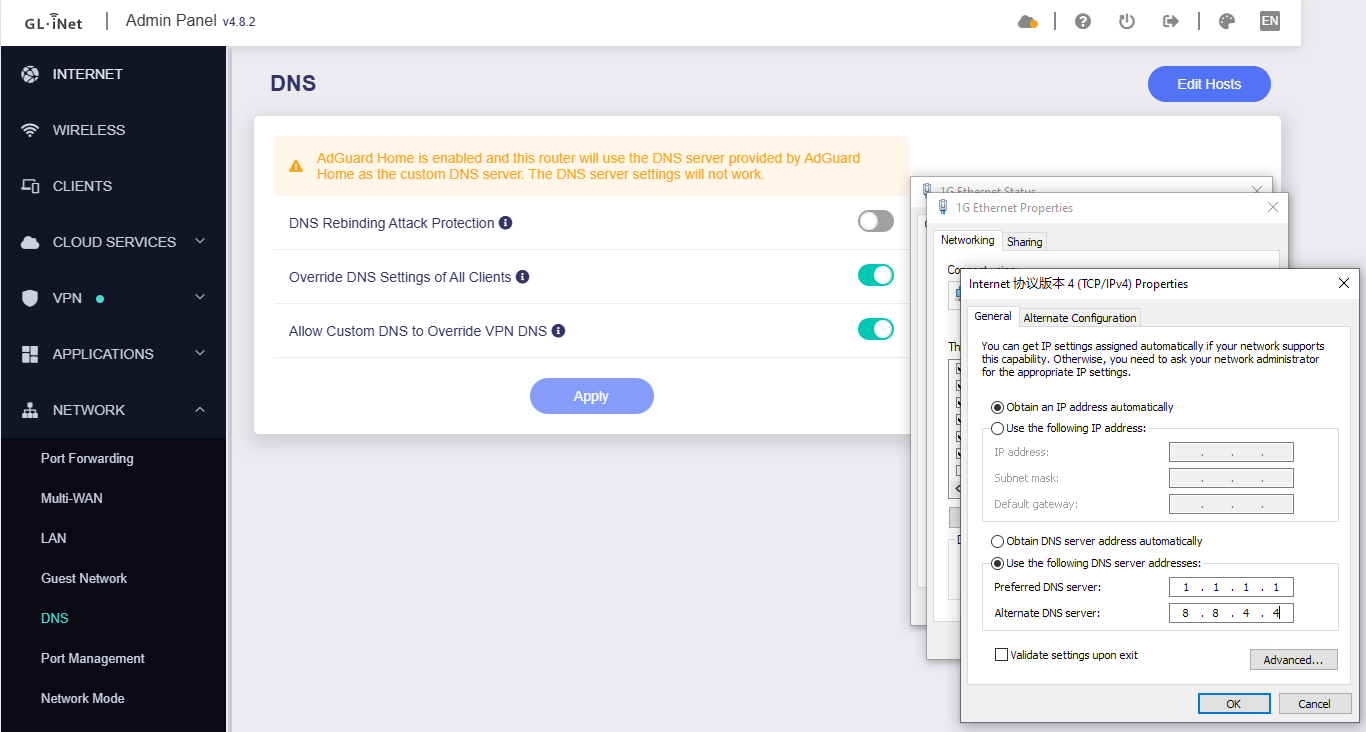
There is no problem with the Override DNS Settings of All Clients.
DNS redirection (Override DNS Settings of All Clients) is enabled, AdGuard Home Handle Client Requests is enabled, and the client's (test PC) network card DNS server is customized to 1.1.1.1 (ordinary UDP DNS):
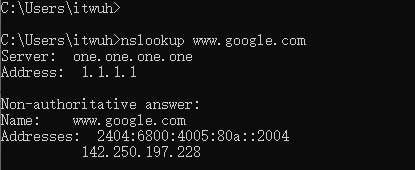
The client test PC, Win CMD initiates a DNS query, and displayed DNS request is to the custom DNS server. This is the expected behavior of Win:
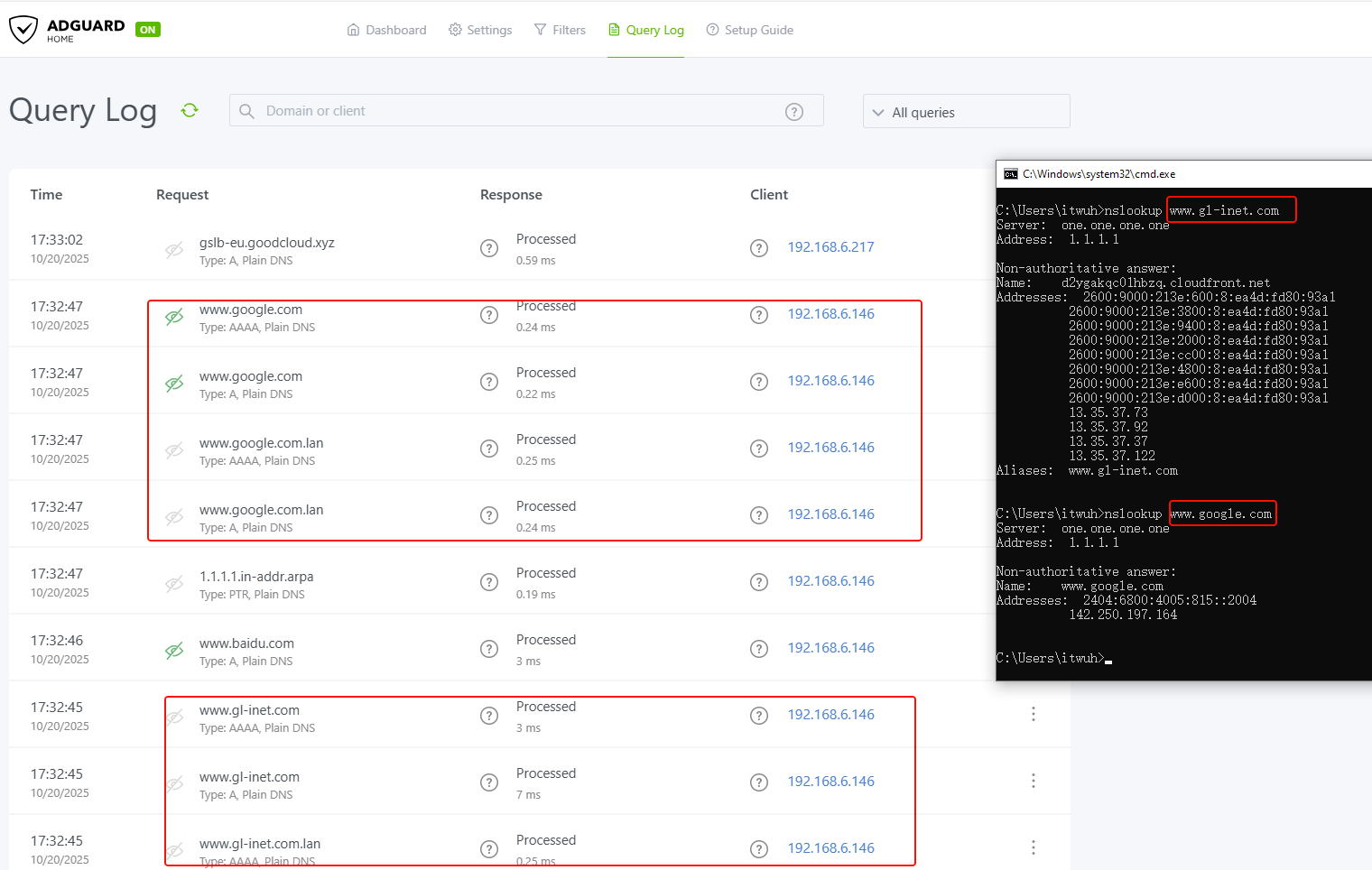
But all DNS requests from the clients will be redirected by the router to ADG:
- ADG Log:
- Connection tracing
cat /proc/net/nf_conntrack|grep -w dport=53 | grep [client's LAN IP or custom DNS server], redirects from port 53 to 3053 of DNS request of clients can be found:
root@GL-AX1800:~# cat /proc/net/nf_conntrack|grep -w dport=53 | grep 1.1.1.1
ipv4     2 udp      17 14 src=192.168.6.146 dst=1.1.1.1 sport=59679 dport=53 packets=1 bytes=58 src=192.168.6.1 dst=192.168.6.146 sport=3053 dport=59679 packets=1 bytes=198 mark=32768 zone=0 use=2
ipv4     2 udp      17 15 src=192.168.6.146 dst=1.1.1.1 sport=61607 dport=53 packets=1 bytes=80 src=192.168.6.1 dst=192.168.6.146 sport=3053 dport=61607 packets=1 bytes=190 mark=32768 zone=0 use=2
ipv4     2 udp      17 9 src=192.168.6.146 dst=1.1.1.1 sport=61026 dport=53 packets=1 bytes=70 src=192.168.6.1 dst=192.168.6.146 sport=3053 dport=61026 packets=1 bytes=86 mark=32768 zone=0 use=2
ipv4     2 udp      17 137 src=192.168.6.146 dst=1.1.1.1 sport=50860 dport=53 packets=2 bytes=120 src=192.168.6.1 dst=192.168.6.146 sport=3053 dport=50860 packets=2 bytes=330 [ASSURED] mark=32768 zone=0 use=2
ipv4     2 udp      17 8 src=192.168.6.146 dst=1.1.1.1 sport=49188 dport=53 packets=1 bytes=69 src=192.168.6.1 dst=192.168.6.146 sport=3053 dport=49188 packets=1 bytes=218 mark=32768 zone=0 use=2
ipv4     2 udp      17 23 src=192.168.6.146 dst=1.1.1.1 sport=63270 dport=53 packets=1 bytes=62 src=192.168.6.1 dst=192.168.6.146 sport=3053 dport=63270 packets=1 bytes=134 mark=32768 zone=0 use=2
ipv4     2 udp      17 22 src=192.168.6.146 dst=1.1.1.1 sport=51189 dport=53 packets=1 bytes=62 src=192.168.6.1 dst=192.168.6.146 sport=3053 dport=51189 packets=1 bytes=78 mark=32768 zone=0 use=2
ipv4     2 udp      17 33 src=192.168.6.146 dst=1.1.1.1 sport=56801 dport=53 packets=1 bytes=69 src=192.168.6.1 dst=192.168.6.146 sport=3053 dport=56801 packets=1 bytes=85 mark=32768 zone=0 use=2
ipv4     2 udp      17 22 src=192.168.6.146 dst=1.1.1.1 sport=53646 dport=53 packets=1 bytes=70 src=192.168.6.1 dst=192.168.6.146 sport=3053 dport=53646 packets=1 bytes=86 mark=32768 zone=0 use=2
ipv4     2 udp      17 8 src=192.168.6.146 dst=1.1.1.1 sport=59663 dport=53 packets=1 bytes=56 src=192.168.6.1 dst=192.168.6.146 sport=3053 dport=59663 packets=1 bytes=107 mark=32768 zone=0 use=2
ipv4     2 udp      17 23 src=192.168.6.146 dst=1.1.1.1 sport=61903 dport=53 packets=1 bytes=71 src=192.168.6.1 dst=192.168.6.146 sport=3053 dport=61903 packets=1 bytes=87 mark=32768 zone=0 use=2
ipv4     2 udp      17 22 src=192.168.6.146 dst=1.1.1.1 sport=51716 dport=53 packets=1 bytes=58 src=192.168.6.1 dst=192.168.6.146 sport=3053 dport=51716 packets=1 bytes=74 mark=32768 zone=0 use=2
ipv4     2 udp      17 53 src=192.168.6.146 dst=1.1.1.1 sport=61670 dport=53 packets=1 bytes=62 src=192.168.6.1 dst=192.168.6.146 sport=3053 dport=61670 packets=1 bytes=105 mark=32768 zone=0 use=2
ipv4     2 udp      17 23 src=192.168.6.146 dst=1.1.1.1 sport=55648 dport=53 packets=1 bytes=79 src=192.168.6.1 dst=192.168.6.146 sport=3053 dport=55648 packets=1 bytes=335 mark=32768 zone=0 use=2
root@GL-AX1800:~#
Note, only ordinary UDP DNS can be redirected. Encrypted DNS cannot be redirected.