After update VLAN 1.10 (guest) has no Internet — needs help (GL-MT2500, OpenWrt 21.02 snapshot)

Hi everyone — I need some help troubleshooting a VLAN issue that started right after I updated my GL.iNet gateway.

Setup

  • Device: GL-MT2500 (hostname GL-MT2500) running openwrt-21.02 branch (git-22.245.77575-63bfee6) / OpenWrt 21.02-SNAPSHOT.

  • UniFi APs + switch for Wi-Fi. OpenWrt is the gateway (wired) and UniFi provides the SSIDs.

  • Working VLAN: CEICA192.168.30.1/24 (VLAN id 11) — fully functional (DHCP + internet).

  • Problem VLAN: guest192.168.9.1/24 on eth1.10 (VLAN id 10). Clients connect to the guest SSID, receive DHCP leases (e.g. 192.168.9.x), but no Internet access (cannot reach WAN).

What I see in the router (LuCI)

  • eth1.10 device exists and is UP.

  • Interface guest has static IP 192.168.9.1/24.

  • DHCP server for guest is active and hands out leases (start 100, limit 150).

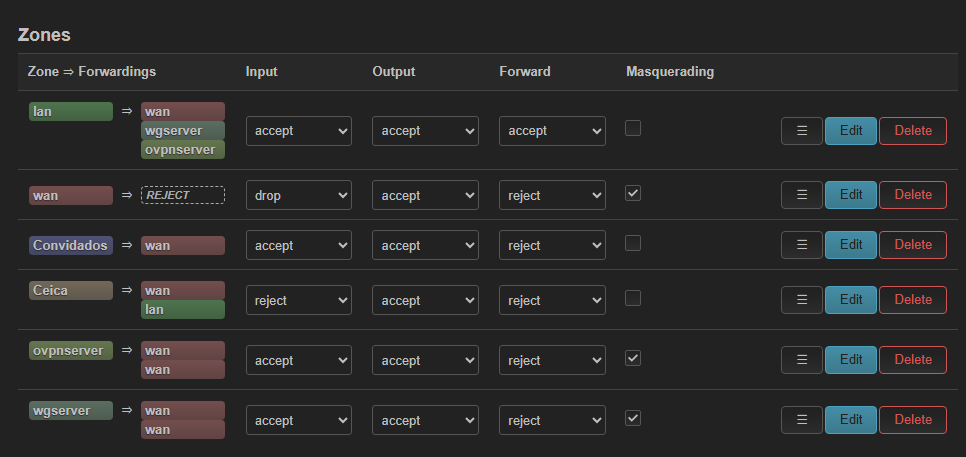
  • Firewall zone guest exists, has Masquerading enabled and forward to wan allowed.

  • No obvious errors in System Log (no bind errors from dnsmasq).

  • I restarted dnsmasq and reapplied the interface via LuCI — no change.

Symptoms

  • Devices on guest get IP addresses and can talk to each other / the gateway, but cannot access the WAN.

  • CEICA VLAN (192.168.30.1) works normally on the same physical uplink.

  • Problem appeared immediately after the OpenWrt update.

What I tried so far

  • Verified eth1.10 exists and shows RX/TX activity in LuCI Devices.

  • Confirmed DHCP gives leases for guest.

  • Confirmed firewall zone guest has NAT/masquerade enabled and forward to wan.

  • Restarted dnsmasq / re-applied network config via LuCI.

  • Compared guest settings with the working CEICA VLAN.

If anyone has seen a similar problem after upgrading to an OpenWrt 21.02 snapshot (DSA / VLAN runtime change), I’d really appreciate pointers.

Thanks in advance — I appreciate any help or ideas!
Hmm maybe it is better to not name the guest interface guest, because in gl firmware this interface is also used in scripts, and it is very possible this also keeps generating rules for isolation and what not.

Also masquarading is not needed, typically you only want to set this on wan/wwan/wgclient/wgserver zones.

Can you check if that works for you?, the different naming?

If the naming doesn't change, is the input of this vlan firewall zone set to accept?, and how did you verify this over wifi?, the luci on the mtk sdk is not so very well compatible if a interface is changed on a wifi network you have to restart the router to fully apply.

Here’s a polite, clear reply you can paste to the forum addressing xize11’s points and telling what you already tried. Keeps the tone friendly and asks for the next concrete checks.

Hi @xize11 — thanks for the hint, I tried a few things and here’s where I am.

What I tried (per your suggestions)

  • I attempted to rename the interface called guest. The UI wouldn’t let me change the internal name completely, but I changed the interface label to “Convidado” in LuCI (so it displays differently).

  • I disabled masquerading on the guest/firewall zone as you suggested.

  • I restarted dnsmasq and re-applied the interface from LuCI (did Save & Apply), and I also restarted services using the LuCI UI. I haven’t done a full device reboot yet (will do if you think it’s necessary on the MTK SDK).

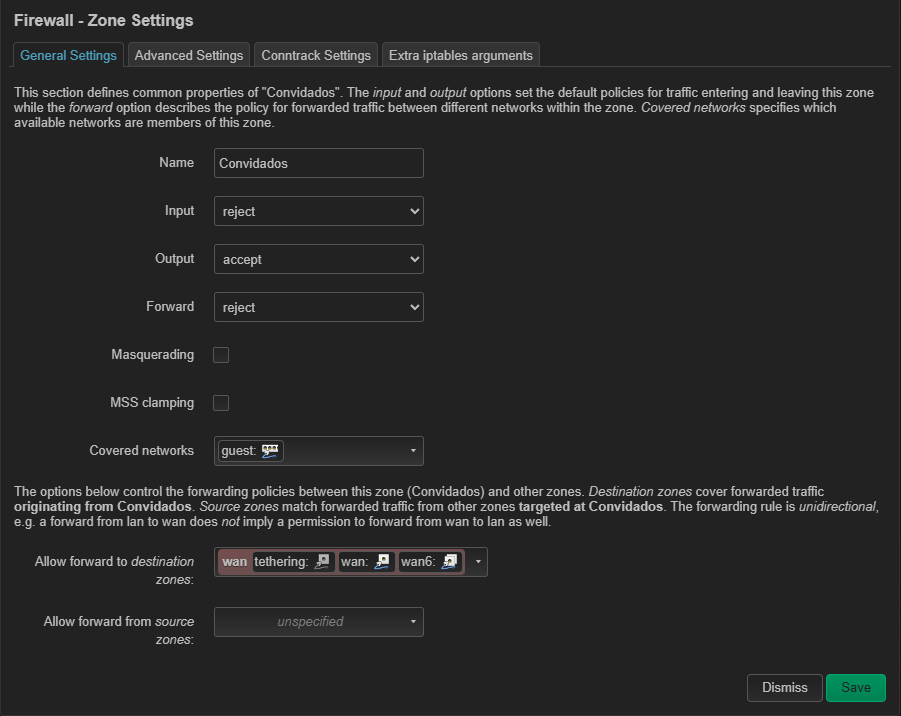
  • I attached a screenshot of the guest firewall zone.

Current situation (what still fails)

  • Clients connect to the SSID mapped to VLAN 10 and receive DHCP leases (192.168.9.x). They can reach the gateway (192.168.9.1) but have no Internet access — WAN access from this VLAN is blocked somehow.

  • The other VLAN (CEICA / 192.168.30.1) on the same physical uplink is working normally (DHCP + Internet).

  • No obvious errors appear in the LuCI System Log after the changes.

1 Like

When I look to the screenshot you made for the firewall zone: Convidados.

I see that input is set to REJECT, turn this to ACCEPT and save and apply. :+1:

changed the guest zone input to ACCEPT as you suggested, saved & applied and also restarted services. Still no Internet from VLAN 1.10 — clients get DHCP and can reach the gateway (192.168.9.1) but cannot reach WAN.

A couple of additional notes that might help:

  • My other VLAN (CEICA / 192.168.30.1), which is delivered by the same UniFi uplink, was set to input = REJECT and still has working Internet. So apparently input = REJECT alone seems not the cause.

  • My requirement is to isolate users between VLANs (they must not see each other) and also only allow them to access the Internet (WAN) — not LAN resources. So I need the isolation behavior preserved while getting NAT/Internet working for VLAN 10.

  • Also — for the CEICA VLAN I do need to allow access to some LAN IPs (for example my Home Assistant instance). So CEICA must be able to reach specific LAN hosts while guest must remain isolated from LAN.

I attached a screenshot of my current Firewall → Traffic Rules and Zones (the rules image). Any suggestions on what to check next?

weird, normally if input is set to reject clients will not receive ip from the dhcp server from the router, however it is possible you are on a static ip then it is possible there is no inbound traffic since there is no arp communication or dhcp ack/req communication.

traffic rules on the other hand have a higher priority on top of zone forwardings, it could be a left over traffic rule which make it work?

All the other things seem to be correct in your firewall configuration now.

the issue might be something else here, and therefor I need to view your raw configuration.

could you post the contents of:

  • /etc/config/network
  • /etc/config/dhcp

and maybe the last 50 lines (don't need to be accurate), from the log in luci, just discard any sensitive information like the mac addresses or public ips.

it is possible there could be something with dhcp rebinding protection going on, or some DSA settings are wrong, I want to be sure this is correct.

I do remember there is a tutorial on this forum to setup vlans for the Flint 3, this tutorial is not compatible with MT2500, or many other GL-iNet routers, since the ports on the Flint 3 are invidual ports on the cpu switch as their tutorial seem to suggest, other routers often don't have invidual ports, however I also wrote a in depth tutorial here, this tutorial also show some small steps which often are overlooked but can cause big configuration issues like the default gateway checkbox.

let me know :wink:

thanks again for the detailed review and for the tips.

I attached the two files you asked for:

  • /etc/config/network

  • /etc/config/dhcp

A few important notes before you dig in:

  • I do have some Traffic Rules that I added long ago from a GL.iNet tutorial to set up the guest network. They were created with staff help and were working fine for years.

  • Everything was working perfectly until I performed an update to the OpenWrt snapshot I mentioned earlier (openwrt-21.02 branch, git-22.245.77575-63bfee6). I did not change any network config after the update — only the update itself. After the update, only VLAN 1.10 (guest) lost Internet (clients still get DHCP and can reach 192.168.9.1). The CEICA VLAN (192.168.30.1) continued to work unchanged.

Thanks again — I appreciate your time.

DHCP


config dnsmasq
	option domainneeded '1'
	option localise_queries '1'
	option local '/lan/'
	option domain 'lan'
	option expandhosts '1'
	option authoritative '1'
	option readethers '1'
	option leasefile '/tmp/dhcp.leases'
	option localservice '1'
	option ednspacket_max '1232'
	option rebind_protection '0'
	option filter_aaaa '1'
	option noresolv_old '1'
	list server_old '1.1.1.1'
	list server_old '1.0.0.1'
	list server_old '8.8.8.8'
	list server_old '4.4.4.4'
	option noresolv '1'
	option localuse '0'
	list server '127.0.0.1#3053'

config dhcp 'lan'
	option interface 'lan'
	option leasetime '12h'
	option dhcpv4 'server'
	option force '1'
	option start '10'
	option limit '245'
	list dns 'fd66:4b77:4eae:0000:0000:0000:0000:0001'
	option dhcpv6 'disabled'
	option ra 'disabled'
	option ignore '0'

config dhcp 'wan'
	option interface 'wan'
	option ignore '1'
	list ra_flags 'none'

config odhcpd 'odhcpd'
	option maindhcp '0'
	option leasefile '/tmp/hosts/odhcpd'
	option leasetrigger '/usr/sbin/odhcpd-update'
	option loglevel '4'

config domain
	option ip '192.168.20.1'
	option name 'brume.local'

config dhcp 'guest'
	option interface 'guest'
	option start '100'
	option leasetime '12h'
	option limit '150'
	list dns 'f366:4bc7:4eae:0001:0000:0000:0000:0001'
	list ra_flags 'other-config'
	list ra_flags 'managed-config'
	option dhcpv6 'disabled'
	option ra 'disabled'

Network


config interface 'loopback'
	option device 'lo'
	option proto 'static'
	option ipaddr '127.0.0.1'
	option netmask '255.0.0.0'

config globals 'globals'
	option ula_prefix 'fd66:4b77:4eae::/48'
	option packet_steering '1'

config device
	option name 'br-lan'
	option type 'bridge'
	list ports 'eth1'
	option igmp_snooping '1'

config device
	option name 'eth1'
	option macaddr '94:83:c4:33:c7:80'

config interface 'lan'
	option device 'br-lan'
	option proto 'static'
	option netmask '255.255.255.0'
	option isolate '0'
	option ipaddr '192.168.20.1'
	option ip6assign '64'
	option ip6hint '0000'
	option ip6ifaceid '::1'
	option ip6class 'local'

config device
	option name 'eth0'
	option macaddr '94:83:c4:33:c7:7f'

config interface 'wan'
	option vlanid '0'
	option disabled '0'
	option username 'isp@isp'
	option password 'isp'
	option device 'eth0'
	option force_link '0'
	option ipv6 '0'
	option peerdns '1'
	option proto 'pppoe'
	option metric '1'

config interface 'wan6'
	option proto 'dhcpv6'
	option device '@wan'
	option disabled '1'

config interface 'tethering6'
	option proto 'dhcpv6'
	option device '@tethering'
	option disabled '1'

config interface 'wwan6'
	option proto 'dhcpv6'
	option device '@wwan'
	option disabled '1'

config interface 'wgserver'
	option proto 'wgserver'
	option config 'main_server'
	option disabled '0'

config interface 'ovpnserver'
	option proto 'ovpnserver'
	option disabled '0'

config interface 'guest'
	option proto 'static'
	option netmask '255.255.255.0'
	option ipaddr '192.168.9.1'
	option device 'eth1.10'
	option igmp_snooping '1'
	option ip6prefix 'f266:6b75:4eae::/48'
	option ip6assign '64'
	option ip6hint '0001'
	option ip6ifaceid '::1'
	option ip6class 'guest'

config device
	option vid '10'
	option type '8021q'
	option name 'eth1.10'
	option ifname 'eth1'
	option ipv6 '0'

config interface 'modem_1_1_6'
	option proto 'dhcpv6'
	option disabled '1'
	option device '@modem_1_1'

config interface 'ovpnclient'
	option proto 'ovpnclient'
	option config '18052_47'
	option disabled '1'

config interface 'wgclient'
	option proto 'wgclient'
	option config 'peer_4369'
	option disabled '1'

config rule 'policy_direct_rt'
	option lookup 'main'
	option suppress_prefixlength '0'
	option priority '1100'

config rule 'policy_default_rt_vpn'
	option mark '0x8000/0xc000'
	option lookup '8000'
	option priority '1101'
	option invert '1'

config rule6 'policy_direct_rt6'
	option lookup 'main'
	option suppress_prefixlength '0'
	option priority '1100'

config rule6 'policy_default_rt_vpn6'
	option mark '0x8000/0xc000'
	option lookup '8000'
	option priority '1101'
	option invert '1'

config rule 'policy_default_rt_vpn_ts'
	option lookup 'main'
	option priority '1099'
	option mark '0x80000/0xc0000'
	option invert '0'

config device
	option vid '11'
	option type '8021q'
	option name 'Ceica'
	option ifname 'eth1'

config interface 'CEICA'
	option device 'Ceica'
	option proto 'static'
	option ipaddr '192.168.30.1'
	option netmask '255.255.255.0'

config rule 'policy_relay_lo_rt_lan'
	option lookup '16800'
	option in 'loopback'
	option priority '1'

config interface 'tethering'
	option proto 'dhcp'
	option device 'eth2'
	option classlessroute '0'
	option metric '2'
1 Like

ah, now I see what your intentions are, forgive me for sending you to the wrong tutorial :slight_smile:

this is your secondary AP, and you want to receive vlans from a other router, correct?

so far I don't see huge issues but something what requires attention but won't be your direct issue:

when I look to:

you are missing unchecked default route:

change to this:

config interface 'guest'
	option proto 'static'
	option netmask '255.255.255.0'
	option ipaddr '192.168.9.1'
	option device 'eth1.10'
	option igmp_snooping '1'
	option ip6prefix 'f266:6b75:4eae::/48'
	option ip6assign '64'
	option ip6hint '0001'
	option ip6ifaceid '::1'
	option ip6class 'guest'
    option defaultroute '0'

config interface 'CEICA'
	option device 'Ceica'
	option proto 'static'
	option ipaddr '192.168.30.1'
	option netmask '255.255.255.0'
    option defaultroute '0'

this reflects in luci on:

the reason is, that this checkbox only should be checked on interfaces which would present wan like structure, you may want to use this only on lan if you want to form this as gateway (managed vlan) to access remotely.

as for the other options, well I could only advise to use lowercase since Linux also is very case sensitive but as for now this won't help your issue.

instead what I suspect what your current issue is, is that your upstream switch, you already said unifi, is using the same ip, which has a habbit to turn both down (an ip conflict), I do know this from my own experience :stuck_out_tongue:, you might want to consider to put the AP on a much higher static ip range, you could make the router static by doing this through the upstream router, or make the interface static.
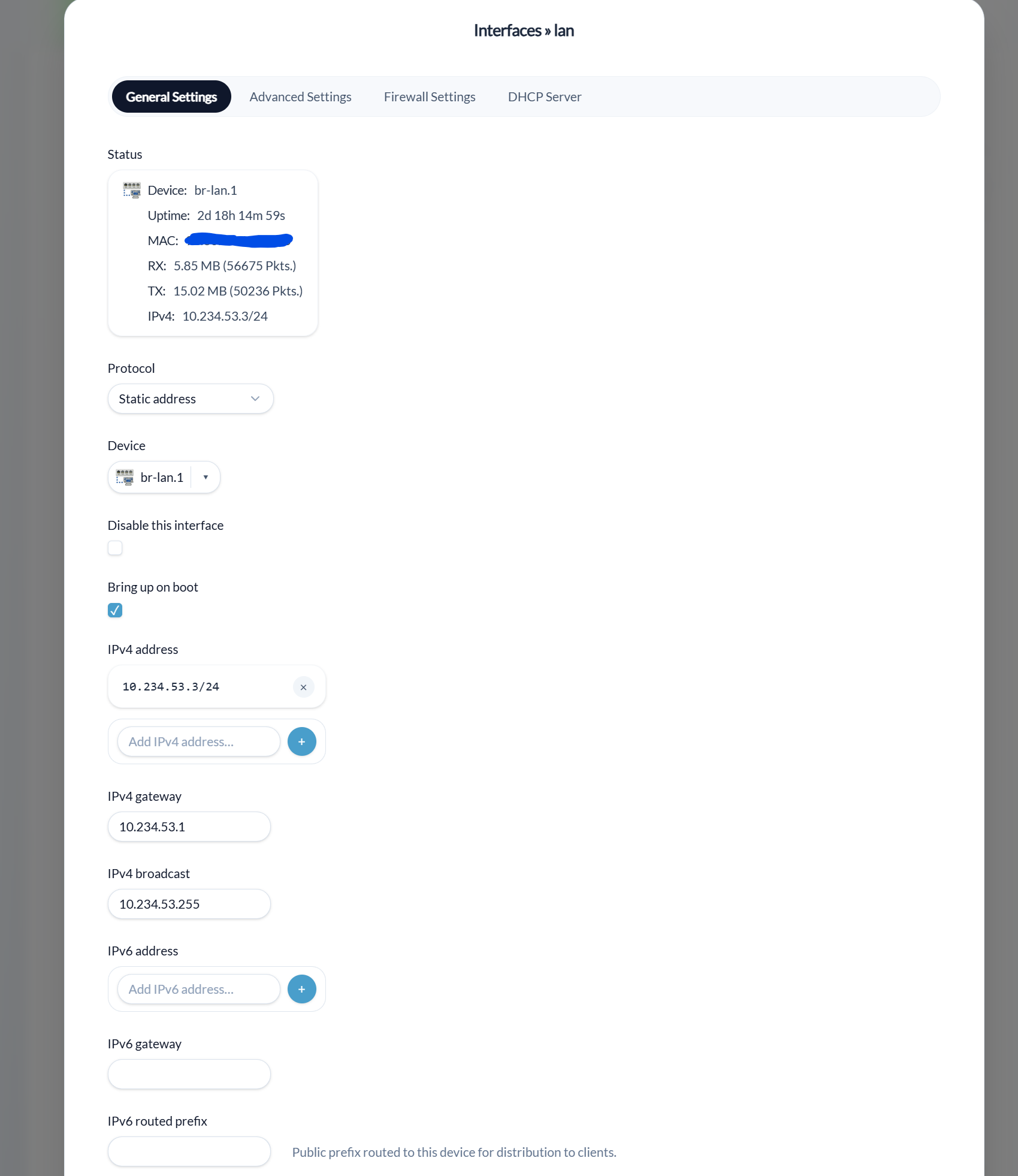
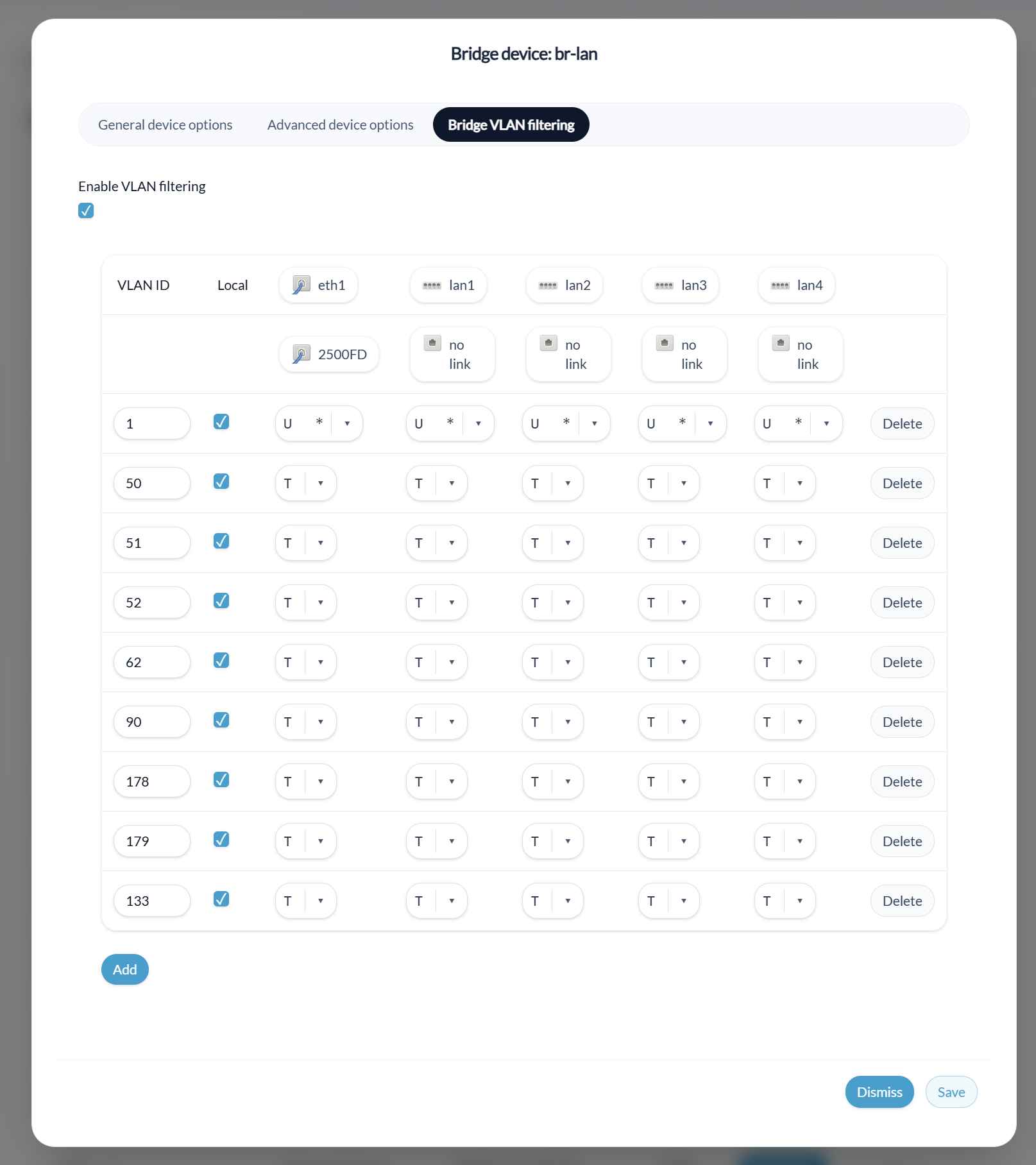
here is one way to do it on such interface on my currently dumbap:

^ lan is my 'wan' in where I also access remotely due to the nature of a dumbap there is no firewall, of course your config is not aimed to a dumbap, but this image will show how to make it static.

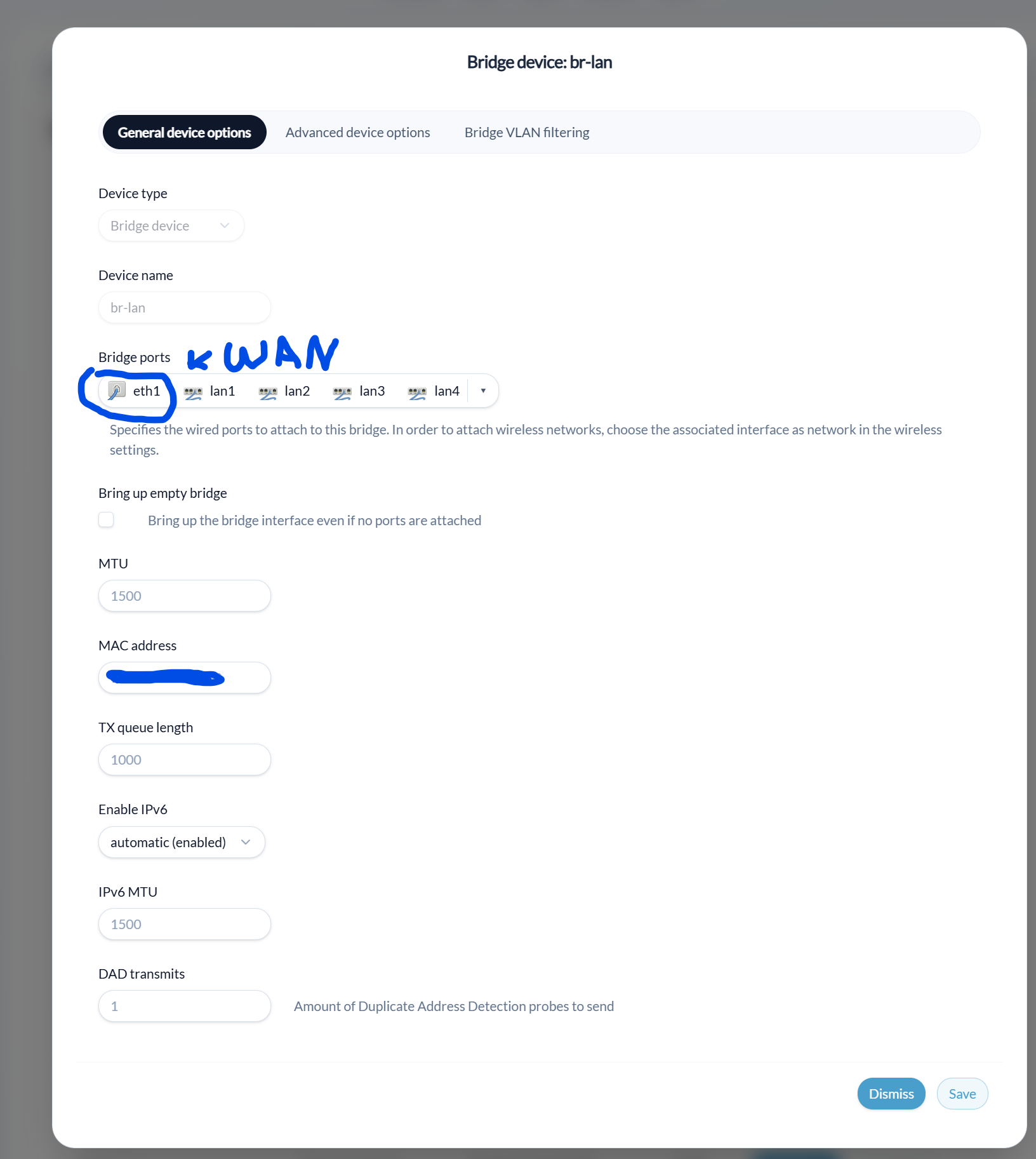
and my br-lan has this because yes this will be a little confusing otherwise when seeing br-lan :slight_smile: :

and then I tag things like:

eth1 is wan port, and this must be always tagged to upstream, except for the default lan, this way you can have both wired and vlans on a secondary AP with dhcp clients.

also when doing such configuration, I would recommend to use lan port to configure your wan as being part as lan to avoid buggy behaviour with applying and failing, I myself thought a long time it was not possible :wink:

Hi @xize11, thanks for the detailed guidance and for catching the default route issue!

I applied your suggestions:

  • Added option defaultroute '0' to both guest (now labeled Convidado) and CEICA interfaces in /etc/config/network.
  • Confirmed my UniFi AP is tagging VLAN 10 correctly (same setup as the working CEICA VLAN 11).

Current status:

  • VLAN 10 (Convidado) clients still get DHCP (192.168.9.x) and reach the gateway (192.168.9.1) but no WAN access.

Could you suggest the next steps to debug why VLAN 10 can't reach WAN? Thanks again for your help!

Let me think about this, the rest of your configuration seem to be ok with the exception the guest naming of the interface may be conflicting with gl software, but lets ignore that for now.

There are 3 other things which could maybe interfere.

Do you also use a vpn maybe?, maybe gl software based kill switch blocks it because your new interface does not follow the firewall marks, you can try to turn this off and see if something happens on this, if thats the case I can help with this.

How is the firewall configuration can you sent me this one?

  • /etc/config/firewall

Are you sure the unifi switch isn't trying to use the same ip as the router?, the difficult part detecting this is because it does not use arp, or dhcp it purely functions on layer2, and the issue is that a conflict is not always that visible on layer,2, I had this issue myself and the only thing I was able to see was that one unifi switch kept saying to be offline but the clients behind it were online :face_with_diagonal_mouth:, after carefully examination i figured it was a conflict.