I am on a Flint 2. I have another OpenWRT AP as well. I set up the Guest network on my Flint 2 and changed the settings to make it a full-blown VLAN. AP Isolate is enabled within the Gl.Inet Networking→Guest menu. I also see under Firewall Zone in Luci that Guest Intra zone forward is disabled.
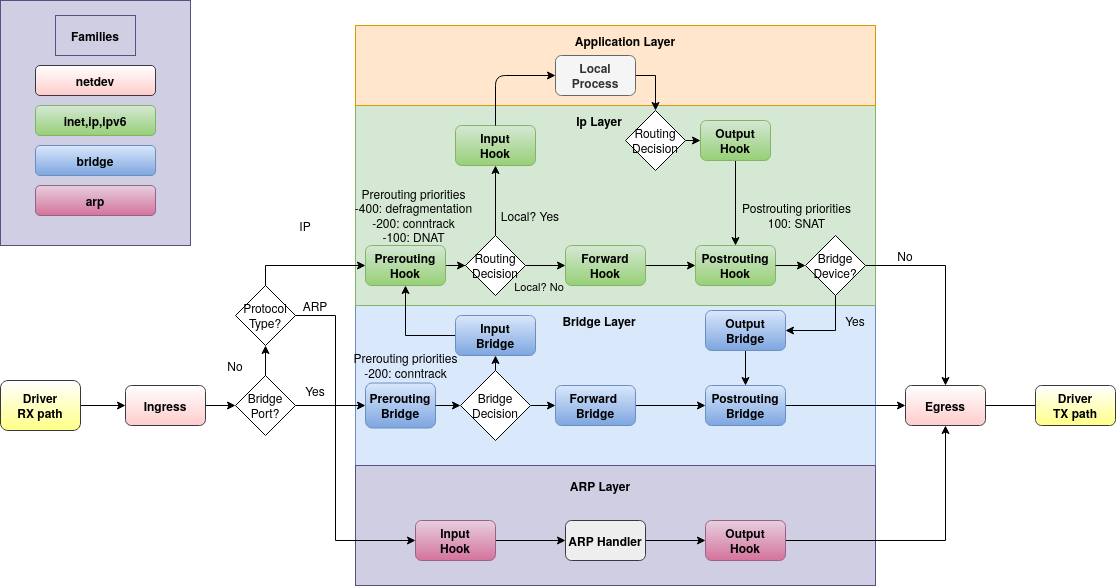
Nonetheless, devices on Guest can talk to each other (tested with ping as well as hitting a self-hosted website). After using Gemini for 2 hours, the only thing I was able to figure out how to block the cross communication was to create the following script to add a layer 2 bridge rule:
nft add table bridge isolation
nft add chain bridge isolation forward '{ type filter hook forward priority -100; policy accept; }'
nft flush chain bridge isolation forward
nft add rule bridge isolation forward ether type vlan vlan id 100 counter drop
Is this an issue with the router firmware or perhaps it’s broken because I converted the subnet into a full blown vlan?
FWIW, I also disabled Flow offloading and wed via /etc/modules.d/mt7915e to no avail (flow offloading was disabled because it was causing other issues with smoothly transitioning between APs w/o dropping packets – a different problem that I don’t want to get hung-up on in this thread.
I also tried a Traffic rule to drop guest-guest zone packets but that didn’t do anything w/o the above nft rule.