I have the same problem, after a while the ar300m wifi is not accepting any connection.SSID is wisible but unable to connect. The router worked fine for years but recently I added an IP kamera. I am running that wifi camera and a frigate server with ethernet. After the wifi dies, I am still able to reach the router using ethernet. The logs are clear, I cannot find any traceable info. I think there is a driver bug in the wifi driver. I replaced ar300m with mr300 router and there is no issue! The configuration is the same for both routers, so there is a ghost in ar300m. I upgraded the ar300m to Version 4.3.27 but the issue remains. Since Version 4.3.27 I cannot connect to openvpn. I am disappointed.
Hi
Do you mean that the IP camera is unable to connect to the AR300M's SSID?
If so, could you please check the following:
-
Besides the IP camera, are other devices such as mobile phones able to connect successfully?
-
If you restore the AR300M to factory settings following the guide below and then reconfigure only the necessary settings, does it help?
-
If the issue still persists, please try connecting the IP camera to the AR300M several times, then export the logs and send them to us via private message for further analysis.
Please also provide the MAC address of the IP camera so that we can locate the relevant entries in the logs.


Sorry for the unclear post.
My AR300M router worked perfectly for years with the old 3.216 firmware. The Wi-Fi was mostly used by a Reolink IP camera, which I viewed occasionally through the camera app. I also sometimes used the Wi-Fi with my phone and laptop when I was nearby. There were never any issues, and the router was always stable.
Recently, I set up a Frigate server that continuously records the camera stream over the local network via Ethernet. Since then, I have been experiencing problems with the AR300M. Within 1–6 hours after a reboot, the Wi-Fi stops working completely. At that point, no device can connect to the Wi-Fi network.
The router itself remains accessible via Ethernet, and everything except Wi-Fi continues to work normally, including the VPN connection. The router logs do not show any errors or useful information. The Wi-Fi only starts working again after rebooting the router. After a reboot, all devices reconnect automatically, but the same problem reappears within 1–6 hours.
If I stop the Frigate server, the Wi-Fi issue does not occur and the router remains stable. I tried different Wi-Fi channels and both 20 MHz and 40 MHz channel widths, but none of these changes helped. The only thing I did not try was adjusting the transmit power, which I saw recommended in discussions about this chipset.
Based on my testing, I suspect that the Wi-Fi driver used by the AR300M contains a bug and crashes under certain traffic loads or packet-processing conditions.
- "Besides the IP camera, are other devices such as mobile phones able to connect successfully?"
No. Once the issue occurs, no device can connect to the Wi-Fi network. I tested multiple mobile phones and laptops, and none of them were able to connect.
- "If you restore the AR300M to factory settings following the guide below and then reconfigure only the necessary settings, does it help?"
I tried a factory reset, but it did not help. The issue occurred exactly the same way. After that, I upgraded to the latest firmware version, but that also did not help. The problem is consistently reproducible whenever my Reolink camera is continuously streamed by a Frigate server.
- "If the issue still persists, please try connecting the IP camera to the AR300M several times, then export the logs and send them to us via private message for further analysis."
The issue persists in every case. I could not find anything useful in the logs, and honestly, I became frustrated with the amount of time I had already spent troubleshooting it. The problem and the testing consumed several days of my time.
As a result, I removed the AR300M from my setup and replaced it with an MR300N-V2 router, simply because I had one available. I copied all settings from the AR300M so the transition would be seamless and transparent to the connected devices.
After switching to the MR300N-V2, all problems disappeared. The system has been running stably for several days, now with two cameras connected. This strongly suggests that the issue is related to the AR300M Wi-Fi driver.
Since the AR300M is no longer in use, I am unfortunately unable to provide any additional logs.
Thank you for the detailed clarification.
Since you are no longer using the AR300M and the relevant logs are no longer available, it may not be possible for us to continue investigating this issue at the moment.
However, if you decide to use the AR300M again in the future, or if you encounter any new issues, please feel free to let us know. We will be happy to assist with further troubleshooting.
I understand your position, but I have spent hours and days trying to isolate this Wi-Fi issue with the AR300M, and frankly, I have reached my limit.
To clarify, the issue is completely reproducible. It only takes continuously streaming a 2K IP camera to a Frigate server for the failure to occur in a few hours.
I strongly believe it is the manufacturer's responsibility to ensure a product functions stably as advertised. I am more than willing to put the AR300M back into my network to help troubleshoot further, but only in exchange for compensation. Since I already have an alternative router using a different SoC that works flawlessly, I no longer have any incentive to do free QA work that your own quality assurance team should be handling.
The AR300M router itself is faulty. To summarize the testing:
-
All devices disconnect from the Wi-Fi and cannot reconnect until I manually reboot the router. This happens regardless of the configuration—including default and the most basic setups—and on both old and new firmware versions.
-
I could not find any errors or traces in dmesg or other logs.
-
A router using a different SoC handles the exact same load from the exact same place with zero issues.
Given that several of your products rely on the QCA9531 SoC, gl-inet should be taking this potential flaw very seriously. It is incredibly frustrating to deal with hardware that proves unreliable under some conditions. Moving forward, this experience prevents me from trusting the AR300M—or any other routers utilizing this SoC—for remote-controlled Wi-Fi deployments.
Thank you for the update.
Could you provide the brand and model of the IP camera you are currently using?
We will see whether we have access to the same device to try reproducing the issue locally. Alternatively, we may use iPerf3 traffic generation tests to simulate a high-throughput environment and see if we can reproduce the behavior.
Same problem with ar300m running openwrt same wifi driver. My tapo cameras would all disconnect at the same time. Research a workaround and have been stabled 10 days plus.
Could you clarify whether you are encountering this issue on Vanilla OpenWrt or the stock firmware?
Would you be willing to share the solution you found? We believe it could be very helpful for others who run into a similar issue.
Thank you in advance.
The camera is a Reolink E1 Outdoor.
Model: E1 Outdoor
Build No.: build 21120806
Hardware No.: IPC_523SD8
Config Version: v3.0.0.0
Firmware Version: v3.0.0.748_21120806
Details: IPC_523SD8S10E1W71100000001
The camera is connected over Wi-Fi and is continuously streamed by a Frigate server using both RTSP streams simultaneously:
rtsp://user:password@192.168.8.110:554/h264Preview_01_main
rtsp://user:password@192.168.8.110:554/h264Preview_01_sub
In my setup, this workload is sufficient to reliably trigger the AR300M Wi-Fi failure after a few hours.
Thank you for further clarification.
We will try to obtain the relevant equipment and attempt to reproduce the issue locally for fixing .
I started using the AR300M router in client mode. The AR300M connects to an access point, and I connect my laptop to the router's LAN port via Ethernet.
Today, after approximately 7 hours of uptime, the internet connection was lost. The router itself remained accessible over the wired connection. However, the router could not detect any Wi-Fi access points, even though there were four available in my area, as confirmed by my phones.
The only solution was to reboot the router.
About one hour before the connection dropped, I had started downloading a 160 GB file. It appears that the router's Wi-Fi driver crashes during continuous high-volume data transfer, regardless of whether the router is operating in AP mode or client mode.
The router was reset to factory settings before I switched it to client mode.
I will start to download my files again and get the logs if the problem appears again.
We tried to reproduce this scenario in our local testing environment, but after transferring 229 GB of data over 13 hours between the AR300M's LAN to Wi-Fi devices, the device continued to operate normally.
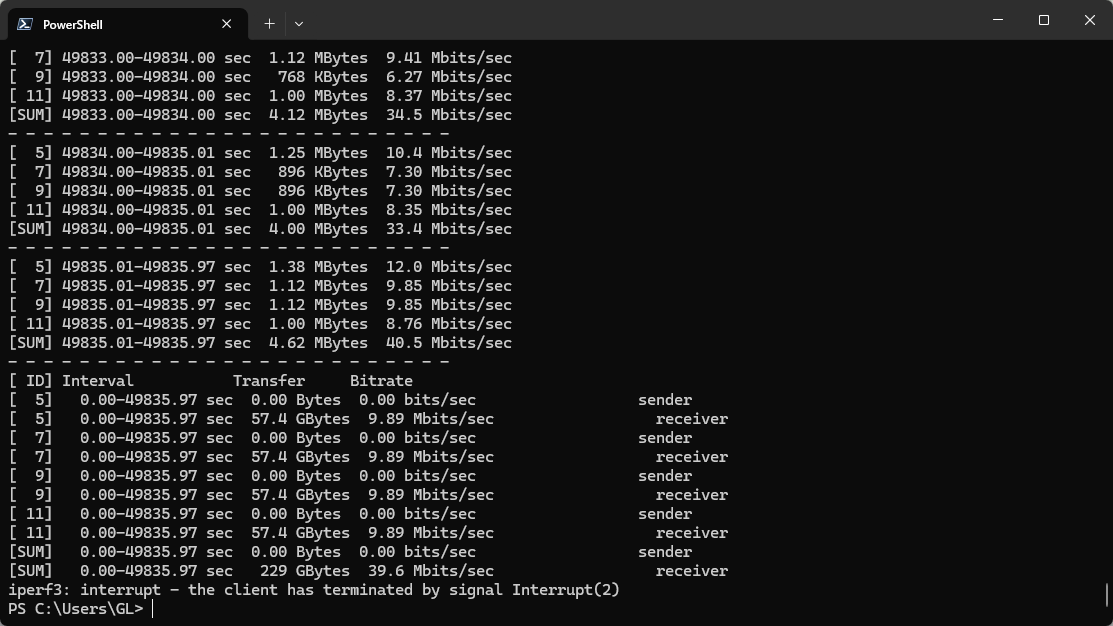
If the issue occurs again, would it be possible for you to leave the environment unchanged and follow the guide below to share your device with us via GoodCloud so that we can investigate it remotely?
Kindly send us the router's MAC address and password via private message so that we can access the device.