From my point of view this would be a totally valid attack. But that’s what I wrote above: The attack is a LAN one - not a WAN one. So yes, if you execute it in your LAN it will work.
But as per Alzhao’s the option 121 is also accepted from the wan side of the upstream router. I think this makes this attack also valid from a wan side?
If GL-iNet does set the routes from DHCP option 121, then it might be possible that VPN traffic gets routed to the WAN interface instead of the VPN interface.
However there are a few things that also need to be considered. GL-iNet uses a multi-wan setup, which means traffic may never hit the default routing table (, which I guess would be the only routing table that will be affected). As alzhao points out, there is additionally a firewall also doing work on GL-iNet routers. If enabling VPN makes it impossible for the lan-zone to get routed to the wan-zone, it will block the traffic between those 2 zones causing all internet traffic not to work instead of going to the attacker.
There are very likely some setups that can indeed be modified using the 121 DHCP option, but I do believe it might be pretty tricky to do so.
2 Likes
By default, OpenWrt lan interface is static IP, and wan interface is dhcp. It should not work if you want to distribute a route from wan dhcp server to lan interface.
It worked !
I did a test last night by connecting my gl device in extender mode to my WiFi AP (simulating a connection to ISP or hotel WiFi). Then I connected an attacker machine to the same AP and sent DHCP option 121 with static route. The gl device happily accepted the route from its wan interface and forwarded some traffic to my attacker machine.
What I am trying to achieve though is to have selective VPN traffic sent to the attacker in unencrypted packets.
May you share the 121 option values you tried?
Yeah sure. I just cloned the GitHub repo:
Basically these the commands you need:
git clone https://github.com/leviathansecurity/TunnelVision.gitcd TunnelVisionsudo ./configdhcpserver.sh
- This will only need to be ran once
sudo ./startup.sh
-
This script will need to be ran each reboot
-
sudo ~/TunnelVision/pushrouteconfig.sh- Pushes a DHCP option 121 route for 8.8.8.8/32
-
sudo ~/TunnelVision/norouteconfig.sh
You can view the content of the dhcp config file to see how the option 121 is set. You can try the push before and after connecting gl device to a vpn.
At the router side to check whether the route had been added or not just issue ip route
uci set network.wan.classlessroute=0
uci commit
service network reload
This should help
I already told so in a post above, and no one cared. I already said that setting classlessroute=0 for any DHCP device is the way to go. I am not sure which device to set it though for WLAN repeater mode.
So what device is used for WLAN tethering? for usb you need to put also I guess
uci set network.tethering.classlessroute=0
Perfect! Then this CVE is a total non-issue for me (and potentially most others of us).
1 Like
I think that is misleading and not true. Just set classlessroute=0 for the 10000th time now and this issue is solved. I also dont see why Glinet is just adopting classlessroute=0 for WAN as default, problem solved.
Please prove that it’s possible to exploit the WAN routes so internal traffic going through VPN will be exposed. If this isn’t possible, there is no need to keep discussing this CVE.
Irrelevant. There are 1000 other ways this could be exploited, this topic is not exclusive for VPN leakes. It could also be for people who dont use VPN.
1 Like
In my case I use all features of GL internet options. The most popular is cellular and repeater mode.
uci set network.@interface[*].classlessroute='0'
uci commit network
service network reload
This may disable it everywhere but I did not test this command.
I doubt the effectiveness of these uci settings. If you look at the processes you find udhcpc always running with 121 option because it is hard coded in the dhcp.sh script.
1 Like
Instead of figuring out which interface to modify with uci, I just commented out the line that has option 121 and restarted the connection . You’re good to go!
/lib/netifd/proto/dhcp.sh
to be honest, im more worried about the wan counter part being misbehaving than a local device being ‘evil’, as a old java developer using Maven this type of attack of pushing malicious routes can be very common appart from infected dependency servers, example: a wrong maven configuration which always downloads dependencies rather than preserve them (what scope provided does) and only over http (this was from years ago) and builds continously soure code into java programs.
though such type of attack is more common to predictfull behaviour otherwise it would be too expensive to leverage such attack without being detected as bad actor, though when this happened to me it gave me a huge dunk and made me question if isps actually have 100% their security in check, they might say so, but advanced actors can also hide and get resilence by not creating much activity and even in unexpected areas like a switch for example, and their interest is probably not the normal user, but build servers, or developers, sys admins with keys to servers, but as i’ve said they often want this attack fast, automating such attack to make chance of detection very low as possible, in my case the attack was easy because it was repetitive, so it could be easy as adding a malicious route through this option and voila, it downloaded a malicious unit script, launched it and took over my machine.
so even appart from vpn, I see it can still be abusive from that point of view, a malicious actor having access on the isp side can be very dangerous so for this reason it actually makes sense to have it disabled, but it makes not always 100% sense to do that since sometimes you need to rely for it for iptv because that is the only way the isp supplies you with.
now for normal users and practices should you do it?
on wireless repeaters (wwan connections) on public ap’s: yes sure, on normal home internet maybe but not neccesary I mean you also have to be realistic that aslong you are not super important as target or more prone to that and you are also not super predictfull (which you more do in a compile process everytime the same downloading the dependencies), then it becomes to costly to specially attack you because you are not their person of importance. 
though on the openwrt forums there are ideas to lower the priority of option 121 so lets see, that might be even the best solution 
Youre wrong. The script is /lib/netifd/dhcp.script and as I said above
Put 'option classlessroute 0' in section wan /etc/config/network
OR
Comment out line 39 in /lib/netifd/dhcp.script: '#[ -n "$staticroutes" ] && set_classless_routes $staticroutes'
Doesnt work, invalid argument. The correct interface name for WLAN tether/repeater is btw wwan at least for the Mango V2:
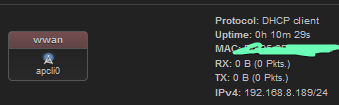
config interface ‘wwan’
option proto ‘dhcp’
option classlessroute ‘0’
option metric ‘20’
option ipv6 ‘0’
config interface ‘wan’
option proto ‘dhcp’
option classlessroute ‘0’
option force_link ‘0’
option ipv6 ‘0’
It creates an dev with the name apcli0
Then how to disable it completely? I need it as I use my E750v2 as repeater mode. I need this security if it is highly unlikely for my physical security. I can’t tell you why exactly for obvious reasons but in general words work + traveling.
Can somebody test solution and provide step by step guide?