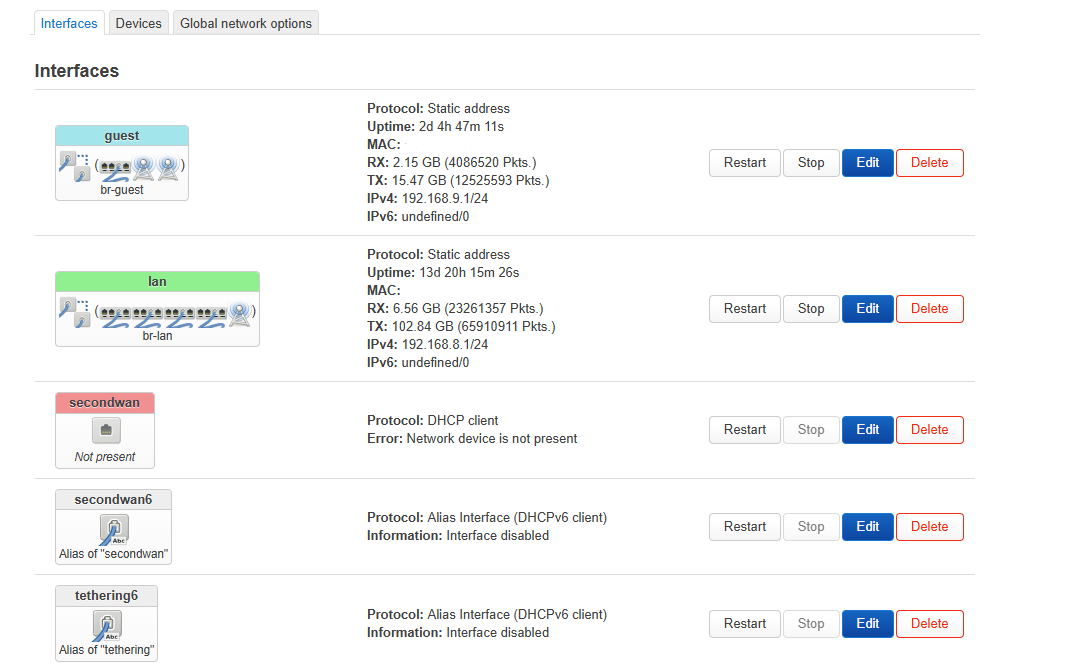
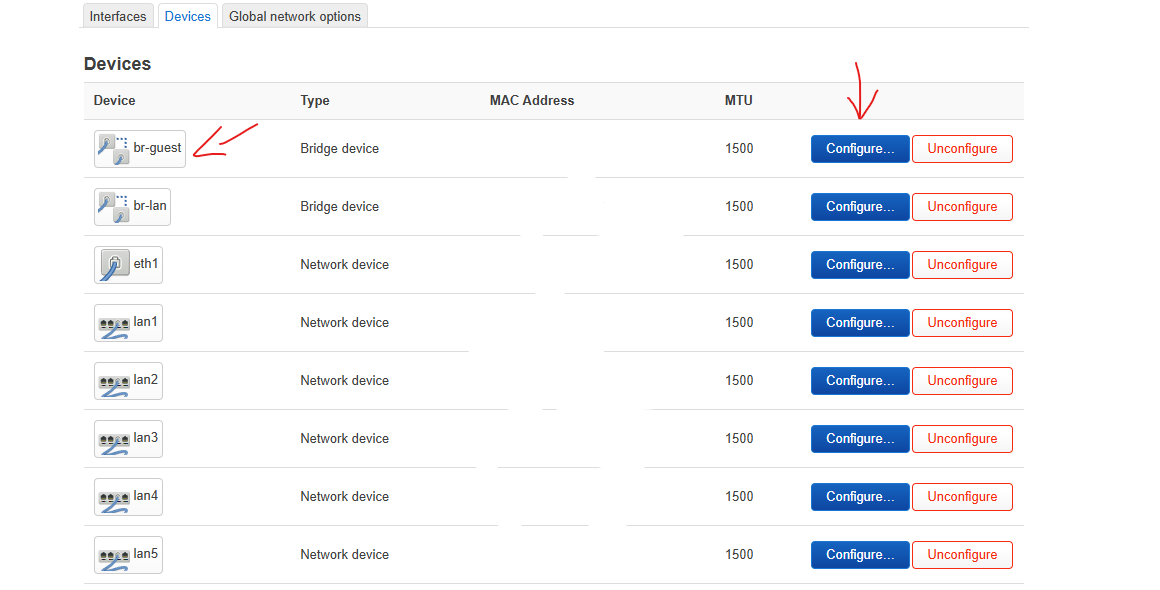
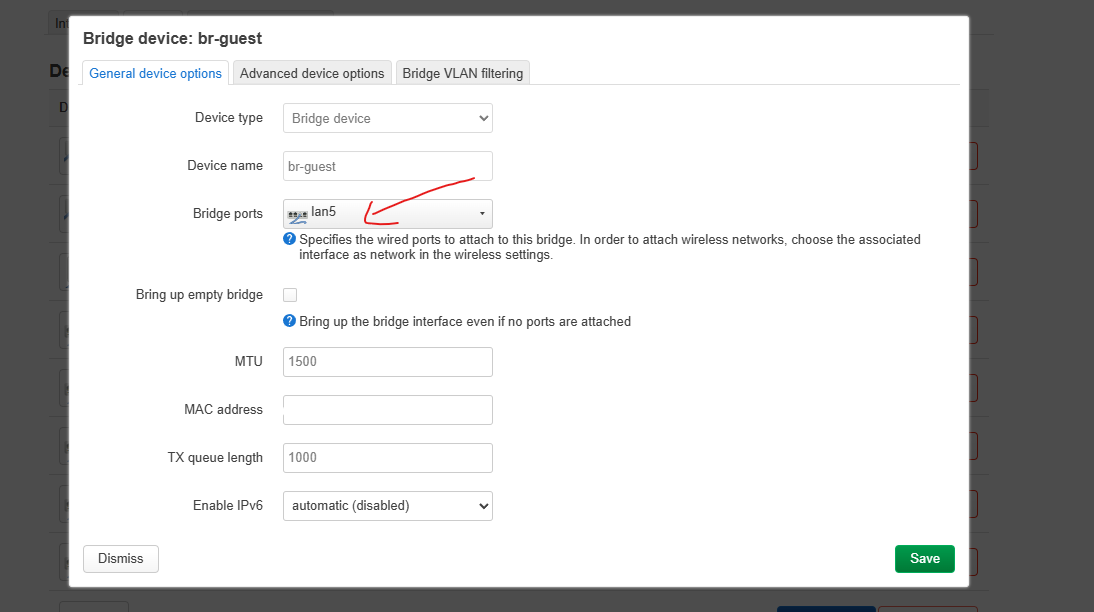
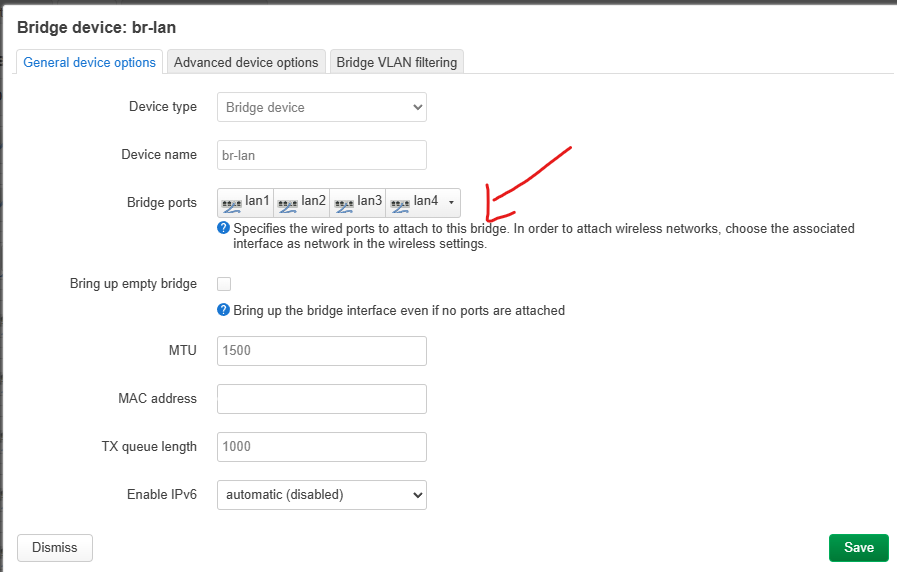
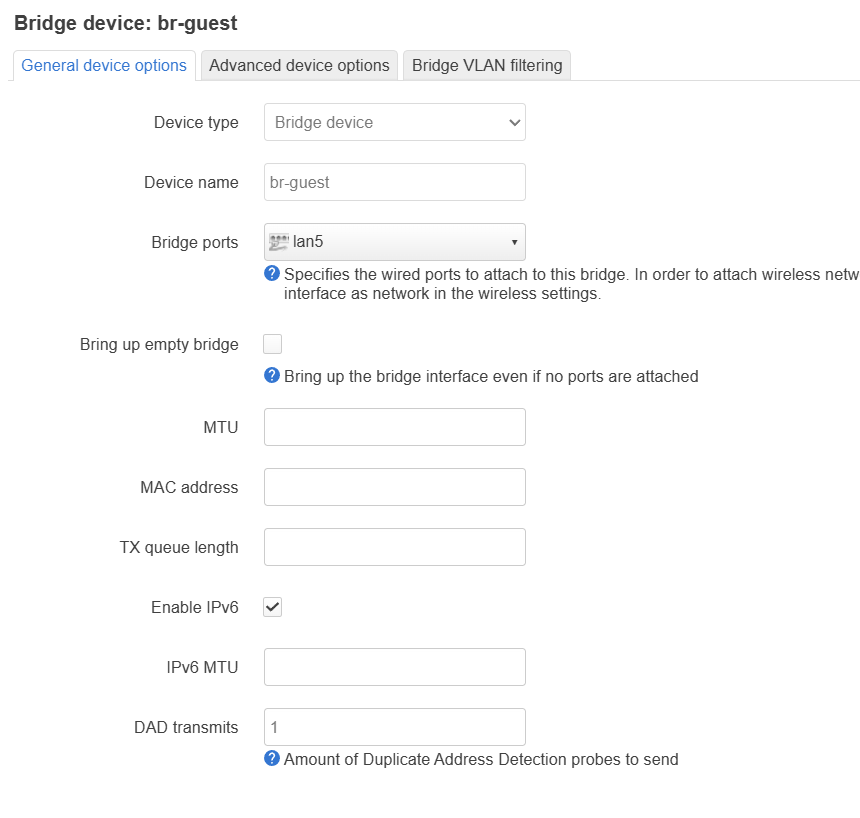
@Void if possible please post screenshots from the network - interface tab and network - device tab. I'm going to try this tonight.
Thanks!
@Void if possible please post screenshots from the network - interface tab and network - device tab. I'm going to try this tonight.
Thanks!
@DaWeav I'm gonna try tonight what @Void suggested first, then dive into the manual config if it does not work for me. Thanks a lot!
BTW I can see all clients on all subnets already in the Luci devices tab, just not on the main GUi.
Thanks for your suggestions.
Hi,
Hope you can replicate on 4.8.3 stock.
I did not touch anything from the interface tab anymore or mess with DHCP settings.
All was done on Devices tab.
First, from br-lan remove LAN5, then add it to br-guest.
@Void Thanks a lot for the effort .
Will do this tonight and let you know. I hope this can be done on Glinet firmware.
No problem.
Well I'm using Gl.iNet firmware too, just the op-24.10.4 version  (It does have the Gl.iNet GUI same as the stable 4.8.3 which is based on 21.02 OpenWrt)
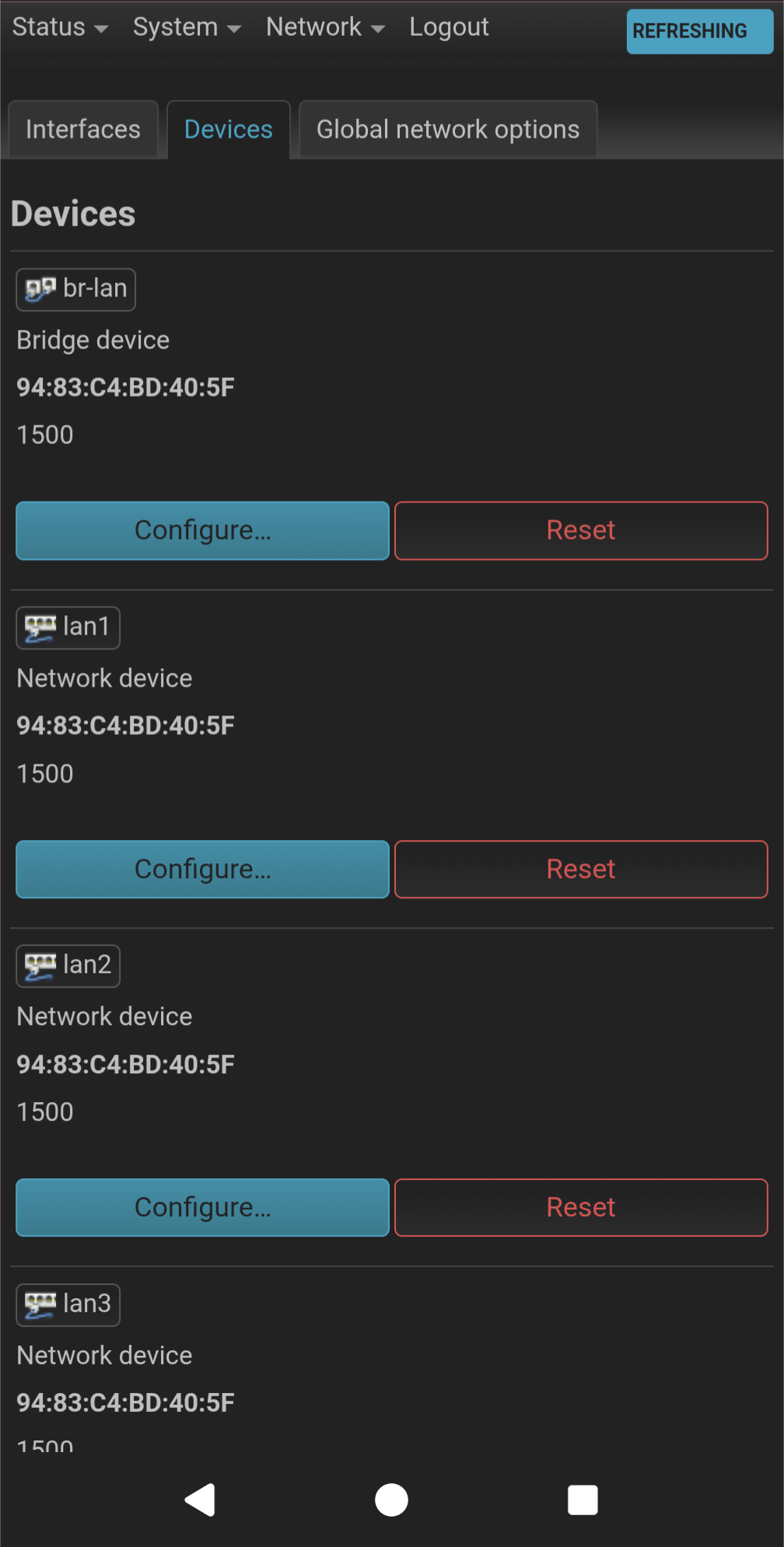
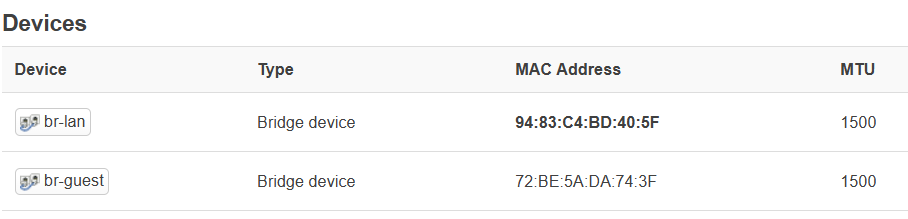
I do have br-guest missing in the device tab. I will create it using your instructions and let you know.
Thanks!
So this did not work
I changed the /etc/config/network file to add the new config device section
I did NOT find option name 'br-guest' in the “interface guest” section, so I created a new entry option device 'br-guest’
When I connect to LAN5, I do not get any IP address.(br-guest device, attached to lan5 does not have any MAC address. Could this be the issue?)
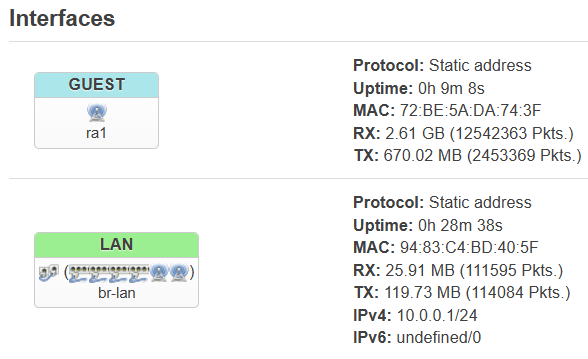
Here are 2 screenshots. On the interfaces page, the GUEST interface got renamed ra1 (it was br-guest)
I had taken a backup just after removing LAN5 from the br-lan device and making a new LAN5 interface per previous instructions, so I have copied the backup and the modified files here.
Can you help me?
START ORIGINAL FILE
This works fine, except that LAN5 clients are in 192.168.10.x subnet, but at least it all works.
config interface 'loopback'
option device 'lo'
option proto 'static'
option ipaddr '127.0.0.1'
option netmask '255.0.0.0'
config globals 'globals'
option ula_prefix 'fd99:dab4:41ad::/48'
config device
option name 'br-lan'
option type 'bridge'
option macaddr '94:83:c4:bd:40:5f'
list ports 'lan1'
list ports 'lan2'
list ports 'lan3'
list ports 'lan4'
config device
option name 'lan1'
option macaddr '94:83:c4:bd:40:5f'
config device
option name 'lan2'
option macaddr '94:83:c4:bd:40:5f'
config device
option name 'lan3'
option macaddr '94:83:c4:bd:40:5f'
config device
option name 'lan4'
option macaddr '94:83:c4:bd:40:5f'
config device
option name 'lan5'
option macaddr '94:83:c4:bd:40:5f'
config interface 'lan'
option device 'br-lan'
option proto 'static'
option netmask '255.255.255.0'
option ip6assign '60'
option isolate '0'
option ipaddr '10.0.0.1'
config device
option name 'eth1'
option macaddr '94:83:c4:bd:40:5d'
config interface 'wan'
option device 'eth1'
option proto 'dhcp'
option force_link '0'
option ipv6 '0'
option classlessroute '0'
option metric '10'
config interface 'wan6'
option proto 'dhcpv6'
option device '@wanwanwanwanwanwanwanwan'
option disabled '1'
config interface 'guest'
option type 'bridge'
option proto 'static'
option ipaddr '192.168.9.1'
option netmask '255.255.255.0'
option ip6assign '60'
option multicast_querier '1'
option igmp_snooping '0'
option isolate '0'
option bridge_empty '1'
option disabled '0'
config rule 'policy_relay_lo_rt_lan'
option lookup '16800'
option in 'loopback'
option priority '1'
config interface 'tethering6'
option devic@tethe@te@tetheringheringing '@tethering'
option proto 'dhcpv6'
option disabled '1'
config i@wwanwanonterface '@wwanwan6'
opt@@wwanwanon device '@wwan'
option proto 'dhcpv6'
option disabled '1'
config interface 'wwan'
option proto 'dhcp'
option classlessroute '0'
option metric '20'
config interface 'secondwan'
option ipv6 '0'
option proto 'dhcp'
option metric '15'
option force_link '0'
option classlessroute '0'
config interface 'secondwan6'
op@secondwa@secondwanoptionoptionion@secondwanproto@secondwan'dhcpv6'@secondwanoption device '@secondwan'
option disabled '1'
config rule 'novpn_to_main'
option gl_vpn_rules '1'
option mark '0x8000/0xf000'
option priority '6000'
option lookup 'main'
option disabled '0'
config rule 'vpn_to_main'
option gl_vpn_rules '1'
option mark '0x0/0xf000'
option priority '9000'
option lookup 'main'
option invert '1'
option disabled '0'
config rule 'vpn_leak_block'
option gl_vpn_rules '1'
option mark '0x0/0xf000'
option priority '9910'
option action 'blackhole'
option invert '1'
option disabled '0'
config rule 'vpn_block_lan_leak'
option gl_vpn_rules '1'
option in 'lan'
option priority '9920'
option action 'blackhole'
option disabled '0'
config rule 'vpn_block_guest_leak'
option gl_vpn_rules '1'
option in 'guest'
option priority '9920'
option action 'blackhole'
option disabled '0'
config rule 'vpn_block_wgserver_leak'
option gl_vpn_rules '1'
option in 'wgserver'
option priority '9920'
option action 'blackhole'
option disabled '0'
config rule 'vpn_block_ovpnserver_leak'
option gl_vpn_rules '1'
option in 'ovpnserver'
option priority '9920'
option action 'blackhole'
option disabled '0'
config rule 'main_static_net'
option gl_vpn_rules '1'
option suppress_prefixlength '0'
option priority '800'
option lookup '9910'
option disabled '0'
config interface 'lan5'
option device 'lan5'
option proto 'static'
option netmask '255.255.255.0'
option ipaddr '192.168.10.1'
START MODIFIED FILE CURRENTLY ON THE ROUTER (BOLDED entries added)
config interface 'loopback'
option device 'lo'
option proto 'static'
option ipaddr '127.0.0.1'
option netmask '255.0.0.0'
config globals 'globals'
option ula_prefix 'fd99:dab4:41ad::/48'
config device
option name 'br-lan'
option type 'bridge'
option macaddr '94:83:c4:bd:40:5f'
list ports 'lan1'
list ports 'lan2'
list ports 'lan3'
list ports 'lan4'
config device
option name 'br-guest'
option type 'bridge'
option igmp_snooping '0'
config device
option name 'lan1'
option macaddr '94:83:c4:bd:40:5f'
config device
option name 'lan2'
option macaddr '94:83:c4:bd:40:5f'
config device
option name 'lan3'
option macaddr '94:83:c4:bd:40:5f'
config device
option name 'lan4'
option macaddr '94:83:c4:bd:40:5f'
config device
option name 'lan5'
option macaddr '94:83:c4:bd:40:5f'
config interface 'lan'
option device 'br-lan'
option proto 'static'
option netmask '255.255.255.0'
option ip6assign '60'
option isolate '0'
option ipaddr '10.0.0.1'
config device
option name 'eth1'
option macaddr '94:83:c4:bd:40:5d'
config interface 'wan'
option device 'eth1'
option proto 'dhcp'
option force_link '0'
option ipv6 '0'
option classlessroute '0'
option metric '10'
config interface 'wan6'
option proto 'dhcpv6'
option device '@wan'
option disabled '1'
config interface 'guest'
option device 'br-guest’
option type 'bridge'
option proto 'static'
option ipaddr '192.168.9.1'
option netmask '255.255.255.0'
option ip6assign '60'
option multicast_querier '1'
option igmp_snooping '0'
option isolate '0'
option bridge_empty '1'
option disabled '0'
config rule 'policy_relay_lo_rt_lan'
option lookup '16800'
option in 'loopback'
option priority '1'
config interface 'tethering6'
option device '@tethering'
option proto 'dhcpv6'
option disabled '1'
config interface 'wwan6'
option device '@wwan'
option proto 'dhcpv6'
option disabled '1'
config interface 'wwan'
option proto 'dhcp'
option classlessroute '0'
option metric '20'
config interface 'secondwan'
option ipv6 '0'
option proto 'dhcp'
option metric '15'
option force_link '0'
option classlessroute '0'
config interface 'secondwan6'
option proto 'dhcpv6'
option device '@secondwan'
option disabled '1'
config rule 'novpn_to_main'
option gl_vpn_rules '1'
option mark '0x8000/0xf000'
option priority '6000'
option lookup 'main'
option disabled '0'
config rule 'vpn_to_main'
option gl_vpn_rules '1'
option mark '0x0/0xf000'
option priority '9000'
option lookup 'main'
option invert '1'
option disabled '0'
config rule 'vpn_leak_block'
option gl_vpn_rules '1'
option mark '0x0/0xf000'
option priority '9910'
option action 'blackhole'
option invert '1'
option disabled '0'
config rule 'vpn_block_lan_leak'
option gl_vpn_rules '1'
option in 'lan'
option priority '9920'
option action 'blackhole'
option disabled '0'
config rule 'vpn_block_guest_leak'
option gl_vpn_rules '1'
option in 'guest'
option priority '9920'
option action 'blackhole'
option disabled '0'
config rule 'vpn_block_wgserver_leak'
option gl_vpn_rules '1'
option in 'wgserver'
option priority '9920'
option action 'blackhole'
option disabled '0'
config rule 'vpn_block_ovpnserver_leak'
option gl_vpn_rules '1'
option in 'ovpnserver'
option priority '9920'
option action 'blackhole'
option disabled '0'
config rule 'main_static_net'
option gl_vpn_rules '1'
option suppress_prefixlength '0'
option priority '800'
option lookup '9910'
option disabled '0'
config interface 'lan5'
option device 'lan5'
option proto 'static'
option netmask '255.255.255.0'
option ipaddr '192.168.10.1'
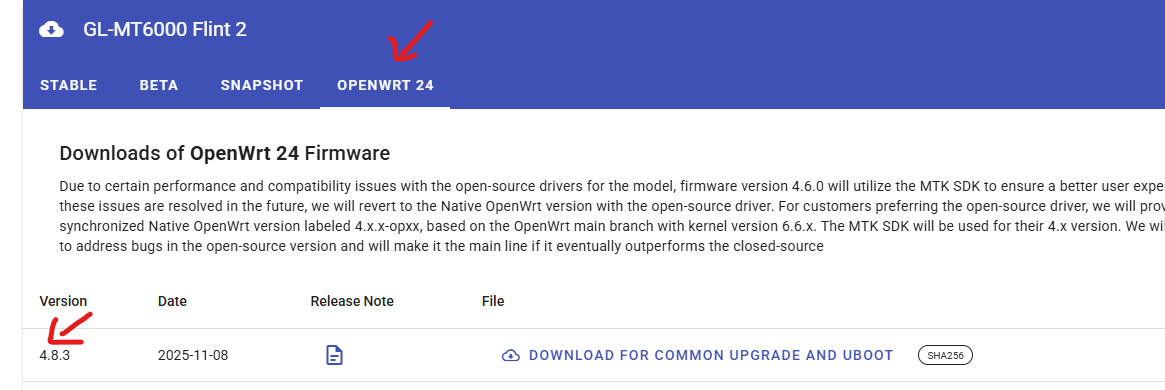
As forcing “br-guest” to be visible into the Luci “Devices” tab did not work for me, I’m thinking of moving to the Openwrt24 version you showed. Looks like it shows br-guest device by default.
The firmware file is mt6000-op-4.8.3-op24_beta1-911-1108-1762535859.bin
Will really appreciate your feedback on whether there are any issues. The “beta” worries me!
AND
It is possible to easily go back to the stable version if the beta does not work for me?
TIA
I did not notice any issues whatsoever.
I'm using it daily from the release date.
Make sure you don't select keep settings when you flash the new firmware though.
Start from scratch when you do the configuration.
Yes, you can go back anytime.
Just create a backup from LuCI before you flash the op24 version so you have it handy if you ever want to go back to stable version.
BIG THANKS! Marked your post as the solution.
I flashed the op24 version of 4.8.3 (Chose not to keep any old settings)
br-guest showed up in the devices tab
I changed only 2 settings:
Removed lan5 from br-lan
Added lan5 to br-guest
That’s it! Works beautifully.