Every time I change the name of one of the SSIDs, the mesh drops the 2 nodes - they show offline. If I manually reboot one of the nodes, it comes up with the blue light blinking slowly.
Normally, modifying the master node's wireless configuration (SSID, password, etc.) should not cause offline issues. Wireless configuration synchronization to child nodes typically takes a few seconds to a minute, generally around 10 seconds.
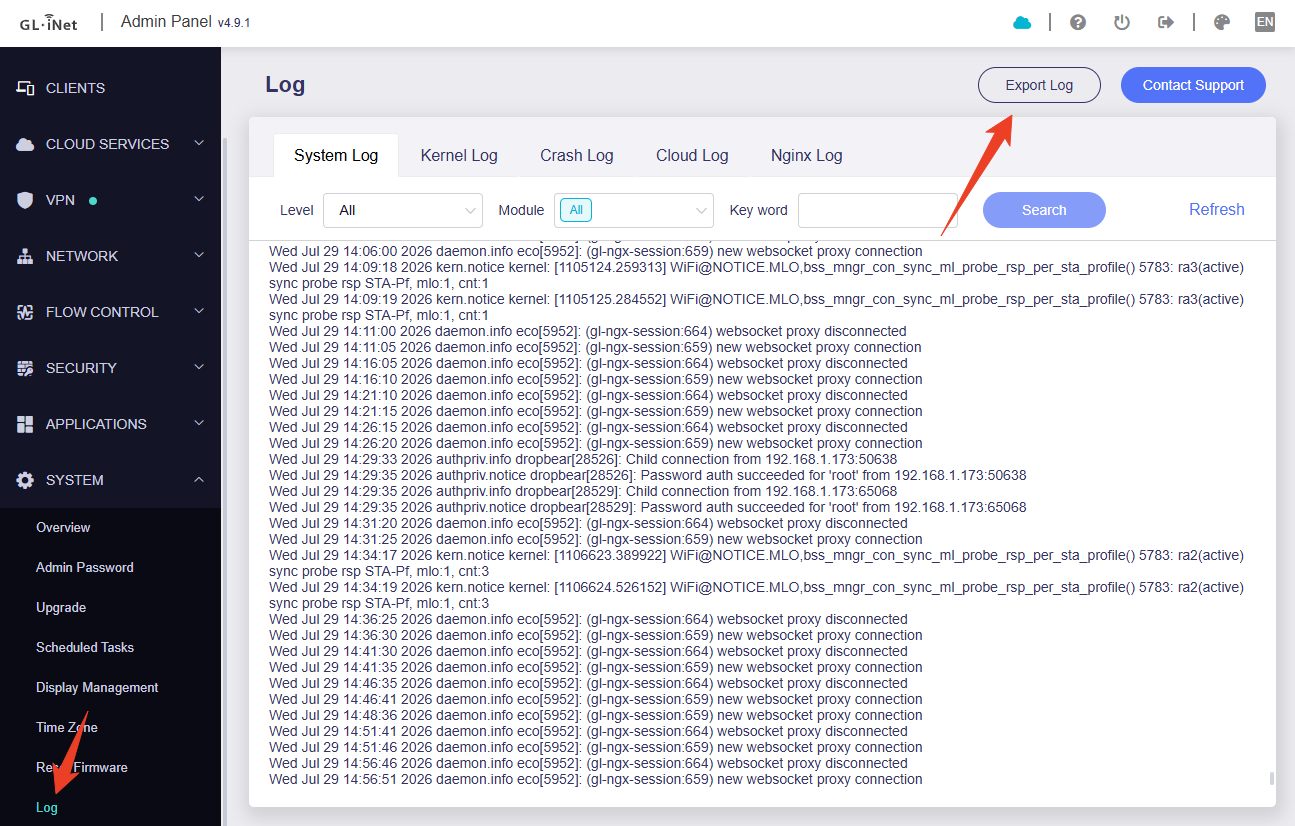
Please provide the logs for the master node and child nodes so that we can investigate further.
Hi @Miles , I did reset the network and started over. Let me find some time and repeat the test.
What I did was to change the SSID to my other network’s one (after I changed that one to SSID-old) so I can have my devices find the AstroMesh, then changed the subnet to match the old one (I have a lot of devices with static IPs that I have shortcuts to so wanted everything to match) and left it way over a minute or a few. Yet, the main node showed the other 2*Flint3 as offline, and those 2 mesh nodes never rejoined the network. I did reboot the manually, as others have posted here, and they both came back with the blue light blinking slowly.
The same happened when I rebuilt the mesh (deleted it on the main node, reboot, recreate local mesh; factory reset both of the leaf nodes; rejoined them via cable) and changed the main nodes SSID back to SSID-test, then the subnet from 192.168.88/255.255.254.0 to 192.168.188/255.255.254 just for the test (didn’t want to go back to the standard 192.168.8) - both leaf nodes went offline and never rejoined the mesh; blinking slow blue when manually rebooted.
Are you able to test in your environment to see if you could reproduce and have local logs and everything? I’ll still try to do it but I might not have the time before the weekend.
Also noticed with the DHCP reservations - the subnet doesn’t get updated like it did in the versions before 4.10, i.e. if I had host123 192.168.88.123 and changed the subnet to 192.168.188, it used to update the device’s reserved IP to host123 192.168.188.123 but it doesn’t do that in 4.10 and I need to go and update all hunders of them manually (the other reason I moved everything to my old network for now)
Does the Astro Node need to have a internet connection (cellular for example on x3000) to bridge the connection exit point to home router (Flint 2)? If the cell connection drops on the x3000 does the connection back to home router drop too?
Yes, AstroNode requires a stable local WAN network on the router to function.
If only a cellular network is available, AstroNode will also fail to connect if the cellular network disconnects. Of course, you can enable a multi-WAN network to ensure stable router network operation.
Quick questions on travelling with the Flint7 as an AstroMesh node and also just my Android phone.
Now that I’ve enabled AstroMesh, when I travel and need multiple devices connected, I carry my Flint7 with me and AstroMesh does the trick for all of the devices that I need for that trip - laptop, phone, tablet, chromebook - nice!
How do I connect back home when I’m out of the hotel and have just my Android phone with me? I used to do that via Tailnet but AstroMesh disables it. Is there an Android client when I step out to have dinner and leave the Slate7 in the hotel room but still need to connect to my home network?
Hi @Miles , any chance your Dev or QA team tested what I reported?
I just repeated the tests and what I see is:
Renaming GL-BE9300-xxx-5G on the main node, did NOT propage to either of the other mesh nodes. They both remained broadcasting GL-BE9300-xxx-5G
Similartly, renaming GL-BE9300-xxx-6G did work only on the main node but did NOT propagade and the other 2 mesh nodes continued to broadcast GL-BE9300-xxx-6G
Both mesh leaf nodes started to show online/offline/online. I could manually copy their IP from the main node and paste it on another tab of my browser, and their GUI would open but the main mesh node continued to see them both as offline.
I tried to reboot the main node, the mesh nodes, try to rename GL-BE9300-xxx-5G to GL-BE9300-xxx-5G-test and no, it didn’t propagate to the other 2 nodes.
At that point I gave up, reset both leaf nodes, deleted the mesh on the main node and started over.
Any fixes coming soon?
PS. Update: When I reset both leaf nodes, reset the astromesh on the main node, wire the 3 nodes and try to repeat the pairing, things are even worse - no SSIDs get propagated, mld0 and eth1.1 are repeatedly toggling disabled, blocking, listening and the 4-way handshake never completes, eco fails:
daemon.err eco[3632]: Connect error: Connection refused
daemon.err eco[3632]: Will try to reconnect in 5 seconds...
Yes, there is an issue where the master node's SSID cannot be synchronized on child nodes after modification. We have confirmed that the issue has been reproduced and will fix it in the next firmware version.
You mentioned that re-pairing failed after resetting. The cause of this issue is likely the same as the first one. We will conduct local testing to confirm.
Is there an ETA for the next beta where the mesh would work?
Anything one could use today (at least MLO+IoT+Guest, maybe no 5G and 6G separated?), or I’ll leave the 3*Flint3 powered off (too much hassle to rebuild the old router+ap+ap setup) and wait for something a bit more useable?
Is there an ETA for the next beta where the mesh would work?
Due to significant changes to the functional logic, the release of the next beta version has been delayed and is expected to be released at the end of this month.
Anything one could use today (at least MLO+IoT+Guest, maybe no 5G and 6G separated?), or I’ll leave the 3*Flint3 powered off (too much hassle to rebuild the old router+ap+ap setup) and wait for something a bit more useable?
Are you still unable to successfully set up the network after resetting? I want to confirm whether you reset the entire router or just the AstroMesh features?
Have you enabled any other features?
You can provide us with the logs so we can check and confirm the device's status.
I don’t have logs anymore as I did reset the 3 nodes a few times. In my “ultimate madness”, I even rolled back to 4.9 stable, then back to 4.10-beta1, went through the basics intital steps to enter a password, and on the main router to select Eth connection. Then wired the other 2 Flint3s WAN ports to the main node’s LAN ports and enabled AstroMesh on the main node, then added the 2 AstroMesh Nodes wired. That looked kind of OK but when I started changing the SSIDs/passwords on the mesh, the 2 nodes started going offline and not propagating the SSID changes as per my previous email.
I went nuts again and reset the 3 Flint3, then pushed yesterday’s https://fw.gl-inet.com/firmware/be9300/snapshot/be9300-4.9.1-1084-0807-1786054948.bin snapshop “just to clear them really well”. Then back to 4.10-beta one, with just password entered on the initial prompt screen, and nothing else. Then changed the SSIDs on one of them so I have one of each GL-BE9300-XXX-6G, BE9300-XXX-5G, BE9300-XXX-5G, BE9300-XXX-24G, BE9300-XXX-Guest, BE9300-XXX-IoT, BE9300-XXX-MLO. This time I made it into the Main Node completely disconnected. Then selected Add nodes via Pairing Code, and added the other 2 Flint3, wirelessly, not plugged into anything but the power cord. That’s pretty much what worked for me initially and it somewhat worked this time. Only that not all SSIDs got propagated and while I had several BE9300-XXX- pushed across all 3 nodes, I also saw some BE9300-YYY-* and BE9300-ZZZ-*. Then I went to change the subnets for the 3 VLANs (192.168.188.1/255.255.254.0 as I have more than 300 devices), and also changed the passwords on the SSIDs so they aren’t the serial number of the Main Node…. and at that point the 2 Astro Nodes had gone offline, like they did before… and I gave up, reset it all, flashed the 4.9.1 snapshot and powered them off; then I asked the question here - when are you expecting at least somewhat usable Beta as this feels more like pre-Canary build that hasn’t gone to the QA department for basic testing yet.
Astro Node sounds really good, but will it work in practice? The ultimate test will be China's GFW. If this is a simple plug-and-play, where I can plug a Slate 7 in China and then automatically have access to my home network, then that would be awesome!Has anyone here tested this yet?
Does Astro Node allow me to configure my streaming apps to utilize my home network while simultaneously forcing all other browsing traffic through a VPN like Mullvad? If not, and this is too complex, can I force my streaming devices to use my home network, and force my phones and tablets to use Mullvad at the hotel?
 Thanks.
