🚀 AstroMesh Beta Test Recruitment: Seamlessly Extend Your Home Network Anywhere!

Dear GL.iNet Community,

We are thrilled to announce the official open beta for our highly anticipated feature: AstroMesh!

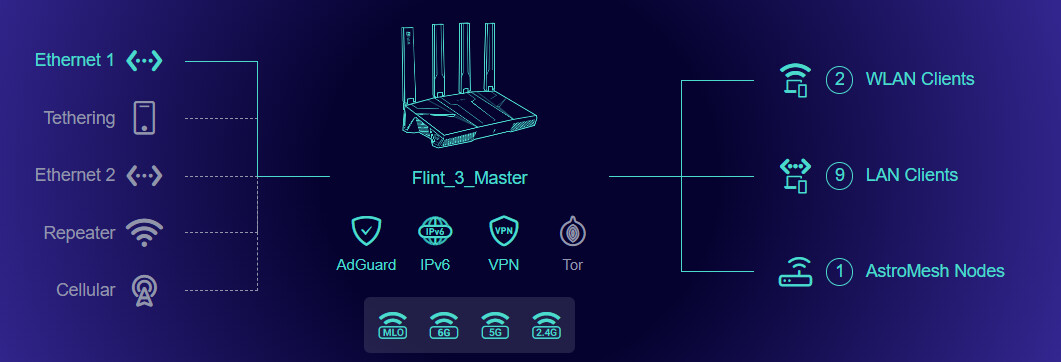
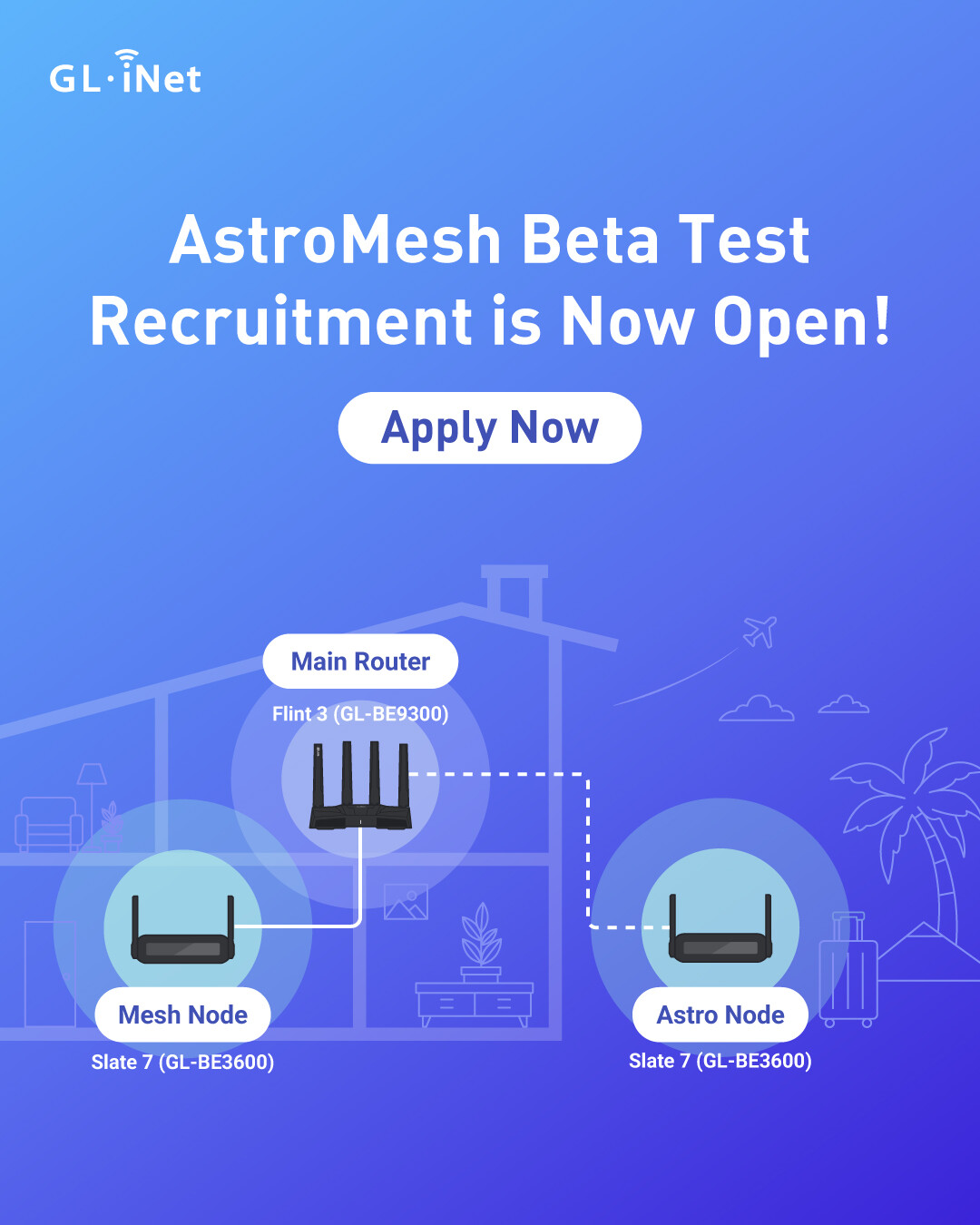
AstroMesh is designed to extend your GL.iNet network beyond your home — connecting your home router, mesh nodes, and travel routers into one seamless network experience.

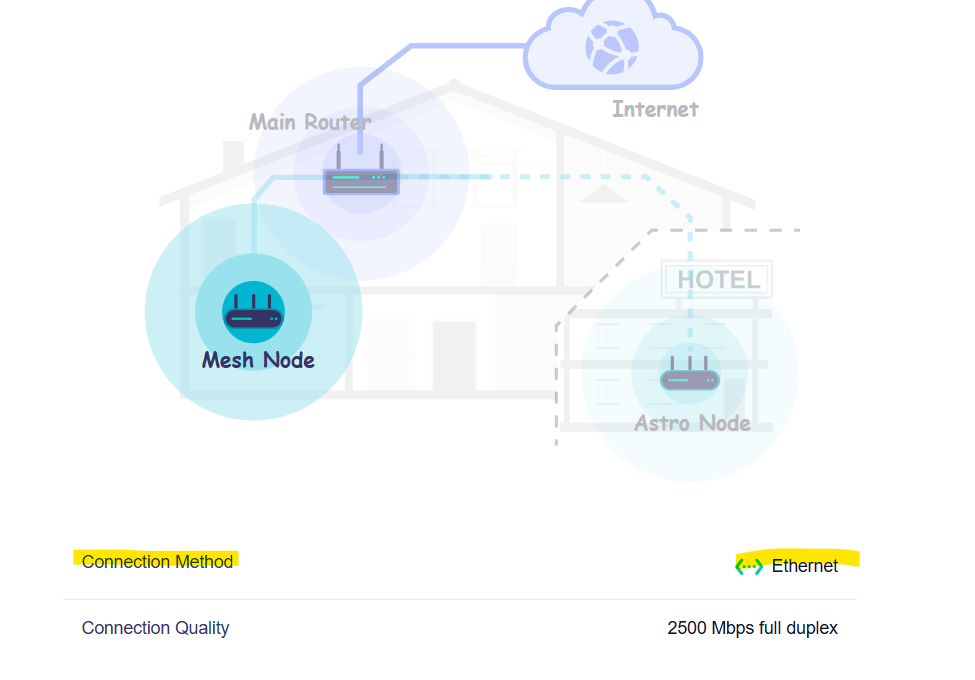
Use it as a Mesh Node at home to expand Wi-Fi coverage, or take it on the road as an Astro Node to securely bridge back to your home Main Router while traveling, staying in hotels, or living on the road.

We are looking for enthusiastic beta testers to help us put this feature through its paces.
:glowing_star: Key Features & Use Cases

AstroMesh seamlessly connects your home, travel, and mobile routers into a single, unified network ecosystem.

Here are the core highlights of this feature:

  • Whole-Home WiFi & Performance Booster (Mesh Node): Deploy a Main Router and Mesh Nodes at home to eliminate dead zones. When acting as a Mesh Node, it significantly extends the WiFi coverage and wireless performance of your main desktop router, ensuring seamless roaming across your entire house.

  • Remote Traffic Routing (Astro Node): Take your network security on the go. When acting as an Astro Node, your device routes all its internet traffic through a secure bridge back to your home Main Router, utilizing your home internet as the network exit.

  • Intelligent Auto-Switching & Plug-and-Play: Zero-touch configuration when you move. Use the exact same device at home and on the go—AstroMesh will automatically detect its environment and switch modes (Mesh Node vs. Astro Node) upon powering up. It is truly plug-and-play, providing a seamless transition between your home and travel network setups.

Here is how it transforms your connectivity:

  • Ultimate Home WiFi Coverage: Deploy a Main Router and Mesh Nodes at home to eliminate dead zones and enjoy high-speed, seamless roaming.

  • The Perfect Travel Companion (Hotel Stay): Take your Travel Router on the road as an Astro Node. Once connected to hotel WiFi, it automatically establishes a secure bridge back to your home Main Router, allowing you to use your home internet as your network exit. Say goodbye to geo-restrictions and risky public networks!

  • On-the-Road Connectivity (RV/Motorhome): Use your Cellular Router as an Astro Node in your RV. It will stay securely linked to your home Main Router over cellular data, ensuring your mobile home shares the exact same network environment as your house.

  • Unified Cloud Management (with Privacy First): No complex manual configurations. While control, management, and configuration synchronization across all devices are completely handled through GoodCloud, binding your devices to a cloud account is completely optional. Even without binding, the cloud will orchestrate secure, isolated, and private connections for each of your devices, ensuring your personal data remains fully protected and private at all times.

:hammer_and_wrench: How to Join the Beta

We want your feedback to make AstroMesh flawless before its official release. If you meet the qualifications below and want to be among the first to experience the future of mesh networking, here is how to participate:

  1. Prerequisites:

    • Must own at least two (2) or more GL.iNet devices.

    • Supported models for this beta include the Flint 3 (GL-BE9300) or Slate 7 (GL-BE3600).

  2. Sign up for beta testing: https://www.gl-inet.com/pages/beta-testing

  3. How to Get Started:

  4. Download the Beta Firmware:

  5. Share Your Feedback: Please report any bugs, performance issues, or feature suggestions directly in this forum thread or our discord channel https://discord.gg/GSEnaPVz8G

:red_question_mark: Frequently Asked Questions (FAQ)

Q1: What is the rollout plan for the AstroMesh feature on other GL.iNet models?

A1: We plan to release firmware updates supporting AstroMesh for all models that meet the required hardware specifications. For devices with lower specifications or those designed for specialized use cases, we will provide standalone support for the Astro Node capability.

Please note that certain models, such as the Flint 2 (GL-MT6000) and Beryl AX (GL-MT3000), will require additional development and optimization time due to WiFi driver complexities. We will roll out the firmware updates as soon as they are fully ready. We highly appreciate your understanding and patience.

Below is our preliminary timeline (please keep in mind that actual release dates may vary or experience delays):

  • Flint 2 (GL-MT6000): Later August

  • Beryl AX (GL-MT3000): Later August

  • Flint 4 (GL-BE14000): Q3, 2026

  • Slate 7 Pro (GL-BE10000): Q3, 2026

  • Mudi 7 (GL-E5800): Q4, 2026

  • Spitz AX (GL-X3000): Q4, 2026

  • Other models: To follow

Q2: After enabling AstroMesh, can I still use other remote networking features like Tailscale or ZeroTier?

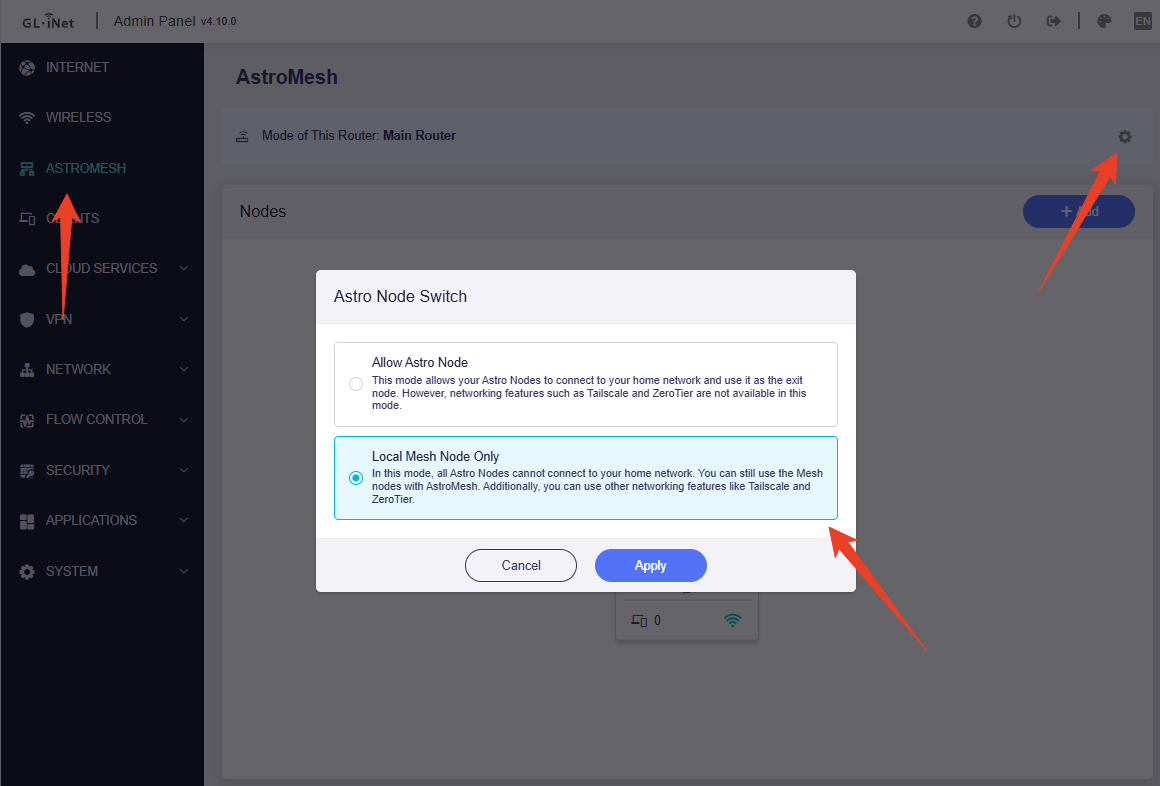
A2: Generally, these networking features are mutually exclusive. However, on the Main Router, you can choose between Allow Astro Node or Local Mesh Node Only modes. In Local Mesh Node Only mode, features like Tailscale and ZeroTier will function normally, and your local Mesh network will continue to work, though remote Astro Nodes will not be able to connect back to your home network.

Q3: When a travel router works in Astro Node mode, is it possible to NOT use the home network as the internet exit?

A3: Yes. Astro Node supports traffic routing configurations. In Exit Node Mode, it uses your main router as the exit node for all traffic. In Traffic Split Mode, regular internet traffic will go through your local network exit instead.

Q4: Can I build a Mesh network using GL.iNet Mesh products with different models, different WiFi protocols, or different chipsets?

A4: Yes. All GL.iNet products that natively support Mesh can be used together to build a Mesh network. Other non-mesh GL.iNet products will be supported to join the network as Astro Nodes.

Q5: Can AstroMesh be configured and managed via the glinet App?

A5: Not at the moment. The current glinet App does not support the configuration and management of AstroMesh. However, we are actively developing a dedicated AstroMesh App. This standalone app is designed specifically for AstroMesh, providing a much more comprehensive way to manage and monitor your entire AstroMesh network and all connected devices.

Thank you for your continuous support. Your feedback is what drives us to build better networking solutions!

Happy testing,

The GL.iNet Product Team

7 Likes

Thank you GL. Stoked to see this was all built on opensource!

Astrowarp/link = V2Ray/V2Fly fork + VMess for tcpTun and AWG/WG for udpTUN.

Astromesh on prplMesh (BSD) + hostapd + emesh-sp

It’s great that GL’s kernel modules in the 4.10 firmware even already self-declare as GPL (so the linux kernel doesn't load TAINTED): gl-mpflow.ko + gl-repeater.ko, gl-sdk4-tertf, gl-sdk4-hw-info, gl-sdk4-black_white_list, etc,

And for mesh .ko’s it appears QC’s emesh-sp.ko (already published by QC). Since the firmware .bins are now distributed, where can we go for source?

1 Like

A quick question for the devs, is the remote astromesh feature IPv6 compliant? Some locales are now moving to non-public facing CGNAT for ipv4 while using IPV6 for the public access.

Is it planned to have a mobile application ?
That could be used to "always be at home", that sounds like a useful use-case for this functionality.

Mentioned in Q5

I think you misunderstood my question.

Q5 is about managing AstroMesh.

My question is about having a mobile application to use AstroMesh as VPN connection on my mobile device, a bit like a replacement to tailscale/netbird…

and I’m ready to also install gl-astromesh-fix and test AstroMesh Enhanced :grin:

@Marv .. hopefully not the direction needed, but..

@bruce - just to avoid another Brume3 situation (we’re already here actually).. These kernel mods are already published as binaries with the firmware images above, and there is no corresponding source on any published repos: gl-mpflow, gl-sdk5-mesh, mptun, gl-p2p-daemon

These are all self-declaring GPL and using GPL kernel symbols to load, so source license is clear and a day overdue at this point. Can we please be directed where we can access the repo? They appear to be stored in a private gitlab instance.

2 Likes

This is great news.

Being an (amateur) tech nerd I take it I can load up the new astro mesh firmware without joining / signing up for the beta testing program? I would love to give this a go but I doubt anything I do, would be much in the way of testing. (I do acknowledge that it is beta and all the issues that may arise from using beta firmware.)

In relation to the Astro mesh I do have two Flint 3 (waiting for the Flint 4) and would use those two for the Astomesh master/slave...

But would I be better off to use the the Slate 7 as the remote node rather than the Flint 3in the home only i.e my intention would not be to use it as a travel router? One useful features of the Flint 3 is the 4 ethernet ports v 1 port on the Slate 7 (& switch).

While we plan to look into this feature for future updates, we regret that it won't be available in the initial launch. For now, AstroMesh is still primarily focused on the concept of creating a local and remote mesh network among GL.iNet devices.

You are welcome to download the beta firmware above directly to try it out.

Two Flint 3 can set up a Mesh network through wired or wireless connections to expand your Wi-Fi coverage.

Alternatively, if you have two houses, you can use them to build a remote network connecting both locations with AstroMesh.

The Slate 7 stands out for its compact size, which is perfect for traveling. Its Ethernet ports and Wi-Fi performance are a bit scaled down, but that won't matter if it's already enough for your use case.

Your branding is confusing, and I take it that AstroWarp has been renamed? What's the difference between that and AstroMesh?

Is AstroMesh effectively a SD-WAN?

Without a GL.iNet account or GoodCloud, what features will I be missing? I take my privacy very seriously and would rather not create an account where your company can collect telemetry about me.

Will that MeshNode still happen? It might not be cost-effective to buy a travel router and use that to expand the network.

AstroMesh is a technical implementation of based on EasyMesh. The two work together to intelligently switch between local and remote network environments, creatively realizing the concept of a Global Mesh.

Of course, if you don't need to use Astro Node, you can select Local Mesh Node Only on your main router. It will then be used solely as a local mesh.

Yes, Mesh Node products are in the planning stages.

1 Like

I upgraded two Flint 3 (F3) to FW 4.10. The master F3 upgraded OK (I had to reload Adguard and toggle Unbound but all good now). One F3 is the master and the other F3 connected via ethernet, has a fixed IP of my choice, and is an access point.

On this router network I am only using the MLO WiFi because I am already using 5gig & 2.4 on my main house WiFi network and I want to minimise any possible WiFi interference (if there is any).

On the F3 master I have the menu choice ASTROMESH but on the Access point / second F3 I do not see any ASTROMESH menu choice (so I am unable to configure ASTROMESH).

So what is going on here?

What I will try is to take it off the network and reset to factory default and setup from square one again....... (wish me luck....lol).

You mean EasyMesh?

With regards to the MeshNode, I hope it'll be STR-MLO compatible and complement the Flint 4. At a minimum, it should be 2x2 on the 2.4, 5, and 6 GHz.

Yes, we have renamed AstroWarp to AstroLink. This service is focused more on pure networking to bridge your home and travel routers together, and we believe the name AstroLink much better reflects this specific use case. Moving forward, we will continue to optimize and develop AstroLink.

As for AstroMesh, you can think of it as a mesh technology that integrates remote networks into the mix—ensuring our travel routers can be fully utilized.

Currently, the GL.iNet account only manages remote management via GoodCloud, but we plan to introduce more features down the road, such as device offline alerts and notifications.

Rest assured, whether you choose to use our cloud features or not, device privacy and data security remain our absolute top priorities. We will never pry into or compromise your privacy.

As a side note, the AstroMesh feature can be used without an account. In strict network environments (such as certain CGNAT networks), remote nodes may require cloud relay, whereas P2P scenarios will establish a direct peer-to-peer connection

2 Likes

OK, Several issues.
I factory reset the F3 to use as a Node. - the ASTROMESH menu choice then appeared on the left menu pane. :check_mark:

And I seem to have some sort of mesh Node


On the master it shows:-

And

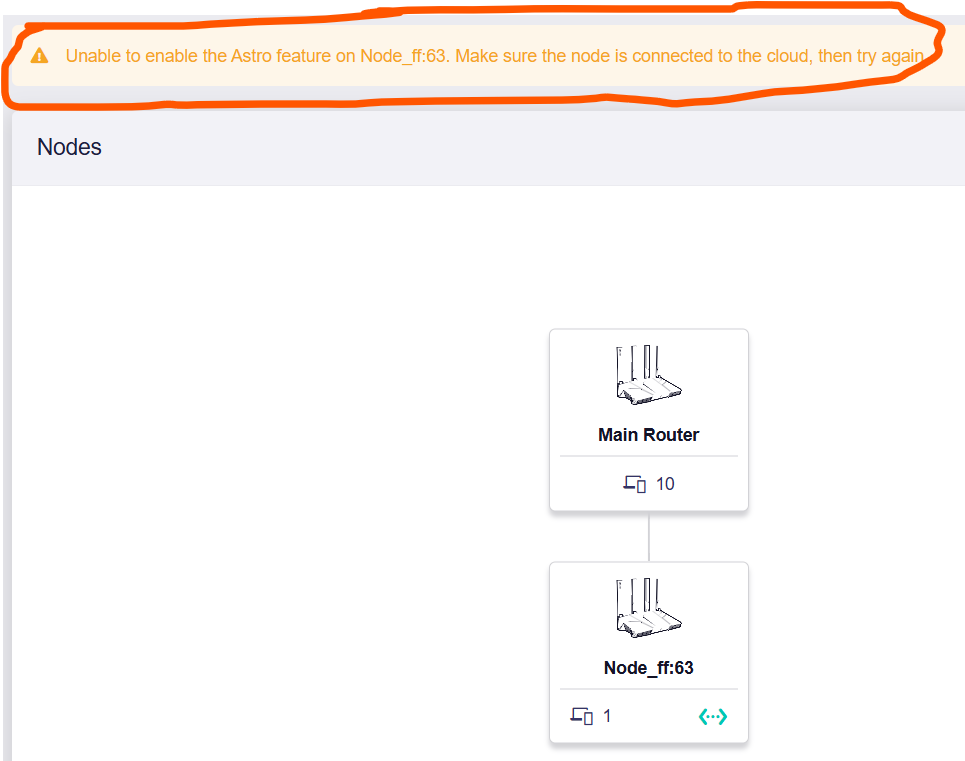
It shows the bit circled in orange.....

The node seems to be working? :thinking:

The other thing I have noticed is there in no "advanced" menu choice and thus unable to access LUCI.

AstroMesh is only supported in Router mode; it is not supported in Access Point (AP) mode or any other modes.

They are currently syncing the remote network configuration, so it might take a moment. Once the sync is complete, you can take the node out of your home network, and it will automatically connect back remotely. You can ignore this.

By the way, it looks like you are just using two Flint 3 as a local mesh network at home. If that's the case, you can go into the main router's settings and switch it to Local Mesh Node Only mode.

Also, it seems this prompt caused some confusion—we'll definitely optimize it to make it clearer!

Accessing the LuCI page is not supported in Mesh Node mode. Practically speaking, there shouldn't be much need for it anyway, right? Since all network configurations are handled directly on the main router at this stage.

I know you said rest assured, but don't your terms and conditions for AstroWarp mention possible cooperation and sharing of personal information if compelled by law enforcement? For your customers to trust your cloud infrastructure and accounts, your company should collect as little and ideally no personally identifiable information like a VPN, so that nothing relevant can be shared if compelled by the government.