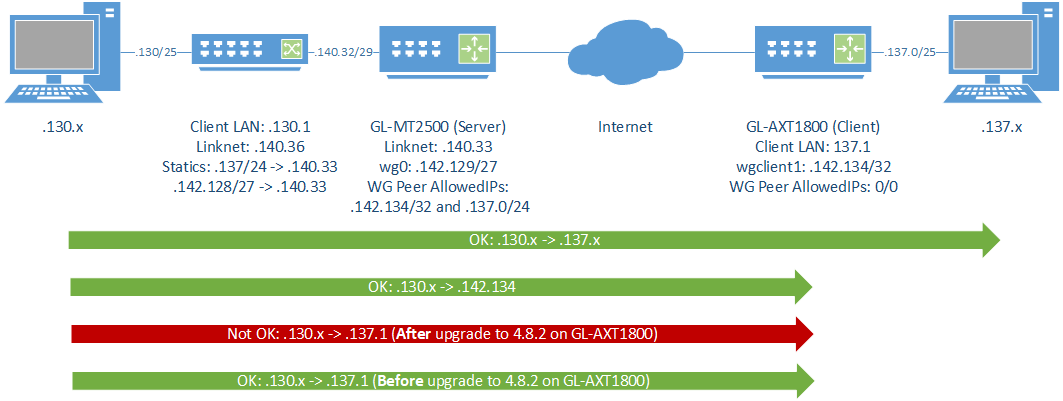
After upgrading to the latest 4.8.2 I lost access to the local LAN interface IP from the remote location. I am running WireGuard (Client) and everything worked fine before. I can reach clients in the LAN subnet, just not the gateway IP on the AXT1800 as I could before. I can also reach the WG interface itself.
Edit: I also have a MT3000 with 4.8.1 which works fine with the same setup.
I'm going to shoot from the hip & say 'Allow Remote Access the LAN Subnet' got toggled off in the drastic change in firmware that introduced PBR. Look for the 'gear' icons for your tunnels in the VPN Dashboard.
May I clarify that the VPN server side access the LAN subnet of the VPN client without any problems, but cannot access the primary WAN subnet of the VPN client, right?
Look like I can reproduce this.
The reason is that the VPN client in v4.8 firmware, the main routing table does not have a VPN tunnel (but in policy routing), and v4.7 firmware VPN tunnel is placed in the main routing table.
This phenomenon exists in routers with v4.8.x firmware.
If you use v4.7.x firmware, the VPN server side access the VPN client's LAN subnet and WAN subnet without any problem.
Edit:
You can enable forwarding for the wgclient/ovpnclient > WAN in luci of v4.8.x firmware, so that VPN server side access the LAN subnet of the VPN client without any problems, and access the primary WAN subnet of the VPN client also without any problems.
Aha, since PC _ A can reach PC _ B, it means that the routing of the data packet will definitely be processed by the gateway 192.168.48.1.
Other client IPs (such as PC _ B 192.168.48.2 can be access, but cannot access the router LAN IP/gateway 192.168.48.1, bit strange.
Traceroute from a server side client reaches a device on the client side, but times out on the LAN IP hop of the client side.
Tracing route to 192.168.137.90 over a maximum of 30 hops

  1    <1 ms    <1 ms    <1 ms  192.168.130.1
  2    <1 ms    <1 ms    <1 ms  192.168.140.33
  3     *        *        *     Request timed out.
  4    51 ms    19 ms    25 ms  192.168.137.90
Client side tunnel IP responds to ICMP from the same source as the trace above.
Pinging 192.168.142.134 with 32 bytes of data:
Reply from 192.168.142.134: bytes=32 time=16ms TTL=62
ICMP to the client side LAN IP times out (same source as above).
Pinging 192.168.137.1 with 32 bytes of data:
Request timed out.
Request timed out.
Full /24 routed from the server side. Note that my client side LAN subnet is the first /25 of the same subnet. No static routes added on the GL-devices, but I do have static routes pointing to the MT2500 from the rest of my server side network of course.
Everything worked fine before the upgrade to 4.8.2, and I also have a MT3000 on 4.8.1 with the same setup which works fine. My server side is a MT2500, however there I run WG Server from LUCI because of limitations in the GL-GUI.
What are the restrictions of the WireGuard server of GL GUI that do not meet your needs?
Without a topology diagram, I have a little bit of a distinction between the IPs of your network.
I think you would draw a topology diagram similar to mine above.
In your Luci screenshot, there is no gateway IP for the wg route,maybe fill in the tunnel IP of the VPN client.
What are the restrictions of the WireGuard server of GL GUI that do not meet your needs?
I believe it was the fact that I could not reuse keys from another solution when switching out the VPN Server side. I have many hardware and software clients spread around so I couldn’t start fresh with everything.
Without a topology diagram, I have a little bit of a distinction between the IPs of your network.
I think you would draw a topology diagram similar to mine above.
My topo matches you drawing and I am so extremely short on time these days so have not had time to draw up something. Only things extra are another hop on my server side as will as different IP addresses of course.
In your Luci screenshot, there is no gateway IP for the wg route,maybe fill in the tunnel IP of the VPN client.
True but that is how it has always been and it always worked fine and still does towards other clients, both software and other hardware units from GL. These routes are also automatically generated by WG, not something I have needed to do manually.
Only change done was the firmware upgrade on the client side AXT1800 going to 4.8.2. And I can reach any client in the LAN subnet of the client from the server side just fine, just not the LAN IP of the AXT1800 itself as I could before.
I just shared both devices, please let me know anything you do and keep in mind that the MT2500 also is used for other incoming connections and not using the plain GL-UI for WG.
Came here to say I have the exact same problem on a brand new GL-ATX1800 migrating from a Gl.AR750S. I have a WG tunnel (client on GL-ATX1800). I can ping all devices behind the NAT 192.168.11.0/24 such as 192.168.11.138. But I cannot access the Router IP via Ping, SSH or HTTP/S on its br-lan address of 192.168.11.1. I can access it locally. If I enable WAN access I can access it via the WAN IP, but should be able to access on 192.168.11.1.
I just now noticed the release of 4.8.3 (2026-04-22) and upgraded this device. Issue is still there. My MT3000 still running 4.8.1 works fine, and the AXT1800 did before the 4.8.2 version.
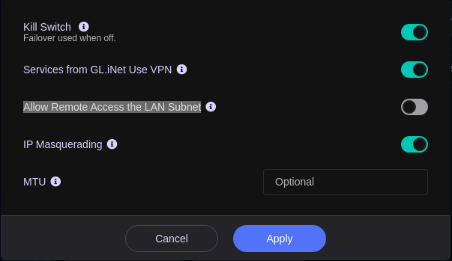

 Also, tried deactivating and then reactivating it. No success.