Hi all, I just took delivery of a B3000 Marble in a new office I am leasing. I simply want it to use an EAP wireless connection for WAN and deliver a WLAN to a couple of devices.
It does not detect ANY wireless networks. There are many that are visible to other devices, without counting there are at least 20 of them.
I can connect to the router wirelessly and get to the admin page and Luci. But whichever way I go, I get zero available networks showing. Using “join other network" also fails.
I have set it to my local timezone.
Any suggestions?
Following on from this - it seems a firmware update (to 4.7.2) allows the device to detect wifi networks in the admin panel.
However, it still doesn't detect any networks in Luci. The EAP network I want to connect to requires a domain as well as user/password which does not seem to be available in the admin panel. I had hoped it would be available in Luci but since I can't detect any networks through Luci that's not really an option.
I therefore end up with a wifi connection but no internet.
1 Like
To recap: I bought a B3000 Marble. It shipped with firmware 4.5.19. With this firmware, it did not detect any wifi networks whatsoever in order to act in repeater mode.
I installed firmware 4.5.22. Same deal. No wifi network detection.
I installed firmware 4.7.15 beta. Now it does detect wifi networks in the Admin panel. However, this lacks the settings I need to connect to the EAP network I am dealing with. Via Luci, once again no wifi networks are detected.
gl.inet support tell me “actually, you can easily configure it through the web admin panel, which is quite convenient” and point me to some publicly available web pages which I have of course already worked through.
I will return this item for a refund as clearly the firmware is junk.
My question, and I hope someone can help me, is whether I might have better luck with a Flint. I am not really impressed with my first ever purchase of a gl.inet product but I still need to solve my basic issue, which is connecting to an EAP network that requires a domain to be entered (as well as password and username), and creating a private LAN as a repeater. It really seems like the impediment is just incomplete firmware for this device.
Has anyone done this with a Flint? or is there some other device I ought to try?
Hi
We apologize for the inconvenience.
Since the B3000 uses Qualcomm’s QSDK, its Wi-Fi may not be fully compatible with LuCI. Please try the steps below to see if you can connect to an EAP Wi-Fi network with domain:
- SSH into the router and disable the repeater function:
/etc/init.d/repeater stop
/etc/init.d/repeater disable

## if want to re-enable it in the future
/etc/init.d/repeater start
/etc/init.d/repeater enable
-
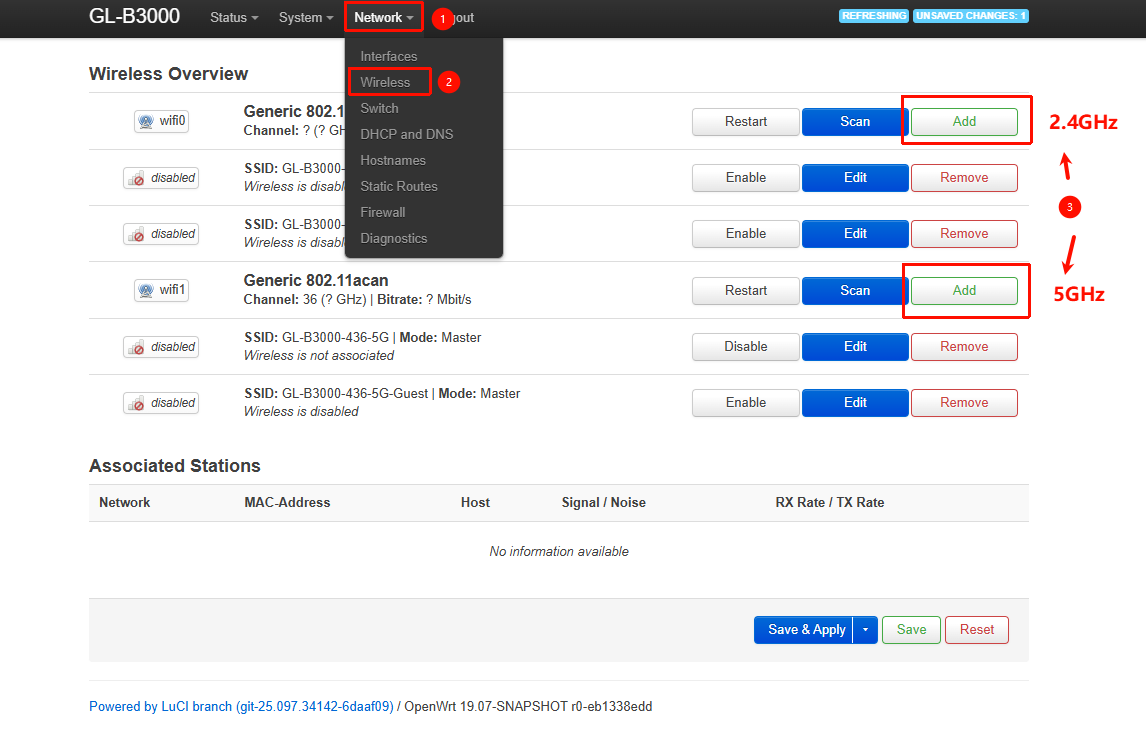
Go to LuCI → Network → Wireless and manually add the EAP network you want to connect to
-
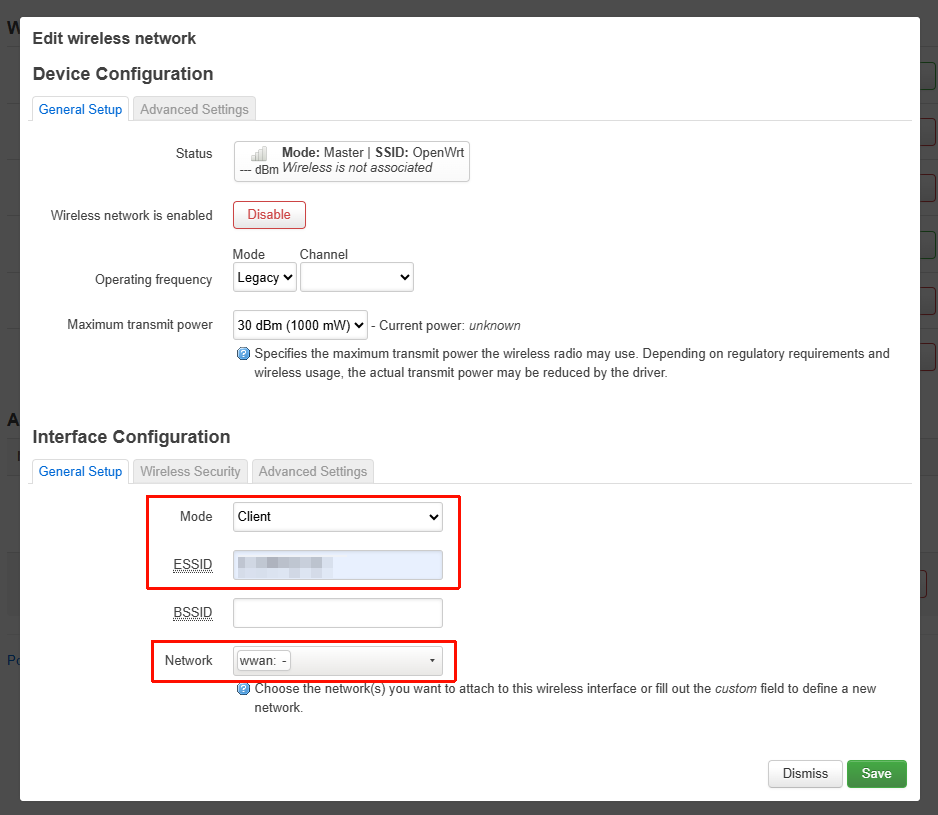
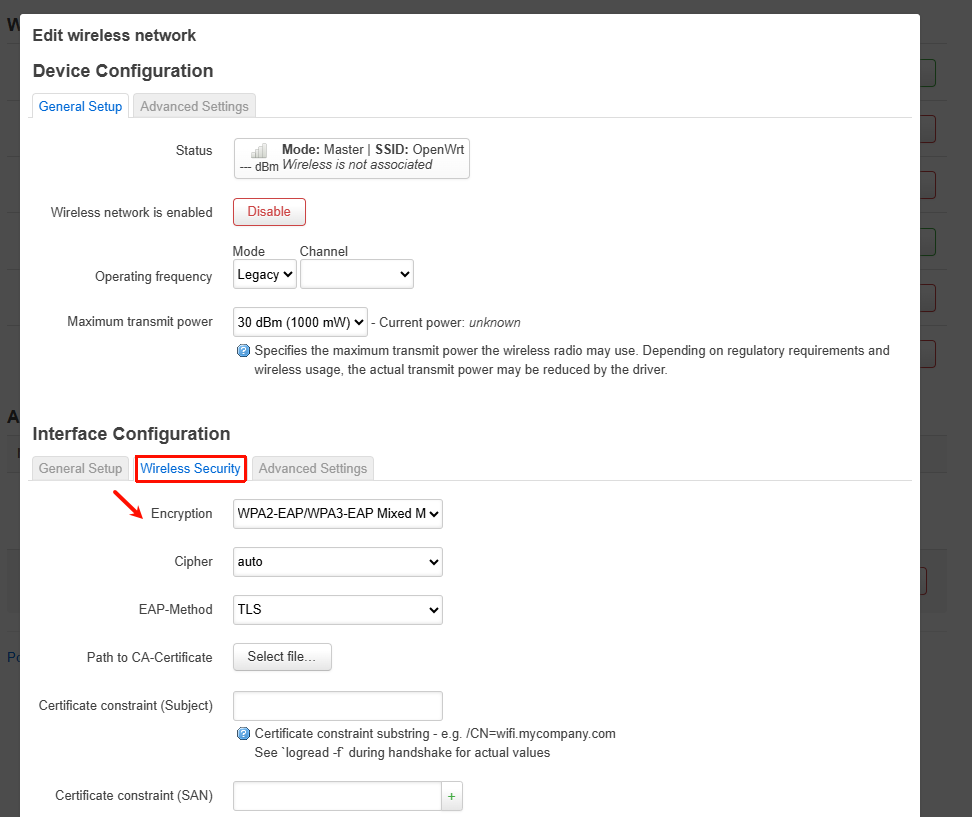
Configure the EAP connection details:
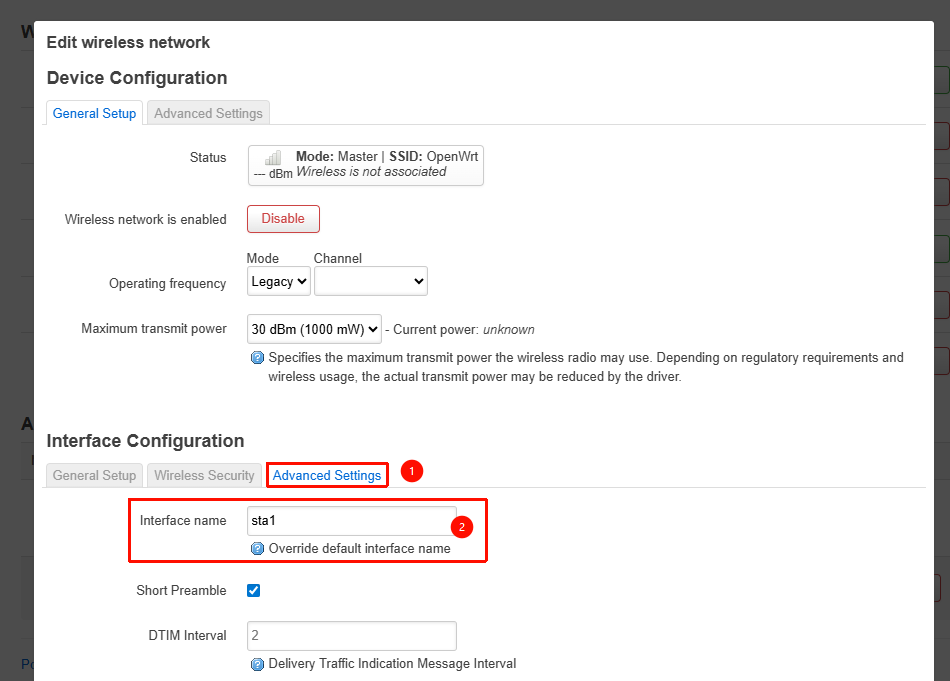
(For 2.4GHz, set the interface name to sta0 under Advanced Settings; for 5GHz, use sta1)
-
Go to Network → Interfaces, edit the WWAN interface, and change Physical Settings → Interface to the interface configured in the previous step (sta0 or sta1)
-
Save and apply the settings
-
Wait a moment—if the Wi-Fi credentials are correct, you should see the WWAN interface obtain an IP address
If these steps feel too complex or don’t suit your needs, and you’d prefer a model with better EAP support, please submit a request through your existing support ticket via email.
We recommend switching to the MT3000 or MT6000, as they support native OpenWrt 24 and generally offer better EAP compatibility.
The Flint - AX1800 you mentioned can also scan and connect to EAP networks via LuCI.
(Note: you may still need to adjust the interface to sta0 or sta1 accordingly.)
1 Like