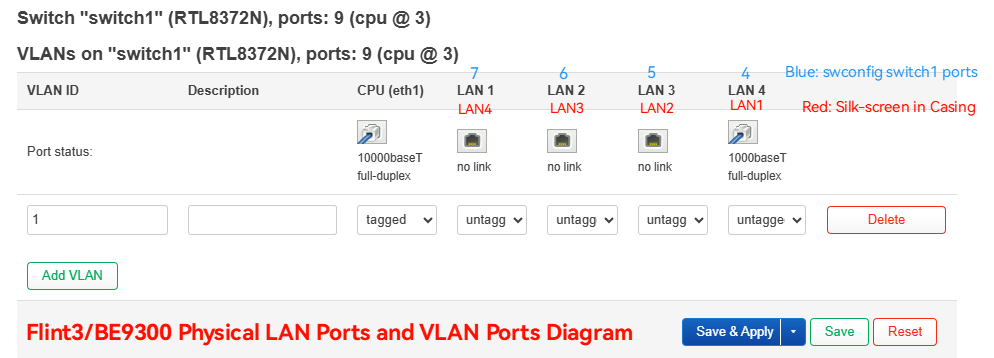
According to your network requirements, LAN1 and LAN2 remain unchanged and belong to br-lan (corresponding to VLAN 1, 1 is default), LAN3 and LAN4 are used for iot, and create a new br-iot (corresponding to VLAN 50).
It seems that the switch part will report an error when using the uci command. Let us edit the configuration directly in /etc/config:
- Network part in
/etc/config/network:
# Find VLAN1 part, remove LAN3 and LAN4, changed result is:
config switch_vlan 'vlan_lan'
        option device 'switch1'
        option vlan '1'
        option ports '3t 6 7'


# Add VLAN50, bind LAN3 and LAN4, add br-iot, add iot network interface
# The [br-name] and [if-name] can be changed according to your needs.

config switch_vlan
        option device 'switch1'
        option ports '3t 4 5'
        option vlan '50'

config device
        option type 'bridge'
        option name 'br-iot'
        list ports 'eth1.50'

config interface 'iot'
        option proto 'static'
        option device 'br-iot'
        option ipaddr '192.168.50.1'
        option netmask '255.255.255.0'
- DHCP part in
/etc/config/dhcp
# Add dhcp server for iot
config dhcp 'iot'
        option interface 'iot'
        option start '100'
        option limit '150'
        option leasetime '12h'
- Firewall part in
/etc/config/firewall
# Add iot zone and some basic rules
config zone
        option name 'iot'
        option input 'REJECT'
        option output 'ACCEPT'
        option forward 'REJECT'
        list network 'iot'

config forwarding
        option src 'iot'
        option dest 'wan'

config rule
        option name 'Allow-DHCP-iot'
        list proto 'udp'
        option src 'iot'
        option dest_port '67-78'
        option target 'ACCEPT'

config rule
        option name 'Allow-DNS'
        option src 'iot'
        option dest_port '53'
        option target 'ACCEPT'
- Restart some modules or reboot router
/etc/config/network restart
/etc/config/firewall restart
/etc/config/dnsmasq restart

# or
reboot
- Clients/devices connected to LAN3 and LAN4 will obtain the IP of 192.168.50.0/24 and will not be able to access the SSH/GUI and other VLANs.
Attached a diagram for more customize-configure VLAN users: