BE9300 Terrible Performance w/o Network Acceleration, or w/ Features

I just took my new BE9300 out of the box to replace mt MT6000 to fix this very issue, only to find that the BE9300 has it WORSE than the MT6000.

First, we must have parental controls enabled, because our kids will not voluntarily turn their stuff off and go to bed. If you have kids, you know what I am talking about.

So, we have 2gbit fiber, and here is the speed we can get through the BE9300, down / up:

NA Enabled: 2gbit / 2gbit

NA Disabled: 1.5gbit / 1.5gbit

NA Disabled, Local PC Enabled: 600Mbit / 400Mbit

Here is what we got with the MT6000:

NA Enabled: 2gbit / 2gbit

NA Disabled: 2gbit / 800Mbit

NA Disabled, Local PC Enabled: 2gbit / 800Mbit

======

It looks like PC is absolutely destroying network performance, regardless of the number of managed devices, and had no noticeable effect on performance on the MT6000.

I see some other threads about PPPoE, and we do have PPPoE, but we have no issues getting our rated speed.

Any thoughts or ideas, or known workarounds for this? I’m a little disappointed that a $200 router has to disable crucial features just to be able to pass a standard residential pipe.
Hello,

I noticed that you also posted some feedback about Flint2 in another thread.

We are very sorry.

When your ISP bandwidth exceeds 1Gbps (higher network speed is required), hardware acceleration needs to be enabled; but when some network control functions are also required, we have to disable hardware acceleration and let the CPU process these network packets so that features can take effect.

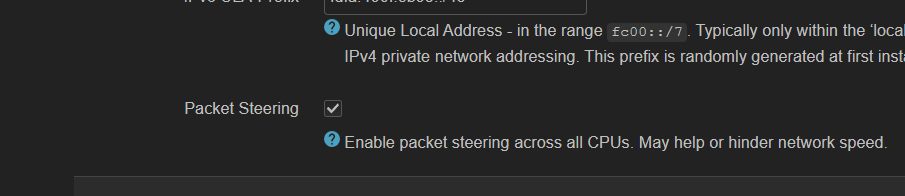
Flint 3 does have broken acceleration (both HW ans SW doesnt work well), however try to enable packet steering under Luci :

@ehidle This is an old post and is unfortunate at the frustration but also having some of these same challenges as a family you may want to look into parental controls on the devices themselves to help here and allow the HW acceleration to remain enabled on the router.

Apple (for iPhones and iPads)

Google (For android phones and tablets)

Microsoft (For Xbox and Windows)

Nintendo (For Switch Switch 2)

All provide tools that allow you to restrict the hours a device can be used to enforce them to shutdown at specific times of day and only work from specific times in the morning. We utilise these in our house to help police and enforce going to bed and they work well.

These can all be setup and managed using separate apps on your own phone to prevent tampering. Hope that is some small help.

Hi - I read this thread with interest.

I too am experiencing very poor performance issues with the BE9300 bridge.

If I iperf3 to the device from a windows PC, to my router (in server mode) I get a speed of approx 2GB.

When I iperf3 from my router (in client mode) to an extenal iperf server on a 10G connection I get approx. 1GB (my ISP provides 1.2GB service).

When I iperf3 from my PC to the same external iperf3 server I get a speed of approx. 80Mb!

I have tried with hardware acceleration on and off. I have also enabled packet steering via Luci in Global Network options.

PC Network adapter is a Intel I225-V

How can the performance be degrading so badly over the BE9300 bridge?

Help and advice greatly appreciated.

This doesn’t appear to be a BE9300 router issue. I swapped the gateway router with a tp-link product running OpenWrt and still have the same performance issue. Guessing the issue is with the networking configuration on the Windows PC. I’ll report back if I find the cause.

1 Like

It seems my main problem was using an old version of iPerf3 for windows. Installing the latest version with winget install -e --id ar51an.iPerf3 in cmd installed the current latest version (CYGWIN_NT-10.0-26200 AMD 3.6.5-1.x86_64 2025-10-09 17:21 UTC x86_64).

Packet Steering enabled via Luci did seem to increase throughput by about 10% (912Mb - 1.08Gb).

Hardware Acceleration Enabled (GL-iNet interface Network→Network Acceleration), increased performance even more to 1.13Gb.

These results are much closer to what I was expecting (better than I expected to be honest)..

My lesson here was to ensure you’re on the correct version of iperf3 on each device!

Hope this is helpful to others.

1 Like

Imho, iperf is a terrible tool for testing network acceleration. If you have the possibility, try to run Free and Open-Source Self-Hosted HTML5 SpeedTest somewhere. iperf has far too many pitfalls instead of just using the OS' defaults.

1 Like

I mean iperf3 is pretty solid and reliable, just not on Windows as it is not a windows app.

Ideally on Windows it’s better to use iperf3 under WSL rather than cygwin as then it’s the native linux binary and linux kernel. There is a common misconception that iperf3 is not multithreaded, but that’s not been the case for quite a while now. Being able to run UDP tests is a big advantage to actually validate link speeds vs browser based tests.

I use iperf3 to check speeds between my various access points (inside my lan, install iperf3 as a server via luci or ssh), and also through my network to the outside world. This helps me understand where network configurations/bottlenecks exist. Pure speedtest tools to the outside world can’t support this to my knowledge.

I agree there are many speed testing options for WAN speed checking - including the one you like.

Thanks for sharing.

The trick is to run something like OpenSpeed-Test inside your network. On another PC, NAS, router or via docker somewhere else.