Hey everyone, been dealing with the Beryl 7 SSID disappearing and LED turning off every couple of hours in repeater mode, requiring a physical unplug to recover. Happens on both release firmware and latest v4.8.5.
Root cause:
The default Wi-Fi modes incorrectly trigger the Wi-Fi 7 code path (repeater-mtkwifi7.lua) against Wi-Fi 5/6 upstream routers, causing an MLO negotiation timeout and a driver crash in the mt7993. Randomized BSSID makes it worse — every MAC change re-triggers the crash. Disabling MLO in the UI does nothing, the driver ignores it.
This is a serious issue for a travel router — hotels and Airbnbs almost exclusively run Wi-Fi 5/6, which is exactly the environment this router is designed for.
Workarounds:
Option 1 — Simplest but not ideal:
Disable Randomized BSSID in the admin panel (192.168.8.1) — this stops the crash but defeats the purpose of a privacy feature that should work out of the box on a modern router.
I have attached a report and waiting on feedback.
Analysis was carried out with the help of Claude (Anthropic's AI). If you're affected please share, better chance of getting this patched quickly.
Based on the information you provided, we confirm:
Fix 1: We only handle BE models, all of which use the MLO logic. However, devices that don't support Wi-Fi 7 are unaffected by the MLO logic. The log is just a printout.
Fix 2: repeater-mtkwifi7 is just a name; it doesn't indicate that Wi-Fi 7 logic is being used.
Fix 3: Ignore UniCmdSetRecSecPnInfo; it's not a problem.
Fix 4 & 5: These require specific analysis.
Therefore: This issue is most likely not caused by Wi-Fi 7 logic. Could you provide a more complete log analysis? (Logs including the exception process would be more helpful for problem analysis.)
Also been having random reboots with the Beryl 7 on 4.8.5. Seemingly caused by devices connecting to WiFi. e.g will return to hotel room and device uptime resets.
Upgraded to 4.8.6 to see if stability is improved. Initial feedback is encrypted DNS was broken after the upgrade. This has been disabled to focus on stability testing (judging from the other threads the encrypted DNS issues are well known already from other devices)
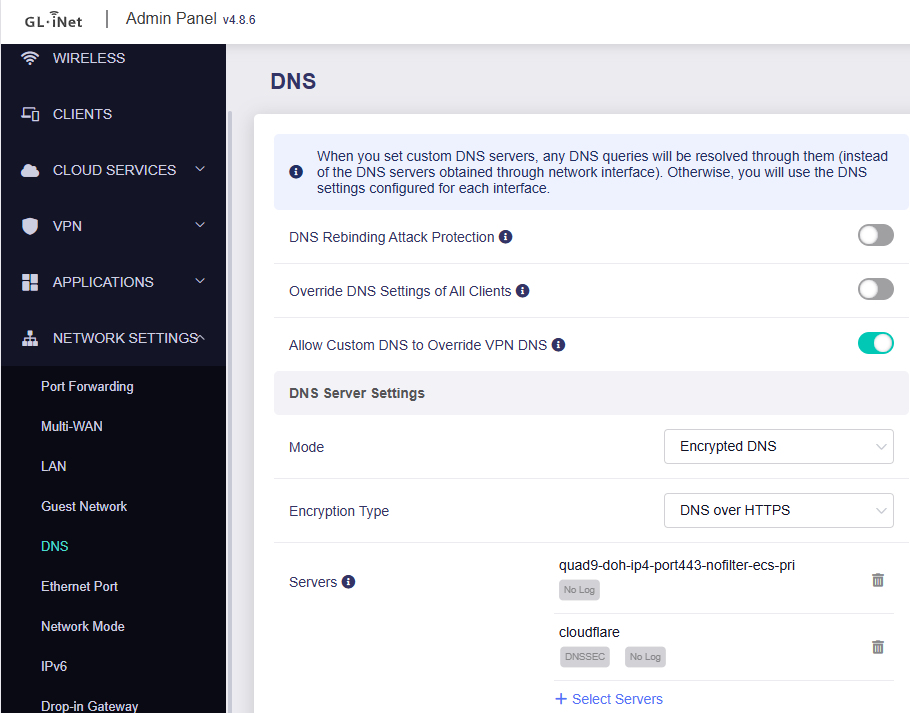
After upgrading clients behind the device as well as the device itself could not resolved DNS. Settings were DNS over HTTPs using Quad9 ipv4 no filter ECS and Cloudflare. Changing to ‘automatic’ for DNS resolved the issue. I have not yet tried re-enabling Encrypted DNS to see if the issue comes back.
I do have a log capture with debug just after one of the reboots on 4.8.5 so I guess this probably has all the settings I was using prior to the upgrade if that is useful? (Do logs also get retained that may show why it rebooted that you could investigate also?). Happy to share if it helps track down any issues
4.8.6 I still seem to have reboots. Just got back to the hotel and checked uptime and it was 2 minutes so appear to have crashed/rebooted as soon as devices connected again.
Frustrating but not quite the same issue as the OP, and in some ways not that disruptive as once it’s up again it seems fine. Whereas OP who has to physically reboot manually.
As a side issue with this 4.8.6 beta as mentioned earlier, re-enabling Encrypted DNS (DoH) breaks connectivity again so I have left it disabled for now.
Same here on 4.8.6 , kernel panic happens ,i’m trying to make a report with whatever logs i have after reboot,no more manual reboot needed however the router does restart after device reconnect.
4.8.6 beta initially worked fine but after a few days i noticed crashes and reboots on devices reconnection.
Atached report done with Claude Ai and also attached the logs i have from the last crash.
At this point, i will probably return the product as the main use of the router doesn’t work, a replacement doesn’t seem to be plausible considering other people experience are similar and it looks like a Driver/Firmware issue.
I find this a major error on GL.iNet side as this product it’s clearly not ready for use.
Couple of things to mention:
1. not willing to install OpenWRT to check if it works better as i dedicated more time than it should to make it work + for my needs it must be the GL.iNet UI as it is user friendly for members of family.
2. Tried 2 different power supplies(inc. Original)with no luck
Ahh even better, to be fair i want this router to work so badly i do believe it is a beast , i like everything about it power,size,tinkering however it just won’t work it keeps crashing rebooting.
I found an interesting thing though which i’m not sure but it might be related
Likely is driver related but the GL images are on the Mediatek proprietary drivers and firmware so get a branch of updates from Mediatek directly. Whereas vanilla OpenWRT would be using the in-kernel drivers and firmware.
Possible there is updates already on the way in the upcoming 4.9 releases but would be speculation on my part currently.
I’d be happy to share logs as I expect any driver fixes and updates will presumably apply to the Slate 7 Pro and other future Mediatek devices also. More info that can be gathered on any issues the better I guess
Haven’t had time to test further WiFi issues yet. @lucas2 I will probably go straight to 4.8.7 now before testing again. Are you able to confirm what ‘fixed some bugs’ from the release notes is in the firmware and if this is likely to have changed anything WiFi side? Thanks
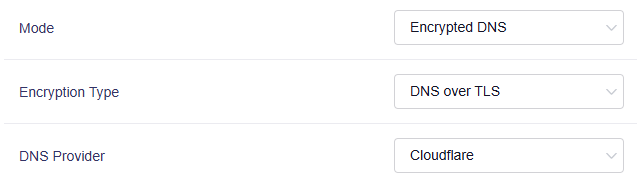


 , to be fair i want this router to work so badly i do believe it is a beast , i like everything about it power,size,tinkering however it just won’t work it keeps crashing rebooting.