Hi! I received my Beryl a few weeks ago. It looked great to me, as I was using it with a 100mbps FTTC internet connection, I didn’t even notice lan speed.
A few days later I got fiber optics installed at home with a good 2.5Gbit/s connection.
My internet provider sent me a Fritzbox which goes full steam, but I was already missing my Beryl so I tried connecting it to the ONT and see how it was over that FTTH goodness.
And it was disappointing, speedtests showed it struggling to reach 90-95Mbps.
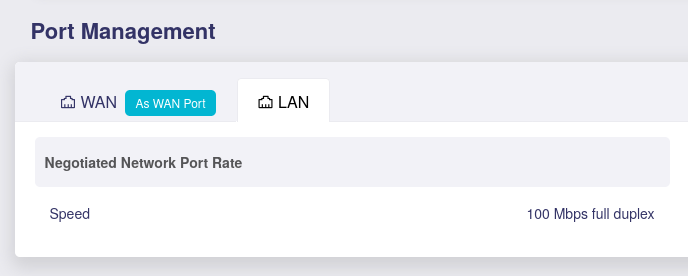
So I went to Port management and found out that WAN was negotiating at just 100 Mbps. Tried to connecting the cable to the LAN port, same.
Tried different cables, the one that shipped with the Beryl, a good old CAT 5e, a couple different new CAT6 which were working fine with the Fritz, nothing changed.
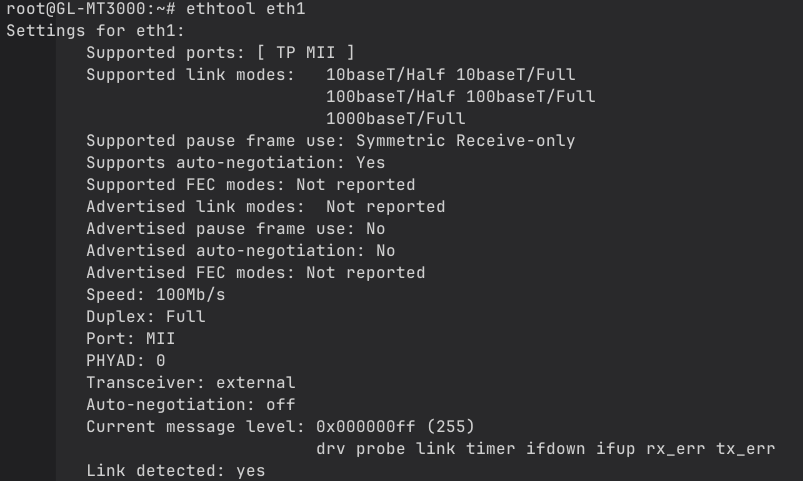
I went through many posts describing the same issues, as this one for the Flint 2, Flint2 Ports issue . Linking with 100 mbps . , tried forcing negotiation speed via ssh with ethtool. Still nothing.
Even connecting it to another router or directly to my PC does not change anything.
The following command is freezing ssh terminal and I have to shut down and restart the Beryl to access it again:
ethtool -s eth1 speed 1000 duplex full autoneg off
Tried resetting the firmware, updating it to 4.8.2, taking it back to 4.8.1 using U-boot.
Still stuck at 100 Mbps, I have no idea of what to do now.
Based on your screenshot, it's unclear why eth1 isn't advertising its supported speeds/auto-negotiation to the other end.
Please try enabling it with the following command:
ethtool -s eth1 advertise 0x03f autoneg on
Note: This will disconnect the current connection. Please unplug and replug the Ethernet cable once and wait for DHCP to work.
Additionally, I assume your existing PC and ISP modem both support port speeds exceeding 1Gbps?
Trying to force the speed to 1000Mb/s seems to make it crash, SSH stop responding even after unplugging-plugging the cable.
And yes, it’s currently connected to my PC’s 2.5G lan port, I previously tried connecting to the 2.5G port of the Fritz and the 1G port of an older TP-link, no difference.
It seems there may be a hardware issue with Beryl’s Ethernet port.
Please contact support@gl-inet.com and include a link to this post so our after-sales team can assist you further.