With the latest update, 4.8.6, the wireguard server has been messed up. I run the MT5000 as my home router. I have a wireguard server that i connect to from work and from my mobile, everything was running just fine. After this update, what I first noticed was I had to change the wireguard dns on my clients from my home ip 192.168.x.x to a public dns like 1.1.1.1 for them to even connect to the interet. I also had to remove the MTU completely from my clients for them to connect to the internet. Now that I have them connected, any site I open then is about a 10 second pause before either client connects to a site or app that uses internet.
I reverted back to 4.8.4 and everything is fine.
Hi
Sorry for the delayed reply.
We performed local testing using the MT5000 v4.8.6 firmware, but were unable to reproduce the issue.
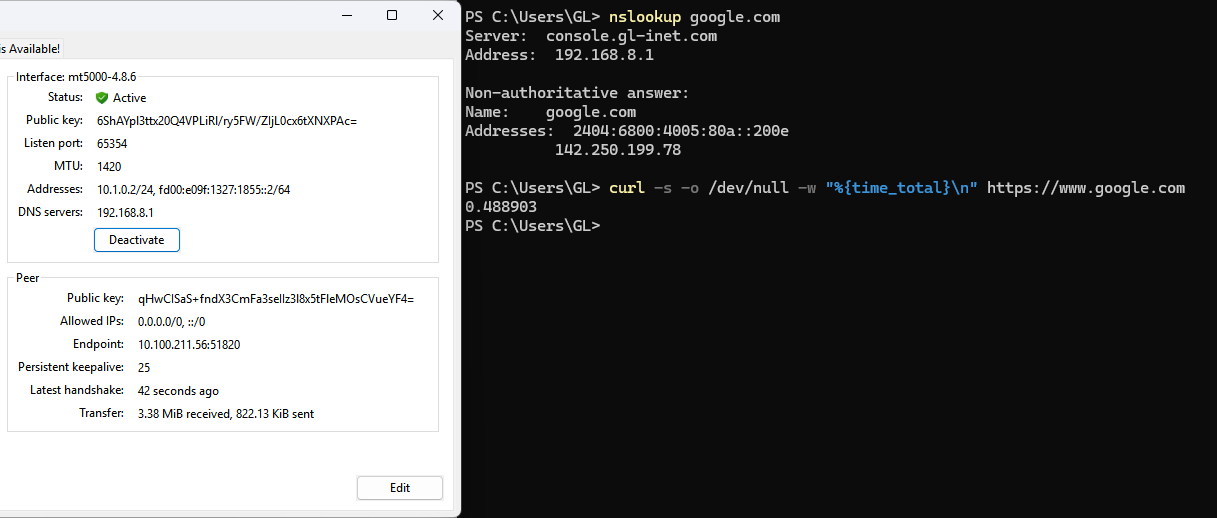
When modifying the DNS field in the WireGuard VPN server exported profile from the original VPN IP 10.1.0.1 to the MT5000 LAN address 192.168.8.1, DNS resolution still worked properly.
At the same time, webpage loading speed also appeared normal, and curl testing showed a load time of 0.489s.
Could you please try updating the MT5000 to v4.8.6 and see whether the issue still occurs?
If the issue can still be reproduced, could you please follow the guide and share your device with us via GoodCloud so we can check it remotely?
Kindly note to send us the MAC address and the router password via private message so we can access it.
I never modified the original VPN IP. As a matter of fact, I didn’t modify anything. Everything was working fine, then when the update happened, all of the above happened. I was just trying to figure out how to get wireguard working again and came up with the solutions above, which got it working, but really poorly.
I will try the upgrade again and message you with the MAC address and password. Do I need to be present when you log into my router to look at this? What times(time zones) would you be available to look at this, as I don’t want to do it and then have to wait too long for it to be checked, because I use it regularly from work and need it to be available and working properly?
Thank you so much for responding and looking into this for me!!