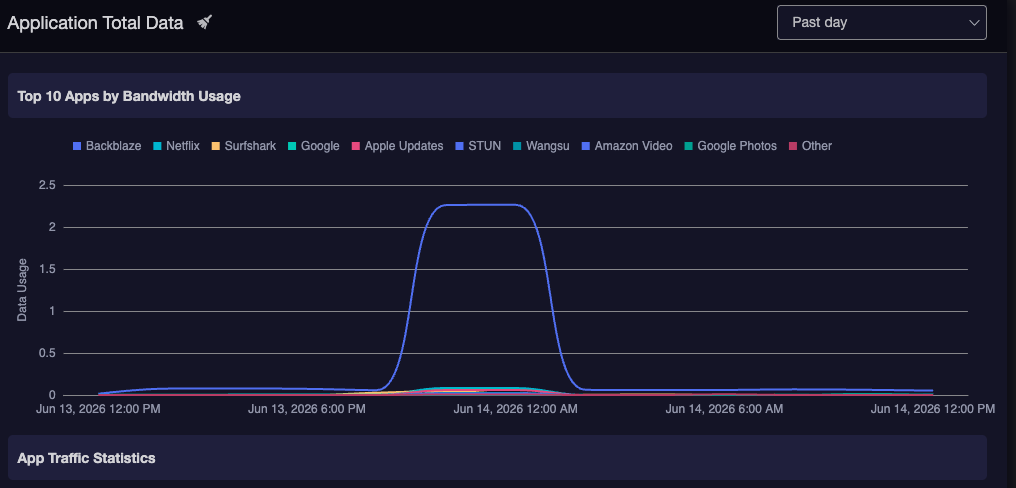


@will.qiu I’m afraid the data is still displayed all lumped up at same 10:00pm and 12:00am hump in the Past Day view; and all rolled up in the current day in the Past Week view.
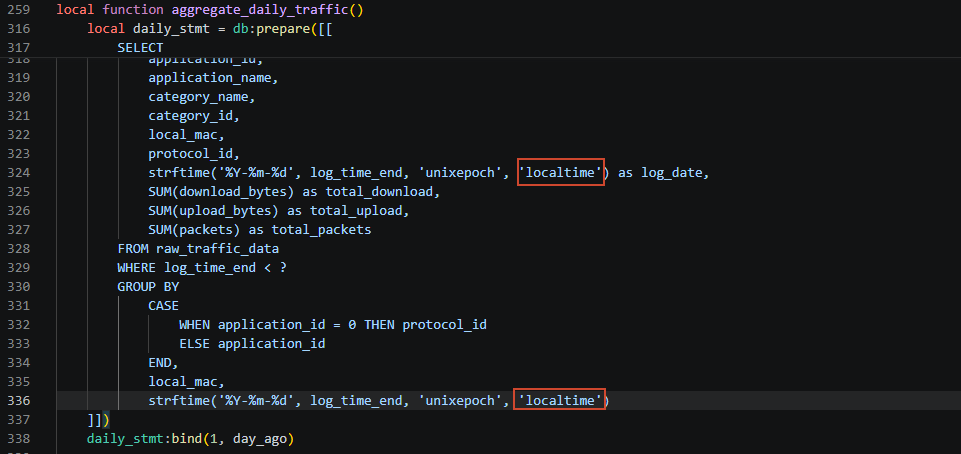
I believe I followed the 4 steps correctly and did Disable first, and Enable after I modified the LUA script.
Should I try one more time to just Disable, Enable, Clear and see if that changes anything?
Your video shows very little data and I wonder if that could be the issue. To do a test similar to mine, you can open a Trial account with Backblaze, and install the backup client on a machine with lots of data/storage/files/HDDs/etc. Let it backup with default settings for a few days (trial is 14 days, no limit) and you should see at least 4-5TB/day uploaded to their cloud service. Maybe the way you handle the volume of data in your database is too much for the Brume 3?
So, from what we can see, the previous issue where the usage data lumped up in the past day appears to have been fixed.
The new issue is that the data for the 22:00 / 24:00 period is incorrect.
Is our understanding correct?
If so, could you please follow the same procedure as before, but replace the contents of /etc/monitor_traffic.lua with the attached file and test again?