Brume 3 - Data Statistics looks completely broken

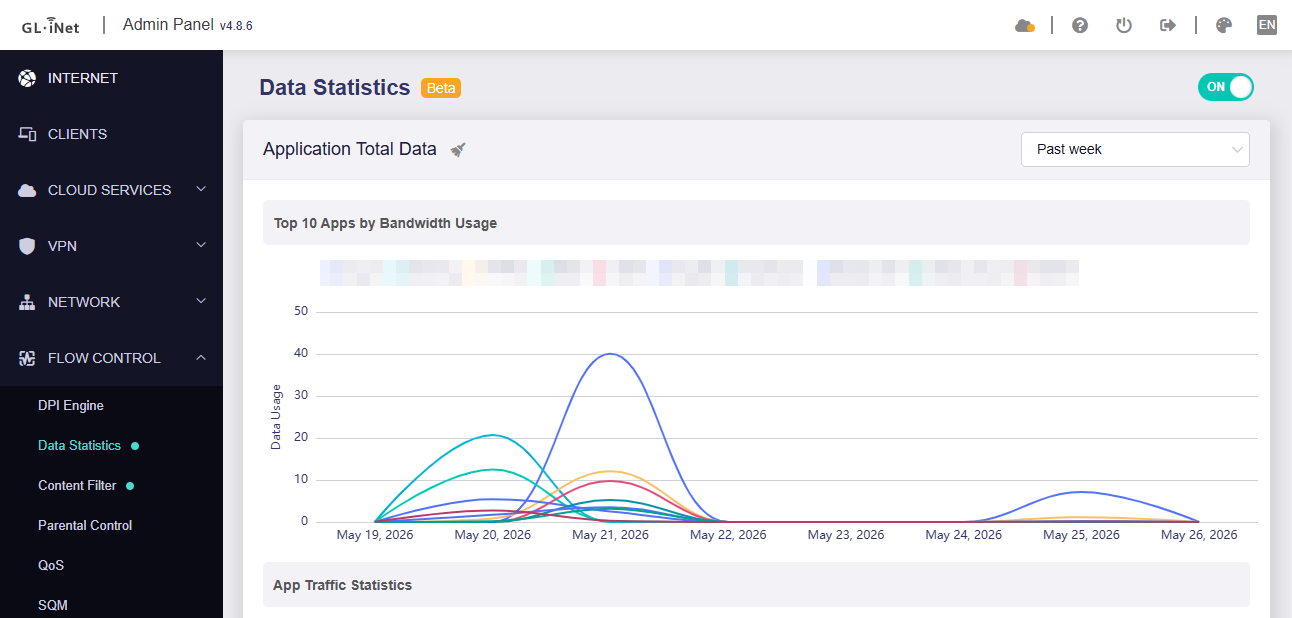
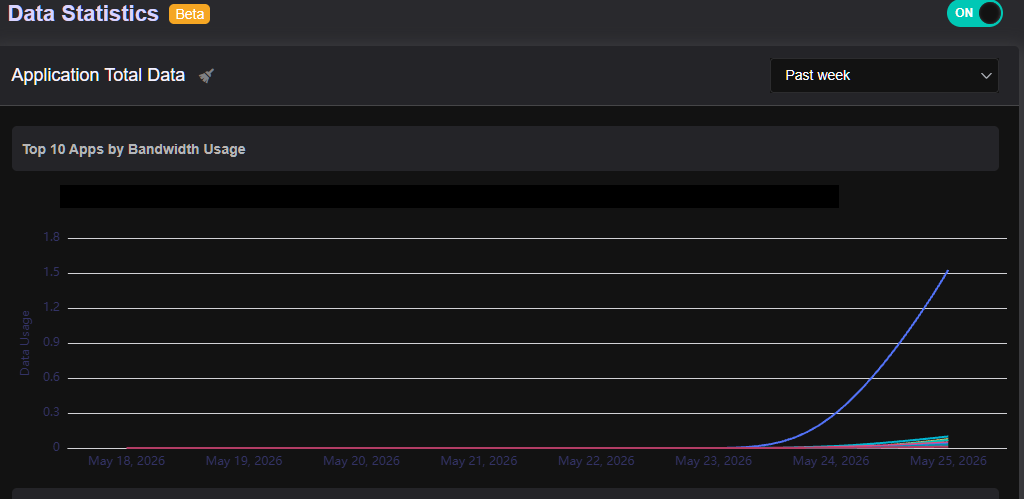
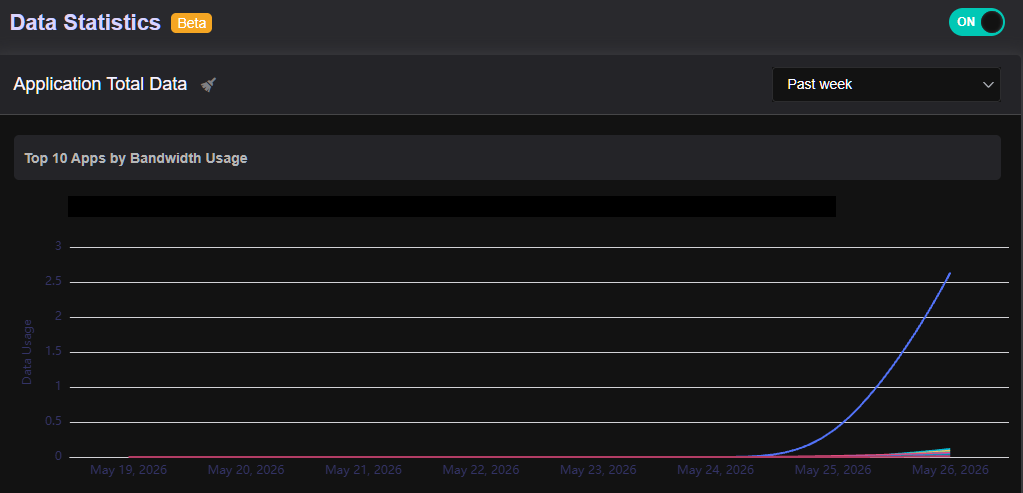
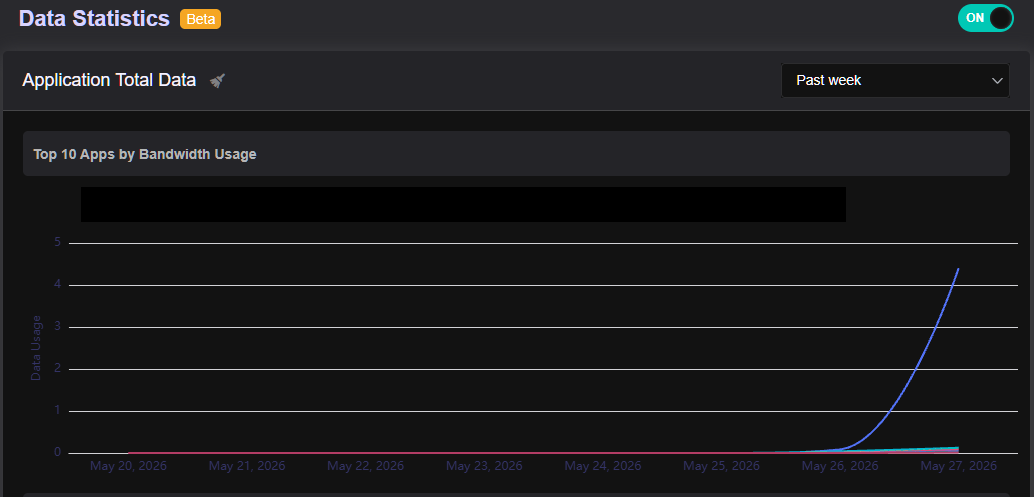
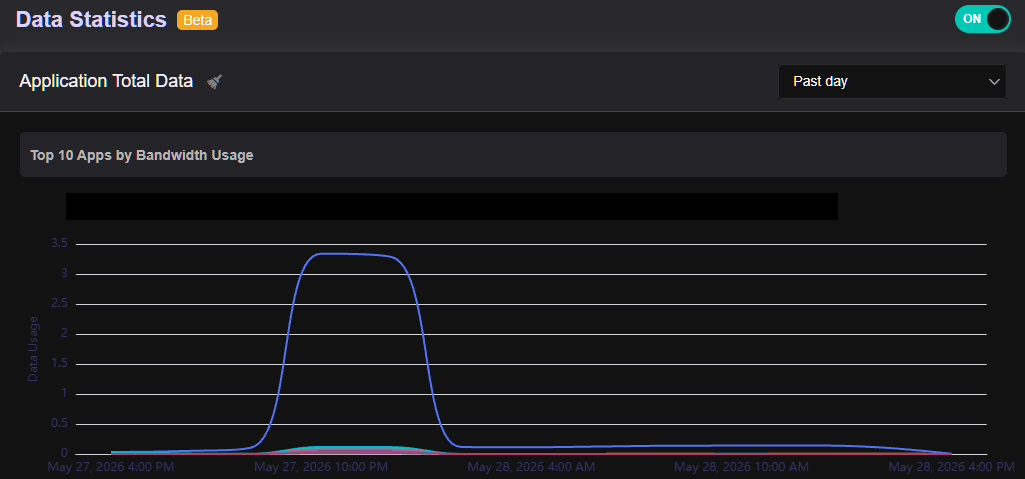
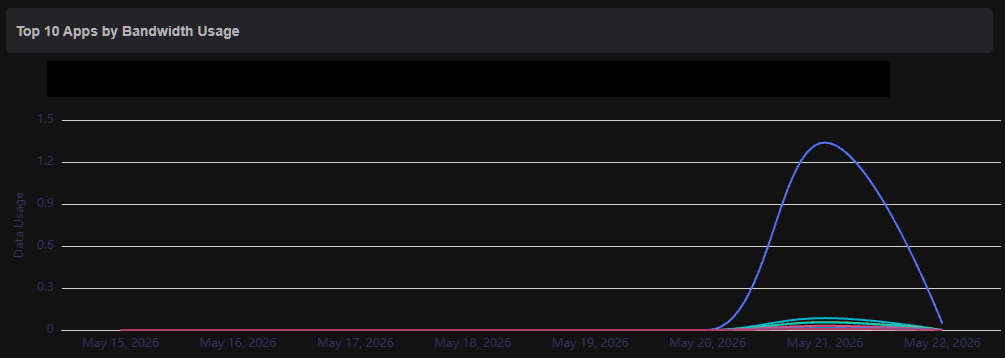
Hi folks, I’ve been trying to get some idea on “Apps by Bandwidth Usage” under Data Statistics but while the Past Day view might be somewhat reasonable, the Past Week view seems to be completely broken showing no traffic whatsoever, apart fom the traffic in the past day.

There is only 4.6.8 that I can find and not many hits on the one device that I just purchased with DPI being fully supported, and I’d assumed, fullu tested and passed QA.

How do I get working what I paid for?

Thanks!

Hi

Could you please follow the guide and share your device with us via GoodCloud so we can check it remotely?

Kindly note to send us the MAC address and the router password via private message so we can access it

Thanks for the reply @will.qiu

I’d rather keep my gear to myself!

Happy to send you logs, traces, whatever you need to see why week and day views are showing all data rolled up in the last 24 hours. What’s the flow of that data, where is it supposed to be stored?

1 Like

Hi,

Thank you for being willing to help investigate the issue.

For now, please export the following three files and send them to us via private message so we can examine them further:

/tmp/traffic_data.db
/tmp/traffic_data.db-shm
/tmp/traffic_data.db-wal

I toggled off (rebooted) and back on the Data Statistics. Let’s give it a day or two and see of all traffic would still be bundled into a single day or something was stuck and this fixed it as I already see some traffic from 20th and some from today, 21st (if this is all in EDT)

Thank you for the update.

So it seems that previously, for some reason, DPI was not functioning properly or was not recording data into the database correctly?

In any case, we’re glad to hear that it is now working properly.

I spoke too fast. The data I was seeing on 19th and 20th has now been “rolled up” under 21st.

Are you able to share troubleshooting steps?

Looking at the /tmp/traffic_data.db* files, I’m not sure what’s in them and as such don’t feel comfortable sending them over to you.

@will.qiu - any troubleshooting steps? are you able to reproduce in your environments?

I see several other posts on this bug and although the other OPs aren’t running the DPI enging on an “officially supported at the time of purchase” hardware, the DPI engine is probably the same, or very similar.

These are the databases used for DPI statistics.

We recommend SSHing into the router and running the following commands to check:

  1. Check whether the router’s current time is accurate:
logread | grep timesync
date
  1. Check the timezone configuration:
uci show system.@system[0].zonename
uci show system.@system[0].timezone
  1. Check the database contents to see whether the data belongs to previous dates:
# Move WAL file transactions back into the database
sqlite3 /tmp/traffic_data.db "PRAGMA wal_checkpoint(FULL);"

# Show database contents and convert Unix timestamps to local time
sqlite3 -header -column /tmp/traffic_data.db "
SELECT
  id,
  datetime(log_time_start, 'unixepoch', 'localtime') AS start_time,
  datetime(log_time_end, 'unixepoch', 'localtime') AS end_time,
  application_id,
  application_name,
  download_bytes,
  upload_bytes,
  packets,
  local_ip,
  local_mac,
  protocol_id,
  datetime(timestamp, 'unixepoch', 'localtime') AS time,
  category_name,
  category_id
FROM raw_traffic_data
ORDER BY timestamp ASC
"

We tested using the Brume 3 with firmware v4.8.6, but were unable to reproduce the issue:

Thanks for the debugging steps and for confirming it all works fine in your environment.

1.I don’t see timesync in the log.

root@GL-MT5000:~# logread | grep timesync
root@GL-MT5000:~# date
Tue May 26 13:10:21 EDT 2026

root@GL-MT5000:~# uci show system.@system[0].zonename
system.cfg01e48a.zonename='America/Toronto'
root@GL-MT5000:~# uci show system.@system[0].timezone
system.cfg01e48a.timezone='EST5EDT,M3.2.0,M11.1.0'

8629200 2026-05-25 12:55:00 2026-05-25 13:00:00 10486 pubnub 632 400
21 nn:nn:nn:nn:nn:nn 0 2026-05-25 13:00:00 business 5

….

8679867 2026-05-26 13:11:28 2026-05-26 13:11:43 10734 eero 342 358 10 192.168.nn.nn nn:nn:nn:nn:nn:nn 196 2026-05-26 13:11:44 device-iot 33

Data seems to start at 2026-05-25 12:55:00, updating every 5 minutes, while I’m typing this lines on 2026-05-26 just after 13:00:00

Somethig gets deleted/dropped/reset? What does timesync do? Don’t you use chronyd or that’s different?

root@GL-MT5000:~# chronyc sources -v

^* ntp2.torix.ca 1 10 377 969 +48us[ +55us] +/- 1576us
^- 173-206-137-239.cpe.dist> 1 10 377 786 -21us[ -21us] +/- 4285us

It feels like timezone/UTC offset mismatch bug inside the daily database aggregation script.

This match to UTC makes me wonder if it misinterprets the my EDT timestamps, dropping the historical blocks instead of archiving them into the weekly/monthly view tables.

Are you able to check how the database rotation script handles local vs. UTC time gaps on firmware v4.8.6 using a device setup for Toronto EDT?

Hi @will.qiu

The bug is consistent, here’s today’s view, appears to have the same cut-off bug and most of the data we say yesterday under May 25th is truncated/lost in the May 26th view below.

12096770 2026-05-26 12:05:00 2026-05-26 12:10:00 10486 pubnub 632 440
22 nn:nn:nn:nn:nn:nn 0 2026-05-26 12:10:00 business 5
12104189 2026-05-26 12:05:00 2026-05-26 12:10:00 10909 google-play 10098 23030
70 nn:nn:nn:nn:nn:nn 0 2026-05-26 12:10:00 os-software-updates 31

Please run the following commands as well and let us know the results:

ll /etc/netifyd/traffic_data.db /tmp/traffic_data.db
df -h /etc/netifyd

It appears that the database may not have been written back from memory to flash storage.


Yes, we use Chronyd on this firmware version; however, the subsystem name shown in the logread output is timesync.
image

The database is actually using Unix timestamps internally, so it should not be caused by a UTC-related timestamp issue.

We will also try switching a local test device to that timezone to see whether we can reproduce the issue.

root@GL-MT5000:~# ll /etc/netifyd/traffic_data.db /tmp/traffic_data.db
-rw-r--r-- 1 root root 27353088 May 28 15:18 /etc/netifyd/traffic_data.db
-rw-r--r-- 1 root root 30056448 May 28 15:34 /tmp/traffic_data.db
root@GL-MT5000:~# df -h /etc/netifyd
Filesystem Size Used Available Use% Mounted on
overlayfs:/overlay 7.2G 569.2M 6.6G 8% /
root@GL-MT5000:~# logread | grep chrony

root@GL-MT5000:~# logread | grep timesync

root@GL-MT5000:~# chronyc sources
MS Name/IP address Stratum Poll Reach LastRx Last sample

^* ntp2.torix.ca 1 10 377 130 -5721ns[-6488ns] +/- 1481us
^- 173-206-137-239.cpe.dist> 1 10 377 76 -544us[ -544us] +/- 5222us

root@GL-MT5000:~# chronyc tracking
Reference ID : CE6C0084 (ntp2.torix.ca)
Stratum : 2
Ref time (UTC) : Thu May 28 19:40:05 2026
System time : 0.000005300 seconds fast of NTP time
Last offset : -0.000000767 seconds
RMS offset : 0.000111594 seconds
Frequency : 9.868 ppm slow
Residual freq : +0.000 ppm
Skew : 0.038 ppm
Root delay : 0.002287004 seconds
Root dispersion : 0.000453227 seconds
Update interval : 1034.4 seconds
Leap status : Normal

root@GL-MT5000:~# ps | grep -E 'tertf|gl-dpi|traffic'
13649 root      6340 S    /usr/bin/eco /usr/bin/gl-dpi
28937 root      9548 S    eco /etc/monitor_traffic.lua

To see if I could force a manual synchronization, I targeted and cycled the daemon directly via its PID (kill 13649). The process safely terminated and immediately respawned under a fresh PID, confirming the orchestration layer is alive.

However, checking the file sizes right after shows that the sync did not happen:

root@GL-MT5000:~# ll /etc/netifyd/traffic_data.db /tmp/traffic_data.db
-rw-r--r--    1 root     root      27353088 May 28 15:18 /etc/netifyd/traffic_data.db
-rw-r--r--    1 root     root      33157120 May 28 15:56 /tmp/traffic_data.db

The core engine is fine: The RAM database (/tmp) is actively growing (now at 33.1 MB), meaning traffic is being intercepted and parsed successfully.

The sync interval is broken? The persistent flash file (/etc) has is still frozen at 27.3 MB since 15:18. Even a process restart doesn't force a flush.

Because the system is missing its steady hourly progression checkpoints on the disk, the frontend UI ends up squishing a massive lump-sum data dump into a single, vertical cliff-like spike on the "Past Day" chart layout instead of distributing it smoothly across a 24-hour timeline.

root@GL-MT5000:~# sqlite3 /etc/netifyd/traffic_data.db "PRAGMA integrity_check;"
ok

Perhaps a bug with how the eco engine/Lua tasks handle the disk write-back timers?

root@GL-MT5000:~# /etc/init.d/netifyd stop
root@GL-MT5000:~# sleep 2
root@GL-MT5000:~# /etc/init.d/netifyd start
Netify Agent/5.2.1 (openwrt; linux-gnu; aarch64; conntrack; netlink; dns-cache; nfqueue; regex)

This application uses nDPI v4.14.0

This program comes with ABSOLUTELY NO WARRANTY.
Netifyd is dual-licensed under commercial and open source licenses. The
commercial license gives you the full rights to create and distribute software
on your own terms without any open source license obligations.

Netifyd is also available under GPL and LGPL open source licenses. The open
source licensing is ideal for student/academic purposes, hobby projects,
internal research project, or other projects where all open source license
obligations can be met.

Report bugs to: Work items · Netify / Netify Public / Netify Agent · GitLab

Processor plugins:

proc-aggregator/1.2.0
/etc/netifyd/netify-proc-aggregator.json
/usr/lib/libnetify-proc-aggregator.so.0.0.0
proc-nfa/1.2.0
/etc/netifyd/netify-proc-flow-actions.json
/usr/lib/libnetify-proc-flow-actions.so.0.0.0

Sink plugins:

sink-http/1.2.0
/etc/netifyd/netify-sink-http.json
/usr/lib/libnetify-sink-http.so.0.0.0
sink-socket/1.2.0
/etc/netifyd/netify-sink-socket.json
/usr/lib/libnetify-sink-socket.so.0.0.0

You appear to be using some of the netify open source but mixing it with your own gl-dpi enging, and the syncing is done in the closed source part. Anything in the monitor_traffic.lua maybe?

1 Like

@will.qiu sorry for the bits and pieces of updates. this view clearly shows that the data is being lumped together. I don’t have the bandwidth to do that much in just a couple of hours, then go to sleep. it’s a backup that pushes up data fairly consistently 24x7

Thank you for the detailed information.

We appear to have reproduced the issue locally, and it does indeed seem to be related to the America/Toronto timezone setting.

We have already asked the development team to investigate further and determine how to fix the issue.

1 Like

Fantastic @will.qiu !

Happy to alpha/beta-test whenever you have something that “appears to work” :slight_smile:

Hi @will.qiu , any ETA on the fix?

I am now running 4.9.0 Beta from 2026-05-29 and the issue is still there.

The development team is still investigating the root cause of this issue, and there is currently no ETA available.

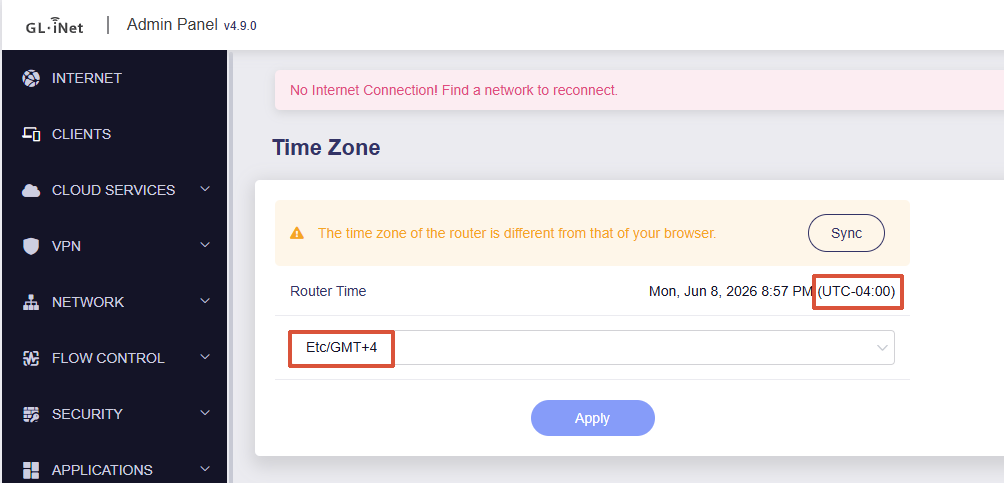
As a temporary workaround, you may try setting the time zone to a fixed UTC offset, for example Etc/GMT+4 (which corresponds to UTC-4).

We still have a lot of Daylight Saving Time (DST) left this year and I trust you’ll have a fix much before that, so I’ll give that a try.

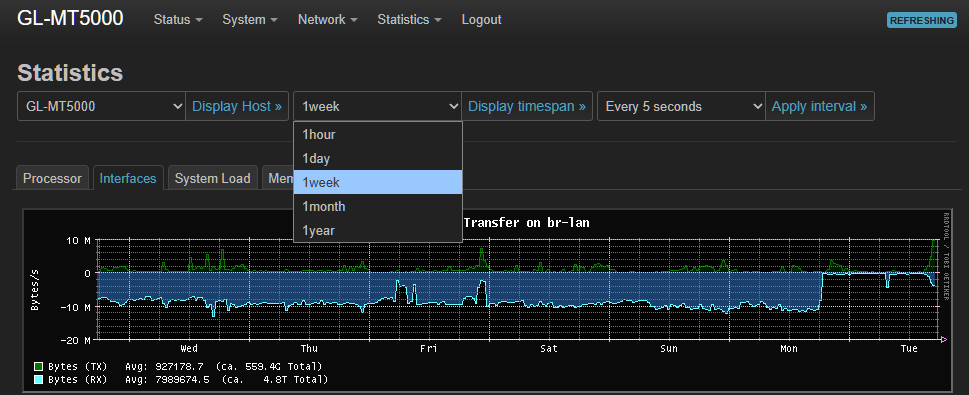
The standard LuCI Statistics Application works well, if you want to take a look at how they deal with hour/day/week/month/year graphs.

1 Like