I installed Brume 3 fw 4.9.2 and all my installed packages were not installed anymore even with checked keep settings. It seems they were just reinstalled in the background, after I once went to packes at http://192.168.8.1/#/plugins and did a refresh.
Yes, the packages were wiped, though the configuration files remained intact. Once I reinstalled Unbound, all of my previous settings came right back.
i have a brune3 in a remote location.
if i install this, will i lose access to the gui via goodcloud?
what about ssh via goodcloud?
and gl inet tailacake plugin fix?
(Shouldn’t you have already turned off goodcloud?)
my brune is quite new and it was found clean fron malware.
i have 4 .9 1 instakked so it should be safe.
i need to manage it remotely
so what happens after installation of 4.9.2?
if i keep access to the main gui and tailscale and luci and ssh i am fine.
no other packages installed.
it is just used as tailscale exit node.
self tested : upgraded to 4.9.2 from goodcloud.
everything works
Hi,
With Keep Settings enabled, the router preserves the configuration files on its backup list by default. Plugins you installed yourself usually need to be reinstalled after a firmware upgrade.
If any plugins are still missing, you can reinstall them from the Plug-ins page. Their settings are generally preserved, so you can usually pick up where you left off.
Thats not true. On some of my devices, for example Brume 2 and 3, my previously installed packages "magically" reapearing after some trigger or some time without me installing them again. I dont know how this is triggered though, either opening http://192.168.8.1/#/plugins manually once, or logging into Luci once, and after some minutes, the old installed packages are installed again. This isnt happenin on all my Glinet devices though automatically.
i updated the firmare from the gl.inet android app.
there is no option to keep the settings.
however i have just tailscale installed.
one comment: ssh enable button in the gui does not work.
i hope it will be fixed in next update?
Hi,
Thanks for letting us know that you didn’t see a Keep Settings option when updating through the Android app.
Could you please confirm which page shows the SSH switch you mentioned?
If it’s the Tailscale SSH switch under Tailscale Enhanced, that feature is provided by a third-party plugin.
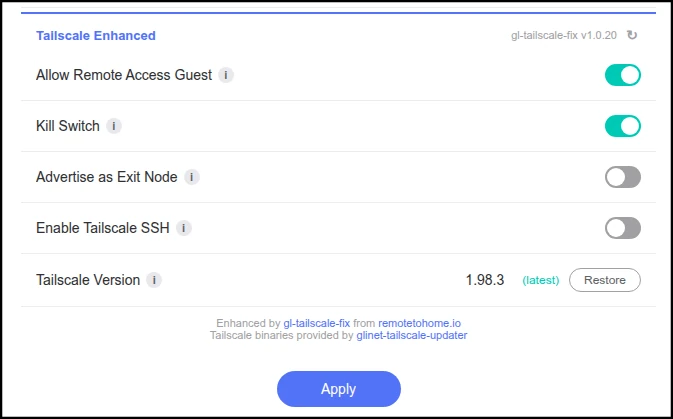
In that case, you may want to report the issue to the maintainer on the plugin’s GitHub issues page.
Thank you for your understanding and support.
yes i confirm that the ssh button is in the enhanced version.
i hope that the owner of the plugin will fix the broken button.