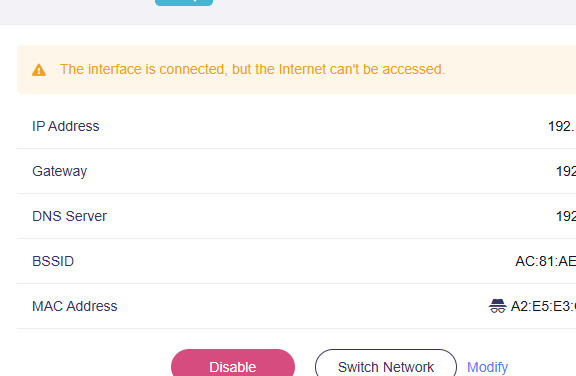
I am in an airbnb which has a claro router. I have used my travel router to connect to multiple airbnb internet wifi but here i am stuck. I can connect with my laptops , phone but when i connect with my travel router i get this error :
The interface is connected, but the Internet can't be accessed.
There is no internet capture page when i connect with my phone to the home wifi. I also tried ethernet and i get the same error. I have a wireguard client on my travel router that i would like to route my internet traffic thru.
I also tried to connect to the home wifi with my phone , and then used my phone hotspot as wifi for my travel router. That worked but the internet speed is very slow and i cant work with that speed. Please help as i am really stuck
That's strange… Claro routers are configured to assign IP address through DHCP, so you don't have to make any special config, specially through wifi. If is fiber connection, some Ethernet ports could be configured to tv connection (vlan) but usually at least one wired port is configured for internet (lan1?). Also, what vpn server you use? Claro uses fortiguard to ban some sites (like illegal sites /banned sites) so try to disable wireguard client to try internet connectivity before trying wg connection.
So here is what happened. I ended up resetting my router , and connecting router directly to the claro router thru Ethernet and that worked. But I lost all my wire guard configs.
Now I have bigger problem , I thought I had saved the wire guard client configs to a text file. When I copy paste them and try to run that config.
Log
Fri Mar 20 17:42:40 2026 daemon.info dnsmasq[8774]: read /tmp/hosts/dhcp.wgclient1 - 3 addresses
Fri Mar 20 17:42:40 2026 daemon.notice netifd: Interface 'wgclient1' is now down
Fri Mar 20 17:42:40 2026 user.notice firewall: Reloading firewall due to ifdown of wgclient1 ()
Fri Mar 20 17:47:20 2026 daemon.notice netifd: Interface 'wgclient1' is setting up now
Fri Mar 20 17:47:21 2026 daemon.info dnsmasq[13660]: read /tmp/hosts/dhcp.wgclient1 - 3 addresses
Fri Mar 20 17:47:21 2026 daemon.warn dnsmasq[13661]: no servers found in /tmp/resolv.conf.d/resolv.conf.wgclient1, will retry
Fri Mar 20 17:47:21 2026 daemon.info dnsmasq[13661]: read /tmp/hosts/dhcp.wgclient1 - 3 addresses
Fri Mar 20 17:47:58 2026 daemon.info dnsmasq[15038]: read /tmp/hosts/dhcp.wgclient1 - 3 addresses
Fri Mar 20 17:47:59 2026 daemon.notice netifd: Interface 'wgclient1' is now down
Fri Mar 20 17:47:59 2026 user.notice firewall: Reloading firewall due to ifdown of wgclient1 ()
Fri Mar 20 17:53:39 2026 daemon.info dnsmasq[20238]: read /tmp/hosts/dhcp.wgclient1 - 3 addresses
Fri Mar 20 17:53:39 2026 daemon.info dnsmasq[20237]: read /tmp/hosts/dhcp.wgclient1 - 3 addresses
Fri Mar 20 19:01:28 2026 daemon.notice netifd: Interface 'wgclient1' is setting up now
Fri Mar 20 19:01:29 2026 daemon.warn dnsmasq[28071]: no servers found in /tmp/resolv.conf.d/resolv.conf.wgclient1, will retry
Fri Mar 20 19:01:29 2026 daemon.info dnsmasq[28071]: read /tmp/hosts/dhcp.wgclient1 - 3 addresses
Fri Mar 20 19:01:29 2026 daemon.info dnsmasq[28069]: read /tmp/hosts/dhcp.wgclient1 - 3 addresses
Fri Mar 20 19:02:01 2026 daemon.warn dnsmasq[31135]: no servers found in /tmp/resolv.conf.d/resolv.conf.wgclient1, will retry
Fri Mar 20 19:02:01 2026 daemon.info dnsmasq[31135]: read /tmp/hosts/dhcp.wgclient1 - 3 addresses
Fri Mar 20 19:02:01 2026 daemon.info dnsmasq[31134]: read /tmp/hosts/dhcp.wgclient1 - 3 addresses
Fri Mar 20 19:02:01 2026 daemon.notice netifd: Interface 'wgclient1' is now down
Also when i copy pasted the config , beryl automatically creates a public key. Shouldn’t that key be the same public key from my config text file ? I have asked a friend to go to my house and generate the wire guard client config from my home beryl router . Would that help ?
Yes, best option is using beryl peer config file generated in your wireguard server, because you need private key that matches the public key of the beryl peer generated on your server (it goes on interface section) and public key of the wireguard server itself (it goes on the peer section). Without those keys, you cannot make a connection.