I have a GL-MT6000. I'm trying to enable Network Acceleration but it says I can't because client speed limit is enabled. I don't remember setting any client speed limit and have around 300 clients. How do I disable client speed limit without going through each of my 300 connected devices to see which one may have speed limit enabled? Is there no way to disable client speed limit globally? Is the only way to do this to completely reset the router?
Thanks for any advice.
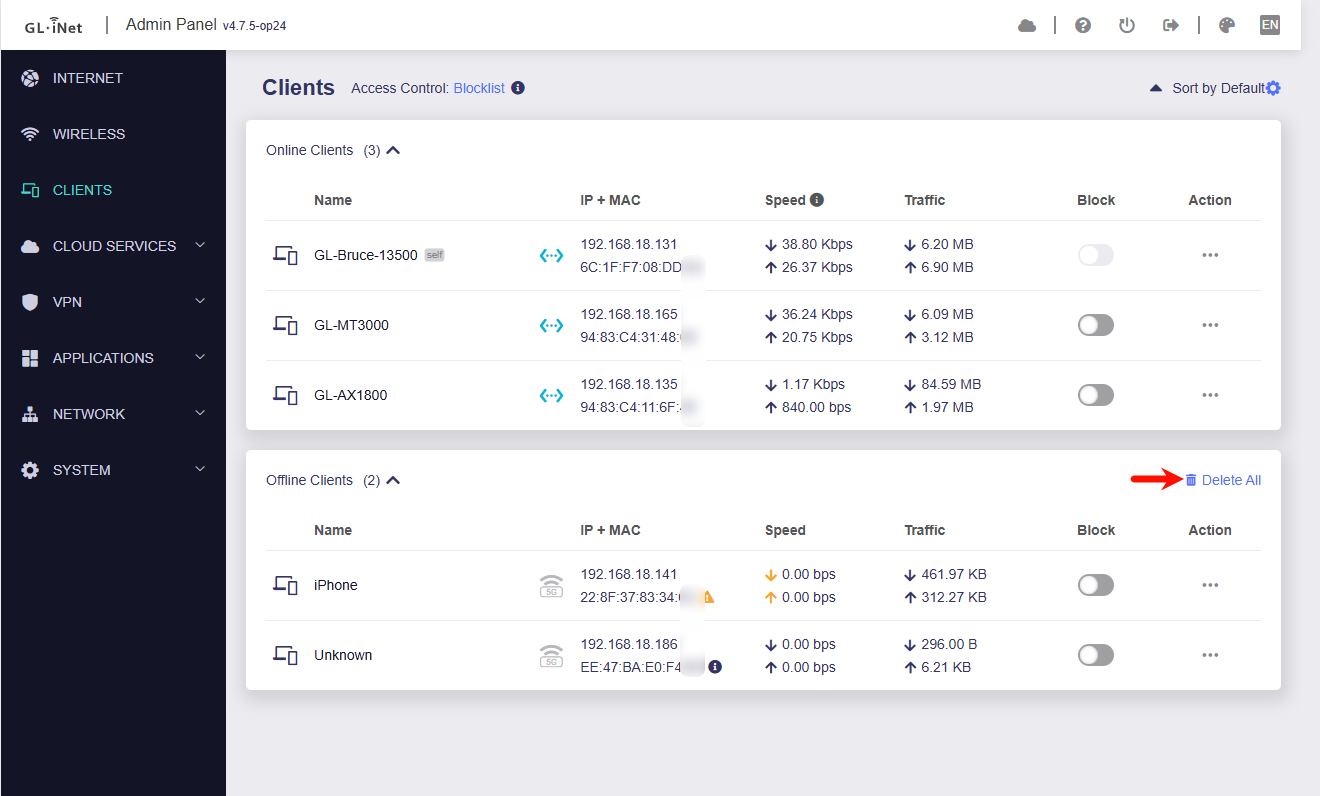
You can see that the up/down arrows are orange in color.

You can clear offline clients via the button "Delete All" to clear these speed limits, that without resetting the router.
I have the same problem. None of my clients have orange arrows. None of them have speed limits set (I painfully went through each one). But Network Acceleration is still unavailable due to speed limits being enabled. What’s next?
Please SSH log in to the router and execute the following command to check whether there is a client speed limit record:
cat /etc/config/qos | grep queue -A3
For example, if it has reconds, will print the following:
root@GL-MT6000:~# cat /etc/config/qos | grep queue -A3
config queue '9483C4xxxxxx'
        option mac '94:83:C4:xx:xx:xx'
        option download '1000'
        option upload '1000'
--
config queue 'B04A39xxxxxx'
        option mac 'B0:4A:39:xx:xx:xx'
        option download '2000'
        option upload '2000'
If records, execute the following command to reset the qos configuration:
cp /rom/etc/config/qos /etc/config/qos
Thank you, that got it.
This topic was automatically closed 180 days after the last reply. New replies are no longer allowed.