Captive portal breaks my firewall config

I have a GL-BE3600 which I use as a travel router to allow access to my home network devices using my home local IP addresses.

The set up I have is:

  • *Tailscale
  • One node at home as exit node
  • Adguard Home with upstream DNS in GL iNet settings configured to use my home network Adguard Home DNS.

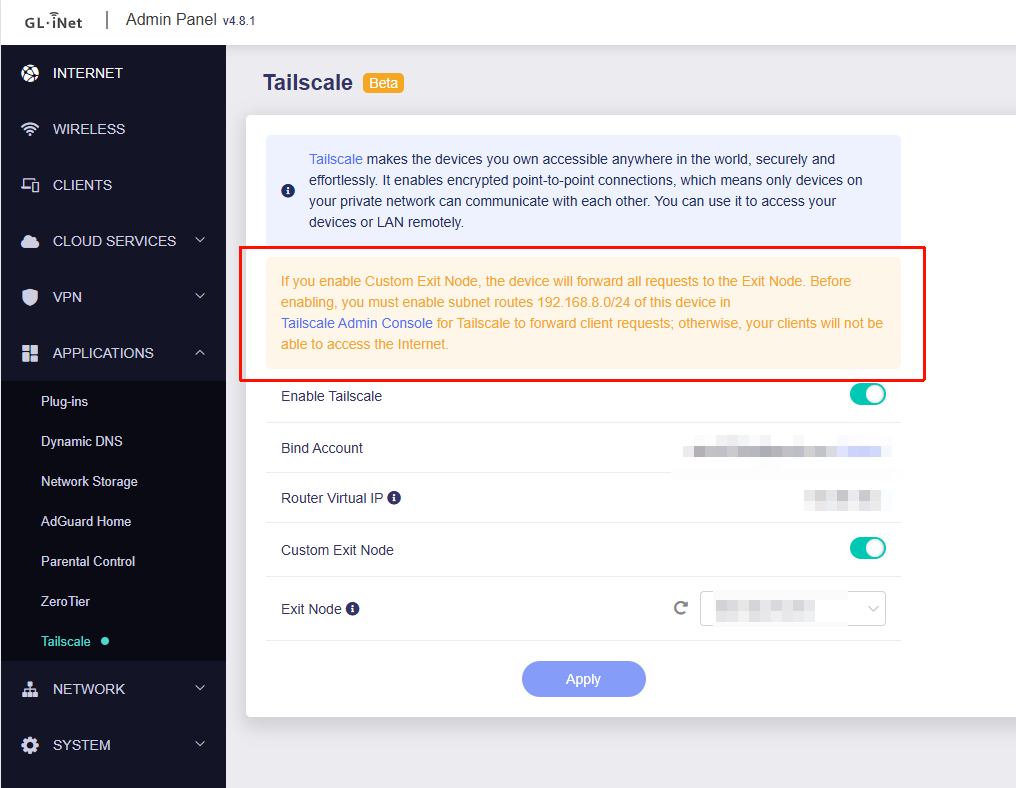
These are the settings I need in order to make it possible for my work laptop to reach my home devices when connected through the GL iNet router:

image

Now to the problem:

  • Each time I connect to a public IP that has a captive portal then GL iNet breaks my firewall settings and I need to manually fix it each time.

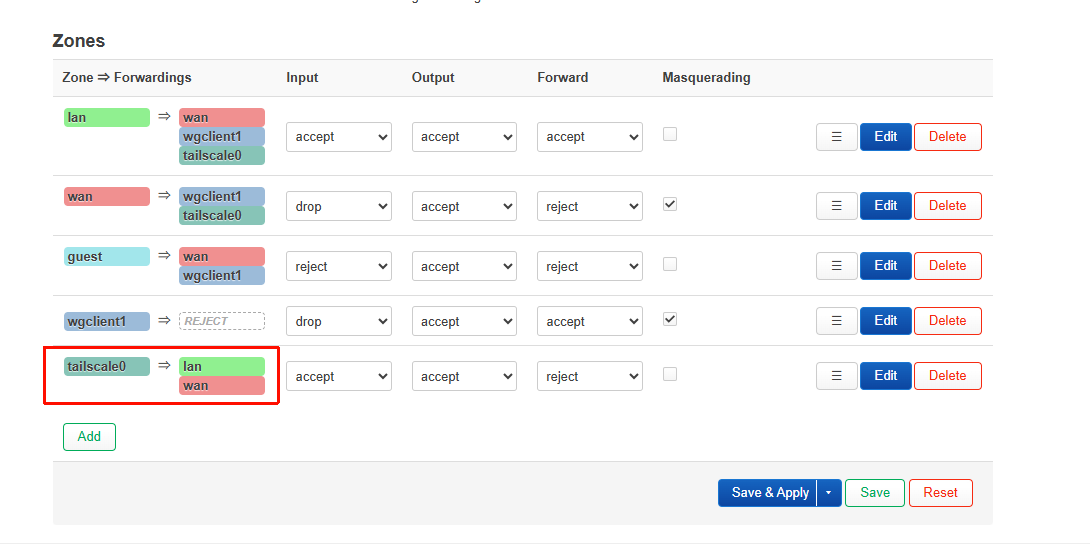
What chnages is the tailscale0 => lan/wan => Forward is changed to Reject, and Masquerading is changed to Off.

This effectively breaks the access for my work laptop to reach my home network.

Why is that? And how can I fix that?*

Hi

Could you further explain why it’s necessary to adjust the options of the tailscale0 firewall zone?

By default, after enabling Tailscale’s Exit Node feature, forwarding from tailscale0 to the WAN/LAN zones is already allowed.

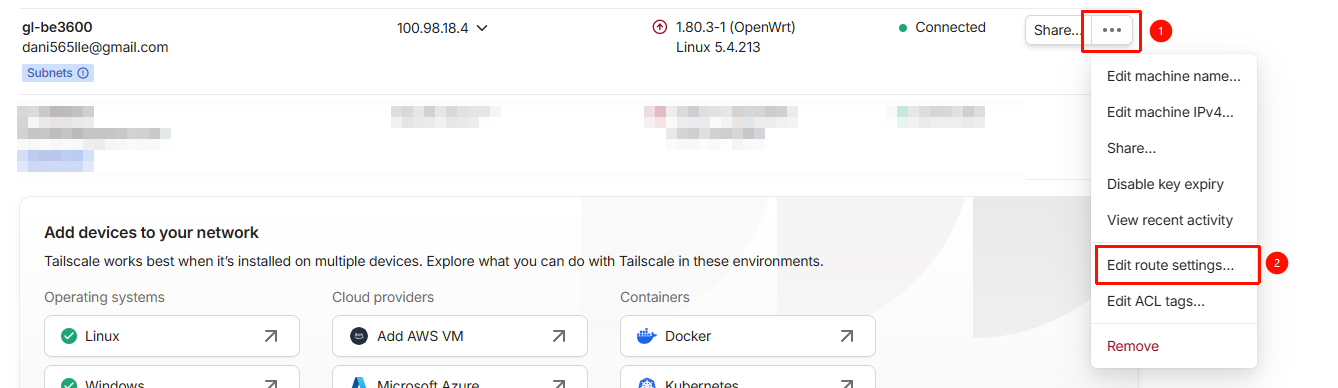
Note that after enabling it, you also need to approve BE3600 to advertise its LAN subnet in the Tailscale admin console, so that the traffic from Exit Node can be routed back.


Under this configuration, it works normally without adjusting the firewall zones.

Hi, thanks for the reply.

I think the key difference is that my setup is not using the BE3600 as a classic Tailscale Exit Node for other Tailscale clients, but instead as a gateway for non-Tailscale LAN clients (my work laptop does not and cannot run Tailscale - and I use my router as a travel router so I can use my work laptop while being on the run).

To clarify my topology:

  • Tailscale runs only on the GL-BE3600 (and services at home such as proxmox hosts, home assistant etc)

  • My work laptop is a regular LAN client behind the router (no Tailscale client, no routes on the laptop) - I lack admin rights on this one so it is what it is…

  • I have a separate Tailscale node at home advertising my home LAN subnets

  • The BE3600 is configured with --accept-routes and uses Tailscale purely as an egress tunnel

  • From the laptop’s perspective, this is just a normal NAT router

In this model, the traffic flow is:

Laptop (LAN client)
 → GL-BE3600 LAN
   → tailscale0 (NAT + forwarding required)
     → home subnet via another Tailscale node

This is different from the Exit Node scenario you describe, where:

  • The BE3600 advertises its LAN subnet

  • Other Tailscale clients route traffic into the BE3600

  • Forwarding is primarily tailscale0 → wan/lan

In my case, the critical requirement is LAN → tailscale0 forwarding with masquerading, because the laptop is not a Tailscale participant.

When tailscale0 is set to:

  • forward = REJECT

  • masquerading = OFF

the following happens:

  • Tailscale itself continues to work (router-originated traffic works)

  • Subnet routes are accepted correctly

  • LAN client traffic fails, because:

    • packets are forwarded but not SNATed

    • return traffic cannot be associated back to the LAN client

This results in:

  • Router can ping home devices

  • LAN clients cannot (my work laptop that is)

Setting:

  • tailscale0 forward = ACCEPT

  • tailscale0 masquerading = ON

creates the required NAT boundary so that my work laptop can use the Tailscale tunnel transparently.

This is why those settings are necessary in my case, but not in the Exit Node example you shared.

Here is my issue…
After authenticating via a captive portal, the firmware appears to reclassify tailscale0 into a more restrictive “VPN client” profile, resetting:

  • forwardREJECT

  • masqOFF

That posture makes sense for a traditional VPN client model, but it breaks the “LAN-as-gateway” use case described above.

Once the zone is reverted, restarting Tailscale alone is not sufficient - the zone policy itself must be corrected.

In short…

  • The default configuration works correctly for:

    • Exit Node usage

    • Tailscale clients routing through the BE3600

  • My use case is different:

    • BE3600 is a Tailscale gateway for non-Tailscale LAN clients (my work laptop specifically)
  • In that scenario:

    • tailscale0 → forward ACCEPT

    • tailscale0 → masquerading ON
      are required for correct NAT and return routing

  • Captive portal handling appears to reset this zone to a restrictive default, which is the root of the issue

So I am just wondering how I can avoid having to go in and adjusting the forward to ACCEPT and masquerading to ON each time I have been signing in over a captive portal.

Thanks again for looking into this.
So at the moment, you have only enabled the BE3600’s Tailscale feature for an Site to Site scenario, and have not enabled its Exit Node mode — this feature does not advertise itself as an Exit Node, but instead selects another Tail Node as the Exit Node.

In this case, you still need to approve the BE3600’s LAN subnet in Tailscale.
As you mentioned, this is used for the return routing of remote Tailscale nodes.


Currently, Tailscale’s custom firewall configuration will be reset if Tailscale needs to be restarted for some reason.
We plan to add an option to enable Masquerading in the v4.9 firmware.

We recommend using the above-mentioned method of approving the BE3600’s LAN subnet.
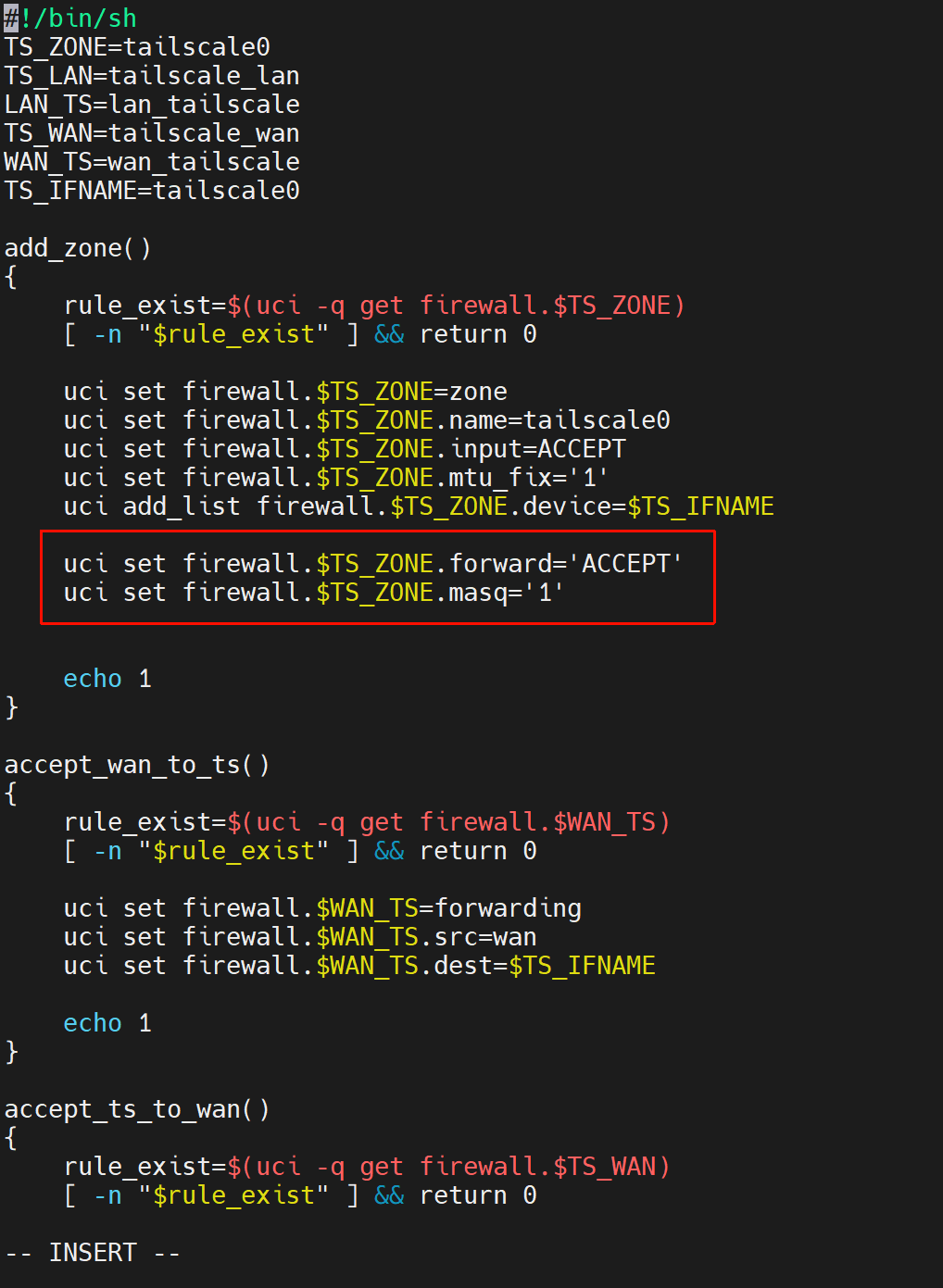
Alternatively, if you think that changing the default forwarding of the tailscale0 firewall zone to “accept” and enabling Masquerading is a better approach, you can try modifying this file /etc/firewall.tailscale.sh as follows.

uci set firewall.$TS_ZONE.forward='ACCEPT'
uci set firewall.$TS_ZONE.masq='1'

This topic was automatically closed 90 days after the last reply. New replies are no longer allowed.