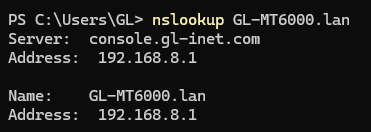
I think you should change inside firmware from console.gl-inet.com to console.gl-inet.lan or something similar.
Why: some devices with encrypted DNS or forced DNSSEC rejects console.gl-inet.com because it points to:
console.gl-inet.com.	300	IN	A	104.21.95.157
console.gl-inet.com.	300	IN	A	172.67.145.231
This interfere with what router try to advertise: 192.168.8.1 on this address.
You should simply change TLD from .com to something local like .lan or .local.
More and more devices implement security features nowadays like DNSSEC, DoH/DoT, HTTPS enforcement etc. All of them conflict with your local adress, because system thinks that it was spoofed (DNSSEC fails). You should definitely yse proper .lan adresses that designed to be used in such scenarios.
IMHO, that is bad practice and no longer state-of-the-art. The current advice is to use fully qualified domain names, which is precisely what is done here.
May you explain why this is an issue? I don't see a reason why you even should be able to access via this domain - but maybe I'm overlooking something?
I cannot use local domain to get into router's settings because of forced DoT/DoH and DNSSEC on my client (device that connects to router) side. Because console.gl-inet.com treated as normal domain, so it forced to resolve through DoT/DoH instead of through router. Changing .com to .lan in LuCi fixes everything.
Because that's how IT thinks it should be right now. FQDN is always better than just local top-level domains. FQDN allows you to use Let's Encrypt (or true TLS), for example.
Call me old school, but I always access my router using the IP rather than the domain. Or I would use the GLDDNS address in combination with Let's Encrypt (see How-To: Let's Encrypt on GLDDNS domain )
But yeah, you've got a point here. @bruce maybe something R&D should think about? A quick fix might be to set the router's default IP (at least the usual 192.168.8.1) as a DNS entry on the public DNS for console.gl-inet.com? Or perhaps introducing mDNS via Avahi for "gl-router.local" or something like that?
Resolving this router side would require dns hijack and all queries to be routed through dnsmasq which would defeat the purpose of DoH; this can only be solved by changing from .com to a local address like .lan .local so that the host os doesn’t resolve it through encrypted dns.
Other way would be an exclusion list on the host device.
Exactly! And for example in privacy-oriented configs (LibreWolf, Arkenfox etc) this leads to simple outcome: host unreachable or shows some generic page just like if you visit it without gl router.
Plain DNS and HTTP where hijack can work is pretty outdated, and more and more things use encrypted versions...
The thing is clients usually DO NOT pass .lan domains through encrypted DNS, so changing domain TLD to .lan will fix it.
It is simply inconvenient.
I use some devices that need to have access to router (i host on it something on custom port), and when i change ip of router it breaks that, so i need to change it in clients too. It will be easier to enter console.gl-inet.lan:7858 (or whatever you choose). This will fix requirement to update IPs
Simple: why you still rely on legacy unencrypted protocols? It is 2026! It is like 90% of clients now use encrypted comms...
This isn't a good approach because you don't know about the future, and maybe .lan will be available for public registration. See the fritz.box incident in Germany. .local is the only one that is protected so far. If a TLD isn't protected by ICANN - don't use it for internal stuff. .local however isn't reserved for DNS, only for mDNS. The only true internal domain space is home.arpa, see RFC 8375 - Special-Use Domain 'home.arpa.'
It might be 2026 - but DNS inside networks is still unencrypted in nearly all cases. Because it's no real security issue as long as you control the network itself. And encrypted DNS without proper CA is just useless because it will not validate the answer.
So there are still 2 very valid options:
Tell your DNS responder that "whatever-address-you-like" resolves to your router.
Use IP to connect.
The alternative: Split-DNS. Using DoH or DoT against public DNS servers isn't useful if you host (or want to reach) services inside your network. Install a local DNS resolver (for example AdGuard on your router) to avoid issues.
They either use cloudflare-dns.com (over DoT) or do not use it at all. And turning it on/off whan i am not in my network is plain bad idea since i can forget to turn it on in another network and get snooped or hacked.
What prevents to use it not by it's purpose?
OpenWRT in hostnames section even recommends to use .lan. It is home router, not a spaceship
And yet using an unqualified name would, as near as I can tell, avoid the problem.
While that obviously works (until you change the subnet but forget to change browser shortcuts), it seems philosophically wrong to provide a domain name that can’t be used (in some circumstances). It also feels just plain wrong to me to have anything on my LAN with a .com TLD.