My Comet Pro passes audio, but the audio stutters, and the audio sounds very high-pitched. It was doing this with the regular comet as well. No issues passing video. Using 1920x1080 ASUS 60hz EDID. The host computer only has DisplayPort output for monitors. I have used two different DisplayPort to HDMI cables (UGREEN brand) from my host computer to the input of the Comet Pro. One active cable and one passive cable, neither of which resolved my issue. I have set the video quaility to low and there is no improvement to the sound. The host computer is running Windows 11 which I don’t have admin access. Remoting in through a Windows 11 computer via the KVM app as well as the IP address and it made no difference. Comet Pro is using ethernet connection. What can I do to get the audio working correctly?
Hi, I have recived your email from ticket system and follow up via email.
We found that the noise suppression and echo cancellation automatically performed by the browser might be the root cause of the issue. We will disable both features in version 1.8.1.
Here to report that I am having the same issue. What’s the eta on version 1.8.1? In the meantime should we downgrade software versions?
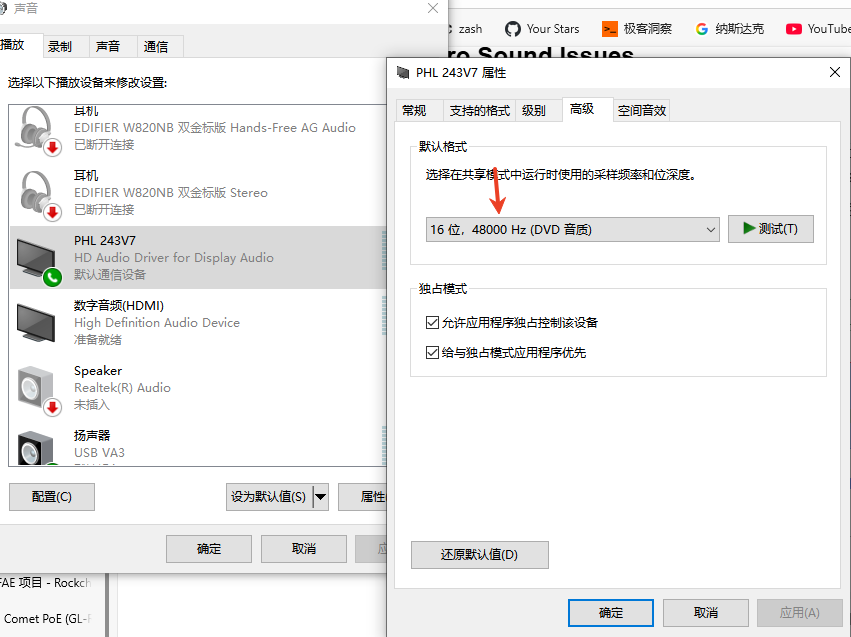
If you didn’t use the microphone, it shouldn’t be the issue I mentioned before. You can take a look at your controlled pc and see if your video output sampling rate is 48Khz. KVM requires the audio sampling rate to be only 48k.
This topic was automatically closed 90 days after the last reply. New replies are no longer allowed.