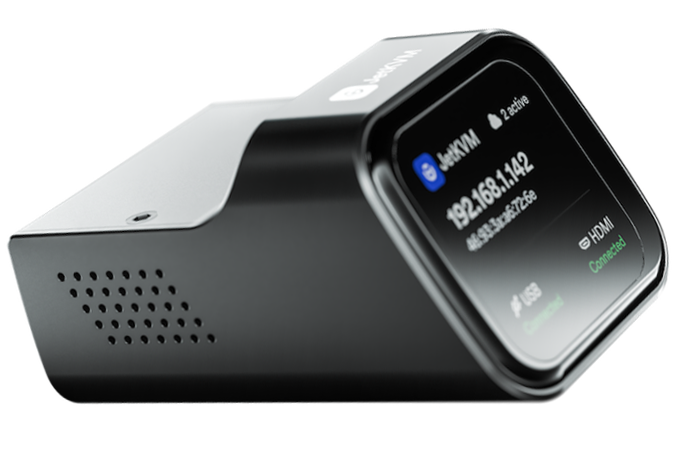
I just noticed the Comet Pro campaign:
What is the purpose of having a touchscreen display on it?
I guess it's supposed to be connected to a computer that will be remotely controlled, so I cannot understand why a display is needed.
I just noticed the Comet Pro campaign:
What is the purpose of having a touchscreen display on it?
I guess it's supposed to be connected to a computer that will be remotely controlled, so I cannot understand why a display is needed.
Bro because they need to sell. They need to sell a seperate product with video outputting capabilities when they could of added that into RM1. Money make the world go round.
Imagine a server room that has 1U dedicated to a collection of these or a site with digital signage systems.
How are you going to match the IP to the machine?
I guess they took inpiration from their Slate 7 travel router and the JetKVM. It's actually not a feature I need. I would be happy with HDMI-Passthrough and WIFI, cause I have 1-2 two machines in my homelab I'd would love to reach via Network.
Not a fan of Kickstarter campaigns though.
You & me both. The hardware specs announced also look brilliant for hacking on.
Agreed. Never preorder!
But if someone don't know the server's IP in a server's room, this IT guy is really an amateur.
Do you mean they added the touchscreen display just to show you the IP of the machine where it's connected?
I'm a little more than reasonably sure it wouldn't have access to the OS to poll the server's NIC. I was thinking more in line of OOB management for machines that didn't have onboard IPKVM/DRAC/etc/whatever. Sites also sometimes use NUCs for digital signage systems. They don't have native IPKVM as they're technically SOHO machines.
I'm kind of spit balling ideas here. I'm sure there's more than a few use cases others will come up with.
Although a large number of users are professional IT personnel who do not need a touch screen, from our technical support experience, a touch screen can significantly lower the threshold for users to use it.
Not only does it display the IP, users can see the connection status of each interface through the screen, and even preview the video. Users can rely on the screen to complete the initialization settings without having to find another computer on site. These features can help users quickly complete installation and deployment.
Personally, I don't think checking an IP address is very useful, but it would be really helpful if we could preview the HDMI display.
But, Comet is supposed to be connected to a REMOTE computer, isn't?
If I'm accessing a remote computer, I don't have access to Comet. So, doesn't matter if has a touchscreen display.
You always need to install once.
Of course, for users who do not need display and WIFI, we also prepare comet and comet POE
When it talks about wifi I assume this for users which have restrictions for physical ethernet cabling? So you deploy it where a pc or server is and as long as the wifi reaches the AP/router then everything else works as normal?
Of course, but if you need to ensure image transmission, the WIFI speed should be at least 10Mbps
Heh; so I recently learned PiKVM runs on Arch Linux. Wait until some enterprising hacker adds Wi-Fi bridging (repeater/extender functionality) to it. That'll be fun to read. 
This topic was automatically closed after 25 days. New replies are no longer allowed.