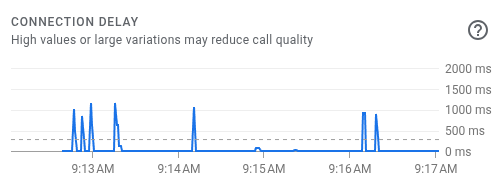
Ever since I switched from AX-3000 TP-Link router to Beryl 7 (GL-MT3600BE), I noticed connection delays started to happen very often in my meetings. This is something I noticed from first week, but it’s been a few months by now, and the issue is still there and slightly worse with the latest versions.
The location between my laptop and the router hasn’t changed as both stay in the same position. The distance between those is 4 meters and there’s nothing in between.
I’d appreciate any suggestions to start debugging this.
Extra information that might be relevant:
When router was new from factory, delays would be around 300-600ms, now they seem to reach 1000ms like shown in the picture.
Feature status in the router: Adguard off, only 5ghz enabled, vpn server enabled, vpn client enabled, iot network disabled, guest network enabled, networks at channel 100 at 5Ghz
A homelab wifi network was added for some devices, but the issue was still there before this was ever in the picture
Wifi-analyzer show only my main network, homelab network and guest network as overlapping, so nobody else nearby is using the same channel.
Were you also using the same VPN connection when you previously used the TP-Link router? If possible, please temporarily disable the VPN client and check whether the delay still occurs during meetings.
At the same time, please continuously ping both the Beryl 7 LAN IP address and a public IP address, for example:
ping 192.168.8.1
ping 8.8.8.8
When the delay occurs, please check whether both ping results increase at the same time, or only the public IP shows a latency spike.
Could you also let us know how the Beryl 7 is currently connected to the Internet, via Ethernet WAN or Repeater?
If convenient, could you please also connect the same computer to the Beryl 7 via Ethernet and perform a short comparison test under the same conditions?
Please also let us know the firmware version currently installed on the Beryl 7.
Came back and ready to test. Haven’t seen issues so far the only changes currently applied are:
Hardware acceleration is still disabled
I turned off a camera that was having issues and constantly disconnected and connected
There’s no setting to enable Airtime fairness in the UI, and it’s disabled from what I saw in the uci settings, so the camera may have been the culprit.
Will keep observing the behavior, and might turn the camera back on to test.
The wan connection is flapping, kmwan (multi wan) process starts shifting around, connection and vpn policy routing restarts.
I observed something like this before, like very tiny spikes which are time outs, I had to re-terminate it.
But if this flow happens in this way it makes sense that connections like dhcp are also getting dropped because the killswitch also temporary kicks in.
Finally got an opportunity to test with ping during a call with hardware acceleration disabled.
In summary, both 192.168.8.1 and 8.8.8.8 saw latency increases at the same time.
Latency got worse when another device was streaming video at the same time as the call, but even if said device was idle, there were still some high latency spikes.
 )
)