When you are doing a lot of copy paste commands the kvm will throw in characters or leave characters out which screws up the commands or programming im trying to put into the terminal. The The commands show up correctly on the admin screen but when i hit paste thats when it can go crazy so its the hand off from the kvm to the terminal thats the problem. other then that i love this device. This doesn’t happen every time but enough to make it highly annoying when you doing alot of copy paste bash commands or programming. maybe its more prone to large size copy paste command structure? but if someone could look into fixing this then that would be great.
Is it during remote access or local network access?
Bumping this post because it is still an issue as of v1.8.0 r1:
When using Toolbox > Clipboard > Paste to Remote Device, some unwanted behaviors happen:
- If the input contains special characters, they are omitted or replaced with other ones. An example would be the “<“ character that is sometimes omitted or replaced with “z”
- If the input only contains ASCII and whitespace characters, some of them are omitted in rare cases (it seems most of the time after a new-line character)
As the OP mentioned, it is quite annoying as we’re forced to always double check that want we wanted to copy is indeed what has been copied and then adjust manually.
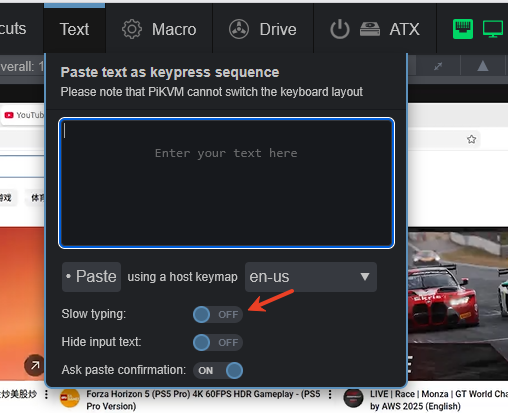
This is related to the software you paste to. For example, Windows Notepad does not support entering text at a very fast speed. If you try to use KVM to paste content into Notepad, you will find that many characters are missed. If you encounter this situation, the feature you need is to reduce the speed of pasting.
1 Like
Is there a way to set paste speed as of v1.8.0 r1? I can’t find such option in the Toolbox sidebar in the web app.
We will add this button in the next version. But for now, please use the buttons in the PIKVM UI.