I solved the problem of unreadable uboot output on my GL-MT300N-V2 using another UART adapter ( The problem is described in this thread:
UBOOT wrong serial speed? - #3 by alzhao )
On the adapter in the blue box PL2303TA - the output uboot unreadable (or nothing is output)
On the PL2303 without box - ok (TXD on adapter connect to RXO on GL-MT300N-V2 )
)
1 Like
Indeed uboot works now with another UART adapter. I can enter the uboot console and get the ath> prompt. Can you get me on track to flash a new openwrt 21.02 system?
I tried this: start the httpd in uboot. I get the Firmware screen on 192.168.1.1. When I try to upload a image from the Openwrt site, a lot of lines like
####################################
flow over the uboot console, then stop. In the web browser, the connection is reset.
Actually the ##################### is totally correct. This is the upload process. But after that, it should be able to write to flash. Generally it should be use ***********************.
Can you give a full screenshot of the console output?
Can you refer to this guide Advanced Uboot - GL.iNet Docs
For this one you need to set up a tftp server and use command to flash, not using the web panel.
1 Like
I got upload the image via tftp, and now it did the write to nand flash. The box is runnung now on 21.02! So the problem is solved. Thank you for your suggestions.
1 Like
I am experiencing the same problem. However the hyperlink to the guide is expired. Can you please repost?
Did you mean the uboot guide?
Hi @bruce I believe I will need to do a tftp recovery (using serial). I have followed the webUI procedures as suggested by GL-inet's support team (I have been communicating with Lucas) with no effect.
Here is another dump of the ath> shell. When I tried flashing the uboot-gl-ar300m-20201224-md5-d06d53166f9eb2cb321c15c3ec0a87e0.bin. It resulted with an error.
Upgrade type: U-Boot
Upload file size: 244244 bytes
## Error: wrong file size, should be: 65536 bytes!
BigMe ~ % sudo kermit -c
Password:
Connecting to /dev/tty.PL2303G-USBtoUART1140, speed 115200
 Escape character: Ctrl-\ (ASCII 28, FS): enabled
Type the escape character followed by C to get back,
or followed by ? to see other options.
----------------------------------------------------

Web failsafe mode aborted!

Warning: Bootlimit (3) exceeded. Using altbootcmd.
ath> ?
?       - alias for 'help'
autoscr - run script from memory
base    - print or set address offset
bdinfo  - print Board Info structure
boot    - boot default, i.e., run 'bootcmd'
bootd   - boot default, i.e., run 'bootcmd'
bootelf - Boot from an ELF image in memory
bootm   - boot application image from memory
bootp	- boot image via network using BootP/TFTP protocol
bootvx  - Boot vxWorks from an ELF image
cmp     - memory compare
coninfo - print console devices and information
cp      - memory copy
crc32   - checksum calculation
dhcp	- invoke DHCP client to obtain IP/boot params
echo    - echo args to console
erase   - erase FLASH memory
ethreg  - Switch/PHY Reg rd/wr  utility
exit    - exit script
flinfo  - print FLASH memory information
go      - start application at address 'addr'
help    - print online help
httpd	- start www server for firmware recovery
iminfo  - print header information for application image
itest	- return true/false on integer compare
loop    - infinite loop on address range
mct   - simple RAM test
md      - memory display
mii     - MII utility commands
mm      - memory modify (auto-incrementing)
mtest   - simple RAM test
mw      - memory write (fill)
nand    - NAND sub-system
nboot   - boot from NAND device
nfs	- boot image via network using NFS protocol
nm      - memory modify (constant address)
pci     - list and access PCI Configuration Space
ping	- send ICMP ECHO_REQUEST to network host
pll cpu-pll dither ddr-pll dither - Set to change CPU & DDR speed
pll erase
pll get
printenv- print environment variables
progmac - Set ethernet MAC addresses
progmac2 - Set ethernet MAC addresses
protect - enable or disable FLASH write protection
rarpboot- boot image via network using RARP/TFTP protocol
reset   - Perform RESET of the CPU
run     - run commands in an environment variable
saveenv - save environment variables to persistent storage
setenv  - set environment variables
sleep   - delay execution for some time
test    - minimal test like /bin/sh
tftpboot- boot image via network using TFTP protocol
version - print monitor version
ath> httpd
Trying eth1
HTTP server is starting at IP: 192.168.1.1
HTTP server is ready!

Request for----: /
we are here 1
open file: /index.html--finished reading file---
Request for----: /style.css
we are here 2
open file: /style.css--finished reading file---
Request for----: /
we are here 1
open file: /index.html--finished reading file---
Request for----: /style.css
we are here 2
open file: /style.css--finished reading file---
Request for----: /uboot.html
we are here 2
open file: /uboot.html--finished reading file---
Request for----: /style.css
we are here 2
open file: /style.css--finished reading file---
Data will be downloaded at 0x80800000 in RAM
Upgrade type: U-Boot
Upload file size: 244244 bytes
## Error: wrong file size, should be: 65536 bytes!
Loading: #######################################
         #######################################
         #######################################
         #######################################
         ##############

open file: /fail.htmlRequest for----: /style.css
we are here 2
open file: /style.css--finished reading file---

Web failsafe mode aborted!

ath> httpd
Trying eth1
HTTP server is starting at IP: 192.168.1.1
HTTP server is ready!

Request for----: /uboot.html
we are here 2
open file: /uboot.html--finished reading file---
Request for----: /style.css
we are here 2
open file: /style.css--finished reading file---
Request for----: /
we are here 1
open file: /index.html--finished reading file---
Request for----: /style.css
we are here 2
open file: /style.css--finished reading file---

Web failsafe mode aborted!

?

U-Boot 1.1.4-g9abb38de (Aug 25 2016 - 08:51:31)

DRAM:  128 MB
Nor Flash:  16 MB, sector count = 256
*** Warning *** : PCIe WLAN Module not found !!!
NAND Flash:  128 MB, page size = 0x800 block size = 0x20000 oob size = 0x80
Protect off 9F040000 ... 9F04FFFF
Un-Protecting sectors 4..4 in bank 1
Un-Protected 1 sectors
Erasing Flash...Erasing flash...
First 0x4 last 0x4 sector size 0x10000
   4
Erased 1 sectors
Writing to Flash... write addr: 9f040000
done
Protecting sectors 4..4 in bank 1
Protected 1 sectors
Press reset button for at least:
- 5 sec. to run web failsafe mode
Reset button is pressed for:  5

Button was pressed for 5 sec...
HTTP server is starting for firmware update...

Trying eth0
eth0 link down
FAIL
Trying eth1
enet1 port0 up
dup 1 speed 1000
HTTP server is starting at IP: 192.168.1.1
HTTP server is ready!


----------------------------------------------------
Press:
  C to return to BigMe.local
  ? or H for this message
  0 (zero) to send the NUL (0) character
  B to send a BREAK signal (0.275sec)
  L to send a Long BREAK (1.5sec)
  U to hangup and close the connection
  Q to hangup and quit Kermit
  S for status
  ! to push to local shell
  Z to suspend
  \ backslash code:
    \nnn  decimal character code
    \Onnn octal character code
    \Xhh  hexadecimal character code;
    terminate with Carriage Return.
  Type the escape character again to send the escape character itself,
  or press the space-bar to resume the CONNECT session.
Press a key>
----------------------------------------------------

----------------------------------------------------
 Device: /dev/tty.PL2303G-USBtoUART1140
Speed 115200
 Terminal echo: remote
 Terminal bytesize: 8
 Command bytesize: 8
 Parity: none
 Autodownload: on
 Session log: (none)
 Carrier Detect      (CD):  Off
 Dataset Ready       (DSR): Off
 Clear To Send       (CTS): Off
 Ring Indicator      (RI):  Off
 Data Terminal Ready (DTR): On
 Request To Send     (RTS): On
 Elapsed time: 00:08:48
----------------------------------------------------

Web failsafe mode aborted!

Warning: Bootlimit (3) exceeded. Using altbootcmd.
ath> ?
?       - alias for 'help'
autoscr - run script from memory
base    - print or set address offset
bdinfo  - print Board Info structure
boot    - boot default, i.e., run 'bootcmd'
bootd   - boot default, i.e., run 'bootcmd'
bootelf - Boot from an ELF image in memory
bootm   - boot application image from memory
bootp	- boot image via network using BootP/TFTP protocol
bootvx  - Boot vxWorks from an ELF image
cmp     - memory compare
coninfo - print console devices and information
cp      - memory copy
crc32   - checksum calculation
dhcp	- invoke DHCP client to obtain IP/boot params
echo    - echo args to console
erase   - erase FLASH memory
ethreg  - Switch/PHY Reg rd/wr  utility
exit    - exit script
flinfo  - print FLASH memory information
go      - start application at address 'addr'
help    - print online help
httpd	- start www server for firmware recovery
iminfo  - print header information for application image
itest	- return true/false on integer compare
loop    - infinite loop on address range
mct   - simple RAM test
md      - memory display
mii     - MII utility commands
mm      - memory modify (auto-incrementing)
mtest   - simple RAM test
mw      - memory write (fill)
nand    - NAND sub-system
nboot   - boot from NAND device
nfs	- boot image via network using NFS protocol
nm      - memory modify (constant address)
pci     - list and access PCI Configuration Space
ping	- send ICMP ECHO_REQUEST to network host
pll cpu-pll dither ddr-pll dither - Set to change CPU & DDR speed
pll erase
pll get
printenv- print environment variables
progmac - Set ethernet MAC addresses
progmac2 - Set ethernet MAC addresses
protect - enable or disable FLASH write protection
rarpboot- boot image via network using RARP/TFTP protocol
reset   - Perform RESET of the CPU
run     - run commands in an environment variable
saveenv - save environment variables to persistent storage
setenv  - set environment variables
sleep   - delay execution for some time
test    - minimal test like /bin/sh
tftpboot- boot image via network using TFTP protocol
version - print monitor version
ath> coninfo
List of available devices:
serial   80000003 SIO stdin stdout stderr
ath> printenv
bootargs=board=CUS531-NAND console=ttyS0,115200  ubi.mtd=5,2048 root=/dev/mtdblock8 mtdparts=spi0.0:256k(u-boot)ro,64k(u-boot-env),128k(reserved),64k(art);spi0.1:2m(kernel),20m(rootfs),106m(data),22m@0x0(firmware) rootfstype=squashfs,jffs2 noinitrd
bootcmd=if nand bad; then nboot 0x81000000 0 || run blf; else run blf; fi
bootdelay=1
baudrate=115200
ethaddr=0x00:0xaa:0xbb:0xcc:0xdd:0xee
ipaddr=192.168.1.1
serverip=192.168.1.2
loadaddr=0x80800000
dir=
bootlimit=3
altbootcmd=run blf
blf=bootm 0x9f050000 || run lf; boot
nlf=if ping 192.168.1.2; then echo ok; elif ping 192.168.1.2; then echo ok; elif ping 192.168.1.2; then echo ok; elif echo ping 192.168.1.2; then echo ok; elif echo ping 192.168.1.2; then echo ok; else echo ping finally failed; fi; tftp 0x81000000 openwrt-ar71xx-nand-gl-ar300m-ubi.img && nand erase && nand write $fileaddr 0 $filesize
wlf=if nand bad; then nand erase && nand write $web_fileaddr 0 $web_filesize; else erase 0x9f050000 +e30000 && cp.b $web_fileaddr 0x9f050000 $web_filesize; fi; erase 0x9f040000 +0x10000
lu=tftp 0x80060000 ${dir}uboot_for_gl-ar300m.bin && erase 0x9f000000 +50000 && cp.b $fileaddr 0x9f000000 $filesize; reset
lf=if ping 192.168.1.2; then tftp 0x80060000 ${dir}openwrt-gl-ar300m.bin && erase 0x9f050000 +e30000 && cp.b $fileaddr 0x9f050000 $filesize; if nand bad; then run nlf; fi; else echo ping 192.168.1.2 failed; fi
lc=if ping 192.168.1.2; then tftp 0x81000000 config.bin && cp.b 0x9fff1000 0x80060000 0xf000 && cp.b 0x81000000 0x80060002 0x06 && erase 0x9fff0000 +0x10000 && cp.b 0x81000000 0x9fff0000 $filesize && cp.b 0x80060000 0x9fff1000 0xefff; else setenv bootcount 1 && saveenv && bootm 0x9fe80000; fi
bc=ap151-16M
lok=tftp 0x80060000 openwrt-ar71xx-generic-${bc}-kernel.bin && erase 0x9fe80000 +${filesize} && cp.b $fileaddr 0x9fe80000 $filesize
lof=tftp 0x80060000 openwrt-ar71xx-generic-${bc}-rootfs-squashfs.bin && erase 0x9f050000 +${filesize} && cp.b $fileaddr 0x9f050000 $filesize
lqsdk=run lof && run lok
web_fileaddr=0x80800000
web_filesize=0x4D81FD
stdin=serial
stdout=serial
stderr=serial
bootcount=333
ethact=eth1

Environment size: 2094/65532 bytes
ath> ?
?       - alias for 'help'
autoscr - run script from memory
base    - print or set address offset
bdinfo  - print Board Info structure
boot    - boot default, i.e., run 'bootcmd'
bootd   - boot default, i.e., run 'bootcmd'
bootelf - Boot from an ELF image in memory
bootm   - boot application image from memory
bootp	- boot image via network using BootP/TFTP protocol
bootvx  - Boot vxWorks from an ELF image
cmp     - memory compare
coninfo - print console devices and information
cp      - memory copy
crc32   - checksum calculation
dhcp	- invoke DHCP client to obtain IP/boot params
echo    - echo args to console
erase   - erase FLASH memory
ethreg  - Switch/PHY Reg rd/wr  utility
exit    - exit script
flinfo  - print FLASH memory information
go      - start application at address 'addr'
help    - print online help
httpd	- start www server for firmware recovery
iminfo  - print header information for application image
itest	- return true/false on integer compare
loop    - infinite loop on address range
mct   - simple RAM test
md      - memory display
mii     - MII utility commands
mm      - memory modify (auto-incrementing)
mtest   - simple RAM test
mw      - memory write (fill)
nand    - NAND sub-system
nboot   - boot from NAND device
nfs	- boot image via network using NFS protocol
nm      - memory modify (constant address)
pci     - list and access PCI Configuration Space
ping	- send ICMP ECHO_REQUEST to network host
pll cpu-pll dither ddr-pll dither - Set to change CPU & DDR speed
pll erase
pll get
printenv- print environment variables
progmac - Set ethernet MAC addresses
progmac2 - Set ethernet MAC addresses
protect - enable or disable FLASH write protection
rarpboot- boot image via network using RARP/TFTP protocol
reset   - Perform RESET of the CPU
run     - run commands in an environment variable
saveenv - save environment variables to persistent storage
setenv  - set environment variables
sleep   - delay execution for some time
test    - minimal test like /bin/sh
tftpboot- boot image via network using TFTP protocol
version - print monitor version
ath> bdinfo
boot_params = 0x87F6FFB0
memstart    = 0x80000000
memsize     = 0x08000000
flashstart  = 0x9F000000
flashsize   = 0x01000000
flashoffset = 0x0003236C
ethaddr     = 00:AA:BB:CC:DD:EE
ip_addr     = 192.168.1.1
baudrate    = 115200 bps
ath>
I think you mean this one
@alzhao For some reason from uboot webUI, then forcing a restart of the webUI in ath> prompt successfully flashed and revived the device with the openwrt-gl-ar300m-clean-2.264.img firmware.
What check should I do to confirm the device is ready for further uboot and firmware upgrade?
Last login: Mon Aug 25 11:52:29 on ttys000
BigMe ~ % sudo kermit -c
Password:
Connecting to /dev/tty.PL2303G-USBtoUART1140, speed 115200
 Escape character: Ctrl-\ (ASCII 28, FS): enabled
Type the escape character followed by C to get back,
or followed by ? to see other options.
----------------------------------------------------


U-Boot 1.1.4-g9abb38de (Aug 25 2016 - 08:51:31)

DRAM:  128 MB
Nor Flash:  16 MB, sector count = 256
*** Warning *** : PCIe WLAN Module not found !!!
NAND Flash:  128 MB, page size = 0x800 block size = 0x20000 oob size = 0x80
Protect off 9F040000 ... 9F04FFFF
Un-Protecting sectors 4..4 in bank 1
Un-Protected 1 sectors
Erasing Flash...Erasing flash...
First 0x4 last 0x4 sector size 0x10000
   4
Erased 1 sectors
Writing to Flash... write addr: 9f040000
done
Protecting sectors 4..4 in bank 1
Protected 1 sectors
Press reset button for at least:
- 5 sec. to run web failsafe mode
Reset button is pressed for:  5

Button was pressed for 5 sec...
HTTP server is starting for firmware update...

Trying eth0
eth0 link down
FAIL
Trying eth1
enet1 port0 up
dup 1 speed 1000
HTTP server is starting at IP: 192.168.1.1
HTTP server is ready!


Web failsafe mode aborted!

Warning: Bootlimit (3) exceeded. Using altbootcmd.
ath> flinfo

Bank # 1: The hell do you want flinfo for??
ath> board_hw_id_show
Unknown command 'board_hw_id_show' - try 'help'
ath> ?
?       - alias for 'help'
autoscr - run script from memory
base    - print or set address offset
bdinfo  - print Board Info structure
boot    - boot default, i.e., run 'bootcmd'
bootd   - boot default, i.e., run 'bootcmd'
bootelf - Boot from an ELF image in memory
bootm   - boot application image from memory
bootp	- boot image via network using BootP/TFTP protocol
bootvx  - Boot vxWorks from an ELF image
cmp     - memory compare
coninfo - print console devices and information
cp      - memory copy
crc32   - checksum calculation
dhcp	- invoke DHCP client to obtain IP/boot params
echo    - echo args to console
erase   - erase FLASH memory
ethreg  - Switch/PHY Reg rd/wr  utility
exit    - exit script
flinfo  - print FLASH memory information
go      - start application at address 'addr'
help    - print online help
httpd	- start www server for firmware recovery
iminfo  - print header information for application image
itest	- return true/false on integer compare
loop    - infinite loop on address range
mct   - simple RAM test
md      - memory display
mii     - MII utility commands
mm      - memory modify (auto-incrementing)
mtest   - simple RAM test
mw      - memory write (fill)
nand    - NAND sub-system
nboot   - boot from NAND device
nfs	- boot image via network using NFS protocol
nm      - memory modify (constant address)
pci     - list and access PCI Configuration Space
ping	- send ICMP ECHO_REQUEST to network host
pll cpu-pll dither ddr-pll dither - Set to change CPU & DDR speed
pll erase
pll get
printenv- print environment variables
progmac - Set ethernet MAC addresses
progmac2 - Set ethernet MAC addresses
protect - enable or disable FLASH write protection
rarpboot- boot image via network using RARP/TFTP protocol
reset   - Perform RESET of the CPU
run     - run commands in an environment variable
saveenv - save environment variables to persistent storage
setenv  - set environment variables
sleep   - delay execution for some time
test    - minimal test like /bin/sh
tftpboot- boot image via network using TFTP protocol
version - print monitor version
ath> httpd
Trying eth1
HTTP server is starting at IP: 192.168.1.1
HTTP server is ready!

Request for----: /
we are here 1
open file: /index.html--finished reading file---
Request for----: /style.css
we are here 2
open file: /style.css--finished reading file---
Data will be downloaded at 0x80800000 in RAM
Upgrade type: firmware
Upload file size: 4980736 bytes
Loading: #######################################
         #######################################
         #######################################
         #######################################
         #######################################
         #######################################
         #######################################
         #######################################
         #######################################
         #######################################
         #######################################
         #######################################
         #######################################
         #######################################
         #######################################
         #######################################
         #######################################
         #######################################
         #######################################
         #######################################
         #######################################
         #######################################
         #######################################
         #######################################
         #######################################
         #######################################
         #######################################
         #######################################
         #######################################
         #######################################
         #######################################
         #######################################
         #######################################
         #######################################
         #######################################
         #######################################
         #######################################
         #######################################
         #######################################
         #######################################
         #######################################
         #######################################
         #######################################
         #######################################
         #######################################
         #######################################
         #######################################
         #######################################
         #######################################
         #######################################
         #######################################
         #######################################
         #######################################
         #######################################
         #######################################
         #######################################
         #######################################
         #######################################
         #######################################
         #######################################
         #######################################
         #######################################
         #######################################
         #######################################
         #######################################
         #######################################
         #######################################
         #######################################
         #######################################
         #######################################
         #######################################
         #######################################
         #######################################
         #######################################
         #######################################
         #######################################
         #######################################
         #######################################
         #######################################
         #######################################
         #######################################
         #######################################
         #######################################
         #######################################
         #######################################
         #######################################
         #######################################
         #######################################
         #############

open file: /flashing.htmlHTTP upload is done! Upgrading...


****************************
*    FIRMWARE UPGRADING    *
* DO NOT POWER OFF DEVICE! *
****************************

Executing: setenv web_fileaddr 0x80800000; setenv web_filesize 0x4C0000; saveenv; run wlf

Saving Environment to Flash...
Protect off 9F040000 ... 9F04FFFF
Un-Protecting sectors 4..4 in bank 1
Un-Protected 1 sectors
Erasing Flash...Erasing flash...
First 0x4 last 0x4 sector size 0x10000
   4
Erased 1 sectors
Writing to Flash... write addr: 9f040000
done
Protecting sectors 4..4 in bank 1
Protected 1 sectors

Device 0 bad blocks:
  06000000
  07fe0000

NAND erase: device 0 offset 0x0, size 0x8000000
OK

NAND write: device 0 offset 0x0, size 4980736 ...  4980736 bytes written: OK
Erasing flash...
First 0x4 last 0x4 sector size 0x10000
   4
Erased 1 sectors
HTTP ugrade is done! Rebooting...

?

U-Boot 1.1.4-g9abb38de (Aug 25 2016 - 08:51:31)

DRAM:  128 MB
Nor Flash:  16 MB, sector count = 256
*** Warning *** : PCIe WLAN Module not found !!!
NAND Flash:  128 MB, page size = 0x800 block size = 0x20000 oob size = 0x80
Protect off 9F040000 ... 9F04FFFF
Un-Protecting sectors 4..4 in bank 1
Un-Protected 1 sectors
Erasing Flash...Erasing flash...
First 0x4 last 0x4 sector size 0x10000
   4
Erased 1 sectors
Writing to Flash... write addr: 9f040000
done
Protecting sectors 4..4 in bank 1
Protected 1 sectors
Hit any key to stop autoboot:  0
Device calibrated. Booting ...

Device 0 bad blocks:
  06000000
  07fe0000

Loading from device 0: ath-spi-nand (offset 0x0)
   Image Name:   MIPS OpenWrt Linux-3.18.27
   Created:      2017-11-20   7:02:11 UTC
   Image Type:   MIPS Linux Kernel Image (lzma compressed)
   Data Size:    1372845 Bytes =  1.3 MB
   Load Address: 80060000
   Entry Point:  80060000
## Booting image at 81000000 ...
   Image Name:   MIPS OpenWrt Linux-3.18.27
   Created:      2017-11-20   7:02:11 UTC
   Image Type:   MIPS Linux Kernel Image (lzma compressed)
   Data Size:    1372845 Bytes =  1.3 MB
   Load Address: 80060000
   Entry Point:  80060000
   Verifying Checksum at 0x81000040 ...OK
   Uncompressing Kernel Image ... OK
No initrd
## Transferring control to Linux (at address 80060000) ...
## Giving linux memsize in bytes, 134217728

Starting kernel ...

[    0.000000] Linux version 3.18.27 (alzhao@alzhao-ubuntu) (gcc version 4.8.3 (OpenWrt/Linaro GCC 4.8-2014.04 r47065) ) #1 Thu Nov 16 14:56:02 HKT 2017
[    0.000000] bootconsole [early0] enabled
[    0.000000] CPU0 revision is: 00019374 (MIPS 24Kc)
[    0.000000] SoC: Qualcomm Atheros QCA9533 ver 2 rev 0
[    0.000000] Determined physical RAM map:
[    0.000000]  memory: 08000000 @ 00000000 (usable)
[    0.000000] Initrd not found or empty - disabling initrd
[    0.000000] Zone ranges:
[    0.000000]   Normal   [mem 0x00000000-0x07ffffff]
[    0.000000] Movable zone start for each node
[    0.000000] Early memory node ranges
[    0.000000]   node   0: [mem 0x00000000-0x07ffffff]
[    0.000000] Initmem setup node 0 [mem 0x00000000-0x07ffffff]
[    0.000000] Primary instruction cache 64kB, VIPT, 4-way, linesize 32 bytes.
[    0.000000] Primary data cache 32kB, 4-way, VIPT, cache aliases, linesize 32 bytes
[    0.000000] Built 1 zonelists in Zone order, mobility grouping on.  Total pages: 32512
[    0.000000] Kernel command line:  board=GL-AR300M console=ttyS0,115200 mtdparts=spi0.0:256k(u-boot)ro,64k(u-boot-env),16000k(reserved),64k(art);spi0.1:2048k(kernel),-(ubi) rootfstype=squashfs noinitrd
[    0.000000] PID hash table entries: 512 (order: -1, 2048 bytes)
[    0.000000] Dentry cache hash table entries: 16384 (order: 4, 65536 bytes)
[    0.000000] Inode-cache hash table entries: 8192 (order: 3, 32768 bytes)
[    0.000000] Writing ErrCtl register=00000000
[    0.000000] Readback ErrCtl register=00000000
[    0.000000] Memory: 125212K/131072K available (3066K kernel code, 139K rwdata, 640K rodata, 240K init, 193K bss, 5860K reserved)
[    0.000000] SLUB: HWalign=32, Order=0-3, MinObjects=0, CPUs=1, Nodes=1
[    0.000000] NR_IRQS:51
[    0.000000] Clocks: CPU:650.000MHz, DDR:597.290MHz, AHB:216.666MHz, Ref:25.000MHz
[    0.000000] Calibrating delay loop... 432.53 BogoMIPS (lpj=2162688)
[    0.060000] pid_max: default: 32768 minimum: 301
[    0.060000] Mount-cache hash table entries: 1024 (order: 0, 4096 bytes)
[    0.070000] Mountpoint-cache hash table entries: 1024 (order: 0, 4096 bytes)
[    0.080000] NET: Registered protocol family 16
[    0.080000] MIPS: machine is GL-AR300M
[    0.540000] usbcore: registered new interface driver usbfs
[    0.540000] usbcore: registered new interface driver hub
[    0.550000] usbcore: registered new device driver usb
[    0.550000] Switched to clocksource MIPS
[    0.560000] NET: Registered protocol family 2
[    0.560000] TCP established hash table entries: 1024 (order: 0, 4096 bytes)
[    0.560000] TCP bind hash table entries: 1024 (order: 0, 4096 bytes)
[    0.570000] TCP: Hash tables configured (established 1024 bind 1024)
[    0.580000] TCP: reno registered
[    0.580000] UDP hash table entries: 256 (order: 0, 4096 bytes)
[    0.590000] UDP-Lite hash table entries: 256 (order: 0, 4096 bytes)
[    0.590000] NET: Registered protocol family 1
[    0.600000] futex hash table entries: 256 (order: -1, 3072 bytes)
[    0.620000] squashfs: version 4.0 (2009/01/31) Phillip Lougher
[    0.630000] jffs2: version 2.2 (NAND) (SUMMARY) (LZMA) (RTIME) (CMODE_PRIORITY) (c) 2001-2006 Red Hat, Inc.
[    0.640000] msgmni has been set to 244
[    0.650000] io scheduler noop registered
[    0.650000] io scheduler deadline registered (default)
[    0.660000] Serial: 8250/16550 driver, 16 ports, IRQ sharing enabled
[    0.670000] console [ttyS0] disabled
[    0.690000] serial8250.0: ttyS0 at MMIO 0x18020000 (irq = 11, base_baud = 1562500) is a 16550A
[    0.700000] console [ttyS0] enabled
[    0.700000] console [ttyS0] enabled
[    0.710000] bootconsole [early0] disabled
[    0.710000] bootconsole [early0] disabled
[    0.720000] m25p80 spi0.0: found w25q128, expected m25p80
[    0.720000] m25p80 spi0.0: w25q128 (16384 Kbytes)
[    0.730000] 4 cmdlinepart partitions found on MTD device spi0.0
[    0.730000] Creating 4 MTD partitions on "spi0.0":
[    0.740000] 0x000000000000-0x000000040000 : "u-boot"
[    0.740000] 0x000000040000-0x000000050000 : "u-boot-env"
[    0.750000] 0x000000050000-0x000000ff0000 : "reserved"
[    0.760000] 0x000000ff0000-0x000001000000 : "art"
[    0.770000] nand: device found, Manufacturer ID: 0xc8, Chip ID: 0xb1
[    0.770000] nand: Giga Device NAND 128MiB 1,8V 16-bit
[    0.780000] nand: 128MiB, MLC, page size: 2048, OOB size: 128
[    0.790000] Scanning device for bad blocks
[    2.400000] Bad eraseblock 768 at 0x000006000000
[    2.940000] Bad eraseblock 1023 at 0x000007fe0000
[    2.940000] 2 cmdlinepart partitions found on MTD device spi0.1
[    2.950000] Creating 2 MTD partitions on "spi0.1":
[    2.950000] 0x000000000000-0x000000200000 : "kernel"
[    2.960000] 0x000000200000-0x000008000000 : "ubi"
[    2.980000] libphy: ag71xx_mdio: probed
[    3.570000] ag71xx ag71xx.0: connected to PHY at ag71xx-mdio.1:04 [uid=004dd042, driver=Generic PHY]
[    3.580000] eth0: Atheros AG71xx at 0xb9000000, irq 4, mode:MII
[    4.170000] ag71xx-mdio.1: Found an AR934X built-in switch
[    4.210000] eth1: Atheros AG71xx at 0xba000000, irq 5, mode:GMII
[    4.220000] usbcore: registered new interface driver cdc_ether
[    4.220000] usbcore: registered new interface driver lg-vl600
[    4.230000] usbcore: registered new interface driver cdc_acm
[    4.240000] cdc_acm: USB Abstract Control Model driver for USB modems and ISDN adapters
[    4.240000] TCP: cubic registered
[    4.250000] NET: Registered protocol family 17
[    4.250000] bridge: automatic filtering via arp/ip/ip6tables has been deprecated. Update your scripts to load br_netfilter if you need this.
[    4.270000] Bridge firewalling registered
[    4.270000] 8021q: 802.1Q VLAN Support v1.8
[    4.280000] UBI: auto-attach mtd5
[    4.280000] UBI: attaching mtd5 to ubi0
[    6.450000] UBI: scanning is finished
[    6.620000] UBI: volume 1 ("rootfs_data") re-sized from 9 to 964 LEBs
[    6.630000] UBI: attached mtd5 (name "ubi", size 126 MiB) to ubi0
[    6.640000] UBI: PEB size: 131072 bytes (128 KiB), LEB size: 126976 bytes
[    6.640000] UBI: min./max. I/O unit sizes: 2048/2048, sub-page size 2048
[    6.650000] UBI: VID header offset: 2048 (aligned 2048), data offset: 4096
[    6.660000] UBI: good PEBs: 1006, bad PEBs: 2, corrupted PEBs: 0
[    6.660000] UBI: user volume: 2, internal volumes: 1, max. volumes count: 128
[    6.670000] UBI: max/mean erase counter: 1/0, WL threshold: 4096, image sequence number: 1056741116
[    6.680000] UBI: available PEBs: 0, total reserved PEBs: 1006, PEBs reserved for bad PEB handling: 18
[    6.690000] UBI: background thread "ubi_bgt0d" started, PID 281
[    6.700000] UBI: ubiblock0_0 created from ubi0:0(rootfs)
[    6.700000] ubiblock: device ubiblock0_0 (rootfs) set to be root filesystem
[    6.710000] drivers/rtc/hctosys.c: unable to open rtc device (rtc0)
[    6.740000] VFS: Mounted root (squashfs filesystem) readonly on device 254:0.
[    6.750000] Freeing unused kernel memory: 240K (80424000 - 80460000)
[    9.030000] init: Console is alive
[    9.050000] init: - watchdog -
[   11.710000] SCSI subsystem initialized
[   11.730000] ehci_hcd: USB 2.0 'Enhanced' Host Controller (EHCI) Driver
[   11.740000] ehci-platform: EHCI generic platform driver
[   11.750000] ehci-platform ehci-platform: EHCI Host Controller
[   11.750000] ehci-platform ehci-platform: new USB bus registered, assigned bus number 1
[   11.760000] ehci-platform ehci-platform: irq 3, io mem 0x1b000000
[   11.790000] ehci-platform ehci-platform: USB 2.0 started, EHCI 1.00
[   11.790000] hub 1-0:1.0: USB hub found
[   11.830000] hub 1-0:1.0: 1 port detected
[   11.830000] usbcore: registered new interface driver usb-storage
[   12.090000] init: - preinit -
[   13.050000] random: mktemp urandom read with 88 bits of entropy available
Press the [f] key and hit [enter] to enter failsafe mode
Press the [1], [2], [3] or [4] key and hit [enter] to select the debug level
[   16.380000] UBIFS: default file-system created
[   16.390000] UBIFS: background thread "ubifs_bgt0_1" started, PID 344
[   16.820000] UBIFS: mounted UBI device 0, volume 1, name "rootfs_data"
[   16.820000] UBIFS: LEB size: 126976 bytes (124 KiB), min./max. I/O unit sizes: 2048 bytes/2048 bytes
[   16.830000] UBIFS: FS size: 121008128 bytes (115 MiB, 953 LEBs), journal size 6094848 bytes (5 MiB, 48 LEBs)
[   16.840000] UBIFS: reserved for root: 4952683 bytes (4836 KiB)
[   16.850000] UBIFS: media format: w4/r0 (latest is w4/r0), UUID 1A03DE74-7E94-4AC7-8E1F-7CA17995D0A3, small LPT model
[   16.870000] mount_root: overlay filesystem has not been fully initialized yet
[   16.880000] mount_root: switching to jffs2 overlay
[   16.910000] procd: - early -
[   16.910000] procd: - watchdog -
[   17.740000] procd: - ubus -
[   18.760000] procd: - init -
Please press Enter to activate this console.
[   19.550000] NET: Registered protocol family 10
[   19.560000] ip6_tables: (C) 2000-2006 Netfilter Core Team
[   19.580000] Loading modules backported from Linux version v4.4-rc5-1913-gc8fdf68
[   19.590000] Backport generated by backports.git backports-20151218-0-g2f58d9d
[   19.600000] ip_tables: (C) 2000-2006 Netfilter Core Team
[   19.620000] nf_conntrack version 0.5.0 (1960 buckets, 7840 max)
[   19.660000] xt_time: kernel timezone is -0000
[   19.750000] PPP generic driver version 2.4.2
[   19.750000] NET: Registered protocol family 24
[   19.820000] ieee80211 phy0: Atheros AR9531 Rev:2 mem=0xb8100000, irq=47
[   23.610000] random: nonblocking pool is initialized
[   29.600000] device eth1 entered promiscuous mode
[   29.630000] br-lan: port 1(eth1) entered forwarding state
[   29.630000] br-lan: port 1(eth1) entered forwarding state
[   29.660000] IPv6: ADDRCONF(NETDEV_UP): eth0: link is not ready
[   30.560000] br-lan: port 1(eth1) entered disabled state
[   31.400000] eth1: link up (1000Mbps/Full duplex)
[   31.460000] br-lan: port 1(eth1) entered forwarding state
[   31.460000] br-lan: port 1(eth1) entered forwarding state
[   31.530000] IPv6: ADDRCONF(NETDEV_UP): wlan0: link is not ready
[   31.560000] device wlan0 entered promiscuous mode
[   32.540000] br-lan: port 2(wlan0) entered forwarding state
[   32.550000] br-lan: port 2(wlan0) entered forwarding state
[   32.550000] IPv6: ADDRCONF(NETDEV_CHANGE): wlan0: link becomes ready
[   33.460000] br-lan: port 1(eth1) entered forwarding state
[   34.550000] br-lan: port 2(wlan0) entered forwarding state
[  349.610000] br-lan: port 2(wlan0) entered disabled state
[  349.610000] br-lan: port 1(eth1) entered disabled state
[  349.620000] device eth1 left promiscuous mode
[  349.630000] br-lan: port 1(eth1) entered disabled state
[  349.640000] eth1: link down
[  349.640000] IPv6: ADDRCONF(NETDEV_UP): eth1: link is not ready
[  349.660000] device wlan0 left promiscuous mode
[  349.660000] br-lan: port 2(wlan0) entered disabled state
[  353.890000] Removing MTD device #5 (ubi) with use count 1
[  353.900000] reboot: Restarting system
?

U-Boot 1.1.4-g9abb38de (Aug 25 2016 - 08:51:31)

DRAM:  128 MB
Nor Flash:  16 MB, sector count = 256
*** Warning *** : PCIe WLAN Module not found !!!
NAND Flash:  128 MB, page size = 0x800 block size = 0x20000 oob size = 0x80
Protect off 9F040000 ... 9F04FFFF
Un-Protecting sectors 4..4 in bank 1
Un-Protected 1 sectors
Erasing Flash...Erasing flash...
First 0x4 last 0x4 sector size 0x10000
   4
Erased 1 sectors
Writing to Flash... write addr: 9f040000
done
Protecting sectors 4..4 in bank 1
Protected 1 sectors
Hit any key to stop autoboot:  0
Device calibrated. Booting ...

Device 0 bad blocks:
  06000000
  07fe0000

Loading from device 0: ath-spi-nand (offset 0x0)
   Image Name:   MIPS OpenWrt Linux-3.18.27
   Created:      2017-11-20   7:02:11 UTC
   Image Type:   MIPS Linux Kernel Image (lzma compressed)
   Data Size:    1372845 Bytes =  1.3 MB
   Load Address: 80060000
   Entry Point:  80060000
## Booting image at 81000000 ...
   Image Name:   MIPS OpenWrt Linux-3.18.27
   Created:      2017-11-20   7:02:11 UTC
   Image Type:   MIPS Linux Kernel Image (lzma compressed)
   Data Size:    1372845 Bytes =  1.3 MB
   Load Address: 80060000
   Entry Point:  80060000
   Verifying Checksum at 0x81000040 ...OK
   Uncompressing Kernel Image ... OK
No initrd
## Transferring control to Linux (at address 80060000) ...
## Giving linux memsize in bytes, 134217728
This is a very old topic and I need to pick up what is happening form memoery.
What is the problem now? Seems that you are able to boot old firmware, right?
Are you going to upgrade the firmware?
Cannot do it from your current firmware or uboot ui?
You want to upgrade the uboot to latest version, e.g. the one released in 2022?
Pls note, upgrading uboot is very dangerous and can brick your router completely.
Thank you for the swift response. I am now aware of the danger, should I received warning from the support staff before the upgrade procedure. I would have kept the device at factory v2.74 firmware.
Now stranded with a depreciated Openwrt 2.264 device and with no way to regain the older firmwares. I would like to perform the following if possible, in a safe manner:
- To update to the latest uboot (2022)
- So that I can flash the latest GL-inet firmware (v4.3.25)
Please advise kindly advise the best course of action.
You can refer to this post General instructions for flashing uboot on GL-AR300M, using your system as a tftpd server to supply the AR300M with the firmware · GitHub
for uboot flash.
Good luck.
1 Like
@alzhao
I am happy to report back I have success in upgrading the old AR300M (uboot version 2016, firmware v2.264)
- Upgrade the uboot to uboot-gl-ar300m-20220216.bin
https://github.com/gl-inet/uboot-for-qca95xx/blob/master/bin/uboot-gl-ar300m-20220216-md5-97ff7bb80cbf129fa21f34ded1559ff8.bin - Upgrade the firmware to v3.216 via uboot
https://fw.gl-inet.com/firmware/ar300m/nand/v1/openwrt-ar300m-3.216-0321-1679391450.img
AR300M old uboot and firmware upgrade guide
Here are the steps I took (If you are on an older device like me, I would advise using UART serial connection to upgrade uboot via tftpd. Based on my experience older uboot upload would crash the uboot webUI)
Part I - get out off stuck uboot, flash firmware v2.264
-
Open up the AR300m with pry tool
-
Connect UART connection to USB UART adapter
https://docs.gl-inet.com/router/en/3/dev/serial/ -
Download and install putty and tftp64 service
-
Manually set computer ip to 192.168.1.2
https://docs.gl-inet.com/router/en/4/faq/debrick/ -
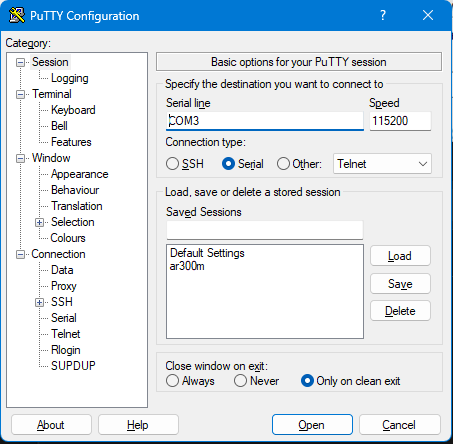
Set up PuTTY, click Open
https://docs.gl-inet.com/router/en/3/tutorials/ssh/
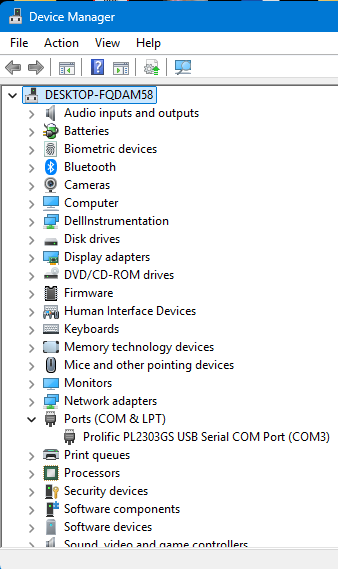
Check COM port
Select COM port and speed
-
Connect UART USB adapter to the board
(see wiring map below) -
Boot AR300M into uboot mode (hold down reset button until red link is permanent) (see debrick guide)
You should see the following in PuTTY's COM window
U-Boot 1.1.4-g9abb38de (Aug 25 2016 - 08:51:31)

DRAM:  128 MB
Nor Flash:  16 MB, sector count = 256
*** Warning *** : PCIe WLAN Module not found !!!
NAND Flash:  128 MB, page size = 0x800 block size = 0x20000 oob size = 0x80
Protect off 9F040000 ... 9F04FFFF
Un-Protecting sectors 4..4 in bank 1
Un-Protected 1 sectors
Erasing Flash...Erasing flash...
First 0x4 last 0x4 sector size 0x10000                                         4
Erased 1 sectors
Writing to Flash... write addr: 9f040000
done
Protecting sectors 4..4 in bank 1
Protected 1 sectors
Press reset button for at least:
- 5 sec. to run web failsafe mode
Reset button is pressed for:  5

Button was pressed for 5 sec...
HTTP server is starting for firmware update...

Trying eth0
eth0 link down
FAIL
Trying eth1
enet1 port0 up
dup 1 speed 1000
HTTP server is starting at IP: 192.168.1.1
HTTP server is ready!
-
Use browser to visit http://192.168.1.1. This is the U-Boot Web UI.
-
Use browser to visit http://192.168.1.1/uboot.html. This is the U-Boot Web UI for uboot upgrade.
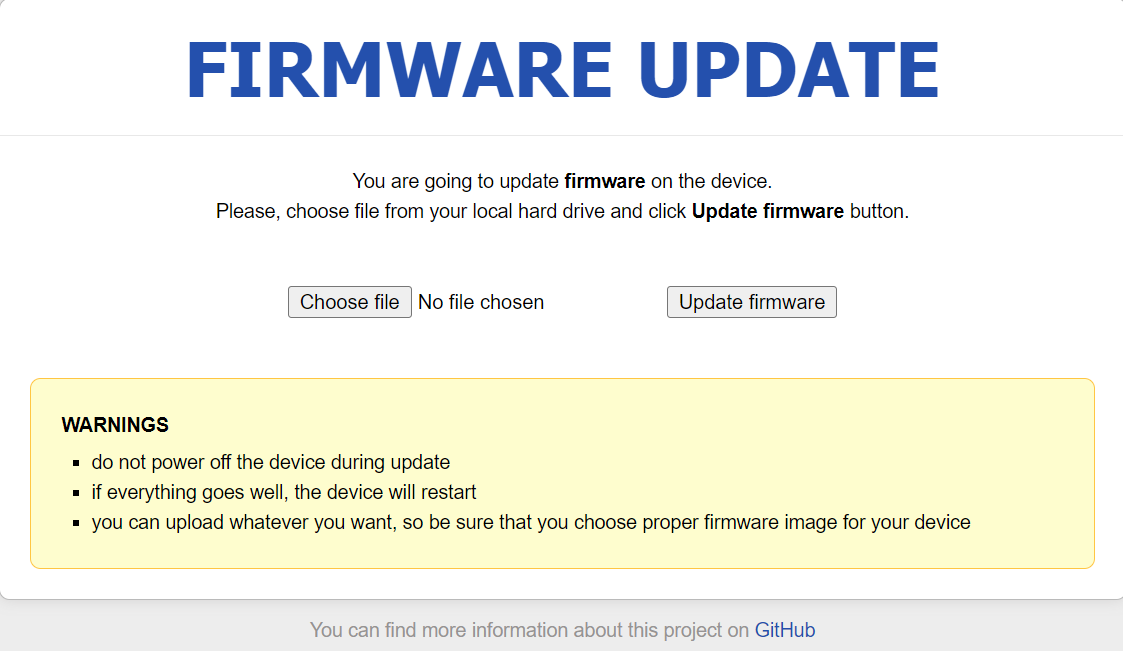
- Try to upload to latest uboot from the link above (.bin file).
- It it likely to receive an error message, but we can get out of it.
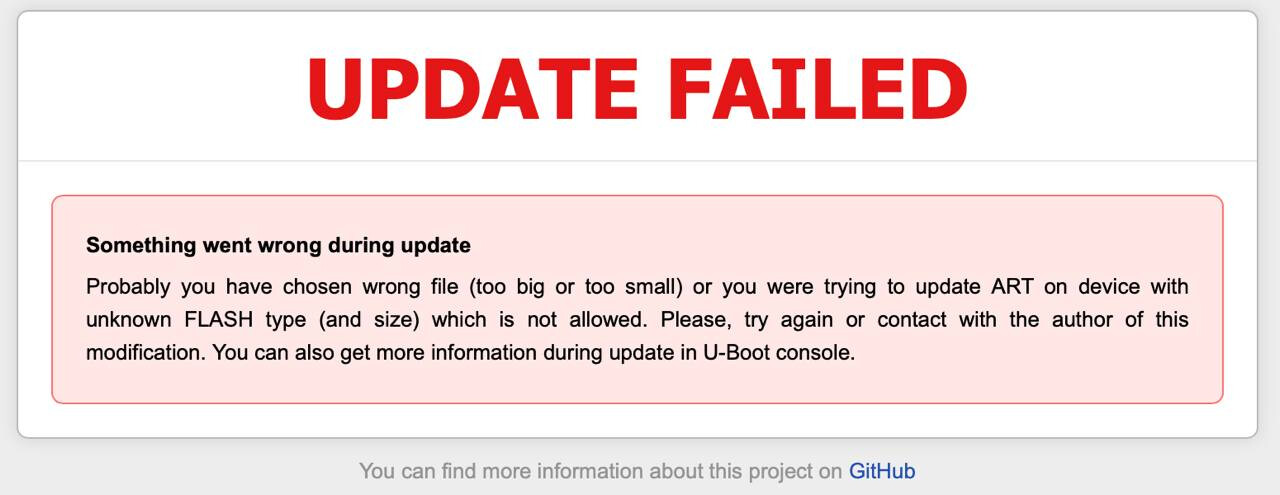
- Restart uboot webUI with COM prompt
- Ctrl + C to interrupt and show prompt
Prompt in ath>httpdto relaunch webUI - If not, reboot the device following the debrick guide
- Revisit 192.168.1.1/index.html
- Upload and update AR300M with firmware v2.264
https://fw.gl-inet.com/firmware/ar300m/nand/clean/openwrt-gl-ar300m-clean-2.264.img
- Wait for the upload and the device should boot up, broadcasting wifi "GLi-net"
- Device should be on firmware v2.264
PART II - uboot upgrade via tftp
- Follow Part I - Steps 1 to 9
- Download uboot ( uboot-gl-ar300m-20220216.bin)
- Use
printenvcommand to get router info
ath> printenv
bootargs=board=CUS531-NAND console=ttyS0,115200  ubi.mtd=5,2048 root=/dev/mtdblo ck8 mtdparts=spi0.0:256k(u-boot)ro,64k(u-boot-env),128k(reserved),64k(art);spi0. 1:2m(kernel),20m(rootfs),106m(data),22m@0x0(firmware) rootfstype=squashfs,jffs2  noinitrd
bootcmd=if nand bad; then nboot 0x81000000 0 || run blf; else run blf; fi
bootdelay=1
baudrate=115200
ethaddr=0x00:0xaa:0xbb:0xcc:0xdd:0xee
ipaddr=192.168.1.1
serverip=192.168.1.2
loadaddr=0x80800000
dir=
bootlimit=3
altbootcmd=run blf
blf=bootm 0x9f050000 || run lf; boot
nlf=if ping 192.168.1.2; then echo ok; elif ping 192.168.1.2; then echo ok; elif  ping 192.168.1.2; then echo ok; elif echo ping 192.168.1.2; then echo ok; elif  echo ping 192.168.1.2; then echo ok; else echo ping finally failed; fi; tftp 0x8 1000000 openwrt-ar71xx-nand-gl-ar300m-ubi.img && nand erase && nand write $filea ddr 0 $filesize
wlf=if nand bad; then nand erase && nand write $web_fileaddr 0 $web_filesize; el se erase 0x9f050000 +e30000 && cp.b $web_fileaddr 0x9f050000 $web_filesize; fi;  erase 0x9f040000 +0x10000
lu=tftp 0x80060000 ${dir}uboot_for_gl-ar300m.bin && erase 0x9f000000 +50000 && c p.b $fileaddr 0x9f000000 $filesize; reset
lf=if ping 192.168.1.2; then tftp 0x80060000 ${dir}openwrt-gl-ar300m.bin && eras e 0x9f050000 +e30000 && cp.b $fileaddr 0x9f050000 $filesize; if nand bad; then r un nlf; fi; else echo ping 192.168.1.2 failed; fi
lc=if ping 192.168.1.2; then tftp 0x81000000 config.bin && cp.b 0x9fff1000 0x800 60000 0xf000 && cp.b 0x81000000 0x80060002 0x06 && erase 0x9fff0000 +0x10000 &&  cp.b 0x81000000 0x9fff0000 $filesize && cp.b 0x80060000 0x9fff1000 0xefff; else  setenv bootcount 1 && saveenv && bootm 0x9fe80000; fi
stdin=serial
stdout=serial
stderr=serial
bootcount=1
ethact=eth1

Environment size: 1735/65532 bytes
- Rename uboot bin file
- Look for sometime similar to uboot_for_gl-ar300m.bin
- rename the downloaded firmware the same
- Place the bin file at the tftp directory, my case C:\tftp
- Turn off firewall
- Setup tftp server
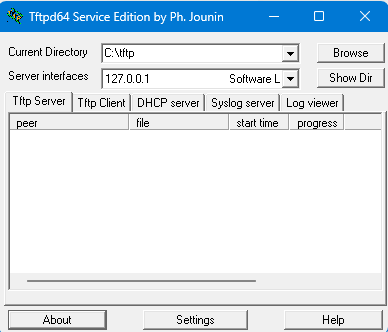
- Flash uboot .bin to router
- Once the tftp server is ready on your computer, prompt in COM window
run lu
- Wait for the uboot to be flashed
- device may stuck in a boot loop
- remove power and reboot in uboot webUI
- new uboot firmware window should be live
ath> run lu
Trying eth0
eth0 link down
FAIL
Trying eth1
Using eth1 device
TFTP from server 192.168.1.2; our IP address is 192.168.1.1
Filename 'uboot_for_gl-ar300m.bin'.
Load address: 0x80060000
Loading: ################################################
done
Bytes transferred = 244244 (3ba14 hex)
Erasing flash...
First 0x0 last 0x4 sector size 0x10000                                          4
Erased 5 sectors
Copy to Flash... write addr: 9f000000
done▒▒

U-Boot 1.1.4-gf8f77125-dirty (Sat Aug 14 08:53:11 UTC 2021)

ar300m - Honey Bee 2.0DRAM:
sri
Honey Bee 2.0
ath_ddr_initial_config(195): (16bit) ddr2 init
ath_sys_frequency: cpu 650 ddr 597 ahb 216
tap = 0x00000003
Tap (low, high) = (0x7, 0x23)
Tap values = (0x15, 0x15, 0x15, 0x15)
128 MB
Flash Manuf Id 0xef, DeviceId0 0x40, DeviceId1 0x18
flash size 16MB, sector count = 256
*** Warning - bad CRC, using default environment

Power up PLL with outdiv = 0 then switch to 3
*** Warning *** : PCIe WLAN Module not found !!!
ath_gmac_enet_initialize...
No valid address in Flash. Using fixed address
No valid address in Flash. Using fixed address
ath_gmac_enet_initialize: reset mask:c02200
Honey Bee ---->S27 PHY*
S27 reg init
: cfg1 0x800c0000 cfg2 0x7114
eth0: 00:03:7f:09:0b:ad
eth0 up
Honey Bee ---->  MAC 1 S27 PHY *
S27 reg init
ATHRS27: resetting s27
ATHRS27: s27 reset done
: cfg1 0x800c0000 cfg2 0x7214
eth1: 00:03:7f:09:0b:ad
eth1 up
eth0, eth1
Qualcomm Atheros SPI NAND Driver, Version 0.1 (c) 2014  Qualcomm Atheros Inc.
MFR:200,DID:177
====== NAND Parameters ======
sc = 0x87ff62e0 page = 0x800 block = 0x20000
Setting 0x181162c0 to 0x7fffa100
Hit 'gl' to stop autoboot:  0 enet1 port0 up                                  -1
Protect off 9F040000 ... 9F04FFFF
Un-Protecting sectors 4..4 in bank 1
Un-Protected 1 sectors
Erasing Flash...Erasing flash...
First 0x4 last 0x4 sector size 0x10000                                          4
Erased 1 sectors
Writing to Flash... write addr: 40000
done
Protecting sectors 4..4 in bank 1
Protected 1 sectors
Un-Protect Flash Bank # 1

Device 0 bad blocks:
  06000000
  07fe0000
Found ART,Checking calibration status...
Device have calibrated,Checking device test status...
Device haven't tested. Please test device in calibration firmware...
Protect off 9F040000 ... 9F04FFFF
Un-Protecting sectors 4..4 in bank 1
Un-Protected 1 sectors
Erasing Flash...Erasing flash...
First 0x4 last 0x4 sector size 0x10000                                          4
Erased 1 sectors
Writing to Flash... write addr: 40000
done
Protecting sectors 4..4 in bank 1
Protected 1 sectors
Un-Protect Flash Bank # 1
Booting image at: 0x9F050000
## Booting image at 9f050000 ...
   Image Name:   MIPS OpenWrt Linux-4.14.241
   Created:      2021-07-29  19:50:28 UTC
   Image Type:   MIPS Linux Kernel Image (lzma compressed)
   Data Size:    1867915 Bytes =  1.8 MB
   Load Address: 80060000
   Entry Point:  80060000
   Verifying Checksum at 0x9f050040 ...OK
   Uncompressing Kernel Image ... OK
No initrd
## Transferring control to Linux (at address 80060000) ...
## Giving linux memsize in bytes, 134217728

Starting kernel ...

[    0.000000] Linux version 4.14.241 (glinet@glinet) (gcc version 7.5.0 (OpenWrt GCC 7.5.0 r11257-5090152ae3)) #0 Thu Jul 29 19:50:28 2021
[    0.000000] bootconsole [early0] enabled
[    0.000000] CPU0 revision is: 00019374 (MIPS 24Kc)
[    0.000000] MIPS: machine is GL.iNet GL-AR300M (NAND)
[    0.000000] SoC: Qualcomm Atheros QCA9533 ver 2 rev 0
[    0.000000] Determined physical RAM map:
[    0.000000]  memory: 08000000 @ 00000000 (usable)
[    0.000000] Initrd not found or empty - disabling initrd
[    0.000000] Primary instruction cache 64kB, VIPT, 4-way, linesize 32 bytes.
[    0.000000] Primary data cache 32kB, 4-way, VIPT, cache aliases, linesize 32 bytes
[    0.000000] Zone ranges:
[    0.000000]   Normal   [mem 0x0000000000000000-0x0000000007ffffff]
[    0.000000] Movable zone start for each node
[    0.000000] Early memory node ranges
[    0.000000]   node   0: [mem 0x0000000000000000-0x0000000007ffffff]
[    0.000000] Initmem setup node 0 [mem 0x0000000000000000-0x0000000007ffffff]
[    0.000000] random: get_random_bytes called from start_kernel+0x98/0x494 with crng_init=0
[    0.000000] Built 1 zonelists, mobility grouping on.  Total pages: 32512
[    0.000000] Kernel command line: console=ttyS0,115200n8 rootfstype=squashfs,jffs2
[    0.000000] PID hash table entries: 512 (order: -1, 2048 bytes)
[    0.000000] Dentry cache hash table entries: 16384 (order: 4, 65536 bytes)
[    0.000000] Inode-cache hash table entries: 8192 (order: 3, 32768 bytes)
[    0.000000] Writing ErrCtl register=00000000
[    0.000000] Readback ErrCtl register=00000000
[    0.000000] Memory: 122404K/131072K available (4427K kernel code, 156K rwdata, 1008K rodata, 1244K init, 218K bss, 8668K reserved, 0K cma-reserved)
[    0.000000] SLUB: HWalign=32, Order=0-3, MinObjects=0, CPUs=1, Nodes=1
[    0.000000] NR_IRQS: 51
[    0.000000] CPU clock: 650.000 MHz
[    0.000000] clocksource: MIPS: mask: 0xffffffff max_cycles: 0xffffffff, max_idle_ns: 5880801374 ns
[    0.000009] sched_clock: 32 bits at 325MHz, resolution 3ns, wraps every 6607641598ns
[    0.008255] Calibrating delay loop... 432.53 BogoMIPS (lpj=2162688)
[    0.074862] pid_max: default: 32768 minimum: 301
[    0.079934] Mount-cache hash table entries: 1024 (order: 0, 4096 bytes)
[    0.086910] Mountpoint-cache hash table entries: 1024 (order: 0, 4096 bytes)
[    0.098654] clocksource: jiffies: mask: 0xffffffff max_cycles: 0xffffffff, max_idle_ns: 19112604462750000 ns
[    0.109076] futex hash table entries: 256 (order: -1, 3072 bytes)
[    0.115605] pinctrl core: initialized pinctrl subsystem
[    0.122319] NET: Registered protocol family 16
[    0.133974] PCI host bridge /ahb/pcie-controller@180c0000 ranges:
[    0.140411]  MEM 0x0000000010000000..0x0000000013ffffff
[    0.145962]   IO 0x0000000000000000..0x0000000000000000
[    0.151462] ar724x-pci 180c0000.pcie-controller: PCIe link is down
[    0.174812] PCI host bridge to bus 0000:00
[    0.179198] pci_bus 0000:00: root bus resource [mem 0x10000000-0x13ffffff]
[    0.186437] pci_bus 0000:00: root bus resource [io  0x0000]
[    0.192313] pci_bus 0000:00: root bus resource [??? 0x00000000 flags 0x0]
[    0.199467] pci_bus 0000:00: No busn resource found for root bus, will use [bus 00-ff]
[    0.210394] clocksource: Switched to clocksource MIPS
[    0.216750] NET: Registered protocol family 2
[    0.221616] IP idents hash table entries: 2048 (order: 2, 16384 bytes)
[    0.229164] TCP established hash table entries: 1024 (order: 0, 4096 bytes)
[    0.236575] TCP bind hash table entries: 1024 (order: 0, 4096 bytes)
[    0.243298] TCP: Hash tables configured (established 1024 bind 1024)
[    0.250150] UDP hash table entries: 256 (order: 0, 4096 bytes)
[    0.256359] UDP-Lite hash table entries: 256 (order: 0, 4096 bytes)
[    0.263255] NET: Registered protocol family 1
[    0.270893] Crashlog allocated RAM at address 0x3f00000
[    0.277745] workingset: timestamp_bits=30 max_order=15 bucket_order=0
[    0.289706] squashfs: version 4.0 (2009/01/31) Phillip Lougher
[    0.295900] jffs2: version 2.2 (NAND) (SUMMARY) (LZMA) (RTIME) (CMODE_PRIORITY) (c) 2001-2006 Red Hat, Inc.
[    0.316917] io scheduler noop registered
[    0.321107] io scheduler deadline registered (default)
[    0.328669] pinctrl-single 1804002c.pinmux: 576 pins at pa b804002c size 72
[    0.336569] gpio-export gpio-export: 1 gpio(s) exported
[    0.342849] Serial: 8250/16550 driver, 16 ports, IRQ sharing enabled
[    0.351958] console [ttyS0] disabled
[    0.355771] 18020000.uart: ttyS0 at MMIO 0x18020000 (irq = 9, base_baud = 1562500) is a 16550A
[    0.364918] console [ttyS0] enabled
[    0.364918] console [ttyS0] enabled
[    0.372472] bootconsole [early0] disabled
[    0.372472] bootconsole [early0] disabled
[    0.400633] m25p80 spi0.0: w25q128 (16384 Kbytes)
[    0.405547] 4 fixed-partitions partitions found on MTD device spi0.0
[    0.412137] Creating 4 MTD partitions on "spi0.0":
[    0.417095] 0x000000000000-0x000000040000 : "u-boot"
[    0.423047] 0x000000040000-0x000000050000 : "u-boot-env"
[    0.429297] 0x000000050000-0x000000ff0000 : "reserved"
[    0.435408] 0x000000ff0000-0x000001000000 : "art"
[    0.444073] spi-nand: Giga SPI NAND was found.
[    0.448678] spi-nand: 128 MiB, block size: 128 KiB, page size: 2048, OOB size: 128
[    0.456662] 2 fixed-partitions partitions found on MTD device spi0.1
[    0.463253] Creating 2 MTD partitions on "spi0.1":
[    0.468211] 0x000000000000-0x000000400000 : "kernel"
[    0.481213] 0x000000400000-0x000008000000 : "ubi"
[    0.875049] found bad block 6000000
[    0.934579] found bad block 7fe0000
[    0.938906] libphy: Fixed MDIO Bus: probed
[    1.281494] ag71xx 19000000.eth: Could not connect to PHY device. Deferring probe.
[    1.960790] libphy: ag71xx_mdio: probed
[    2.250859] mdio-bus.0:1f: Found an AR934X built-in switch
[    2.256699] libphy: ar7240sw_mdio: probed
[    2.318035] ag71xx 1a000000.eth: connected to PHY at fixed-0:00 [uid=00000000, driver=Generic PHY]
[    2.327943] eth1: Atheros AG71xx at 0xba000000, irq 5, mode: gmii
[    2.336276] NET: Registered protocol family 10
[    2.345529] Segment Routing with IPv6
[    2.349415] NET: Registered protocol family 17
[    2.354121] bridge: filtering via arp/ip/ip6tables is no longer available by default. Update your scripts to load br_netfilter if you need this.
[    2.367522] 8021q: 802.1Q VLAN Support v1.8
[    2.570389] random: fast init done
[    2.712586] ag71xx 19000000.eth: connected to PHY at mdio-bus.0:1f:04 [uid=004dd042, driver=Generic PHY]
[    2.723272] eth0: Atheros AG71xx at 0xb9000000, irq 4, mode: mii
[    2.732977] UBI: auto-attach mtd5
[    2.736437] ubi0: attaching mtd5
[    6.917329] ubi0: scanning is finished
[    6.968433] ubi0 warning: ubi_eba_init: cannot reserve enough PEBs for bad PEB handling, reserved 2, need 18
[    6.979896] ubi0: attached mtd5 (name "ubi", size 124 MiB)
[    6.985627] ubi0: PEB size: 131072 bytes (128 KiB), LEB size: 126976 bytes
[    6.992740] ubi0: min./max. I/O unit sizes: 2048/2048, sub-page size 2048
[    6.999752] ubi0: VID header offset: 2048 (aligned 2048), data offset: 4096
[    7.006949] ubi0: good PEBs: 990, bad PEBs: 2, corrupted PEBs: 0
[    7.013159] ubi0: user volume: 2, internal volumes: 1, max. volumes count: 128
[    7.020636] ubi0: max/mean erase counter: 2/1, WL threshold: 4096, image sequence number: 1056741116
[    7.030064] ubi0: available PEBs: 0, total reserved PEBs: 990, PEBs reserved for bad PEB handling: 2
[    7.040730] block ubiblock0_0: created from ubi0:0(rootfs)
[    7.046400] ubiblock: device ubiblock0_0 (rootfs) set to be root filesystem
[    7.054163] ubi0: background thread "ubi_bgt0d" started, PID 327
[    7.062995] List of all partitions:
[    7.066624] 1f00             256 mtdblock0
[    7.066628]  (driver?)
[    7.073441] 1f01              64 mtdblock1
[    7.073445]  (driver?)
[    7.080196] 1f02           16000 mtdblock2
[    7.080199]  (driver?)
[    7.086953] 1f03              64 mtdblock3
[    7.086957]  (driver?)
[    7.093719] 1f04            4096 mtdblock4
[    7.093723]  (driver?)
[    7.100485] 1f05          126976 mtdblock5
[    7.100490]  (driver?)
[    7.107238] fe00            2480 ubiblock0_0
[    7.107240]  (driver?)
[    7.114177] No filesystem could mount root, tried:
[    7.114182]  squashfs
[    7.119211]  jffs2
[    7.121563]
[    7.125178] Kernel panic - not syncing: VFS: Unable to mount root fs on unknown-block(254,0)
[    7.134939] Rebooting in 1 seconds..
▒

PART III - Flash firmware v 3.216 via uboot webUI
- Download firmware v 3.216 (uboot .img)
- Upload and flash firmware in uboot webUI
- Device should be updated to v3.216
Debrick guide url
https://docs.gl-inet.com/router/en/4/faq/debrick/
AR300M board layout
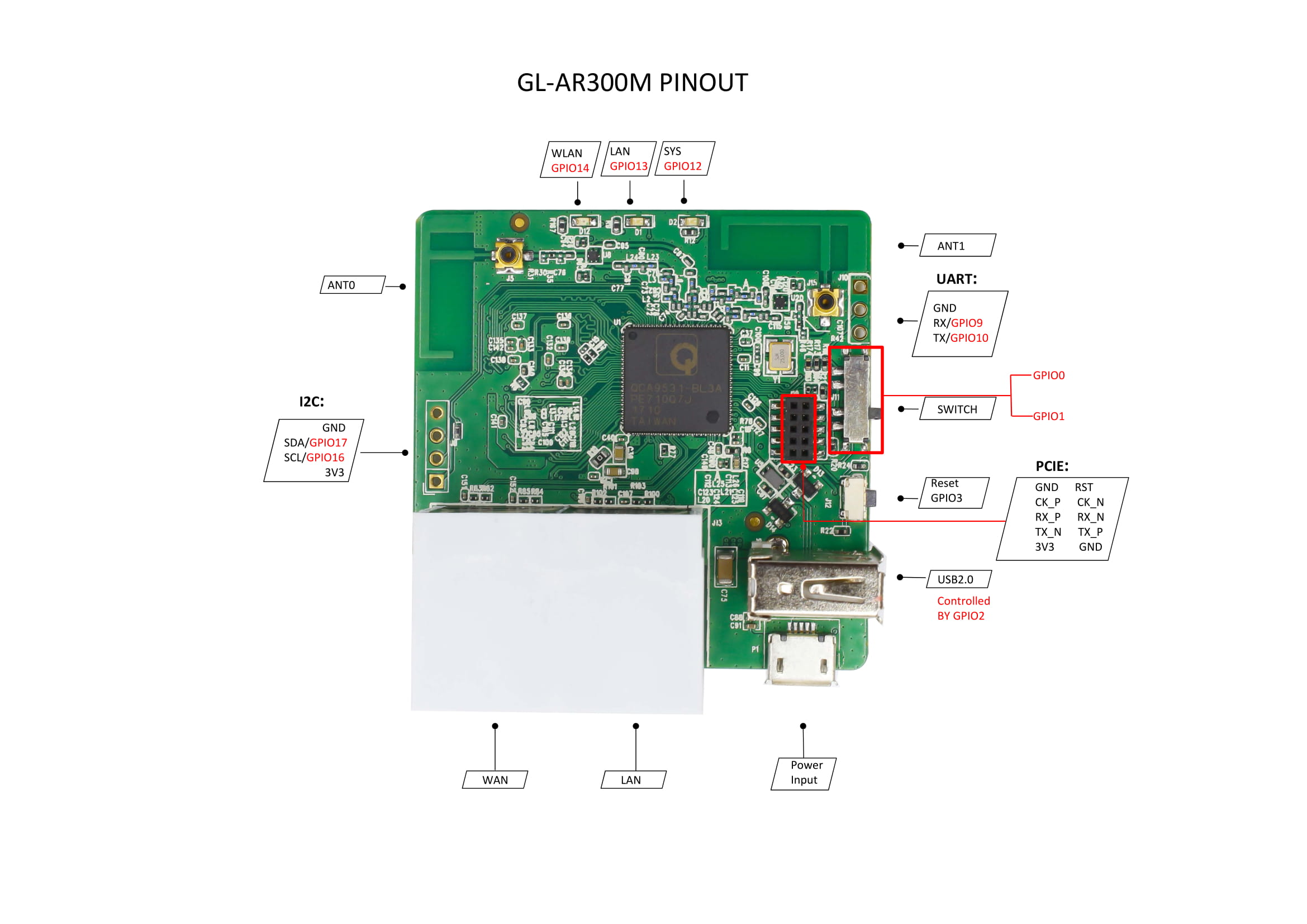
https://docs.gl-inet.com/router/en/2/hardware/ar300m/
UART wiring
| Column 1 | Column 2 | Column 3 | Column 4 |
|---|---|---|---|
| GND | GND | ||
| AR300M | RX | TX | UART USB adapter |
| TX | RX |
2 Likes
Update
Here is the steps to update from v3.216 NAND firmware to v4.3.25 NAND firmware.
All executed in uboot webUI
Starting with v3.216 (openwrt-ar300m-3.216-0321-1679391450.img)
- flashed v4.3.27 (NOR .bin), under this firmware the device will always boot into the nor firmware (re-flash of v3.216 nand firmware would not work)
- flash vanilla openwrt NOR firmware (openwrt-22.03.5-ath79-nand-glinet_gl-ar300m-nor-squashfs-sysupgrade.bin)
- flash vanilla openwrt NAND firmware (openwrt-22.03.5-ath79-nand-glinet_gl-ar300m-nand-squashfs-sysupgrade.bin)
- flash v4.3.25 (nand .img), check when asked force flash. Wait for device to boot, it will come up.
I am not sure if skipping ahead and flash v3.216 nand -> openwrt nand -> v4.3.25 nand would work.
Hope it helps.