Create Multiple WiFi on GL-MT6000 (Flint 2)

Hello everyone,

I need to create a new WiFi network with a dedicated subnet and SSID, conceptually identical to a guest network, but reachable from the primary network. Under this network, I should place all the IoT devices in the house, ensuring they are neither in the Guest network nor in the management network.

I followed the steps in this guide: [link to the YouTube video]. However, I encountered an error stating that the interface I created has no associated devices. I see that the guest network refers to a device “br-guest” that bridges the physical WiFi interfaces, but I can’t find it within the devices list. I only see br-lan and the other LAN-WAN ports.

Can you help me with the configuration?

1 Like

Did you resolve your problem? I have the same issue/requirement.

Can anyone @ GLiNet help me with my new router and setup?

This should help you:

Thanks for the link.

Although the issue and solution is useful, it doesn't quite give me what I am looking for.

The link above has the following:

"so i noticed ssids become unstable after having more than 2 per band on 2.4ghz or on 5ghz, this means you either have to sacrifice the guest wifi for the custom network you can trust me this is the easiest way, honestly i doubt guests need 5ghz"

This approach will not give me what I am looking to achieve!

Many of my IOT devices only operate on 2.4Ghz.

I want my IOT devices to have a new SSID on 2.4Ghz and to have a different subnet (192.168.30.0/24) to that of the LAN (192.168.10.0/24) and the GUEST (192.168.50.0/24 on both 2,4 Guest and 5Ghz Guest) interfaces.

I managed to create two new bridges and interfaces (with different subnets) to manage a single VOIP telephone on LAN4 port, and an Xbox on LAN5. I got both to work as expected with new subnets and firewall rules to ensure isolation from the LAN interface (which has LAN1, LAN2, LAN3 plus the two RA0 and RAX0 wireless devices).

Based on the 'success' of the VOIP and XBOX interfaces (and new bridge devices), I tried to do the same with 2.4Ghz ra0 but I could not make it work. I could not figure out why the 'GUEST' interface showed it was associated with br-guest bridge device and yet this device is not in the list of devices in the Interfaces tab, and when looking at the config of the GUEST interface, the 'Device' on the General Settings tab is 'unspecified'. On my VOIP and XBOX interfaces, I associated the new bridges for each (br-voip for the LAN4 port, and br-xbox for the LAN5 port), but I cannot find a way to create a wifi bridge and get the ra0 to work as I want with a new subnet.

It would be extremely helpful if some instructions could be given to help me. Just as a test to prove the process, if I disable the 2.4Ghz Guest, what is the process for me to add a new radio, with a new IOT interface and say an associated br-wwan0 bridge (a copy of the br-guest bridge) to allow my IOT devices to connect on a new subnet (different to the GUEST subnet) and be isolated from the LAN?

Many thanks.

EDIT:
I stumbled across this post.
"Show different subnet clients in gui"

Given the additional issue of the Client list not showing connected devices which have connected via a custom bridge (i.e. the VOIP and XBOX do not show in the client list, but they do in the LUCI screen), I suspect the issue I had in not getting the custom WiFi to work is likely associated with this.

Does this imply that I can only get an additional custom WiFi SSID through the Luci interface and that none of my IOT devices will show in the GL GUI? I hope not! I've just spent €140 on my first GLiNET router!

Please refer to:

Sorry for the lateness but, can this be done on the Beryl AX, Slate Plus or Opal travel routers?

not universal

Did you made any progress? Just bought a new Flint 2 as well. And having the exact same problem, kind of a shame I would have thought it is straight forward with such an open device.

So do I understand this correctly. There is no way to add a third wifi without disabling one of the existent? So I cannot really split my network into three zones, just two?

In openwrt, you can have multiple vaps, more than just 2. I can't say for sure if this is possible on glinet openwrt, but I'm pretty sure it's possible. This is old school (vanilla openwrt) way of doing it, so I would adjust IPs accordingly because glinet uses 192.168.8.1 by default.

Log into Luci, Network > Wireless it should show your radios.

radio0 for 2.4Ghz radio1 for 5Ghz

For the radio you want to use, click edit.

Set your basic radio settings like mode, channel, and width.

Set your country code.

Set transmit power

Check enable if it's not already.

Save and apply. This activates the radio.

On the Wireless page, under your radio (e.g., radio0), you'll see existing interfaces (if any). Click Add to create a new wireless interface (this is your VAP).

Configure the new interface:ESSID: Enter the SSID (network name), e.g., Home-WiFi.

Mode: Select Access Point (default for VAPs).

Network: Choose or create a network to attach this VAP to:For the main network, select lan (your default LAN bridge).

For a guest or isolated network, you'll create a new one later—temporarily select lan or leave as None for now.

Wireless Security (under the tab or section):Encryption: Choose WPA3 Personal (recommended) or WPA2-PSK for compatibility.

Cipher: Auto or CCMP (AES).

Key: Enter a strong password.

Advanced Settings (optional tab):Hide ESSID: Check to make it hidden.

Hide ESSID: Check to make it hidden.

Isolate Clients: Check for guest networks to prevent devices from seeing each other.

Short Preamble: Enabled for better performance.

Click Save (not Save & Apply yet).

Repeat this step for additional VAPs:Example: Add another with SSID Guest-WiFi, attach to a new guest network, enable client isolation, and set a different password.

Repeat this step for additional VAPs:Example: Add another with SSID Guest-WiFi, attach to a new guest network, enable client isolation, and set a different password.

Example: Add one more with SSID IoT-Devices, attach to a new iot network.

Most hardware supports 4–8 VAPs per radio. If you hit limits, you'll get an error.

If your VAPs need separate subnets (e.g., for guest or IoT), configure them here. VAPs attached to the same lan will share the network; new ones allow isolation.Go to Network > Interfaces.

Click Add new interface....

For a guest network:Name: guest.

Protocol: Static address.

Interface: Create a new one or bridge (e.g., br-guest if bridging).

Under Interface Configuration > General Setup:IPv4 address: e.g., 192.168.2.1.

IPv4 netmask: 255.255.255.0.

Under DHCP Server (enable it):

Start: 100, Limit: 150 (for IP pool).

Lease time: 12h.

Click Save & Apply.

Repeat for other networks, e.g., iot with IP 192.168.3.1.

Back in Network > Wireless, edit each VAP and attach it to the correct network (e.g., Guest-WiFi to guest).

Click Save & Apply on the Wireless page.

To prevent guest/IoT devices from accessing your main LAN or each other:

Go to Network > Firewall.

Under Zones, click Add for a new zone.

For the guest zone:Name: guest.

Input: Reject.

Output: Accept.

Forward: Reject.

Masquerading: Check (for NAT to WAN).

Covered networks: Select guest.

Under Traffic Rules or Forwardings:Add a forwarding: Source zone guest to Destination zone wan (allows internet access but not LAN).

For DNS/DHCP on guest: Under Traffic Rules, allow UDP/TCP port 53 (DNS) and 67-68 (DHCP) from guest to the router.

Repeat for other zones like iot.

Click Save & Apply.Tip: For stricter isolation, add rules to block access between zones (e.g., reject forward from guest to lan).

On any page, click Save & Apply.

Wi-Fi may restart briefly.

From a device, scan for Wi-Fi networks—your new SSIDs should appear.

Connect to each:

Test internet access.

From a guest device, try pinging a LAN device (should fail if isolated).

Check IP: Main should be 192.168.1.x, guest 192.168.2.x, etc.

Monitor via LuCI: Status > Overview shows connected devices per interface.
2 Likes

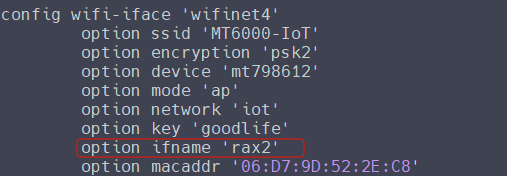
If the radio SSID is added manually via Luci, please login the SSH of the router, edit the file: vi /etc/config/wireless, find the iot interface group, andadd the option ifname 'rax2'
(raxn for 5GHz WiFi, ran for 2.4GHz WiFi. n ≤ 3)

3 Likes

That is the useful information! Thanks.

Indeed you can have more access points while ra0 is for the standard private network and ra1 is for the guest one, it seems that ra2 and ra3 are available. To anything else.

For example IOT wifi:
vim /etc/config/wireless:

config wifi-iface 'WIFINAME'              
        option device 'mt798611'          
        option mode 'ap'             
        option network 'FWZONE'           
        option ifname 'ra2'               
        option wds '1'  
        option hidden '1'    
        option ieee80211k '1'   
        option bss_transition '1'
        option ssid 'WIFINAME'
        option key 'WIFIPW'
        option encryption 'psk2'