I have a router model GL-AXT1800 running firmware version 4.8.2.
I’m looking for a way of adding a custom config for dnsmasq.
How do I do that (assuming it is possible)?
I have a router model GL-AXT1800 running firmware version 4.8.2.
I’m looking for a way of adding a custom config for dnsmasq.
How do I do that (assuming it is possible)?
Hi
You can do this as follows:
/etc/dnsmasq.conf file, and then restart the device for the changes to take effect.Thank you for the quick response.
I have some experience with dnsmasq. Typically, dnsmasq uses the folder /etc/dnsmasq.d/ for custom config files. Does this approach also work here?
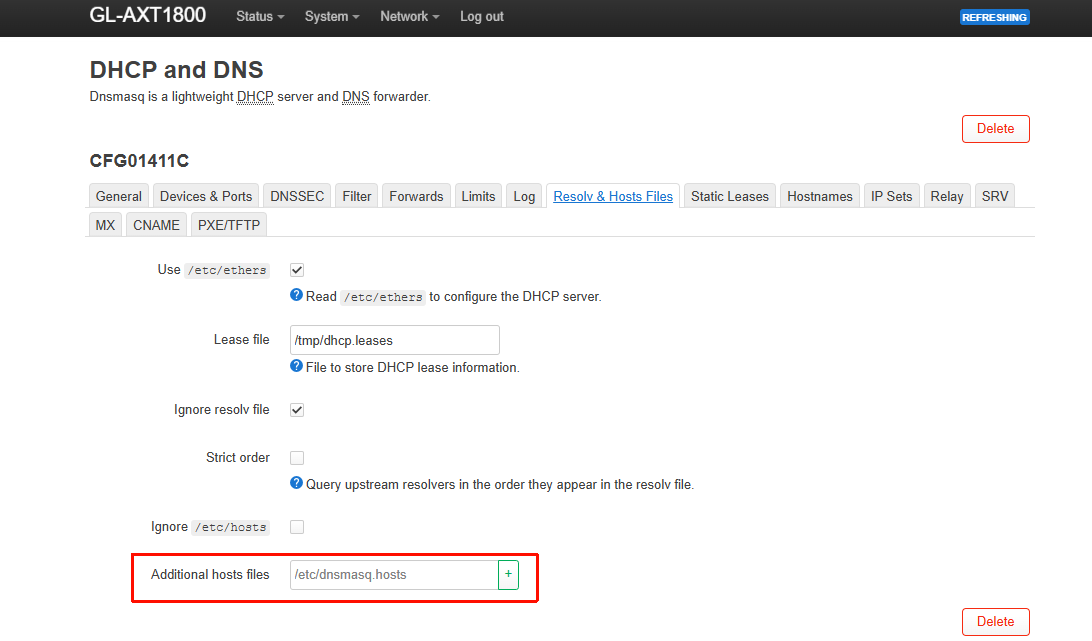
I also need a custom hosts file that contains the parameters for add-blocks. What is recommended here?
Support for /etc/dnsmasq.d/ is implemented by adding the following configuration to /etc/dnsmasq.conf. You can do the same thing in OpenWRT:
conf-dir=/etc/dnsmasq.d/,*.conf
Custom Hosts can be specified directly within the LuCI.
Still some struggling…
This time its about forwarding and split-DNS.
The custom dnsmasq config part is:
# Listen only on ipv4 interfaces
listen-address=127.0.0.1
listen-address=10.10.1.240

# The dns servers for split dns to all 192.168 and 100.64 subnets
server=/dmz.lan/192.168.2.235/
server=/tech.lan/192.168.139.235/
server=/ts.net/100.100.100.100/
The dnsmasq log shows that these are loaded as expected.
I also added these to LuCI in the forwards section
The dnsmasq service is running on lan and local interfaces:
# netstat -tulpn
Active Internet connections (only servers)
Proto Recv-Q Send-Q Local Address           Foreign Address         State       PID/Program name
tcp        0      0 100.100.1.240:63923     0.0.0.0:*               LISTEN      30722/tailscaled
tcp        0      0 127.0.0.1:53            0.0.0.0:*               LISTEN      24671/dnsmasq
tcp        0      0 10.10.1.240:53          0.0.0.0:*               LISTEN      24671/dnsmasq
tcp        0      0 10.10.1.240:22          0.0.0.0:*               LISTEN      5119/dropbear
tcp        0      0 0.0.0.0:443             0.0.0.0:*               LISTEN      6607/nginx.conf -g
tcp        0      0 0.0.0.0:8443            0.0.0.0:*               LISTEN      4433/uhttpd
tcp        0      0 0.0.0.0:80              0.0.0.0:*               LISTEN      6607/nginx.conf -g
tcp        0      0 0.0.0.0:8080            0.0.0.0:*               LISTEN      4433/uhttpd
udp        0      0 127.0.0.1:53            0.0.0.0:*                           24671/dnsmasq
udp        0      0 10.10.1.240:53          0.0.0.0:*                           24671/dnsmasq
udp        0      0 0.0.0.0:67              0.0.0.0:*                           24671/dnsmasq
udp        0      0 0.0.0.0:41641           0.0.0.0:*                           30722/tailscaled
udp        0      0 :::41641                :::*                                30722/tailscaled
The file /etc/resolv.conf has nameserver 127.0.0.1
However, all requests to these specific domains result in a nxdomain.
What am i missing/overlooking?
Config seem to be okay.
But what response do you see if you visit a website on a local server ip you forward if available?
I'm hoping to look for:
' dns probe possible'
In that case,the upstream router owns the topology of the '.lan' domain as authorization which mean only one router can own the authorization, you can fix this by deleting /lan/ in luci on the current router you try to configure this custom dnsmasq config on.
^ imo i find it the checkbox for dhcp authority misleading as this field basicly seem to enforce it, this was a problem for me a long time but I figured it was this field.
The option can be named server domain or domain, it differs per luci, there should only be one with value /lan/ or /lan ... /, if vpn or vpn server has been configurated with the new dashboard, it becomes more interesting this one come with a another luci dnsmasq instance, you need to remove it there aswell, I had issues with this previously accessing lan domain resources through vpn 
Thank you for the quick response.
As far as I’m aware of: the dhcp authorative flag means that that particular device is expected to be the only dhcp server for a specific subnet - has nothing to do with being the authorative dns server.
There are multiple domains that end with lan - but there is only one dns server for each of those.
The GL-inet router is hosting the domain cyberbrein.lan with local dns server 10.10.1.240.
All other sites have a line in its custom dnsmasq config that says server=/cyberbrein.lan/10.10.1.240
Anything I did wrong on this part?
Pings over the (tailscale-)vpn are working as expected.
Also nslookups for systems in the domains tech.lan or dmz.lan are resolved as expected when using the respective dns server of the domain.
The only thing that doesn’t work is dns requests for the domains tech.lan and dmz.lan - there is always this annoying nxdomain (or nothing). This applies for all sites when doing dns requests for one of the remotes.
Any (other) suggestions?
Are these ment as dns ?, basicly what you use now works similar as a hosts file but that may not work always.
Otherwise what you may look for is an A dns record.
This is not visible on all lucis but in /etc/config/dhcp it looks like:
config domain
        option name 'nextcloud.lan'
        option ip '10.244.244.9'
In raw dnsmasq which I use in /etc/dnsmasq.conf
address=/vulcan.dl.playstation.net/10.244.244.5
local=/vulcan.dl.playstation.net/
You likely want to skip the local entries, but I don't use the server reference
This topic was automatically closed 90 days after the last reply. New replies are no longer allowed.