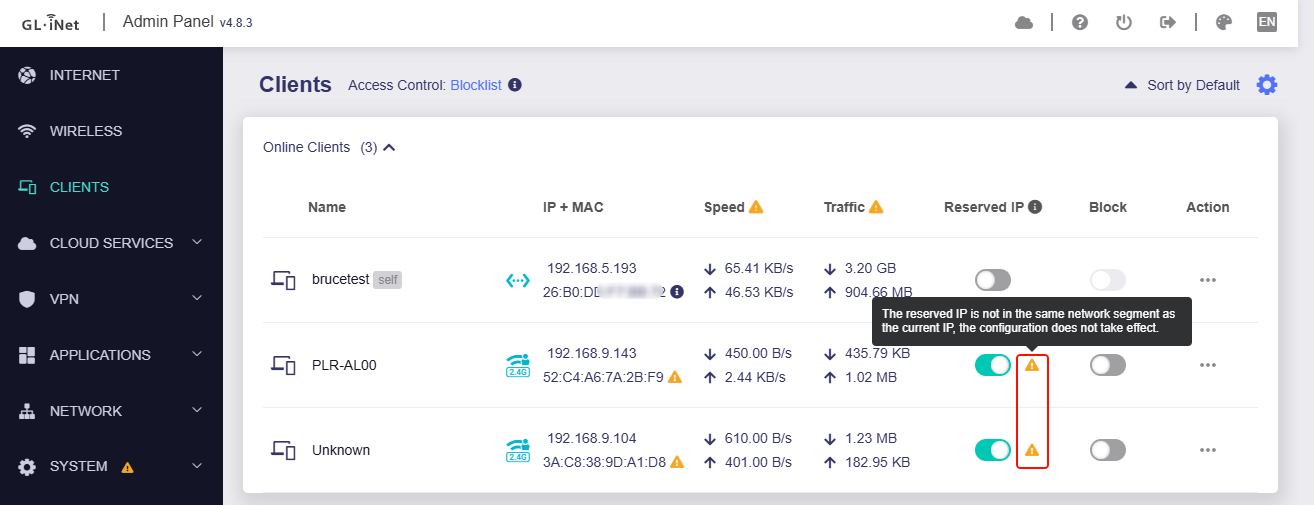
Hi,
I have a Flint2 router that I use via the Glinet interface with firmware 4.8.3. (not Luci)
DHCP is active on the LAN and Guest networks.The IP ranges are the default ones.
My guest Wi-Fi is dedicated to IoT with AP Isolation enabled.
All my LAN IPs are already in static DHCP.
I reserved an IP for a guest device.
I added my reservation from the menu: Network / LAN / Address reservation. No problems.
I rebooted the device. The address was assigned correctly.
Now, in the client menu, an orange triangle has appeared next to the Reserved IP button, saying:
“The reserved IP is not in the same network segment as the current IP, the configuration does not take effect.”
This triangle appears next to each device on the Guest network where I am trying to reserve the assigned IP.
Where does this alert come from? Have I done something wrong?
Thanks in advance