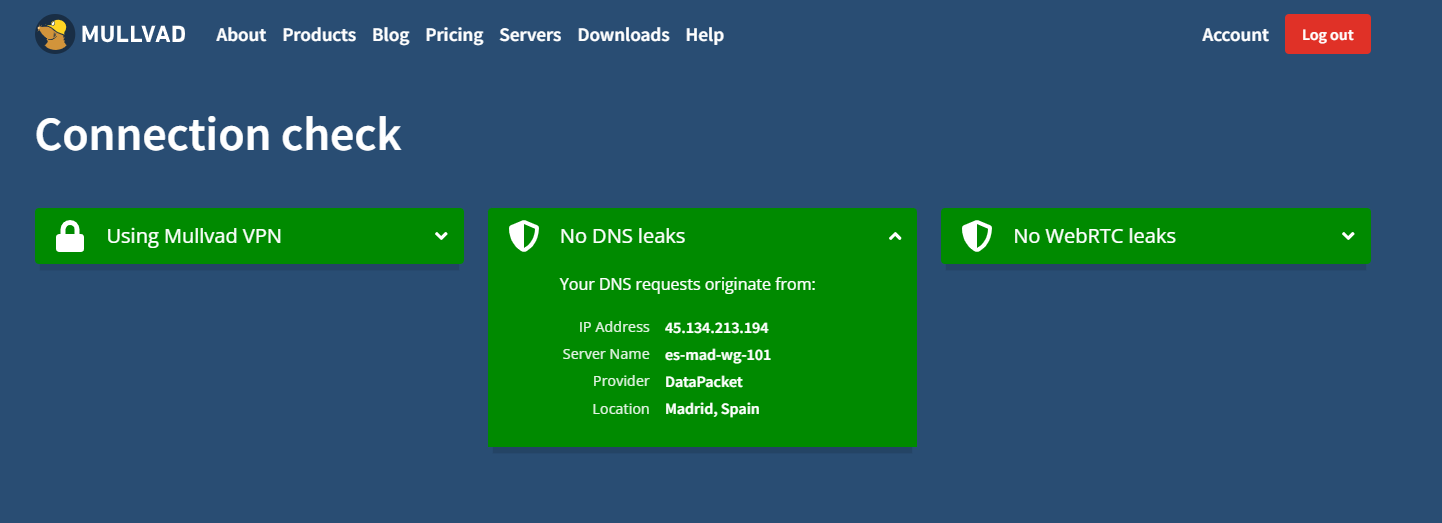
Here's the output with some redactions (this is with the VPN turned on):
❯ ifconfig
lo0: flags=8049<UP,LOOPBACK,RUNNING,MULTICAST> mtu 16384
	options=1203<RXCSUM,TXCSUM,TXSTATUS,SW_TIMESTAMP>
	inet 127.0.0.1 netmask 0xff000000
	inet6 ::1 prefixlen 128
	inet6 fe80::1%lo0 prefixlen 64 scopeid 0x1
	inet 127.164.101.204 netmask 0xff000000
	nd6 options=201<PERFORMNUD,DAD>
gif0: flags=8010<POINTOPOINT,MULTICAST> mtu 1280
stf0: flags=0<> mtu 1280
anpi0: flags=8863<UP,BROADCAST,SMART,RUNNING,SIMPLEX,MULTICAST> mtu 1500
	options=400<CHANNEL_IO>
	ether xx:xx:xx:xx:xx:xx
	media: none
	status: inactive
anpi1: flags=8863<UP,BROADCAST,SMART,RUNNING,SIMPLEX,MULTICAST> mtu 1500
	options=400<CHANNEL_IO>
	ether xx:xx:xx:xx:xx:xx
	media: none
	status: inactive
anpi2: flags=8863<UP,BROADCAST,SMART,RUNNING,SIMPLEX,MULTICAST> mtu 1500
	options=400<CHANNEL_IO>
	ether xx:xx:xx:xx:xx:xx
	media: none
	status: inactive
en4: flags=8863<UP,BROADCAST,SMART,RUNNING,SIMPLEX,MULTICAST> mtu 1500
	options=400<CHANNEL_IO>
	ether xx:xx:xx:xx:xx:xx
	nd6 options=201<PERFORMNUD,DAD>
	media: none
	status: inactive
en5: flags=8863<UP,BROADCAST,SMART,RUNNING,SIMPLEX,MULTICAST> mtu 1500
	options=400<CHANNEL_IO>
	ether xx:xx:xx:xx:xx:xx
	nd6 options=201<PERFORMNUD,DAD>
	media: none
	status: inactive
en6: flags=8863<UP,BROADCAST,SMART,RUNNING,SIMPLEX,MULTICAST> mtu 1500
	options=400<CHANNEL_IO>
	ether xx:xx:xx:xx:xx:xx
	nd6 options=201<PERFORMNUD,DAD>
	media: none
	status: inactive
en1: flags=8963<UP,BROADCAST,SMART,RUNNING,PROMISC,SIMPLEX,MULTICAST> mtu 1500
	options=460<TSO4,TSO6,CHANNEL_IO>
	ether xx:xx:xx:xx:xx:xx
	media: autoselect <full-duplex>
	status: inactive
en2: flags=8963<UP,BROADCAST,SMART,RUNNING,PROMISC,SIMPLEX,MULTICAST> mtu 1500
	options=460<TSO4,TSO6,CHANNEL_IO>
	ether xx:xx:xx:xx:xx:xx
	media: autoselect <full-duplex>
	status: inactive
en3: flags=8963<UP,BROADCAST,SMART,RUNNING,PROMISC,SIMPLEX,MULTICAST> mtu 1500
	options=460<TSO4,TSO6,CHANNEL_IO>
	ether xx:xx:xx:xx:xx:xx
	media: autoselect <full-duplex>
	status: inactive
bridge0: flags=8863<UP,BROADCAST,SMART,RUNNING,SIMPLEX,MULTICAST> mtu 1500
	options=63<RXCSUM,TXCSUM,TSO4,TSO6>
	ether xx:xx:xx:xx:xx:xx
	Configuration:
		id 0:0:0:0:0:0 priority 0 hellotime 0 fwddelay 0
		maxage 0 holdcnt 0 proto stp maxaddr 100 timeout 1200
		root id 0:0:0:0:0:0 priority 0 ifcost 0 port 0
		ipfilter disabled flags 0x0
	member: en1 flags=3<LEARNING,DISCOVER>
	        ifmaxaddr 0 port 10 priority 0 path cost 0
	member: en2 flags=3<LEARNING,DISCOVER>
	        ifmaxaddr 0 port 11 priority 0 path cost 0
	member: en3 flags=3<LEARNING,DISCOVER>
	        ifmaxaddr 0 port 12 priority 0 path cost 0
	nd6 options=201<PERFORMNUD,DAD>
	media: <unknown type>
	status: inactive
ap1: flags=8863<UP,BROADCAST,SMART,RUNNING,SIMPLEX,MULTICAST> mtu 1500
	options=6460<TSO4,TSO6,CHANNEL_IO,PARTIAL_CSUM,ZEROINVERT_CSUM>
	ether xx:xx:xx:xx:xx:xx
	nd6 options=201<PERFORMNUD,DAD>
	media: autoselect (none)
	status: inactive
en0: flags=8863<UP,BROADCAST,SMART,RUNNING,SIMPLEX,MULTICAST> mtu 1500
	options=6460<TSO4,TSO6,CHANNEL_IO,PARTIAL_CSUM,ZEROINVERT_CSUM>
	ether xx:xx:xx:xx:xx:xx
	inet6 fe80::1410:7587:8d78:a830%en0 prefixlen 64 secured scopeid 0xe
	inet 192.168.x.x netmask 0xffffff00 broadcast 192.168.8.255
	nd6 options=201<PERFORMNUD,DAD>
	media: autoselect
	status: active
awdl0: flags=8863<UP,BROADCAST,SMART,RUNNING,SIMPLEX,MULTICAST> mtu 1500
	options=6460<TSO4,TSO6,CHANNEL_IO,PARTIAL_CSUM,ZEROINVERT_CSUM>
	ether xx:xx:xx:xx:xx:xx
	inet6 fe80::885e:b5ff:fe88:1f3f%awdl0 prefixlen 64 scopeid 0x10
	nd6 options=201<PERFORMNUD,DAD>
	media: autoselect
	status: active
llw0: flags=8863<UP,BROADCAST,SMART,RUNNING,SIMPLEX,MULTICAST> mtu 1500
	options=400<CHANNEL_IO>
	ether xx:xx:xx:xx:xx:xx
	inet6 fe80::885e:b5ff:fe88:1f3f%llw0 prefixlen 64 scopeid 0x11
	nd6 options=201<PERFORMNUD,DAD>
	media: autoselect (none)
	status: inactive
utun0: flags=8051<UP,POINTOPOINT,RUNNING,MULTICAST> mtu 1500
	inet6 fe80::84d8:dbaf:53f2:2f22%utun0 prefixlen 64 scopeid 0x12
	nd6 options=201<PERFORMNUD,DAD>
utun1: flags=8051<UP,POINTOPOINT,RUNNING,MULTICAST> mtu 1380
	inet6 fe80::98dd:83c8:b3ab:d000%utun1 prefixlen 64 scopeid 0x13
	nd6 options=201<PERFORMNUD,DAD>
utun2: flags=8051<UP,POINTOPOINT,RUNNING,MULTICAST> mtu 2000
	inet6 fe80::9e1a:3c4c:67d3:a90b%utun2 prefixlen 64 scopeid 0x14
	nd6 options=201<PERFORMNUD,DAD>
utun3: flags=8051<UP,POINTOPOINT,RUNNING,MULTICAST> mtu 1000
	inet6 fe80::ce81:b1c:bd2c:69e%utun3 prefixlen 64 scopeid 0x15
	nd6 options=201<PERFORMNUD,DAD>
utun4: flags=8051<UP,POINTOPOINT,RUNNING,MULTICAST> mtu 1380
	inet6 fe80::e5c3:5dc:9072:d6b%utun4 prefixlen 64 scopeid 0x16
	nd6 options=201<PERFORMNUD,DAD>
utun5: flags=8051<UP,POINTOPOINT,RUNNING,MULTICAST> mtu 1380
	inet6 fe80::a6c1:25f1:baa5:a059%utun5 prefixlen 64 scopeid 0x17
	nd6 options=201<PERFORMNUD,DAD>
utun6: flags=8051<UP,POINTOPOINT,RUNNING,MULTICAST> mtu 1500
	options=6460<TSO4,TSO6,CHANNEL_IO,PARTIAL_CSUM,ZEROINVERT_CSUM>
	nd6 options=201<PERFORMNUD,DAD>

~
❯ nslookup www.google.com
Server:		192.168.x.1
Address:	192.168.x.1#53

Non-authoritative answer:
Name:	www.google.com
Address: 172.253.63.104
Name:	www.google.com
Address: 172.253.63.105
Name:	www.google.com
Address: 172.253.63.147
Name:	www.google.com
Address: 172.253.63.103
Name:	www.google.com
Address: 172.253.63.106
Name:	www.google.com
Address: 172.253.63.99


~
❯ dig www.google.com

; <<>> DiG 9.10.6 <<>> www.google.com
;; global options: +cmd
;; Got answer:
;; ->>HEADER<<- opcode: QUERY, status: NOERROR, id: 63808
;; flags: qr rd ra; QUERY: 1, ANSWER: 6, AUTHORITY: 0, ADDITIONAL: 1

;; OPT PSEUDOSECTION:
; EDNS: version: 0, flags:; udp: 1232
;; QUESTION SECTION:
;www.google.com.			IN	A

;; ANSWER SECTION:
www.google.com.		113	IN	A	172.253.63.99
www.google.com.		113	IN	A	172.253.63.104
www.google.com.		113	IN	A	172.253.63.105
www.google.com.		113	IN	A	172.253.63.147
www.google.com.		113	IN	A	172.253.63.103
www.google.com.		113	IN	A	172.253.63.106

;; Query time: 20 msec
;; SERVER: 192.168.x.1#53(192.168.x.1)
;; WHEN: Fri Sep 19 00:51:57 EDT 2025
;; MSG SIZE  rcvd: 139


~
❯ traceroute www.google.com
traceroute: Warning: www.google.com has multiple addresses; using 142.251.16.106
traceroute to www.google.com (142.251.16.106), 64 hops max, 40 byte packets
 1  [ROUTER].local (192.168.x.1)  14.940 ms  2.587 ms  2.759 ms
 2  10.64.0.1 (10.64.0.1)  22.434 ms  21.833 ms  21.977 ms
 3  [ISP-HOSTNAME] (23.234.76.1)  22.927 ms  22.707 ms  22.747 ms
 4  * * *
 5  * * *
 6  194.2.225.104.ptr.anycast.net (104.225.2.194)  26.122 ms
    192.2.225.104.ptr.anycast.net (104.225.2.192)  22.482 ms  21.844 ms
 7  * * *
 8  * * *
 9  * * 192.178.240.207 (192.178.240.207)  28.409 ms
10  192.178.248.33 (192.178.248.33)  28.711 ms  74.841 ms
    192.178.97.147 (192.178.97.147)  28.292 ms
11  192.178.243.4 (192.178.243.4)  29.655 ms
    142.251.49.194 (142.251.49.194)  28.891 ms
    192.178.243.2 (192.178.243.2)  28.348 ms
12  216.239.50.93 (216.239.50.93)  28.652 ms
    216.239.63.232 (216.239.63.232)  28.919 ms
    108.170.235.157 (108.170.235.157)  28.298 ms
13  142.251.237.185 (142.251.237.185)  30.005 ms  30.217 ms *
14  142.251.68.19 (142.251.68.19)  33.209 ms
    142.250.209.104 (142.250.209.104)  30.169 ms
    142.251.68.17 (142.251.68.17)  30.414 ms
15  142.251.68.17 (142.251.68.17)  30.291 ms * *
16  * * *
17  * * *
18  * * *
19  * * *
20  * * *
21  * * *
22  * * *
23  * * *
24  * * *
25  * bl-in-f106.1e100.net (142.251.16.106)  29.397 ms  29.327 ms

~ 3m 49s